

At first glance, FBDown looks almost too simple to question.
Paste a Facebook link, click download, and save the video.
That’s the promise.
But if you’ve ever used online video downloaders before, you already know the real questions don’t start with “Does it work?”
They start with:
What happens behind the download button?
Why does it sometimes fail?
What’s the difference between public and private downloads?
How safe is it, really?
This guide breaks FBDown down completely, not as a marketing tool, but as a utility that exists in a messy, ad-driven corner of the internet.

FBDown is not an app, not a hosting service, and not a Facebook feature.
It functions as a web-based video extraction utility whose only role is to:
The videos themselves:
A useful mental model is this:
FBDown does not “download Facebook videos for you.”
It helps your browser locate the video file that Facebook already streams to you.
Facebook does not provide a universal, easy way to download videos, especially public videos that aren’t yours.
As a result:
FBDown exists to fill that gap, but it does so without official platform support, which explains many of its limitations.
Generally Supported
Inconsistently Supported
Not Reliably Supported
If a video doesn’t play normally in your browser, FBDown almost certainly won’t retrieve it.
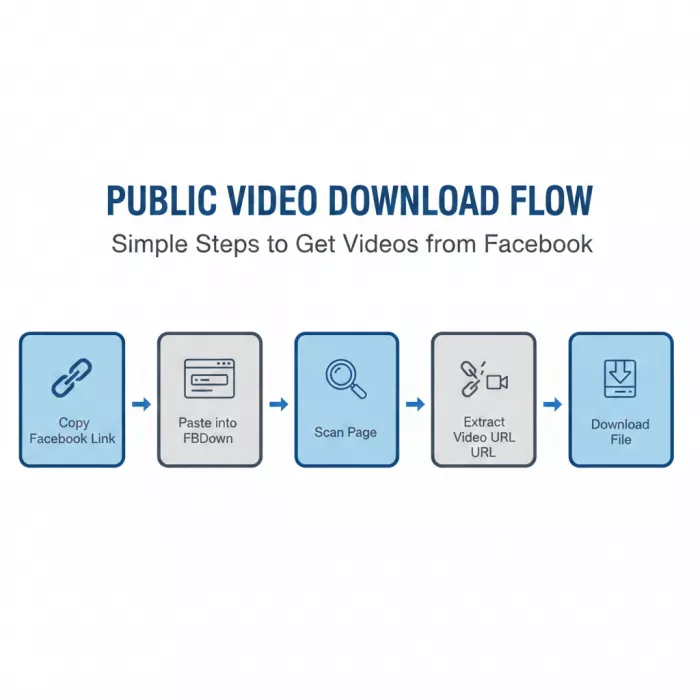
For public videos, FBDown follows a straightforward path:
When this works, it feels instant and simple.
When it doesn’t, users often assume something is broken, when in reality, Facebook has changed the page structure.
FBDown does not create video quality options.
It only exposes what Facebook already serves:
Factors that affect quality:
This is why:
This is the most misunderstood part of FBDown.
What users expect
“Paste private video link → download.”
What actually happens
FBDown’s private workflow relies on your logged-in Facebook session.
It asks you to:
What this means
FBDown is not bypassing Facebook privacy.
It’s attempting to:
If you don’t have permission to view the video, this method fails.
Copying page source feels technical and suspicious to non-technical users.
But the real risks usually come from:
The method itself is clumsy, not inherently malicious.
FBDown promotes browser-based helpers to simplify downloading.
The trade-off
Extensions can:
But they also:
For cautious users, this creates a dilemma:
Is convenience worth giving an extension constant access to browsing data?
There’s no universal answer—but it’s a decision users should make consciously.
FBDown does not charge money.
Instead, it monetizes through:
This is why:
The service itself may be “free,” but attention and navigation friction are the real cost.
Across forums and review platforms, complaints cluster around a few themes:
“Too many fake buttons”
“Redirects before download”
“Worked yesterday, broken today”
“Private downloader is confusing”
Very few complaints accuse FBDown of:
That distinction matters.
File Safety
Browsing Safety
Most risk comes from misclicks, not from FBDown’s core function.
FBDown claims:
Realistically, like most ad-funded sites, it likely collects:
There is no indication it collects:
This is where many users misunderstand downloaders.
Even if a tool works:
FBDown does not police how users use downloads, but responsibility still lies with the user.
Suitable Users
Not Ideal For
FBDown is not a scam.
It’s not elegant.
It’s not especially user-friendly.
It’s a functional, ad-funded utility that does one thing reasonably well, as long as you understand its limits.
Used carefully, it’s useful.
Used blindly, it’s frustrating.
The real danger isn’t the tool, it’s expecting it to behave like a polished product instead of a workaround.

Let’s start with a small truth about storytelling: writing the first s...

WhatsApp is preparing to allow third-party artificial intelligence cha...

BrandCrowd built its name as a go-to logo tool for small business...

There is a specific kind of disappointment that comes from opening a b...
AI companion apps have moved well beyond novelty status. What started...

Let’s start with an uncomfortable truth. Most people want their photos...
Discussion