

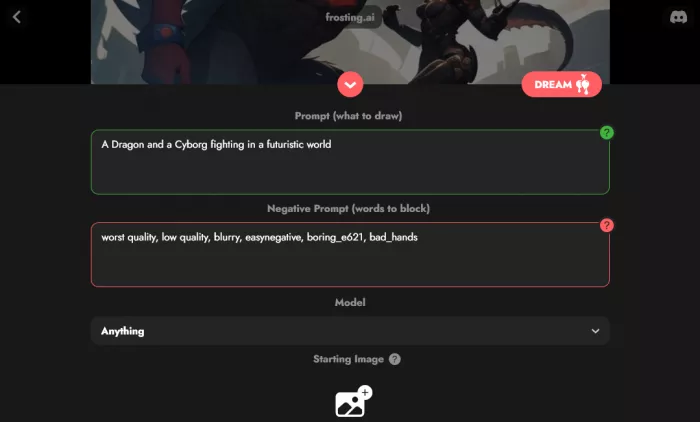
Frosting AI is an online text-to-image generation tool that we type a descriptive prompt, and the AI generates a visual image (artwork, illustration, concept art, etc.) based on that prompt. It leverages models such as Stable Diffusion (or similar AI-art models) to synthesize images from text. The overarching goal of Frosting AI is to make AI-driven art generation accessible to both beginners (with minimal art/AI experience) and advanced users who want custom, high-quality visuals quickly.
● Simple, user-friendly interface - easy for first-time users.
● Prompt-based generation - just write an idea (prompt) and Frosting AI interprets it into an image.
● Customization options - can adjust style, color palettes, aspect ratio (portrait/landscape/square), prompt strength, quality, and often more advanced parameters.
● Support for reference images - We can upload an existing image to guide the AI, which helps when we need consistency or a certain base style.
● Image upscaling - after generation, we can upscale the image to get higher resolution, useful for prints or professional usage.
● Fast generation - images are usually generated in seconds, making it efficient for iterative experimentation or quick creative projects.
● Flexible pricing / Freemium model - there’s a free tier (with limited features) and paid tiers for heavier or professional use.
● Wide applicability - useful for digital art, concept art, illustrations, marketing visuals, social-media graphics, storyboards, and more.
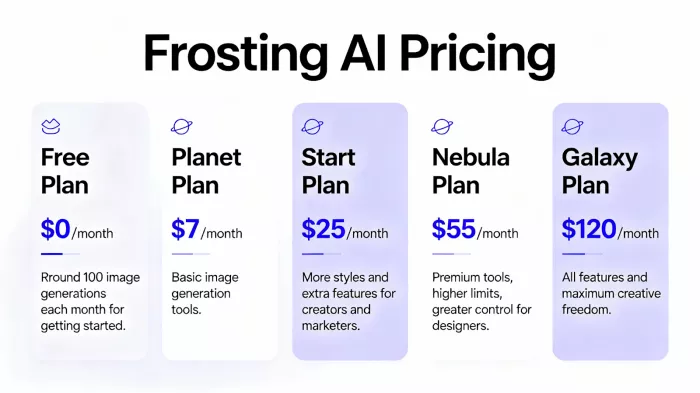
● Free Plan: Get started with ~100 image generations monthly.
● Planet Plan ($7/month): Basic image generation tools.
● Start Plan ($25/month): More styles, extra features, for creators/marketers.
● Nebula Plan ($55/month): Premium tools, higher limits, greater control for designers.
● Galaxy Plan ($120/month): All features, maximum creative freedom.

Structured star‑style or numeric ratings specific to Frosting AI are sparse. G2, for example, lists the product but shows no reviews or rating yet. Some AI‑tool directories describe pros/cons and may label Frosting AI as recommended or “cutting‑edge,” but do not always attach a clear 1–5 star scale or review count.
Since no large, verifiable star‑rating set (with full distribution of 1★–5★ and counts) is visible on major review platforms, a precise numeric average rating and distribution cannot be reliably reported at this time.
1. A tech reviewer notes that Frosting AI is easy for beginners while still providing advanced controls, making it suitable for marketing visuals, concept art, and educational images, though it struggles with very detailed or highly specific prompts. https://thedatascientist.com/frosting-ai-review-the-good-bad-ugly/
2. A hands‑on review describes Frosting AI’s interface as clean and straightforward, stating that creating and downloading images feels seamless even for first‑time AI‑image users. https://fritz.ai/frosting-ai-review/
3. A Reddit user in an AI art context calls Frosting AI a surprisingly good option for abstract tattoo‑style images when using its “realistic” model. https://www.reddit.com/r/aiArt/comments/15mv23d/tattoo_inspiration_the_realistic_model_on/
4. Another Reddit comment recommends Frosting AI as a free image generator with no login requirement for basic use and multiple model options, though advanced features sit behind a paywall. https://www.reddit.com/r/artificial/comments/15b6u5s/whats_the_best_free_image_generator_ai_with_image/
5. An AI‑tool review site remarks that Frosting AI is good for users wanting accessible AI art, but points out that its image quality and consistency can lag behind some top competitors. https://www.tooljunction.io/ai-tools/frosting-ai
6. Another guide emphasizes that Frosting AI speeds up creative workflows, but that outputs may feel generic without careful prompt tuning and still benefit from human oversight. https://techsauryacom1.odoo.com/blog/1/frosting-ai-a-complete-guide-to-how-it-works-56
● Very easy, beginner‑friendly interface and workflow; low friction from prompt to downloadable image.
● Fast image generation, often singled out as quicker than some well‑known competitors.
● Good for marketing graphics, social posts, illustrations, concept art, and educational visuals. frosting AI
● Multiple artistic models and styles (realistic, abstract, anime, etc.), enabling experimentation. reddit
● Freemium access, with a free tier that lets users test the service before paying.
● Generally stable platform with relatively few reported outages according to reviewers.
● Struggles with very detailed or tightly constrained prompts; some images lack fine detail or accuracy.
● Output quality and consistency sometimes seen as below top‑tier rivals like Midjourney or DALL·E. frosting AI Review
● Some features, higher limits, or removal of watermarks require a paid subscription, limiting the free tier.
● Requires continuous internet access and may have an initial learning curve for using advanced controls effectively.
| Feature / Tool | Frosting AI | Midjourney | DALL·E 3 | Stable Diffusion XL |
| Ease of Use | Very Easy | Medium | Very Easy | Medium |
| Image Quality | High | Very High | High | High |
| Realistic Outputs | Good | Excellent | Excellent | Good |
| Style Variety | Good | Very High | High | Very High |
| Best For | Quick art & AI images | Artistic visuals | Clean + realistic images | Custom model training |
Frosting AI works well for a variety of users and purposes:
● Digital artists / illustrators - to quickly prototype ideas, generate concept art or backgrounds, or experiment with styles without manual painting.
● Content creators & marketers - for social media posts, blog graphics, marketing imagery, ads - especially when you need compelling visuals and don’t have time for manual design.
● Designers & creatives with limited art skills - if you can describe your idea in words, Frosting AI turns it into an image - no advanced design skills required.
● Small businesses, startups - useful for logo mockups, concept visuals, quick marketing collateral, etc.
● Educators, students, hobbyists - for learning, illustration projects, experimenting with AI-driven art, storytelling, etc.
● Anyone needing quick visuals - concept brainstorming, mood-boards, story ideas, visual inspiration, etc.
Frosting AI feels like the kind of tool you keep coming back to when you want something fast, simple, and surprisingly creative without fighting complex settings. I appreciate how effortless it makes turning an idea into a visual. It gives you a smooth, friendly space to experiment, play, and produce clean results quickly.
If you’re someone who values speed, simplicity, and creative flexibility, Frosting AI fits naturally into your workflow, almost like a lightweight creative partner that’s always ready to generate something inspiring with just a few words.
However, if you need high fidelity, consistency, realism, or polished final art, treat Frosting AI as a quick draft generator or “first pass.” Use it to brainstorm or prototype; finalize with manual editing or a more advanced tool.

Do your emails often get ignored and end up unopened in crowded inboxe...
Homework used to take time. You had to go through books, notes, and di...
There is a very specific kind of confidence that comes from generating...
If AI could understand vibes, we wouldn’t be writing essays as prompts...

Hospitals are beginning to see measurable reductions in waiting times...
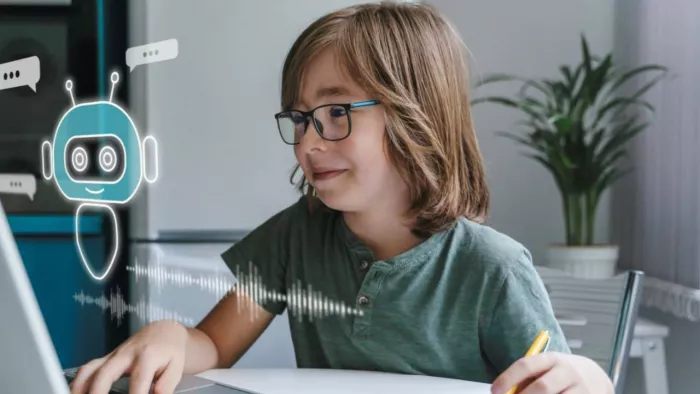
Artificial intelligence has quickly become part of everyday learning....
Discussion