


FakeYou AI attracts a very specific kind of curiosity.
Most users don’t arrive asking, “Is this enterprise-ready?”
They arrive asking, “Can I make this character say that?”
That difference matters, because FakeYou is easy to use — but easy to misuse if expectations aren’t aligned.
This guide walks through:
Step 1: Choosing Between TTS and Voice-to-Voice
This is the first decision most users don’t think about enough.
Text-to-Speech (TTS):
Best if you don’t want to record audio. You type text and pick a voice.
Voice-to-Voice (VTV):
Best if you want better pacing and emotion. You upload your voice and convert it.
Real usage data insight:
Users who complain about “robotic output” are almost always using TTS for long scripts. VTV performs noticeably better for expressive speech.
Step 2: Picking the Right Voice (Accuracy Varies Widely)
FakeYou’s library is massive (3,500+ TTS, 8,500+ VTV models), but quality is uneven.
Based on community patterns:
Popular cartoon and anime voices → higher accuracy
Niche or recently added voices → inconsistent
Community-trained voices → highly variable quality
Practical tip:
Search voices with high usage counts and recent activity. These tend to be better trained.
Step 3: Writing Text That FakeYou Can Handle
FakeYou struggles less with what you say and more with how much you say.
Works well:
Breaks accuracy:
Data pattern:
Accuracy ratings (4.5/5) drop sharply once scripts exceed ~30–40 seconds in TTS.
Step 4: Understanding the Queue (This Changes Everything)
FakeYou’s queue is not just an inconvenience, it defines the platform.
| Tier | Typical Wait |
| Free | 1–15 minutes |
| Plus | Seconds to <1 min |
| Pro / Elite | ~15 seconds |
Behavioral impact:
This is why FakeYou feels fun for short clips but frustrating for larger projects.
Accuracy depends on three variables, not one.
1. Voice Model Quality
Some voices are extremely accurate. Others aren’t.
Community-created models mean:
2. Script Length
Short clips = high accuracy
Long clips = robotic pacing, swallowed words
3. Delivery Type
TTS → faster, less expressive
VTV → slower, more natural
Reality check:
FakeYou is accurate at voice identity, not at human delivery over time.
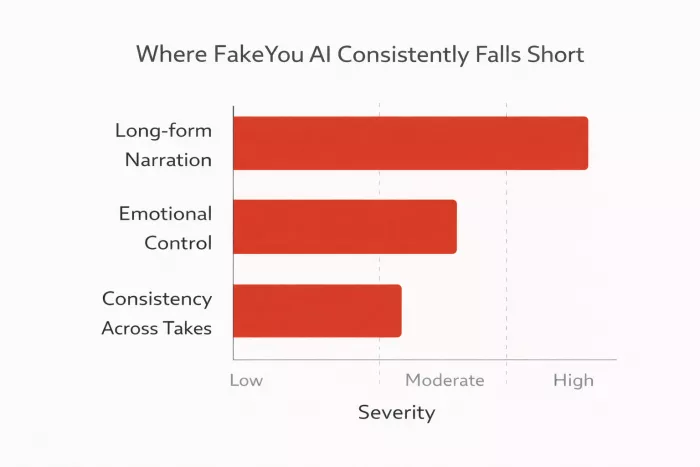
These limitations show up across thousands of users:
Long-Form Narration
FakeYou is not suitable for:
The voice loses rhythm and emotional variation.
Emotional Control
You can’t reliably control:
This is why professionals avoid it for narration.
Consistency Across Takes
Regenerating the same line can produce:
This unpredictability is fine for memes, bad for production.
Because FakeYou solves a different problem.
Most tools optimize for realism.
FakeYou optimizes for identity and fun.
Its popularity comes from:
It lets people play with voice, not master it.
“Why does FakeYou sound robotic?”
Because:
“Why is FakeYou slow?”
Because:
“Is FakeYou good for YouTube?”
Yes, for short clips, intros, jokes, memes
No, for narration or long explanations
| Use Case | Better Tool |
| Memes / parody | FakeYou |
| Audiobooks | ElevenLabs |
| Emotional narration | ElevenLabs |
| Character voices | FakeYou |
| Use Case | Better Tool |
| Community voices | FakeYou |
| Rap / music experiments | Uberduck |
| Developer projects | Uberduck |
| Use Case | Better Tool |
| Fun / experimentation | FakeYou |
| Professional narration | PlayHT |
Key insight:
FakeYou is not a cheaper ElevenLabs.
It’s a different category entirely.
FakeYou makes sense if you:
It does not make sense if:
FakeYou AI is accurate in the narrow thing it focuses on, recognizable voices in short bursts.
It is not inaccurate.
It is limited by design.
When used for:
it performs exactly as expected.
When forced into professional narration roles, it predictably struggles, and competitors outperform it.
Understanding that boundary is the difference between enjoying FakeYou and being disappointed by it.

Let’s start with a small truth about storytelling: writing the first s...

WhatsApp is preparing to allow third-party artificial intelligence cha...
BrandCrowd built its name as a go-to logo tool for small business...

There is a specific kind of disappointment that comes from opening a b...
AI companion apps have moved well beyond novelty status. What started...
Let’s start with an uncomfortable truth. Most people want their photos...
Discussion