Trending: AI Tools, Social Media, Reviews

AI Tools

NoteGPT AI Features: What It Offers, Ratings and Limitations

Kanishk Mehra
Published By
Kanishk Mehra
Updated Dec 30, 2025 5 min read
NoteGPT AI Features: What It Offers, Ratings and Limitations

Learning has always been time-consuming, but the rise of digital education has made the problem worse. Students now watch video lectures instead of attending class. Professionals attend Zoom meetings instead of in-person briefings. Researchers download PDF papers instead of reading textbooks. Teachers share PPT lessons instead of verbal explanations.

The volume of content has multiplied, but human time has not.

That gap created the need for tools like NoteGPT AI, tools that automate:

  • summarizing
  • extracting
  • restructuring
  • rewriting
  • visualizing

WHAT NoteGPT AI ACTUALLY IS

NoteGPT AI isn’t a single tool; it is a multi-module learning automation system.
Here is the fully expanded breakdown of everything it includes.
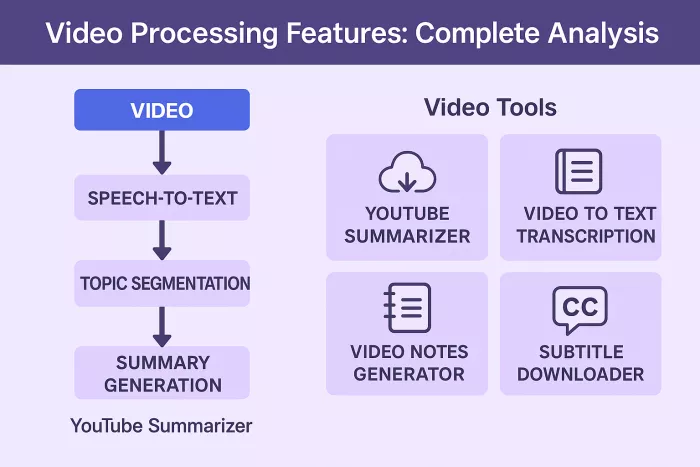
VIDEO PROCESSING FEATURES

Video Tools Included

  • YouTube Summarizer
  • Video-to-Text Transcription
  • Video Notes Generator
  • Subtitle Downloader

Commentary

1. YouTube Summarizer

  • Extracts speech using speech-to-text algorithms.
  • Breaks the video into conceptual blocks based on topic shifts.
  • Generates summaries at multiple detail levels.

Users often use it for lecture-heavy subjects like economics, biology, programming, and psychology.

Limitation:
If the video includes:

  • equations
  • diagrams
  • visuals
  • code walkthroughs
    NoteGPT AI cannot fully interpret them.

2. Video-to-Text Transcription

  • Transcribes uploaded videos into readable paragraphs.
  • Helps students convert recorded lectures into text.
  • Converts meetings into editable discussions.

Limitation:
Dual-speaker or fast dialogue results in missing words or misinterpretations.

3. Video Notes Generator

Converts entire video into structured notes such as:

“Topic 1 → Explanation → Examples”

“Topic 2 → Key Concepts → Summary Points”

Users rely on it for exam preparation and revision.

Limitation:
Notes may repeat points or omit subtle arguments.

4. Subtitle Downloader

Extracts subtitles for language learners.

Good for bilingual students doing comparative reading.

Limitation:
Only works with videos where subtitles exist.

AUDIO PROCESSING FEATURES

Audio Tools Included

  • Audio to Text
  • Meeting Notes
  • Audio Summary Engine

Commentary

1. Audio to Text

  • Helpful for lecture recordings.
  • Converts voice memos into structured paragraphs.
  • Often used by journalists, students, podcast listeners.

Limitation:
Machine-learning models struggle with regional accents, slang, or sarcasm.

2. Meeting Notes

Separates discussion into:

  • action items
  • decisions
  • discussion points

Used heavily by remote teams.

Limitation:
Does not tag speakers individually.

3. Audio Summary Engine

Condenses audio into:

  • bullet summaries
  • topic outlines
  • short overviews

Limitation:
If the audio wanders or includes non-linear discussion, summaries become vague.
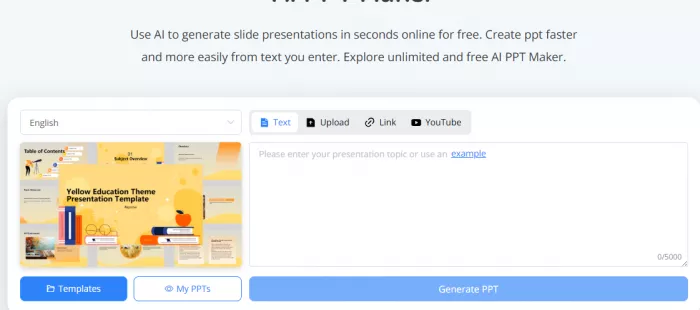
PDF and DOCUMENT PROCESSING

PDF Tools Included

  • PDF Summarizer
  • PDF → Study Notes
  • PDF → PPT
  • PDF → Audio
  • Highlight Extraction

Commentary

1. PDF Summarizer

  • Extracts text from multi-column documents.
  • Breaks them into chapters/sections.
  • Creates bullet summaries for quick revision.

Limitation:
Research-heavy or formula-heavy papers lose meaning.

2. PDF → Study Notes

Converts PDF into a study guide:

  • definitions
  • important lines
  • chapter outline

Often used by competitive exam aspirants

Limitation:
Not reliable for scientific accuracy.

3. PDF → PPT Converter

Converts document headings into slide titles.

Helpful for teachers preparing lessons.

Limitation:
Does not handle:

  • flowcharts
  • figures
  • tables

4. PDF → Audio

Helps auditory learners.

Good for visually impaired users.

Limitation:
Voice quality sometimes robotic.

5. Highlight Extraction

Pulls out bolded text, definitions, and key sentences.

Saves time while skimming huge PDFs.

PRESENTATION (PPT) TOOLS

Tools Included

  • PPT Summarizer
  • Slide Explainer
  • PPT Outline Creator

Commentary

1. PPT Summarizer

  • Good for students who receive 50–100 slides per chapter.
  • Extracts textual content only.
  • Useful for revision.

Limitation:
Visual slides such as charts or graphs are lost in translation.

2. Slide Explainer

Converts slides into:

  • detailed notes
  • step-by-step explanations
  • Helps when slides use minimal text.

Limitation:
Cannot infer meaning from images.

3. PPT Outline Creator

  • Converts slides into teaching outlines.
  • Helps teachers create lesson plans.

Limitation:
Sometimes merges unrelated slide topics.

STUDY TOOLS

Tools Included

  • Flashcards
  • Mind Maps
  • Quiz Maker
  • Study Guide Maker

Commentary

1. Flashcards

Extracts Q&A from the uploaded content.

Works best for subjects like:

  • history
  • biology
  • geography
  • management

Limitation:
Not suitable for math or engineering unless manually corrected.

2. Mind Maps

  • Converts linear text into hierarchical visual maps.
  • Helps identify relationships between concepts.
  • Very useful for memory and understanding.

Limitation:
Complex subjects require manual restructuring.

3. Quiz Maker

Generates quizzes for:

  • teachers
  • coaching institutes
  • learners

Formats:

  • MCQs
  • True/False
  • Short answer

Limitation:
Not valid for high-stakes or exam-level rigor.

4. Study Guide Maker

Turns raw content into:

  • chapter overview
  • important definitions
  • summary paragraphs

Limitation:
Over-compression may remove important context.

WRITING TOOLS: TRUE ABILITIES & LIMITS

Tools Included

  • Essay Writer
  • Assignment Helper
  • Paragraph Expander
  • Humanizer
  • Story Creator
  • Citation Builder

Commentary

1. Essay Writer

Good for:

  • basic essays
  • opinion pieces
  • descriptive writing

Limitation:
Not suitable for academic research essays.

2. Paragraph Expander

  • Adds detail to short paragraphs.
  • Useful for students completing assignments.

Limitation:
Sometimes over-exaggerates ideas.

3. Humanizer

  • Attempts to remove AI-like tone.
  • Adds natural phrasing.

Limitation:
Not 100% undetectable for advanced AI detectors.

4. Story Creator

  • For creative writing prompts.
  • Good for fiction.

Limitation:
Lacks emotional depth.

5. Citation Builder

  • APA & MLA citations
  • Good for academic formatting

Limitation:
Needs manual verification for accuracy.

TEACHER TOOLS

Tools Included

  • Math Worksheet Generator
  • Spelling Sheets
  • Vocabulary Sheets
  • Activity Worksheets

Commentary

These tools help teachers generate classroom materials quickly, especially useful for:

  • primary schools
  • ESL classes
  • homeschooling setups

Limitations:

Limited to simple worksheets

No advanced mathematical diagrams

VISUAL/DIAGRAM TOOLS

Tools Included

  • Flowchart Generator
  • Pie Chart Creator
  • ER Diagram Generator
  • Infographic Tool

Commentary

1. Flowchart Generator

  • Converts text to simple flowcharts
  • Good for presentations
  • Helps explain processes

Limitation:
Not suitable for software engineering specifications.

2. Pie Chart Creator

  • Turns simple data into visuals
  • Useful for classrooms

Limitation:
Has only basic styling.

3. ER Diagram Generator

  • Very simplistic
  • Only suitable for academic explanations

Not suitable for actual database projects.

4. Infographic Generator

  • Converts summaries into visuals
  • Helps with presentation decks

Limitation:
Not customizable to professional branding requirements.

UTILITY TOOLS

Tools:

  • OCR
  • Keyword Extractor
  • Topic Cluster Tool
  • Text-to-Speech
  • Workspace Organizer

Explanation:

  • OCR helps with scanned worksheets.
  • Topic Cluster groups content logically.
  • Text-to-speech helps auditory learners.
  • Workspace organizes all outputs chronologically.

SAFETY and PRIVACY ANALYSIS

Strengths

  • Claims no data selling
  • Claims encrypted storage
  • Claims content deletion

Weaknesses

  • No third-party compliance
  • No published security audits
  • Cloud-based → inherent risk

ACCURACY SCORECARD

Content TypeAccuracyExplanation
YouTube Lectures★★★★☆Good for conceptual topics
Business Meetings★★★☆☆Decent but misses nuance
Technical PDFs★★☆☆☆Too compressed
Scientific Papers★★☆☆☆Poor understanding
Creative Writing★★★☆☆Acceptable

FINAL VERDICT

Overall Rating: 3.3 / 5

NoteGPT AI is a time saver, not a precision engine.
Great for:

  • students
  • teachers
  • general learners

Not ideal for:

  • technical research
  • sensitive materials
  • legal/medical content