


If you’re choosing between Pika and Runway, don’t think of it as “which one is better?” Think of it as:
● Pika = fast, trend-friendly, effect-heavy creation (great for short-form, memes, stylized clips, quick iterations)
● Runway = production-grade control + cinematic fidelity (great for ads, film-style shots, consistent characters, workflow pipelines)
Both do text-to-video and image-to-video, but they “feel” different the moment you try to direct a scene.
● quick stylized video generations
● viral “template/effect” style content (object swaps, effects, playful transformations)
● easy creation without building a full editing workflow
Pika is pushing its Pika 2.5 model positioning around more realistic generations + improved physics/prompt adherence.
● more “directorial” control (keyframes, video-to-video, camera controls, structured workflows)
● higher chance of “cinematic” output for commercial use
● a platform that behaves like a creative suite, not just a generator
Runway’s roadmap is very publicly “model + controls + workflows,” including updates like Gen-4, Gen-4.5, and expanding control modes (image-to-video, keyframes, video-to-video, etc.).
Runway wins if you care about shot planning and repeatability:
● Runway explicitly supports control modes like Keyframes and Video-to-Video, and is actively bringing these control modes into newer model tiers like Gen-4.5.
● Gen-4 also highlights consistent characters from a single reference image—hugely useful if you’re doing narrative or brand content.
Pika wins if you want speed + playful transforms:
● Pika’s product positioning leans into “reality is optional,” with model upgrades and effect-driven features.
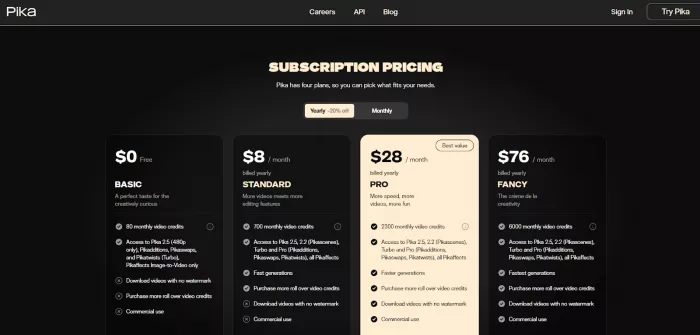
● Its pricing page directly calls out access to features like Pikadditions, Pikaswaps, Pikatwists, and Pikaffects depending on plan.
Runway feels like a toolkit you can build inside. It literally markets “workflows,” and its changelog shows ongoing additions around workflow publishing and nodes.
Pika feels like a creation engine + effects playground. For many creators, that’s the whole point.
Both can be amazing and both can glitch—just in different ways.
● Runway’s own research posts emphasize gains in fidelity and consistency (Gen-3 Alpha improved motion/consistency vs Gen-2; Gen-4 pushes consistent characters).
Performance isn’t just render time—it’s iteration cost (time + credits + how often it nails the prompt).
● A recent third-party benchmark-style writeup (not a formal lab test) reports Pika short generations on free/paid tiers often landing in the ~1–4 minute range depending on resolution and tier. Treat as directional, not absolute.
● Runway’s updates and positioning around Gen-4.5 emphasize quality improvements without compromising performance, but exact speed varies heavily by plan/queue.
| Dimension | Pika Labs | Runway ML |
| Core focus | Text/image/clip to short video for creators and social media. | High-fidelity, cinematic AI video with full post and editing tools |
| Camera & motion | Good camera control and simple animation tools, but less granular. | Advanced camera paths, motion design, and scene controls for precise shots. |
| Editing workflow | Lightweight timeline and effects; good for quick iterations | Full creative suite: masking, keying, compositing, editing, captioning. |
| Aspect ratios | Multiple ratios (16:9, 9:16, 1:1, 21:9) for cross-platform publishing | Supports common cinematic and social ratios with 4K upscaling |
| Learning curve | Solid, but can show artifacts and lower realism vs Runway. | Consistently higher realism, motion, and detail on Gen‑3/Gen‑4. |
● Very creator-friendly for short-form and trendy effects
● Strong “fun factor” and quick experimentation workflow
● Clear focus on model upgrades (Pika 2.5 positioning)
● Less “production pipeline” feel than Runway for serious editorial workflows
● Some advanced controls are less emphasized vs Runway’s keyframes/video-to-video direction
● Strong creative-suite feel: tools + workflows + control modes
● Research-driven model line (Gen-3 → Gen-4 → Gen-4.5) with focus on fidelity/consistency
● Widely used and reviewed, with lots of community feedback volume
● Credit burn can be real if you’re experimenting heavily (common complaint pattern on community review pages)
● Some users find it expensive for what they get, depending on usage style
Pika offers multiple tiers (including Free) and ties usage to a credit model; its pricing page spells out what features and resolution access you get per tier (for example, Pika 2.5 access and limits like 480p on certain tiers).
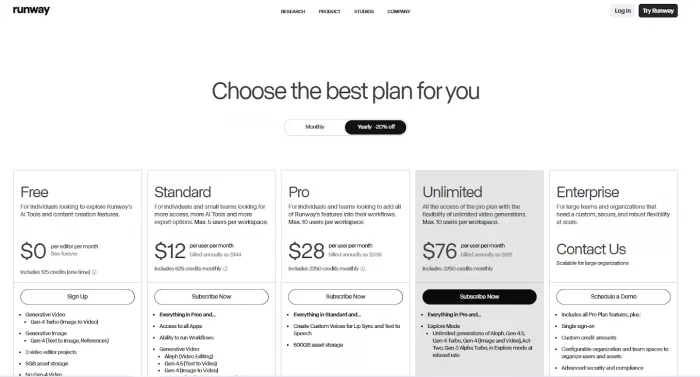
Runway also uses tiers and credits, with plan differences in resolution, speed/priority, and usage capacity.
● Choose Pika Labs if you:
● Create TikToks, Reels, YouTube Shorts, meme videos, or quick concept previews.
● Want fast turnaround with minimal setup and don’t need ultra-cinematic realism.
● Are an indie creator, educator, or marketer on a tight budget.
● Choose Runway ML if you:
● Produce ads, trailers, film concepts, or branded videos where visual polish is non‑negotiable.
● Need an all‑in‑one environment for AI generation plus editing, compositing, and export.
● Work in teams, agencies, or studios and can amortize higher subscription costs
Here’s the tricky part: “rankings” vary by site methodology, and some pages mix editorial opinion with aggregated ratings.
● Runway is heavily reviewed on G2 and has frequent recent review activity.
● A meta-aggregation style listing reports Runway ratings across platforms (e.g., G2, Capterra, Product Hunt). Treat this as a convenient snapshot, not a primary source.
● For Pika, listicles and tool roundups often place it among top AI video generators; one example cites a G2 rating and review count for Pika. Again: useful signal, but not a definitive benchmark.
● Product Hunt reviews exist for both (good for qualitative pros/cons rather than “objective” scoring)
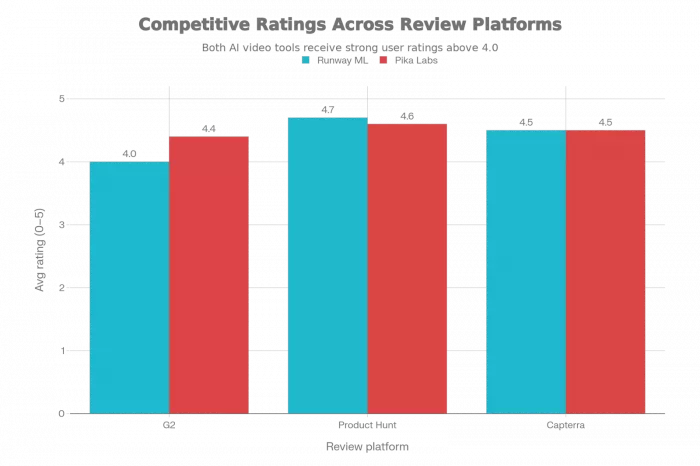
Pika Labs and Runway ML are both strong AI video tools, but they tend to win for different kinds of creators. If you want a faster, more playful workflow for generating short, stylized clips which is great for social content, quick concept “proofs,” and rapid iteration, Pika Labs often feels like the lighter, more immediate choice. If your priority is a more production-oriented pipeline, with stronger emphasis on editing control, compositing-style workflows, and a broader “toolbox” mindset for taking ideas closer to a finished deliverable, Runway ML is usually the better long-term workhorse.
So the best pick depends less on “which is better” and more on where you are in the process: choose Pika when you need speed and creative exploration, choose Runway when you need structure, repeatability, and more end-to-end finishing power. For many teams, the most practical answer is a hybrid: Pika for ideation and look exploration, Runway for refinement and delivery.

Do your emails often get ignored and end up unopened in crowded inboxe...

Homework used to take time. You had to go through books, notes, and di...

There is a very specific kind of confidence that comes from generating...
If AI could understand vibes, we wouldn’t be writing essays as prompts...

Hospitals are beginning to see measurable reductions in waiting times...

Artificial intelligence has quickly become part of everyday learning....
Discussion