


I didn’t start using Wonderplan AI because I was looking for the “ultimate” travel planner. I used it because I was tired.
Tired of opening 15 tabs just to figure out what to do on Day 2.
Tired of bookmarking blogs I’d never return to.
Tired of group chats where everyone says, “Let’s decide later.”
So instead of overthinking it, I typed my destination into Wonderplan AI and let it do its thing. What followed wasn’t magic, but it was interesting enough that I stuck with it through the entire planning process.
Here’s what that experience really looked like.
The first thing that stood out was how little the tool demanded from me. No account creation loop. No “unlock premium” screen. No long preference quiz that makes you feel like you’re filling out a visa application.
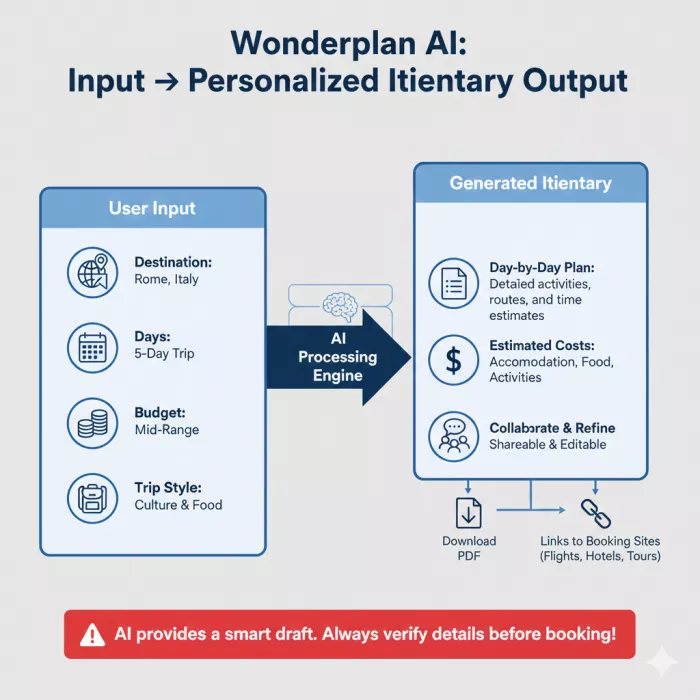
I entered:
That was it.
Within moments, I had something on my screen that actually resembled a plan, not just a list of places, but a timeline.
That alone felt like progress.
What Wonderplan gave me wasn’t a perfect itinerary, it was momentum.
Each day had:
It felt like someone had taken the overwhelming “blank page” and sketched the outline for me.
That sketch mattered more than I expected. Instead of asking “What should I do?”, I started asking “Do I like this idea?”, which is a much easier question to answer.
As I read through the plan more carefully, patterns started to emerge.
Certain days were thoughtfully paced.
Other days felt optimistic, borderline unrealistic.
On one afternoon, the itinerary had me visiting two places that looked close on paper but were far apart once I checked a map. Another time slot assumed I’d casually fit in an activity that locals know requires advance tickets.
This wasn’t a deal-breaker, but it was a reminder:
the AI doesn’t know how tired I’ll be, how long queues are, or whether a place closes early on a weekday.
I found myself opening Google Maps more than once to sanity-check distances.
One thing I genuinely appreciated was how painless it was to make changes.
I didn’t feel punished for disagreeing with the AI.
I removed things I wasn’t interested in.
I reshuffled days that felt overloaded.
I simplified sections that felt rushed.
Instead of collapsing, the plan adapted. That made the tool feel cooperative rather than rigid.
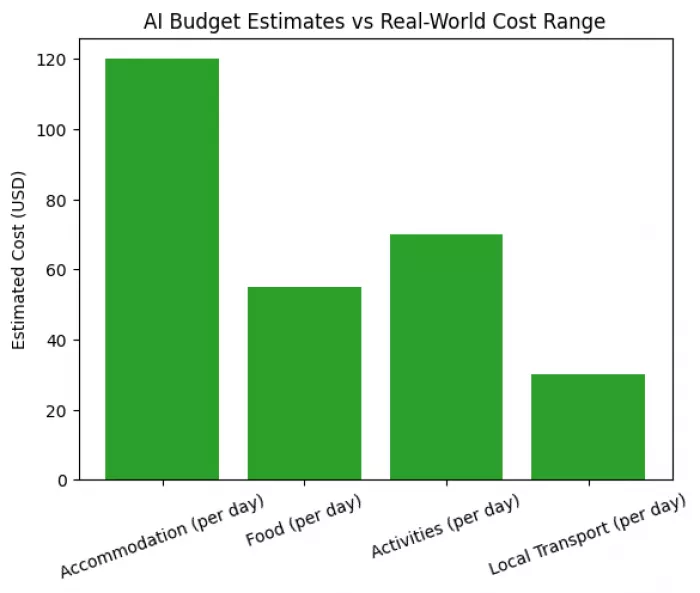
Wonderplan gave me cost expectations tied to the budget level I selected. These numbers weren’t precise, but they helped answer one important question:
“Am I planning something wildly unrealistic?”
For that purpose, they worked.
What they didn’t do was replace actual price checks. I still verified hotels, transport, and activities separately, and the real costs didn’t always match the estimates.
That gap wasn’t shocking, but it’s worth acknowledging.
I shared the itinerary with the people I was traveling with, and this is where the tool quietly earned points.
Instead of endless messages like:
“Maybe we can do this?”
“Wait, which day was that?”
Everyone looked at the same plan.
Even when we disagreed, we were disagreeing about something concrete. That saved time, and friction.
At no point did Wonderplan pretend to be a booking engine or a live pricing source. That honesty helped.
Still, I didn’t blindly follow it.
I double-checked:
Whenever I did that, I noticed the same thing: the AI was directionally right, but occasionally off in the details.
That’s manageable, as long as you expect it.
It felt like Wonderplan was okay being used as a stepping stone rather than a final destination, and that made it easier to trust.
There were moments where:
If you’re the kind of traveler who hunts for hyper-local experiences or plans down to the minute, you’ll still need extra research.
If I had to summarize the experience honestly:
My Personal Rating
4 out of 5
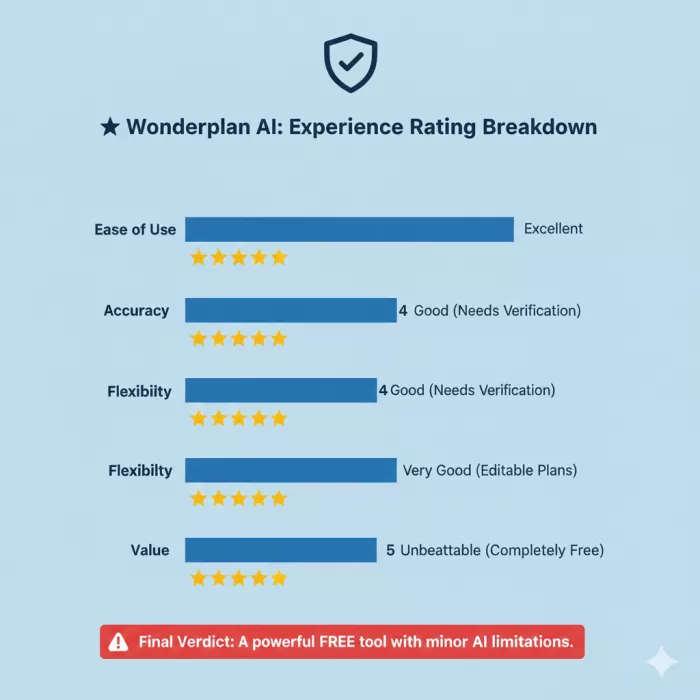
Not because it’s flawless, but because it saved time, reduced stress, and gave me something workable faster than I could have done alone.
Wonderplan AI didn’t plan my trip for me.
It planned my trip with me.
And for a free tool that doesn’t overpromise, that’s a fair outcome.
If you treat it like a collaborator instead of an oracle, it earns its place in the planning process.

Let’s start with a small truth about storytelling: writing the first s...

WhatsApp is preparing to allow third-party artificial intelligence cha...
BrandCrowd built its name as a go-to logo tool for small business...

There is a specific kind of disappointment that comes from opening a b...

AI companion apps have moved well beyond novelty status. What started...
Let’s start with an uncomfortable truth. Most people want their photos...
Discussion