

I didn’t approach PopPop AI expecting a miracle. Free AI audio tools usually fall into one of two categories: either heavily watermarked demos or underpowered toys that sound impressive on landing pages but fall apart in real use.
So I tested PopPop AI, built by Nabla Mind, the way a real creator would, throwing messy files at it, skipping tutorials, and seeing whether it saves time or creates new problems.
If you want fast, usable audio results without friction, PopPop AI delivers.
If you want studio-grade control, deep editing, or mastering, it won’t replace your DAW.
I’d describe it as:
“The tool I open when I just need the job done and don’t want to think.”
| Category | My Rating |
| Ease of Use | ⭐⭐⭐⭐⭐ |
| Speed | ⭐⭐⭐⭐⭐ |
| Audio Quality (Contextual) | ⭐⭐⭐⭐☆ |
| Feature Coverage | ⭐⭐⭐⭐☆ |
| Reliability | ⭐⭐⭐⭐☆ |
| Value (Free Tier) | ⭐⭐⭐⭐⭐ |
| Overall | 4.4 / 5 |
The first thing I noticed: nothing blocked me.
I uploaded a random MP3, clicked “Vocal Remover,” and had a result before I could second-guess the decision. That frictionless start matters more than most people realize, especially if you’re juggling content deadlines.
In practice, PopPop AI feels like a collection of single-purpose audio tools packaged into one clean interface.
It’s not a DAW.
It doesn’t pretend to be one.
Instead, it’s a task executor:
Upload → Process → Download → Move on
That design philosophy explains both why it’s effective and why it has limits.
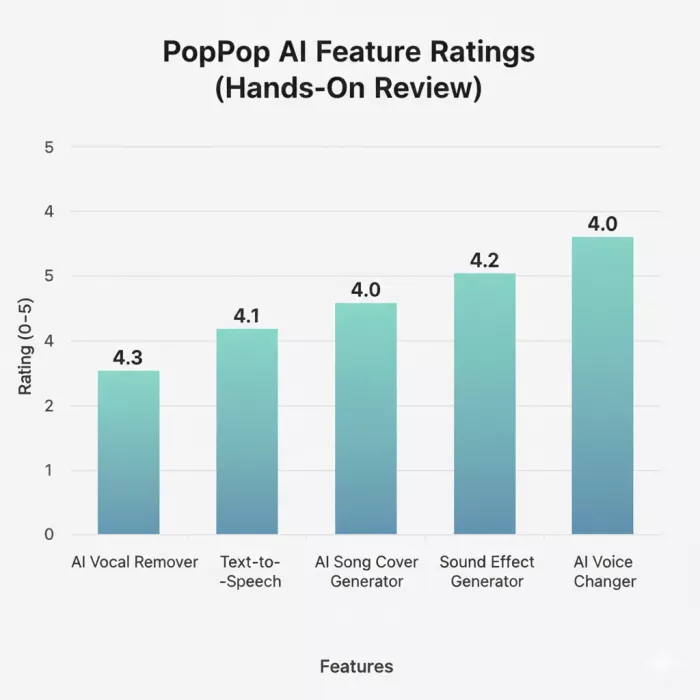
My Rating: ⭐⭐⭐⭐☆ (4.3/5)
This is the feature I tested first—and the one I ended up using the most.
What impressed me
I tried:
A pop track → very clean result
A live recording → acceptable but not perfect
A dense EDM track → vocals leaked slightly
What annoyed me
My takeaway:
For DJ prep, karaoke, and content edits, it’s more than good enough. For studio remixing, it’s not the right tool.
My Rating: ⭐⭐⭐⭐☆ (4.1/5)
I’m usually skeptical of free TTS tools, they often sound robotic or awkward. PopPop AI surprised me here.
What worked
Where I hit limits
How I’d use it
My Rating: ⭐⭐⭐⭐☆ (4.0/5)
This is clearly the “fun” feature, and it shows.
I tested it with:
Clean studio vocals → surprisingly convincing
Noisy tracks → mixed results
What I liked
What I wouldn’t use it for
This feels like a creative sandbox, not a production tool, and that’s okay.
My Rating: ⭐⭐⭐⭐☆ (4.2/5)
This feature quietly became one of my favorites.
Instead of hunting stock libraries, I typed prompts like:
“A metallic door sliding shut in a sci-fi hallway”
The results were:
Limitations
For indie creators, this alone can save hours.
My Rating: ⭐⭐⭐⭐☆ (4.0/5)
I tested this with clean voice recordings and rough mic audio.
Best results
Where it breaks
I wouldn’t use it for professional voice acting, but for casual content, it’s solid.
Small audio files: processed in seconds
Short videos (2–4 minutes): under a minute
Larger files: limited by daily quota, not crashes
I didn’t encounter major failures, just usage caps, which are fair for a free tool.
Free Tier (What I Used)
$0
No login
Around 20 processing actions per day
Paid Options
Appear via partner platforms
Mainly add batch processing and higher export quality
Crucially, core features are not crippled, which is rare.
What I Genuinely Liked
What Got in My Way
I’d recommend PopPop AI if you are:
I wouldn’t recommend it if you are:
PopPop AI doesn’t try to impress audio engineers, and that’s its strength.
It impressed me because it:
In a market full of overengineered AI tools, PopPop AI succeeds by doing something simple:
It lets you finish audio tasks without becoming an audio expert.
My Final Score: 4.4 / 5
Let’s start with a small truth about storytelling: writing the first s...
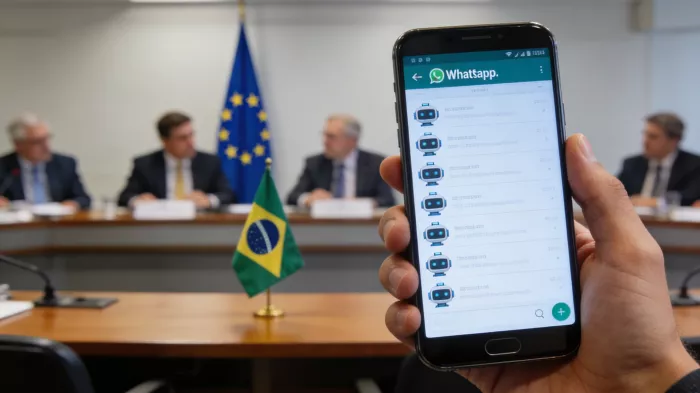
WhatsApp is preparing to allow third-party artificial intelligence cha...
BrandCrowd built its name as a go-to logo tool for small business...
There is a specific kind of disappointment that comes from opening a b...
AI companion apps have moved well beyond novelty status. What started...
Let’s start with an uncomfortable truth. Most people want their photos...
Discussion