


Choosing the right DNS and domain management solution is more important than most people realize. It affects your website’s uptime, performance, global accessibility, integration options, and even long-term scalability. Two popular options Amazon Route 53 and GoDaddy are often compared, but they serve very different types of users.
Amazon Route 53 is a cloud-based DNS and domain name management service provided by AWS. It is engineered for:
● high availability
● low latency
● global traffic distribution
● reliability under load
Route 53 is widely used for:
● SaaS applications
● APIs
● Enterprise-scale web apps
● Global latency-sensitive workloads
From experience, teams already using AWS infrastructure (EC2, CloudFront, ALB, EKS, Lambda, S3, etc.) often adopt Route 53 because of its integration efficiency. It reduces manual configuration and plays well with CI/CD pipelines, IaC (Infrastructure as Code), and DevOps workflows.
GoDaddy is one of the world’s largest domain registrars. While it also offers DNS management, its core strength lies in offering a simple, beginner-friendly, all-in-one solution for going online. With GoDaddy, you can:
● buy a domain
● set up hosting
● add email
● build a website
● purchase SSL certificates
Small businesses, freelancers, and non-technical users typically choose GoDaddy because it’s fast, guided, and requires minimal DNS knowledge.
While prices vary by TLD and region, here’s a generalized comparison for the domain example.com:
| Feature | Route 53 | GoDaddy |
| Domain Registration | ~$12/year | $0.99 – $19.99 first year (promo) |
| Domain Renewal | ~$12/year | ~$20–25/year |
| DNS Hosting | ~$0.50/month + usage | Included |
| DNS Queries | ~$0.40 per 1M queries | Included (basic) |
| Not included | Paid add-on | |
| Hosting | Not included | Available as add-on |
Key Takeaways:
✔ For simple websites → GoDaddy may be cheaper initially due to promos.
✔ For high traffic apps → Route 53 can be cheaper and more scalable long-term.
| Criteria | Route 53 | GoDaddy |
| Routing Options | Advanced (Geo, Weighted, Failover) | Basic |
| Health Checks | Yes | Limited |
| Integrations | AWS ecosystem | Hosting ecosystem |
| Ease of Use | Moderate | Very Easy |
| Phone Support | No | Yes |
| Automation (API/IaC) | Excellent | Limited |
| DNS Performance | Global, low-latency | Standard |
| Best For | Cloud, SaaS, DevOps | Small business & beginners |
From experience, Route 53 excels in scenarios where traffic must be distributed or routed intelligently. It supports:
● Latency-based routing
● Weighted routing (A/B testing)
● Failover routing
● Geo DNS
● Multi-value routing
● Health checks + automatic failover
For example, if you run a global SaaS platform with users in Europe and Asia, latency routing can automatically serve users from the nearest AWS region — reducing load times and improving user experience.
GoDaddy provides functional DNS but lacks these advanced routing mechanics.
● AWS CloudFront
● EC2
● ALB / ELB
● S3 Static Hosting
● Kubernetes on EKS
● DevOps pipelines (Terraform, Pulumi, Ansible)
This matters for developers, DevOps teams, and cloud architects.
● Shared hosting
● WordPress hosting
● Business email setups
● Non-technical website builders
Ideal for entrepreneurs, local businesses, and personal brands.
In performance tests typically conducted by cloud teams over the past few years, Route 53 consistently delivered:
● faster DNS resolution
● better propagation consistency
● lower global query latency
Meanwhile, GoDaddy delivers completely acceptable performance for basic websites and most non-technical users will never notice the difference.
However, developers building mission-critical systems will.
● G2: 4.5 out of 5 stars based on ~144 reviews, indicating strong satisfaction and reliability among users. (G2)

1. Reliability & Uptime
● Users consistently highlight high availability and DNS stability even under heavy global traffic. (TrustRadius)
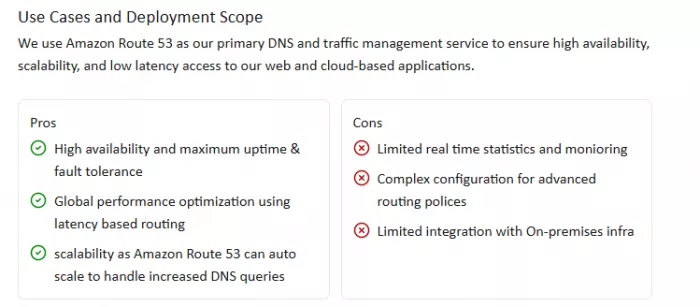
● Many reviewers report fewer outages compared to traditional DNS providers, with one noting dramatic reduction in downtime after migrating to Route 53.
2. Performance & Global Traffic Routing
● Teams using latency-based routing observed improved response times, especially for global applications. One verified user reported ~28–30% faster response after implementing latency-based routing.
3. Integration With AWS
● Deep integration with AWS services such as CloudFront, EC2, and S3 is frequently praised, especially by DevOps and cloud engineering teams who appreciate API-level automation.
● Users like that Route 53 fits into infrastructure-as-code (IaC) workflows with tools like Terraform and AWS SDKs.
4. Scalability & API Automation
● Many users depend on Route 53 for managing hundreds of domains programmatically. Large enterprises with mission-critical workflows have relied on Route 53 for years without major issues.
1. Learning Curve & Complexity
● Several reviewers note that Route 53 isn’t beginner-friendly. The interface and setup process can feel technical for users with little DNS experience.
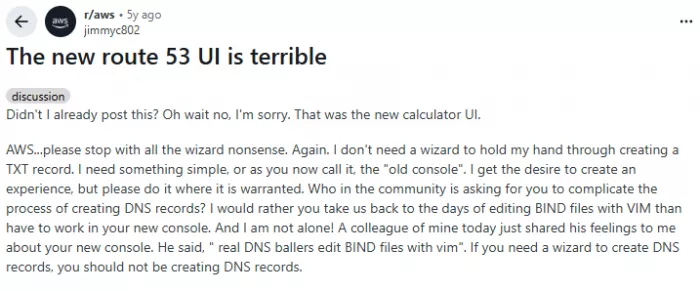
● Community users on Reddit also complained about UI design and the number of clicks required for simple tasks.
2. Monitoring & Analytics Limitations
● Some users find the monitoring and real-time analytics tools less intuitive or lacking when compared with other DNS services.
3. Cost Considerations
● While Route 53’s pricing model is transparent and usage-based, some reviewers feel it can be relatively expensive if you’re not already in the AWS ecosystem or if you use advanced features heavily.
4. Support Experience
● A few users say support options could be improved; for example, adding live chat or more accessible help options.
GoDaddy doesn’t have as centralized review data for DNS specifically as Route 53, but user discussions and complaints help paint a picture of actual experience.
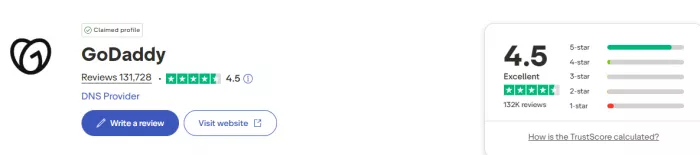
● Ease of Use: Users often praise GoDaddy for a simple, guided UI that’s very easy for beginners to manage.
● Support: Small businesses appreciate phone support and a more traditional customer support model, compared to cloud-centric services.

1. DNS Reliability & Automatic DNS Changes
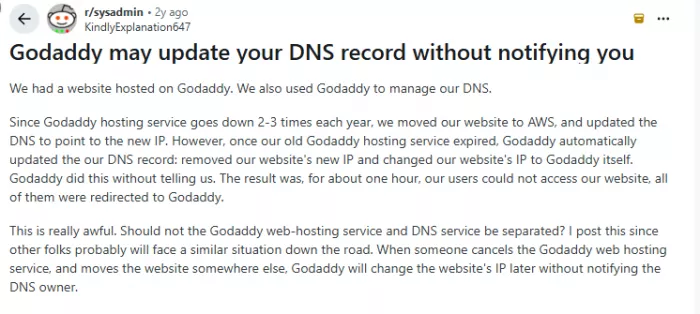
● In several sysadmin discussions, users report unexpected DNS behavior where GoDaddy changed DNS records automatically after a hosting expiration, leading to site downtime.
2. Upsells & Pricing Practices
● A frequent complaint is aggressive upselling and promotional introductory pricing that increases significantly on renewal. Users report add-ons for privacy, premium DNS, hosting, and SSL that can quickly increase yearly costs.
3. Transfer Challenges
● Transferring domains between providers can sometimes be confusing or slow, though experiences vary widely in community reports.
4. Mixed DNS Experience
● Some users looking to delegate DNS control away from GoDaddy to services like Route 53 or Cloudflare cite limitations in GoDaddy’s native DNS tools, especially for complex records or automation.
| Aspect | Route 53 | GoDaddy |
| Ease of Use | Technical, steep for beginners | Simple & guided |
| Reliability | Very high enterprise grade | Standard, with occasional issues |
| Support | Documentation + AWS support | Phone + chat support |
| Pricing Perception | Transparent, usage-based | Promotional but upsell heavy |
| Best For | Developers, cloud services | Small business owners |
To make this practical, here’s a straightforward decision flow:
➡ Are you deploying apps on AWS?
→ Choose Route 53
➡ Are you launching a simple business site or blog?
→ Choose GoDaddy
➡ Do you need advanced routing?
→ Choose Route 53
➡ Do you want domain + hosting in one place?
→ Choose GoDaddy
➡ Do you need DevOps/IaC automation?
→ Choose Route 53
Both platforms excel just for different audiences.
Route 53 is built for:
→ developers, DevOps teams, startups, enterprises, and AWS-native workloads
GoDaddy is built for:
→ small businesses, beginners, non-technical users, and quick website deployments
Instead of asking “Which is better?”
The smarter question is:
“What am I building, and who is operating it?”
1. Is Route 53 better than GoDaddy?
Route 53 is better for cloud workloads and advanced DNS. GoDaddy is better for beginners launching basic websites.
2. Is Route 53 worth it for small businesses?
Not usually. Unless you’re on AWS, GoDaddy may be simpler and more cost-effective.
3. Does Route 53 include hosting?
No. It only provides DNS and domain registration.
4. Can I transfer my domain from GoDaddy to Route 53?
Yes. Transfers between registrars are supported.
5. Which is cheaper, Route 53 or GoDaddy?
GoDaddy is cheaper upfront. Route 53 can be cheaper at scale depending on queries.
6. Can beginners use Route 53?
Possible, but there’s a learning curve. It is not designed for non-technical users.
7. Is GoDaddy secure?
Yes, but Route 53 offers more advanced failover and monitoring for mission-critical apps.

Do your emails often get ignored and end up unopened in crowded inboxe...

Homework used to take time. You had to go through books, notes, and di...

There is a very specific kind of confidence that comes from generating...

If AI could understand vibes, we wouldn’t be writing essays as prompts...

Hospitals are beginning to see measurable reductions in waiting times...

Artificial intelligence has quickly become part of everyday learning....
Discussion