


Presentation design sits at an awkward intersection of time, skill, and expectations. Most people don’t want to be designers, but they still need slides that look professional, often on short notice. Slidesgo AI exists precisely in that gap.
Instead of positioning itself as a full design suite, Slidesgo focuses on ready-to-use presentation frameworks, layered with AI tools that reduce the effort needed to go from idea to finished deck. This review restructures the discussion to move from context to mechanics to value to limitations, providing a clearer picture of how Slidesgo AI actually fits into real-world workflows.
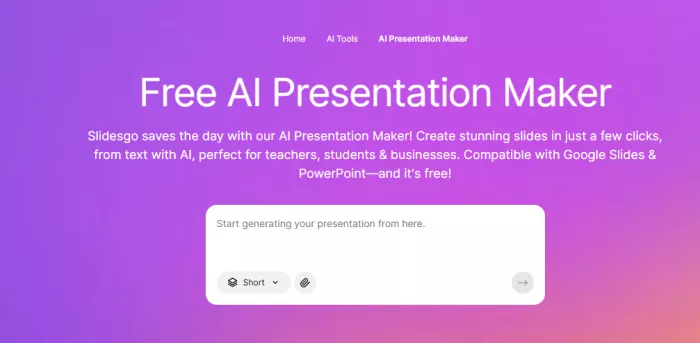
Slidesgo is best understood as a presentation acceleration platform, not a creativity-first design tool. It does not compete directly with PowerPoint or Google Slides; instead, it feeds into them.
The platform is owned by the Freepik Company, which also operates Freepik, Flaticon, and Wepik. That matters because Slidesgo inherits:
Founded in 2019 and based in Malaga, Spain, Slidesgo’s core purpose is simple:
help users skip the blank slide problem.
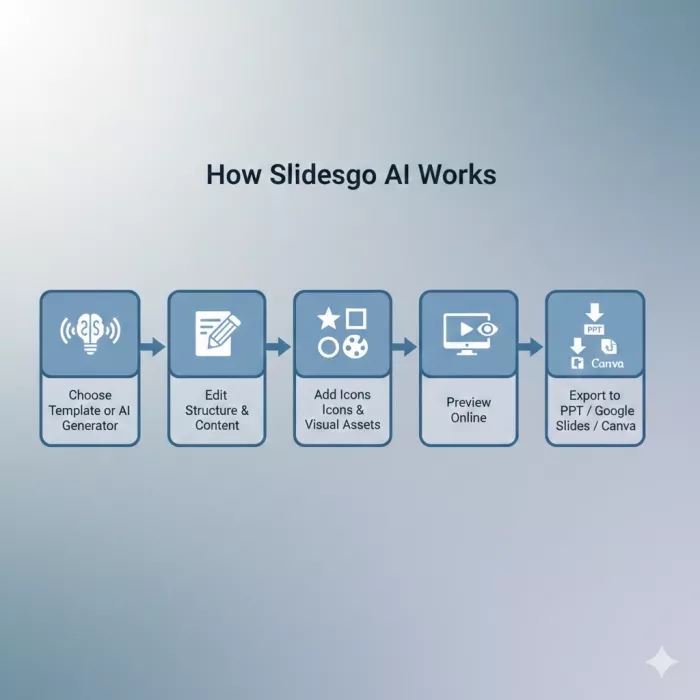
The Slidesgo experience typically follows this flow:
Choose a starting point
A ready-made template
Or an AI-generated deck
Customize structure and content
Edit online using the built-in editor (via Wepik)
Or export to PowerPoint / Google Slides
Enhance with assets
Icons (Flaticon)
Illustrations and photos (Freepik)
Finalize and export
.pptx for PowerPoint
Direct copy for Google Slides
Canva compatibility for select templates
This workflow prioritizes speed and consistency, not infinite flexibility.
Slidesgo’s value begins with its template library, which spans thousands of professionally designed slide decks.
Instead of generic layouts, templates are built around specific use cases, such as:
Each template includes:
This is why Slidesgo is especially popular with teachers, students, and non-design professionals.
Slidesgo AI is not a single feature, it’s a toolset designed to reduce manual work.
AI Presentation Maker
Users enter a topic or short description, select:
Important limitation:
The AI is strong at formatting and flow, but weak at deep subject expertise. Human editing is still necessary.
AI PDF to PPT Converter
Designed for:
It focuses on layout extraction, not content rewriting.
Education-Focused AI Tools
Slidesgo has invested heavily in classroom use cases:
These tools emphasize organization and speed, not pedagogical depth.
Online Editor & Asset Integration
One of Slidesgo’s underrated strengths is its browser-based editor, powered by Wepik.
This allows users to:
Because Slidesgo integrates directly with Freepik and Flaticon, users also gain access to:
This reduces the need to jump between multiple tools.
Slidesgo templates support:
This makes Slidesgo suitable not just for presentations, but also for:
Free Plan
$0/month
Limited downloads (usually 2–5/month)
Attribution required (credits slide must remain)
Partial AI access
Best for occasional users.
Premium Plan
~$5.99/month (monthly)
~$3/month (annual billing)
Unlimited downloads
No attribution
Full AI tool access
Best for frequent presenters.
Education & Teams Plans
Discounted education pricing
Compliance with GDPR, FERPA, COPPA
Admin dashboard for teams
User management and collaboration
Widely adopted by schools and small organizations.
Slidesgo excels at presentation structure, not just visuals.
These issues appear most often among power users and professional designers.
G2: Generally strong ratings (~4.5–4.7/5), focused on usability
Trustpilot: Mixed (~2.5–3.0/5), with complaints mostly about billing
Education communities: Strongly positive
The divide is clear: design quality is praised; account management gets criticism.
Best suited for:
Less suitable for:
Slidesgo AI is not a replacement for design expertise, it is a multiplier for productivity.
Its real strength lies in:
For most users, Slidesgo AI works best as a starting point that feels close to finished, rather than a blank canvas that demands skill and time.
Bottom Line
Slidesgo AI is best viewed as a presentation framework engine—fast, polished, and practical, while still leaving the final refinement to human judgment.
Do your emails often get ignored and end up unopened in crowded inboxe...
Homework used to take time. You had to go through books, notes, and di...
There is a very specific kind of confidence that comes from generating...
If AI could understand vibes, we wouldn’t be writing essays as prompts...

Hospitals are beginning to see measurable reductions in waiting times...

Artificial intelligence has quickly become part of everyday learning....
Discussion