

AI has moved beyond hype and into the daily rhythm of office work. Instead of juggling emails, chasing updates, and rebuilding the same reports, professionals are relying on intelligent tools that quietly handle the busywork. These systems don’t just automate tasks—they anticipate needs, connect scattered workflows, and surface insights when they’re actually useful. The result is a workday with fewer interruptions, clearer priorities, and more time spent on thinking, planning, and decision-making rather than routine admin.
In this article, we’ll explore the top 5 AI tools to automate daily office tasks, helping you work smarter and stay ahead in an increasingly competitive landscape.
Microsoft 365 Copilot is an AI assistant embedded directly into Word, Excel, PowerPoint, Outlook, Teams, OneNote, and other Microsoft apps. It can draft documents and presentations, propose formulas and insights in Excel, summarize long email threads, and generate meeting summaries inside Teams using your existing Microsoft 365 data.
● Email and calendar: Summarizes inboxes, drafts replies, identifies urgent messages, and creates follow‑up tasks or reminders in Outlook.
● Documents and presentations: Drafts reports, slides, lists, and whiteboard ideas based on prompts or existing files, saving hours on first drafts.
● Meetings and collaboration: Summarizes Teams meetings, extracts action items, and helps navigate files and chats across Microsoft 365.
● Deep, native integration across Microsoft 365 apps that most offices already use.
● Strong context awareness because it can use your organization’s emails, documents, and calendars (subject to permissions) to give targeted answers.
● Requires Microsoft 365 licensing and Copilot add‑on, which can be expensive for small teams.
● Works best in a Microsoft‑centric environment; value drops if your core stack is Google Workspace or mixed tools.
Teams already on Microsoft 365 that want end‑to‑end AI automation across email, documents, meetings, and office workflows without changing tools.
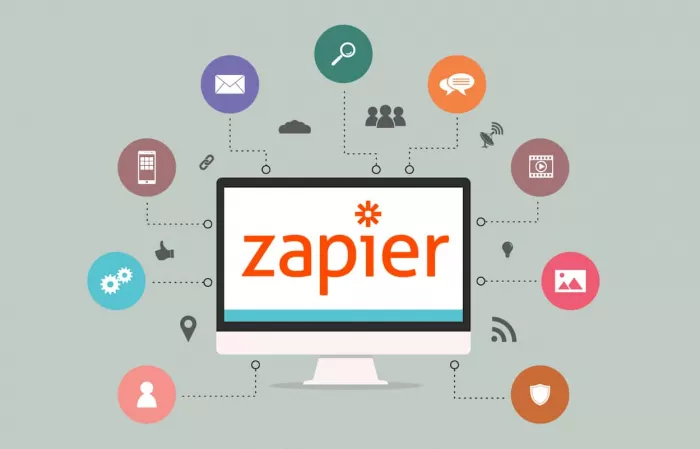
Zapier is a no‑code automation platform that connects 8,000+ apps and now combines AI with workflows and agents so you can automate multi‑step office processes. It is widely used to connect CRMs, email tools, spreadsheets, chat apps, and internal systems to eliminate manual data entry and repetitive tasks.
● Cross‑app automation: Automatically log form responses to spreadsheets, create CRM records from emails, and send Slack notifications for important updates.
● AI workflows: Use OpenAI or other models inside Zaps to generate replies, summarize tickets, or classify incoming messages, creating internal AI tools for non‑technical teams.
● Massive app ecosystems and templates make it easy to automate common office workflows without coding.
● AI steps and agent‑style features allow smarter decisions in workflows (e.g., routing, summarization, content generation).
● Complex workflows can become hard to maintain without proper documentation and ownership.
● Costs rise with task volume and advanced features, which matters for high‑throughput teams.
Offices that use many SaaS tools and want to connect them with no‑code AI‑powered workflows, especially for operations, marketing, HR, and admin tasks.
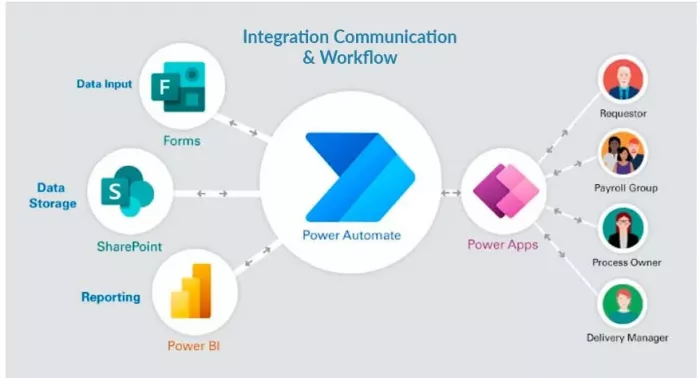
Microsoft Power Automate combines robotic process automation (RPA) with cloud‑based automation and AI Builder to orchestrate workflows across Microsoft 365 and third‑party apps. It is particularly strong for enterprises heavily invested in Microsoft and needing both desktop automation and cloud flows.
● Office 365 workflows: Automates approvals, document routing, notifications, and data syncing across Outlook, SharePoint, Excel, and Teams.
● RPA and AI: Uses desktop flows and AI Builder for document processing (e.g., invoice extraction), form recognition, and rule‑based process automation.
● Deep integration with Microsoft services and strong support for both low‑code and RPA use cases.
● Suitable for IT‑led automation programs with governance, compliance, and centralized management.
● Learning curve is steeper for non‑technical staff compared with simple automation tools.
● Best value appears in organizations already standardized on Microsoft 365 and Azure; otherwise setup effort is higher.
Mid‑size and enterprise organizations in the Microsoft ecosystem needing structured, governed automation across desktop and cloud processes.
Lindy is an AI agent platform focused on building smart, task‑specific agents for operations, sales, and back‑office workflows. It is designed to handle repetitive tasks like updating systems, sending follow‑ups, and managing operational processes rather than just generating text.
● Task‑specific agents: Automates things like lead follow‑up, internal ticket handling, and routine back‑office tasks by acting as a digital coworker.
● Process automation: Connects to tools and runs multi‑step actions, reducing the need for humans to manually move data or trigger repetitive actions.
● Purpose‑built for agentic workflows where the AI not only suggests but executes tasks.
● Strong fit for operations and sales teams that run the same sequences of actions daily.
● Less general‑purpose than broad platforms like Zapier; value depends on how well your processes align with supported agents.
● May require careful setup and monitoring to ensure agents behave correctly within business rules.
Teams that want “AI coworkers” to handle repeatable operational workflows rather than just assist with writing or research.

Perplexity AI is an AI‑powered answer engine designed for research, knowledge retrieval, and question‑answering with inline citations, making it ideal for information‑heavy office roles. It is often used as a smarter alternative to traditional search when teams need fast, cited answers across the web and internal sources (in enterprise versions).
● Research and summaries: Handles quick research, competitive scans, and briefing docs with cited answers, helping analysts, marketers, and managers work faster.
● Knowledge assistance: In enterprise setups, can connect to internal knowledge bases to answer company‑specific questions with context and references.
● Citation‑first design builds trust and makes it easy to verify information.
● Excellent for roles that rely on constant information gathering, comparisons, and quick briefings.
● Focused on research and Q&A; it does not directly automate transactional tasks like sending emails or updating records.
● Enterprise knowledge integrations may require additional configuration and licensing.
Knowledge workers (strategy, marketing, research, leadership) who need fast, reliable, cited information to support decisions and content creation.
AI matters more in office work today because it dramatically increases efficiency and accuracy in everyday tasks. Modern offices deal with huge volumes of emails, documents, data, and meetings, and AI tools can handle much of this workload faster than humans. From drafting reports and summarizing meetings to analyzing spreadsheets and scheduling tasks, AI reduces repetitive manual work and minimizes human error. This allows employees to focus on higher-value activities such as problem-solving, creativity, and strategic decision-making rather than routine administrative duties.
Additionally, AI enhances decision-making and collaboration in the workplace. By analyzing large datasets and identifying patterns, AI helps managers make informed, data-driven decisions in areas like finance, marketing, and human resources. AI-powered tools also improve communication through real-time translation, smart chatbots, and personalized recommendations. As remote and hybrid work become more common, AI supports productivity across locations and time zones, making offices more flexible, competitive, and responsive to change.
Office automation works best when it feels invisible and that’s exactly what these tools deliver. Microsoft 365 Copilot sharpens everyday work inside apps you already use, Zapier and Power Automate quietly eliminate repetitive processes, Lindy steps in as a hands-on AI assistant, and Perplexity AI cuts straight to reliable answers when research matters.
Used together, they don’t just save time, they reduce mental clutter. Less switching, less chasing, less manual follow-up. The result is a workday that runs smoother, decisions that come faster, and teams that can focus on impact instead of admin. That’s the real payoff of AI in the modern office.
Do your emails often get ignored and end up unopened in crowded inboxe...
Homework used to take time. You had to go through books, notes, and di...
There is a very specific kind of confidence that comes from generating...

If AI could understand vibes, we wouldn’t be writing essays as prompts...

Hospitals are beginning to see measurable reductions in waiting times...

Artificial intelligence has quickly become part of everyday learning....
Discussion