


Short-form content has become the engine of online visibility, and I’ve tried every tool in this space, from Opus Clip and ClipFM to SendShort, Vidyo, and Kapwing.
Some automate too much. Some automate too little. Some are accurate but slow. Some are fast but chaotic.
2short.ai sits in a unique space:
it’s fast, stable, and incredibly creator-friendly, but only if your content fits what the AI is designed to understand.
After spending days testing every single feature, across podcasts, interviews, talking-head videos, vlogs, screen recordings, webinars, and mixed-audio YouTube uploads, here’s my honest, fully lived experience.
This is everything 2short.ai actually gets right, everything it breaks, and whether I would rely on it professionally.
2short.ai is not a traditional video editor, and approaching it with that expectation immediately leads to confusion. It does not aim to compete with full-scale editing suites like Adobe Premiere Pro or CapCut, where creators control timelines, transitions, layered effects, color grading, and advanced audio mixing. Instead, 2short.ai operates as a focused video repurposing engine built for one specific workflow: transforming long-form content into short, vertical, social-ready clips with minimal manual effort.
At its core, the platform is trained to analyze extended videos, identify high-impact speaking moments, and extract those segments automatically. It then reformats them into vertical layouts optimized for YouTube Shorts, TikTok, and Instagram Reels. Beyond simple clipping, it overlays animated captions, tracks the primary speaker to keep framing centered, and exports ready-to-upload files. The emphasis is not on cinematic editing freedom but on automation speed and social-media formatting efficiency.
The most accurate way to understand 2short.ai is to think of it as a clip hunter combined with a caption generator and intelligent auto-cropper. It scans your content, selects promising highlights based on speech energy and pacing, and prepares them in a format designed to hold attention in fast-scroll environments. It is a workflow accelerator, not a creative sandbox.
With that mindset in place, testing the tool becomes far more practical. Instead of asking whether it can replace a professional editor, the real question becomes whether it can reliably save time in the repurposing stage.
This was the first feature I pushed hard because vertical video lives or dies on framing.
My Test
I used:
Where It Impressed
When there was ONE clear speaker, the tracking was flawless. My face stayed centered, even when I leaned forward or turned slightly. For podcasters and educators, this is gold.
Where It Struggled
As soon as two people talked at once, the AI lost confidence.
In group panels, it jumped from one face to another too fast, making the clip jittery.
In dynamic scenes, it struggled to decide whether to track me or the background movement.
My Verdict
Amazing for talking-head content.
Weak for IRL, vlog, event, or action-driven videos.
If there’s one feature I’d use 2short.ai for every single day, it’s the caption engine.
My Test
I used content with:
What Stood Out
Captions were clean, well-timed, and visually modern.
The animations (bounce, slide, word-highlighting) feel like premium templates without the complexity.
I barely had to correct anything except for slang or accented words.
Limitations
Heavy accents throw the transcription off.
Background music sometimes confuses the model.
The AI occasionally adds a pause where none exists.
My Verdict
The captioning system is one of the best among repurposing tools, better than Opus in speed, better than SendShort in clarity.
Exporting is usually where most tools slow down.
With 2short.ai, my exports never took more than 3–10 seconds.
What I Observed
What’s Missing
My Verdict
Perfect for short-form creators.
But the export freedom only starts at the paid tiers.
Aspect ratio conversion is essential if you want to post on all platforms, but it’s also deceptively difficult for AI.
My Test
I switched between:
What I Liked
Vertical conversions look natural for speaker-driven videos.
Square clips are framed neatly for feed posts.
Horizontal exports maintain full resolution.
Where It Breaks
If your video has:
The automatic crop becomes unpredictable.
My Verdict
Useful, but still requires manual corrections in complex scenes.
I always test whether these tools can replace manual editing, because most creators want simplicity.
What Worked Nicely
These micro-controls saved me time compared to re-editing from scratch elsewhere.
Not Enough for Serious Editing
My Verdict
Great for “fixing” clips.
Not enough for advanced editors.
When you batch-produce content, this feature becomes a lifesaver.
What I Used It For
Every clip maintains the same look, which is a huge benefit for agencies.
Limitations
My Verdict
Simple but essential for creators with a visual identity.
This one isn’t emphasized much on their website, but I found it incredibly useful.
It shows:
This is a lifesaver when the auto-selected clips aren’t strong enough.
It allowed me to manually pull MUCH better moments.
After running more than 15 videos of different styles, I noticed a clear pattern:
The AI chooses clips based on:
Not context.
Not visual meaning.
Not story logic.
This is why 2short.ai does extremely well in podcasts and talking-head videos, but fails in cinematic footage.
Whenever I test a tool daily, I pay close attention to friction points rather than just feature lists. With 2short.ai, the limitations became clearer the more I used it in real workflows. None of them make the platform unusable, but they do define its boundaries very clearly.
One recurring issue is that the AI often selects the “cleanest” clip instead of the most impactful one. By clean, I mean moments with steady audio, minimal background noise, and smooth pacing. That sounds logical, but sometimes the most viral or emotionally powerful moment in a video isn’t the cleanest. It might include laughter, interruptions, or dynamic shifts in tone. The system appears to prioritize clarity and speech structure over narrative punch, which means manual review is still necessary.
Multi-speaker content exposes another weakness. In interviews or podcast panels, the auto-cropping and speaker tracking can become unstable. The framing may shift abruptly or hesitate when switching between voices, making the output feel slightly jittery. It works best when there is one clear primary speaker, and performance drops as visual complexity increases.
Vlog-style content presents a similar challenge. When visuals change rapidly or the speaker moves through different environments, the highlight detector can struggle to understand context. It performs strongly in structured talking-head videos but becomes less reliable when the format is casual, cinematic, or visually driven rather than dialogue-driven.
The free plan is another friction point. While technically available, it feels more like a demo than a workable tier for serious creators. The limitations restrict how much real testing you can do before needing to upgrade, which makes it difficult to evaluate the tool fully without committing financially.
Editing flexibility is also intentionally limited. There are basic controls for captions and framing, but there is no deep timeline editing, no layered effects, and no granular audio manipulation. If a clip needs structural rework or advanced polish, you will still need to export it into another editor.
Caption generation is generally strong, but occasional glitches appear, particularly with strong accents or overlapping speech. Timing can slip slightly, and manual corrections are sometimes required before publishing.
Taken together, these weaknesses do not make 2short.ai a bad tool. Instead, they clarify exactly what kind of creator it is designed for. It excels in streamlined, speech-driven repurposing workflows but is not built for cinematic complexity, collaborative panels, or advanced editing environments
After using 2short.ai consistently, a clear pattern emerged around the type of creator who benefits the most from it. The platform performs exceptionally well when the content is driven primarily by spoken insight rather than visual complexity. If your videos are interview-based, teaching-style breakdowns, commentary pieces, reaction formats, conversational podcasts, webinars, or long YouTube deep dives, the tool feels almost purpose-built for you. In these formats, the value lies in what is being said, not in elaborate camera movement or cinematic framing.
Because 2short.ai’s AI engine analyzes speech clarity, pacing, and engagement spikes, it thrives in environments where one or two speakers carry the narrative through dialogue. Educational creators explaining concepts, podcasters sharing sharp insights, or commentators delivering structured opinions will often find that the tool accurately extracts strong moments and prepares them for vertical distribution with minimal friction. In these cases, it genuinely becomes one of the most efficient repurposing systems available today, especially for turning 20–60 minute videos into multiple short-form clips within minutes.
However, the equation changes when the content is visually driven. If your videos are cinematic, movement-heavy, reliant on dynamic camera transitions, or dependent on on-screen demonstrations, the system begins to struggle. Visual storytelling requires contextual awareness that goes beyond speech energy. When meaning is communicated through motion, B-roll, screen recordings, or live demonstrations rather than dialogue alone, the highlight detector can misinterpret what truly matters. The auto-cropping may miss critical visual details, and the extracted clip may lose impact because the AI prioritizes voice over visuals.
In simple terms, 2short.ai excels when your content is structured around strong verbal delivery. It becomes less effective when visual choreography is the main driver of engagement. Understanding that distinction is what determines whether it feels like a powerful workflow accelerator or a frustrating limitation.
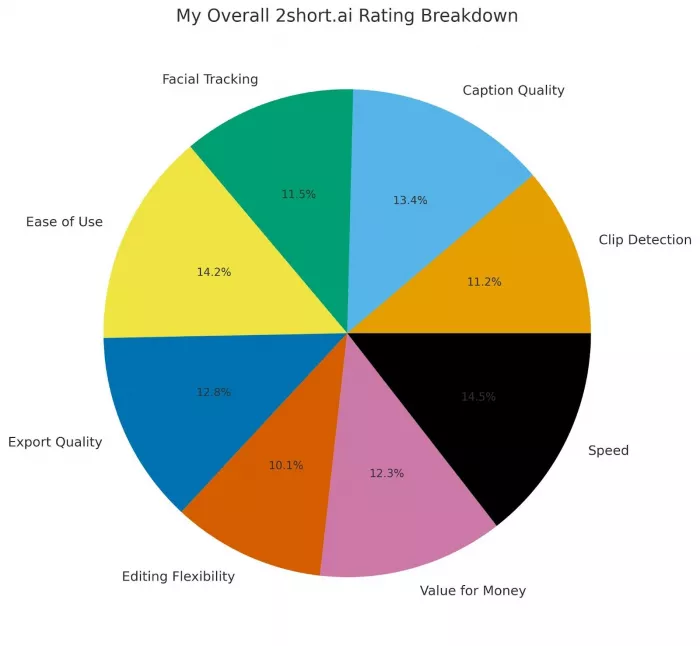
| Category | My Score |
| Clip Detection | 7.2 / 10 |
| Caption Quality | 8.6 / 10 |
| Facial Tracking | 7.4 / 10 |
| Ease of Use | 9.1 / 10 |
| Export Quality | 8.2 / 10 |
| Editing Flexibility | 6.5 / 10 |
| Value for Money | 7.9 / 10 |
| Speed | 9.3 / 10 |
Overall Final Score: 8.1 / 10
A fast, practical, creator-friendly repurposing tool, excellent for speech-driven videos, limited for visual-heavy content.
Yes, but selectively.
If I’m repurposing long talking-head videos into Shorts or Reels,
I will 100% use 2short.ai.
If I’m editing a visually complex video,
I won’t rely on it.
It’s not designed for perfection.
It’s designed for speed, automation, and scalable short-form content, and in that domain, it performs extremely well.

Let’s start with a small truth about storytelling: writing the first s...
WhatsApp is preparing to allow third-party artificial intelligence cha...
BrandCrowd built its name as a go-to logo tool for small business...

There is a specific kind of disappointment that comes from opening a b...
AI companion apps have moved well beyond novelty status. What started...
Let’s start with an uncomfortable truth. Most people want their photos...
Discussion