


I ran my first three years of social media management exclusively on Buffer. Scheduled every post, tracked every metric, built every calendar inside it. For a solo freelancer managing two Instagram accounts and a LinkedIn page, it was exactly right. Clean interface, zero learning curve, and the free plan covered everything I needed.
Then I picked up a fourth client. Then a fifth. Suddenly I was managing 14 social channels across six brands, and Buffer's per-channel pricing turned my $30/month bill into a $168/month problem. Worse, I needed approval workflows, competitive benchmarking, and a social inbox that could handle more than just Instagram and Facebook comments. Buffer doesn't do any of that.
That realization sent me on a three-month tool hunt. I tested seven platforms on real client accounts (with their permission), tracked actual engagement changes, and compared every invoice. This article is the result of that process.
Before I list alternatives, I want to be fair. Buffer earned its reputation. The scheduling interface is the cleanest in the industry. You can queue a week of content in under 20 minutes, and the calendar view makes it effortless to spot gaps. The AI assistant writes decent first drafts of captions, and the Start Page feature (a free link-in-bio builder) is surprisingly polished for something included at no extra cost.
The free plan still exists, which matters. Three channels, 10 scheduled posts per channel, and basic analytics. In a market where Hootsuite killed its free tier in March 2023 and Sprout Social has never offered one, Buffer's free option remains a legitimate starting point for creators and micro-businesses.
On G2, Buffer holds a 4.3/5 rating with consistent praise for ease of use. On Capterra, reviewers frequently mention the intuitive workflow as the primary reason they chose it. One Capterra user put it simply: the interface felt so natural they never needed to check the FAQ.
“Buffer has a very easy to use interface, and auto-scheduling and reorganizing scheduled posts is extremely easy. The workflow feels intuitive.” — Capterra verified review
The cracks show up in three specific areas, and they tend to appear all at once when your operation scales past a certain size.
Buffer charges $5-6/month per channel on the Essentials plan and $10-12/month per channel on the Team plan. For 3 channels, that's $18-36/month. Manageable. For 15 channels (a typical small agency workload), the math gets ugly: $90-180/month for scheduling and basic analytics alone. Hootsuite's $99/month plan includes 10 channels by default. SocialBee's $29/month plan covers 5 profiles with content recycling built in.
Buffer's analytics show you impressions, engagement rate, and follower growth. That's it. There's no competitor tracking, no sentiment analysis, no custom report builder, and no way to benchmark your performance against industry averages. A G2 reviewer noted that after upgrading, they found more robust tools for less money. Multiple Software Advice reviews echo this, calling the analytics "basic unless you upgrade" and noting that even the upgraded version falls short of what competitors offer at similar price points.
“It did what I was originally trying to use it for, but over time there are more robust tools that are cheaper.” — Software Advice verified review
Buffer lets you reply to Instagram and Facebook comments from the dashboard. That's the extent of its engagement features. There's no unified inbox, no DM management, no way to handle X/Twitter replies, no message tagging, and no team assignment for incoming messages. For anyone doing community management or customer support through social, this is a dealbreaker.
Pricing is the number one reason people start looking for Buffer alternatives. Here's how the entry-level and mid-tier plans compare across the seven tools I tested:
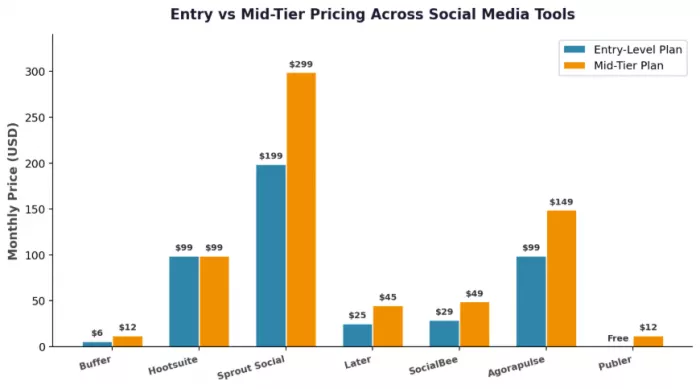
| Tool | Free Plan? | Starting Price | Channels Included | Per-Seat Model? | Annual Discount |
| Buffer | Yes (3 ch) | $6/ch/mo | Pay per channel | No | 20% |
| Hootsuite | No | $99/mo | 10 | Yes | Yes |
| Sprout Social | No | $199/seat/mo | 5 | Yes | Yes |
| Later | Limited | $25/mo | 1 social set | Yes | Yes |
| SocialBee | 14-day trial | $29/mo | 5 | No | Yes |
| Agorapulse | Limited free | $99/mo | 10 | Yes | Yes |
| Publer | Yes (3 acc) | $12/mo | Varies | No | Yes |
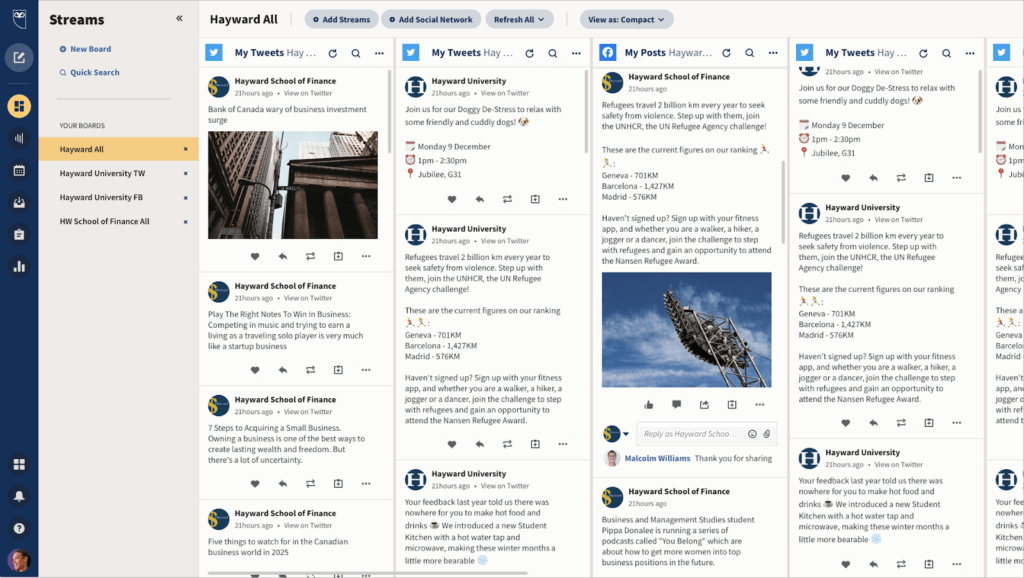
Hootsuite is the obvious first stop for anyone leaving Buffer who needs more power. It supports over 100 integrations (Buffer has roughly 10), includes social listening on every paid plan, and its OwlyWriter AI generates captions, hashtag suggestions, and content ideas that are noticeably better than Buffer's AI assistant.
The publishing tools let you customize posts for each network within a single composer window. Buffer can do this too, but Hootsuite adds bulk scheduling, content libraries, and a team approval workflow that actually works for agencies. The analytics are substantially deeper: competitor benchmarking, custom date ranges, exportable PDF reports, and best-time-to-post recommendations based on your specific goal (reach vs. engagement vs. traffic).
The $99/month starting price eliminates it for solo creators and most freelancers. And the interface carries years of feature accumulation. It works, but it can feel heavy compared to Buffer's stripped-down approach. The learning curve is real: plan for a week of adjustment.

Sprout Social starts at $199 per seat per month. That's not a typo. It's the most expensive tool on this list by a wide margin, and it's only worth considering if you need enterprise-grade reporting and social listening.
That said, the Smart Inbox is the best unified engagement tool I've used. Every comment, DM, and mention across every connected platform lands in one chronological feed. You can tag, assign, and resolve messages the way you'd handle a support ticket. For brands doing serious community management, this single feature can save hours per week.
The reporting is presentation-ready without customization. You can export client reports that look polished enough to include in a board deck. The social listening goes beyond mention tracking into sentiment analysis, competitive intelligence, and trend identification. G2 gives it a 4.4/5 rating, with users praising the reporting quality above everything else.
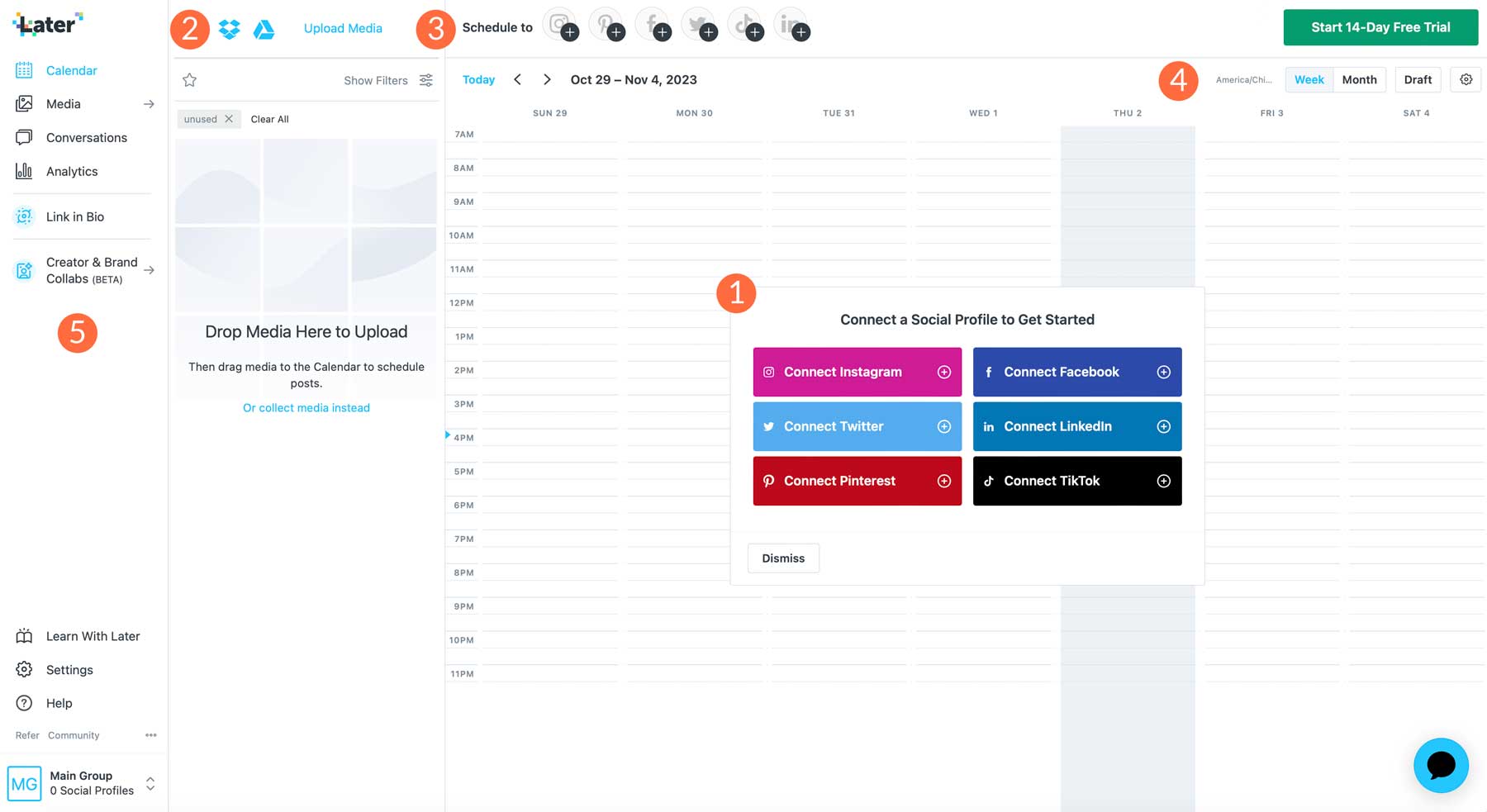
Later started as an Instagram scheduling tool and still carries that DNA. The visual content planner lets you drag and drop posts to preview how your feed will look before anything goes live. For brands where aesthetic consistency matters (fashion, food, travel, design), this visual-first approach is a genuine differentiator.
The platform now supports TikTok, Pinterest, Facebook, LinkedIn, and X alongside Instagram. The Linkin.bio feature turns your Instagram grid into a clickable landing page, and the AI caption writer is trained specifically for Instagram. Pricing starts at $25/month for one "social set" (one profile per platform), which makes it competitive for creators focused on a single brand.
The limitations are clear: analytics are surface-level compared to Hootsuite or Sprout, social listening barely exists, and the tool feels noticeably less capable for text-heavy platforms like LinkedIn and X. If Instagram and TikTok aren't your primary channels, Later probably isn't your tool.

SocialBee solves a problem that Buffer completely ignores: evergreen content management. You organize posts into content categories (promotional, educational, behind-the-scenes, curated), set a rotation schedule, and the platform automatically cycles through your library. A single blog post can resurface every 45 days with varied captions, keeping your feed active without creating new content every day.
At $29/month for 5 social profiles, the pricing undercuts Buffer the moment you manage more than 5 channels. The AI content generator (Copilot) creates post variations, suggests hashtags, and can even generate a month of content from a single URL. For small businesses that produce limited original content but need to maintain posting consistency, SocialBee is arguably the best value on this list.
The trade-off is a less polished interface. It's functional but not beautiful. Analytics are adequate rather than impressive. And there's no social inbox at all.
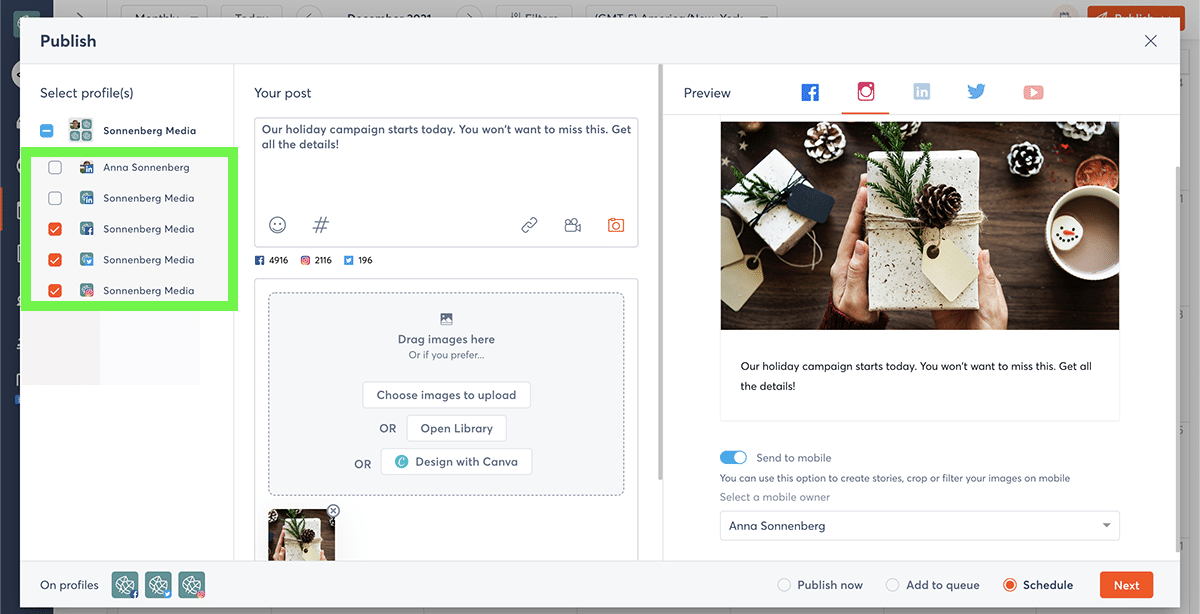
If Buffer's missing social inbox is what's pushing you to switch, Agorapulse should be your first stop. Its unified inbox handles comments, DMs, mentions, and reviews across every connected platform. You can assign conversations to team members, add internal notes, and set up automated moderation rules that catch spam or flag urgent messages.
The inbox alone would justify the price for community-heavy brands. But Agorapulse also includes ROI tracking that connects social media activity to actual website conversions (via UTM parameters), which is something even Sprout Social charges extra for. The reporting module generates white-label PDF reports that agencies can send directly to clients.
Pricing starts at $99/month for the Standard plan with 10 social profiles. It's positioned between Buffer and Sprout Social in both price and capability. G2 rates it 4.5/5, with particular praise for the inbox workflow and customer support responsiveness.

Publer rarely makes it onto "best of" lists, and that's a mistake. It offers a genuinely useful free plan (3 social accounts, scheduling, basic analytics, Canva and Unsplash integrations) and paid plans starting at $12/month that include auto-scheduling, content recycling, and a bulk upload feature that ingests CSV files.
The workspace model is particularly smart for agencies. You can create separate workspaces for each client, each with its own set of connected accounts and team members. This organizational structure is similar to what Sprout Social offers at 16x the price. Publer won't match Sprout on analytics depth or social listening, but for scheduling, organizing, and publishing, it punches well above its weight class.
The main downside is limited analytics and no social listening. If you need reporting that goes beyond post-level metrics, you'll need to pair Publer with a dedicated analytics tool.
This radar chart captures how each tool performed across six dimensions during my testing. Higher scores indicate stronger capability in that area:
The shapes tell the story clearly. Sprout Social dominates analytics and listening but tanks on value. SocialBee and Buffer score highest on value but sacrifice depth. Hootsuite and Agorapulse occupy a middle ground that works well for growing teams.
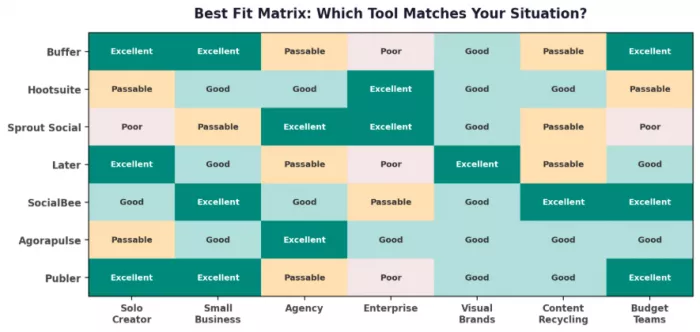
Features and pricing only matter in context. A $199/month tool is a bargain for a 50-person marketing department and absurd for a freelance photographer. This matrix maps each tool to the scenarios where it actually makes sense:
G2 is the closest thing this industry has to an impartial scoreboard. These ratings aggregate thousands of verified reviews from people who actually use the tools daily, not just during a trial period:
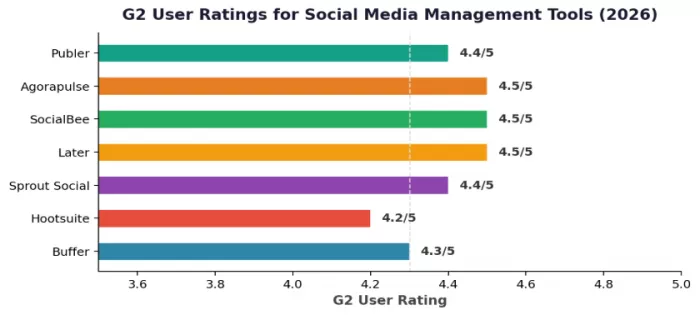
The interesting pattern here is that the newer, less expensive tools (SocialBee, Agorapulse, Later) rate higher than the legacy platforms. This tracks with what I experienced during testing: the smaller tools are more focused, update faster, and haven't accumulated the interface bloat that comes with 15 years of feature additions.
After three months of testing, here's where I landed. For my own freelance accounts (2 brands, 6 channels), I switched to SocialBee. The content recycling alone saves me roughly 4 hours per week. The AI copilot drafts decent first versions of posts, and the category-based scheduling means I don't have to manually plan every single day. My monthly cost dropped from $72 on Buffer to $29.
For client accounts that need approval workflows and reporting, I moved to Agorapulse. The inbox handles community management that Buffer literally cannot do, and the white-label reports eliminated a separate step in my monthly client deliverables. The $99/month covers 10 profiles, which maps neatly to two or three clients.
I still recommend Buffer to people who ask. Specifically, I recommend it to solo creators managing 1-3 accounts who want the simplest possible scheduling tool and don't need analytics beyond basic engagement metrics. For that exact use case, nothing beats it. The moment you need anything more, the alternatives on this list do it better for the same price or less.
One thing I wouldn't do: jump straight to Sprout Social or Hootsuite unless your budget genuinely supports it and your team is large enough to use the collaboration features. Paying $199/month for a tool you use like a $29/month tool is a waste. Match the tool to the actual job, not the brand name.
Buffer built its reputation on doing one thing well: making social media scheduling simple. In 2026, simplicity is still valuable. But the market has caught up. Tools like SocialBee deliver comparable scheduling with content recycling and AI features at lower prices. Agorapulse and Hootsuite offer the engagement and analytics depth that Buffer has never prioritized. Later owns the visual planning space. And Publer proves you can get a surprising amount of functionality without spending a dollar.
The best move is to test 2-3 options from this list on your actual workflow before committing annually. Most offer free trials or free plans generous enough to make a real comparison. Your social media stack should match the work you do today, not the work you did three years ago when you first signed up for Buffer.

Marketing teams often need images before a product is ready for a phot...

Creating a logo that will grab customers' attention is one of the main...

Enterprise software has a well-known failure mode. The demo goes great...

Most people who produce video at any real scale hit the same wall even...

A cinematic AI video needs more than realistic skin, dramatic lighting...

Have you noticed how difficult it is not to watch spoilers of a sporti...
Discussion