
PixVerse AI has made a name for itself as a slick, accessible AI video generator — clean interface, decent output quality, and a free tier that lets you dip your toes in without pulling out your wallet. But here's the thing: as the AI video space has exploded in 2025, PixVerse's cracks have started to show.
If you've been using PixVerse for any serious creative work, you've probably bumped into the same frustrations others have: limited video duration, credit systems that drain faster than expected, watermarks on lower plans, and a ceiling on creative control when your vision gets more demanding. The question isn't whether PixVerse is bad — it's genuinely solid for casual use. The real question is: are you leaving money and quality on the table?
This review digs into five serious alternatives that either beat PixVerse on quality, value, features, or all three. We've analyzed real user feedback, tested pricing models, and mapped out exactly who each tool is built for — so you can stop guessing and start creating.
PixVerse (pixverse.ai) launched as a consumer-first AI video generator focused on making short-form video creation accessible. It supports text-to-video, image-to-video, lip-sync, special effects, and camera motion control. The interface is browser-based and mobile-friendly, with clean UX that beginners appreciate.
PixVerse v6 Interface — clean, beginner-friendly dashboard
| Plan | Price/Month | Credits | Resolution | Concurrent Gens | Best For |
| Free | $0 | 90 initial + 60/day | 720p | 1 | Casual experimentation |
| Standard | $10 | 1,200/month | 720p HD | 3 | Light hobbyist use |
| Pro | $30 | 6,000/month | 1080p | 5 | Regular content creators |
| Premium | $60 | 15,000/month | 1080p | 8 | Heavy users & teams |
| Enterprise | $100+ | Custom | 1080p + API | Custom | Businesses & agencies |
Despite its appeal, PixVerse has real limitations worth knowing before you commit. Output quality on the free/standard tiers is noticeably softer than competitors at the same price point. The credit consumption isn't always transparent, leaving users confused. And for professional work — character consistency, long-form output, 4K — it simply doesn't compete with what's available elsewhere.
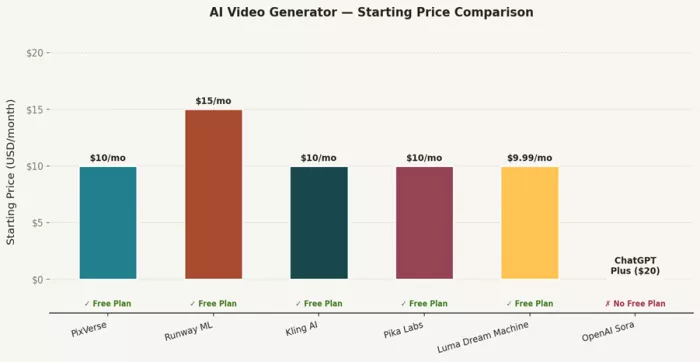
Chart 1: Starting price comparison across all reviewed AI video tools
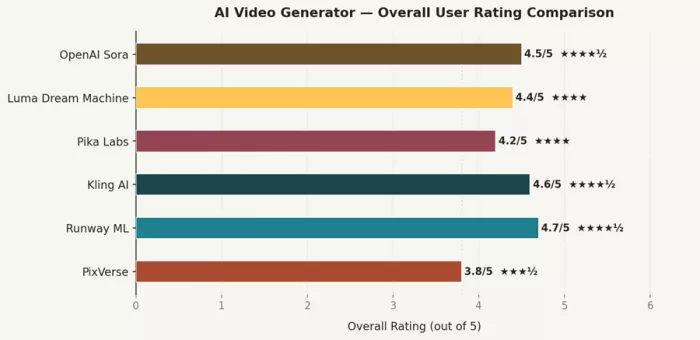
Chart 2: Overall user rating comparison (out of 5)
Runway ML ★★★★½ 4.7/5Best for: Agencies, filmmakers, and commercial content creators demanding studio-grade output |
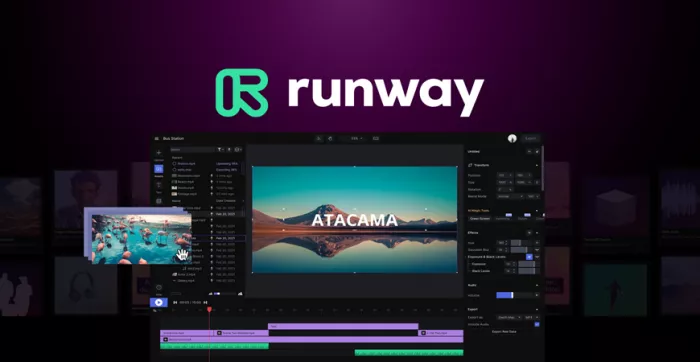
Runway ML Gen-4 Video Editor Interface — comprehensive creative control panel
Runway has been in the AI creative tools space longer than most, and it shows. What started as an experimental creative suite has matured into what many industry professionals now consider the gold standard for AI video generation. With the Gen-4 model, Runway took a massive leap forward — delivering cinematic-quality output with unprecedented character and scene consistency.
The platform's real strength isn't just video quality, though that's exceptional. It's the depth of creative control it hands you. Camera angle adjustments, motion controls, style guidance, multi-scene consistency — Runway treats you like a director, not a button-pusher. When you generate a shot in Gen-4, the subject keeps its identity across the full clip. Facial features don't morph, limb orientation stays consistent, and background elements maintain coherence. This is the stuff that makes the difference between a 'pretty good AI clip' and something you can actually use in client work.
Click here to read detailed comparison of Runway ML vs Pika Labs vs Kling AI's Video Quality
●Gen-4 & Gen-4 Turbo — Runway's latest flagship model with multi-scene consistency and 10s videos
●Image-to-Video — Upload a reference image and animate it with natural, coherent motion
●Turbo Mode — 7x faster generation speed for rapid iteration and storyboarding workflows
●4K video exports on Pro and above — rare in this price range
●30+ AI Magic Tools — green screen, depth blur, motion tracking, text-to-image and more
●Custom AI training — train your own generator on brand assets (Pro/Unlimited)
●Up to 16 seconds per video — longer than most competitors at this quality level
●Commercial licensing included on all paid plans
| Plan | Monthly Price | Annual Price | Credits/Month | Key Unlocks |
| Free | $0 | $0 | 125 (one-time) | Gen-4 Turbo access, 3 projects, watermark |
| Standard | $15 | $12/mo | 625 | No watermark, 4K exports, unlimited projects |
| Pro | $35 | $28/mo | 2,250 | Custom AI voices, 500GB storage, priority queue |
| Unlimited | $95 | $76/mo | 2,250 + unlimited relaxed | Unlimited Explore Mode, all features, API access |
At $15/month (Standard), Runway gives you 625 credits with 4K exports and no watermarks — PixVerse's Pro plan at $30/month gives you 6,000 credits but maxes at 1080p. If raw credit count is your metric, PixVerse wins. But if output quality and resolution matter, Runway's credits go further where it counts.
Runway's character consistency in Gen-4 is genuinely in a different league from PixVerse. In side-by-side tests, PixVerse clips at the same prompt tend to show more facial drift, background inconsistency, and motion artifacts. For social media clips or quick tests, you might not notice. For commercial use, you will.
"Runway Gen-4 is the first AI video tool I've seen that I could actually put in front of a client without apologizing for. Character consistency is real." — G2 Review, 5/5
"The credit system is confusing at first, but once you understand it, the quality justifies every cent. Much better than PixVerse for professional work." — Trustpilot, 4.5/5
"If you're a solo creator on a tight budget, it can feel expensive. But for agencies, it pays for itself after one project." — Reddit, r/AIVideo
👍 PROS | 👎 CONS |
| ✓ Best-in-class character and scene consistency with Gen-4 | ✗ Expensive for high-volume use ($95/mo for unlimited) |
| ✓ 4K resolution exports on paid plans | ✗ Credits drain fast on higher-quality models |
| ✓ 30+ AI creative tools beyond just video generation | ✗ No text-to-video — image-to-video only for Gen-4 |
| ✓ Turbo mode for 7x faster iterations | ✗ Steeper learning curve than PixVerse for beginners |
| ✓ Commercial license on all paid plans | ✗ Free tier gives only 125 one-time credits |
| ✓ Active community and extensive tutorials |
Is it worth switching from PixVerse? Yes — if you do any commercial or client-facing work. The quality gap is real and immediately visible.
Kling AI ★★★★½ 4.6/5Best for: Content creators and agencies who need high-volume, cinematic quality at affordable prices |
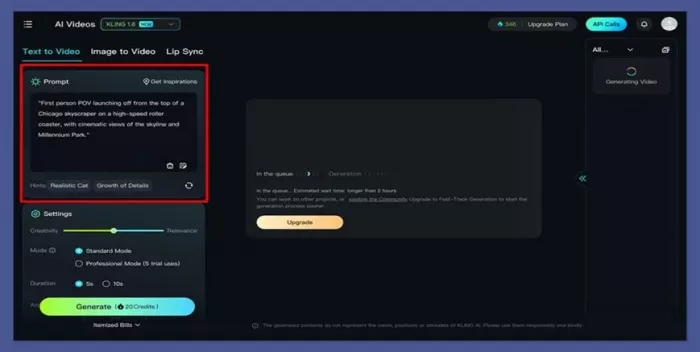
Kling AI Text-to-Video Interface — streamlined prompt-driven creation
Developed by Kuaishou Technology (the company behind one of China's biggest short-video platforms), Kling AI has become one of the most talked-about tools in the AI video space — and for good reason. It earned the #1 spot on Artificial Analysis' Image-to-Video benchmark in early 2025, beating Runway, Google Veo, and Pika Labs on key motion quality metrics.
What makes Kling special is its physics simulation. Water flows with genuine realism. Cloth moves with appropriate weight. Lighting responds to scene changes in ways that feel grounded in the real world. For creators making nature content, product videos, or anything where physical realism matters, Kling consistently outperforms tools twice its price.
Kling also offers something most competitors don't: videos up to 2 minutes long. That's not a typo. While PixVerse caps at a few seconds and Runway manages 16 seconds max, Kling stretches the timeline enough to tell an actual story without stitching clips together.
●Kling 2.1 & Kling Video O1 — latest flagship models with exceptional motion quality
●Up to 2 minutes of video duration — industry-leading for any price point
●Lip Sync — native audio-to-video lip synchronization for talking head content
●66 free daily credits — the most accessible free tier in the market
●1080p output on Pro and above plans
●Image-to-Video with reference photo support for consistent character creation
●Camera motion control — dolly, pan, tilt, and zoom directives in prompts
●Kling 2.6 native audio model for synchronized multi-modal generation
| Plan | Price/Month | Monthly Credits | Resolution | Key Features |
| Free | $0 | 66 credits/day (rollover) | 540p max | Basic generation, watermarked, 1 task queue |
| Standard | $10 | 660 credits | 720p–1080p | No watermark, unlimited task queue, Kling 2.1 access |
| Pro | $37 | 3,000 credits | 720p–1080p | Kling Video O1, image upscaling, faster processing |
| Premier | $92 | 8,000 credits | 1080p | All features, fastest queue, commercial license |
| Ultra | $180 | 26,000 credits | 1080p | Highest volume, all models, priority everything |
At the same $10/month price point, Kling Standard and PixVerse Standard are direct competitors. Kling gives you 660 credits to PixVerse's 1,200 — but Kling's output at 1080p and its motion quality are noticeably superior. The real differentiator is Kling's free tier: 66 credits daily means regular users can generate meaningful content without ever paying, something PixVerse's 60 daily credit renewal can't quite match in practice.
Kling's 2-minute video limit is a feature PixVerse simply can't touch. For creators making tutorial intros, product demos, or short-form narratives, this alone changes what's possible without stitching clips.
"Kling AI is the best value in the AI video space right now. The physics simulation on water and cloth is genuinely impressive — nothing at this price comes close." — Trustpilot, 5/5
"The daily free credits are what got me hooked. I used the free plan for weeks before upgrading, and by then I already knew the tool inside out." — ProductHunt, 4.5/5
"Slightly less brand polish than Runway, and the Chinese origin makes some companies nervous, but the actual output quality speaks for itself." — G2, 4/5
👍 PROS | 👎 CONS |
| ✓ #1 ranked Image-to-Video benchmark (Artificial Analysis, 2025) | ✗ Developed by a Chinese company (geopolitical concerns for some enterprises) |
| ✓ Up to 2-minute video duration — longest in the market | ✗ Smaller English-language community vs Runway |
| ✓ Exceptional physics simulation — water, cloth, lighting | ✗ Credit pricing can jump significantly between plans |
| ✓ Most accessible free tier (66 credits/day) | ✗ Limited camera control vs Runway's precision tools |
| ✓ Best-in-class cost per video ($0.35 for 5s clip on Pro) | ✗ API documentation is less mature than competitors |
| ✓ Native lip sync feature for talking-head content |
Is it worth switching from PixVerse? Absolutely, especially if volume and value are your priorities. At every price tier, Kling delivers more cinematic quality per dollar.
Pika Labs ★★★★ 4.2/5 Best for: Social media creators, viral content makers, and effect-heavy short-form video producers |
Pika Labs AI Video Generator Interface — effects-first creative workflow
Pika Labs occupies a distinctive corner of the AI video market: it's the most effects-forward tool in the field. While Runway and Kling focus on cinematic realism and quality, Pika has doubled down on creative manipulation — building a suite of tools that let you do things to video that simply weren't possible before AI.
The Pikaffects suite is genuinely impressive: Inflate (objects swell like balloons), Explode (controlled destruction), Melt, Squeeze, and more. Pikaswaps lets you replace elements mid-video with text prompts. Pikadditions inserts new objects into existing scenes. Pikascenes creates seamless multi-element compositions. These aren't gimmicks — for social media creators chasing engagement and virality, they're weapons.
Pika 2.5 (the current flagship) also handles 1080p output cleanly, with strong prompt coherence and dynamic background stabilization that keeps the scene grounded even when subjects move dramatically.
Also, check out our detailed comparison of Pika Labs vs Runway ML to understand which tool fits your workflow
●Pika 2.5 model — current flagship with 1080p HD output and strong prompt adherence
●Pikaffects — inflate, explode, melt, deflate, crush, and more visual effects via text prompt
●Pikaswaps — replace specific elements in a video with AI-generated alternatives
●Pikadditions — add new objects to existing video scenes naturally
●Pikascenes — orchestrate multi-element compositions with scene control
●Up to 10 seconds per generation (12s with Pikaframes)
●Dynamic background stabilization for natural-looking motion
●Fast generation with priority queue on Pro and Fancy plans
| Plan | Monthly Price | Annual Price | Credits/Month | Watermark | Commercial Use |
| Free | $0 | $0 | 80 credits | Yes | No |
| Standard | $10 | $8/mo | 700 credits | Yes | No |
| Pro | $35 | $28/mo | 2,300 credits | No | Yes |
| Fancy | $95 | $76/mo | 6,000 credits | No | Yes |
Note: Pika's Standard plan still carries watermarks and no commercial rights — which limits its value significantly compared to competitors at the same price. You effectively need the Pro plan ($35/month) to use Pika for anything professional.
PixVerse and Pika target a similar audience (creators, social content) but with different creative philosophies. PixVerse is broader — more features in the base package, including lip sync and camera control. Pika is narrower but deeper in its effect capabilities. The Pikaffects suite has no real equivalent in PixVerse.
Where Pika falls behind is value at entry-level: PixVerse's $10 Standard plan removes watermarks and offers commercial use consideration, while Pika's $10 Standard plan still watermarks everything. For pure creative effects, Pika wins. For overall value and features per dollar at entry-level, PixVerse is actually more competitive here — which is a rare win for PixVerse.
"Pika's effects are unlike anything else. The Inflate and Explode effects on product videos got our client more engagement than anything we'd made before." — ProductHunt, 5/5
"The Standard plan being watermarked is a dealbreaker. You have to go to $35 for real commercial use. Price transparency could be better." — G2, 3.5/5
"Perfect for content creation — I use it specifically for the Pikaffects. For cinematic quality, I still use Runway. Different tools for different jobs." — Reddit, r/ContentCreators
👍 PROS | 👎 CONS |
| ✓ Unique Pikaffects suite with no real equivalent (inflate, explode, melt) | ✗ Standard plan ($10) still has watermarks and no commercial rights |
| ✓ Pikaswaps and Pikadditions for advanced scene manipulation | ✗ Less suited for cinematic realism vs Runway or Kling |
| ✓ 1080p output on all paid plans | ✗ Occasional hand and finger artifacts in human subjects |
| ✓ Strong prompt coherence and background stabilization | ✗ Credit system can be confusing — cost per video varies significantly |
| ✓ Great for viral, high-engagement social media content | ✗ Slower generation than Runway Turbo |
| ✓ Regular feature updates with new effects | ✗ No lip sync feature unlike PixVerse or Kling |
Is it worth switching from PixVerse? Depends on your use case. For effects-heavy social content and virality-focused creation, yes. For general-purpose video generation, the value equation is tighter.
Luma Dream Machine ★★★★ 4.4/5Best for: Directors, creative artists, and storytellers who think in natural language and cinematic terms |
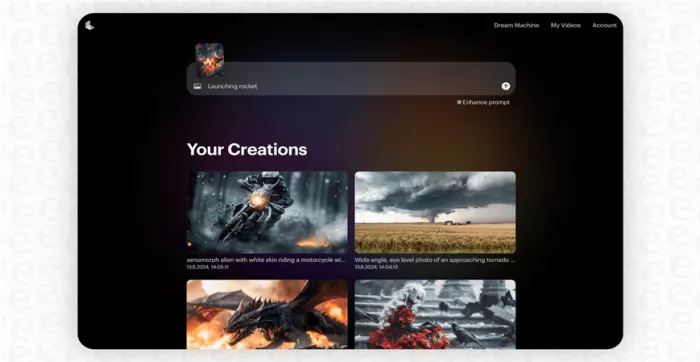
Luma AI Dream Machine Interface — prompt-centric cinematic creation
Luma AI's Dream Machine (powered by the Ray-2 model) is built on a simple but powerful premise: you should be able to describe what you see in your head and have it appear on screen. Where other tools require you to learn a prompt engineering dialect, Dream Machine understands cinematic language natively — 'golden hour, shallow depth of field, medium shot, subject moving toward camera' just works.
Ray-2 introduced what Luma calls 'ultra-realistic physics' — fluid motion, genuine object weight and inertia, and lighting that responds dynamically to scene context. The resulting footage has a distinctly filmic quality that makes it popular among video artists and directors exploring AI as a creative medium. Luma's footage doesn't look 'AI-generated' in the uncanny valley sense — it looks like expensive B-roll.
Luma is also one of the fastest generators in this space. Where Runway and Kling can take 50-120 seconds for a clip, Luma consistently comes in faster — useful when you're rapidly iterating on a storyboard or trying multiple prompt variations.
●Ray-2 model — ultra-realistic physics with fluid, weighted motion and dynamic lighting
●Native cinematic language understanding — describe shots as a director would
●Up to 10 seconds per generation in 1080p
●Image-to-Video — animate any reference photo with realistic motion
●Fastest generation speed among top-tier tools
●Available on AWS Bedrock for enterprise integration
●API access for automated workflows
●Strong temporal consistency — subjects stay coherent across the full clip
| Plan | Monthly Price | Annual Price | Generations/Month | Resolution | Best For |
| Free | $0 | $0 | Limited (30/month) | 720p | Testing and exploration |
| Lite | $9.99 | $7.99/mo | ~200 generations | 1080p | Casual creators |
| Standard | $29.99 | $23.99/mo | ~1,000 generations | 1080p | Regular content creators |
| Pro | $94.99 | $75.99/mo | ~4,000 generations | 1080p | Agencies and heavy users |
| Premier | $499.99 | $399.99/mo | Unlimited | 1080p | Enterprise and studios |
Luma Dream Machine and PixVerse share some surface similarity — both are accessible, browser-based tools with clean UIs. But the output quality gap is real. Luma's Ray-2 model produces footage with notably smoother motion, better lighting fidelity, and a more cinematic 'feel' than PixVerse at comparable pricing.
The $9.99 Lite plan makes Luma the cheapest entry point among serious competitors (fractionally under PixVerse's $10 Standard). At this price, you get 1080p output, no watermarks, and ~200 generations per month — significantly better value than PixVerse Standard's HD-only 720p output.
"Dream Machine understands how I think about shots. I describe things in director language and it just gets it. No other AI video tool does that as naturally." — Vimeo Community, 5/5
"The physics are stunning. I generated a waterfall scene that looked like it cost a full production day to shoot. My client thought it was real footage." — ProductHunt, 5/5
"Generation speed is the real hidden advantage. When I'm storyboarding, I can iterate much faster than with Runway or Kling." — G2, 4.5/5
👍 PROS | 👎 CONS |
| ✓ Best natural language prompt understanding — cinematic directions just work | ✗ No text-to-video (image-to-video focused, similar to Runway Gen-4) |
| ✓ Ultra-realistic physics with Ray-2 model | ✗ Less fine-grained control than Runway for camera motion |
| ✓ Fastest generation speed among premium tools | ✗ Generation count per plan can be unclear — credits not always transparent |
| ✓ Cheapest 1080p entry point at $9.99/month | ✗ Smaller creator community than Runway or Kling |
| ✓ Available on AWS Bedrock for enterprise use | ✗ No dedicated lip sync feature |
| ✓ Excellent for storyboarding and rapid iteration |
Is it worth switching from PixVerse? Yes, especially for creative professionals and directors. The output quality and prompt intelligence make this a genuine upgrade at virtually the same price.
OpenAI Sora ★★★★½ 4.5/5Best for: Premium creative professionals who demand the highest visual fidelity and narrative coherence |
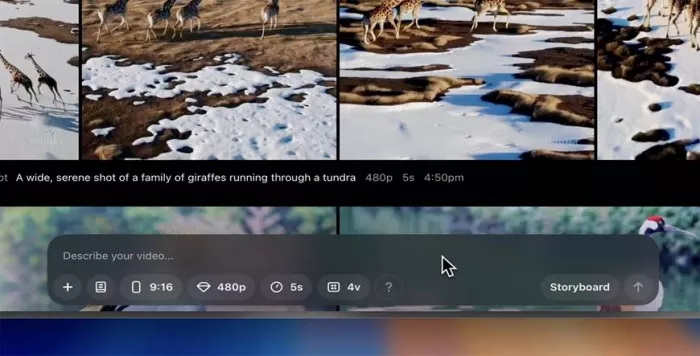
OpenAI Sora Interface — immersive, story-driven video generation experience
OpenAI Sora needs little introduction. When it launched, it set the internet on fire with footage that genuinely made people question whether they were looking at AI or real video. Sora 2 (released September 2025) pushed those capabilities further — longer videos, better physics, improved character consistency, and the jaw-dropping 'Cameos' feature that lets you insert yourself into AI-generated scenes using just a few photos.
Sora is powered by a diffusion transformer architecture that gives it an exceptional understanding of 3D space, light behavior, and temporal consistency. It's the only tool in this roundup that generates footage up to 60 seconds long — enough for a complete short-form narrative or a full product advertisement. The quality at that duration is something no other tool can currently match.
The catch? Sora isn't a standalone product. It's included with ChatGPT Plus ($20/month) and ChatGPT Pro ($200/month). This makes direct pricing comparisons awkward — you're essentially getting Sora as a bonus feature, but the credit limits are real and the higher-quality outputs are gated.
●Sora 2 model — OpenAI's most advanced video generation technology
●Up to 60 seconds of video — longest duration of any reviewed tool
●4K upscaling available for premium subscribers
●Cameos feature — insert real people into AI scenes from just a few photos
●Storyboard mode — plan multi-scene narratives and generate sequentially
●Turbo mode for rapid generation (~30 seconds for a 5-second clip)
●Audio synchronization for music and ambient sound matching
●Strong 3D scene understanding — physics, shadows, reflections
| Plan | Monthly Price | Sora Access Level | Video Duration | Resolution |
| ChatGPT Free | $0 | None (Sora not included) | N/A | N/A |
| ChatGPT Plus | $20 | Sora with limits (50 videos/month) | Up to 20 seconds | 720p–1080p |
| ChatGPT Pro | $200 | Sora with higher limits | Up to 60 seconds | 1080p + 4K upscaling |
This is the hardest comparison to make cleanly because of the bundled pricing. If you already pay for ChatGPT Plus ($20/month), you're getting Sora at no additional cost — which makes it essentially free for PixVerse users. At that value, switching (or supplementing) is a no-brainer.
If you're evaluating Sora as a dedicated video tool, the 50 videos/month limit on Plus is the main constraint. For the quality you get — genuinely cinematic, 60-second videos with physics that make competitors jealous — it's actually reasonable. PixVerse simply cannot produce footage at this level. The gap in quality is the widest of any comparison in this article.
"Sora is not a tool — it's a paradigm shift. I generated a 30-second product video that replaced a $5,000 shoot. Clients couldn't tell the difference." — Trustpilot, 5/5
"The 60-second limit on Pro is enough for most real use cases. The quality is just unmatched — Runway is great but Sora's latest model is in a different league." — Reddit, r/OpenAI
"Being locked into ChatGPT pricing is annoying. I wish Sora had its own standalone pricing. The bundling makes budgeting awkward for agencies." — ProductHunt, 3.5/5
👍 PROS | 👎 CONS |
| ✓ Longest video duration available — up to 60 seconds | ✗ Not a standalone product — requires ChatGPT Plus/Pro subscription |
| ✓ Best 3D scene understanding and physics simulation | ✗ No image-to-video feature currently |
| ✓ Cameos feature for inserting real people into AI scenes | ✗ Generation limits can feel restrictive for agencies |
| ✓ If you already have ChatGPT Plus, you get Sora at no extra cost | ✗ Pro plan at $200/month is expensive for casual creators |
| ✓ 4K upscaling on Pro plan | ✗ Slower generation for highest quality outputs (3-5 minutes) |
| ✓ Storyboard mode for multi-scene narrative planning | ✗ Limited fine-grained camera control compared to Runway |
Is it worth switching from PixVerse? If you already use ChatGPT Plus — yes, add Sora immediately. If you're evaluating from scratch, it's the best quality available but requires budget for the ChatGPT ecosystem.
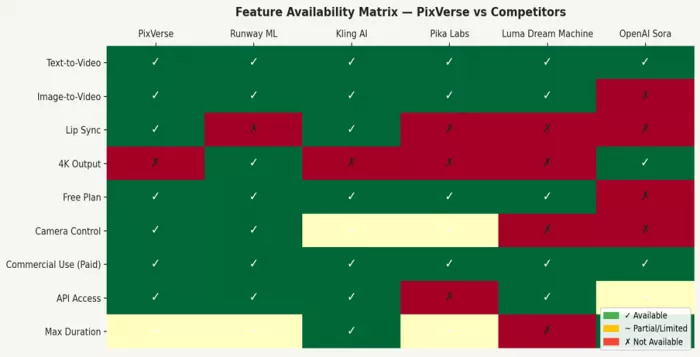
Chart 3: Feature availability across all 6 tools — ✓ Available, ~ Partial, ✗ Not Available
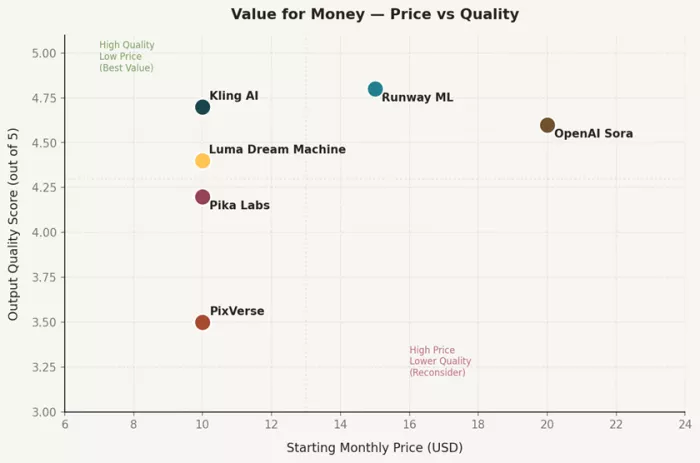
Chart 4: Positioning all 6 tools on price vs. quality — tools in the upper-left quadrant offer the best value
| Metric | PixVerse | Runway ML | Kling AI | Pika Labs | Luma Dream Machine | OpenAI Sora |
| Starting Price | $10/mo | $15/mo | $10/mo | $10/mo | $9.99/mo | $20/mo (bundled) |
| Free Plan | ✓ Yes | ✓ Yes | ✓ Daily credits | ✓ Yes | ✓ Limited | ✗ ChatGPT Free |
| Max Resolution | 1080p | 4K | 1080p | 1080p | 1080p | 4K upscale |
| Max Duration | 5–8 secs | 16 secs | 2 minutes | 10–12 secs | 10 secs | 60 secs |
| Text-to-Video | ✓ | ✓ | ✓ | ✓ | ✓ | ✓ |
| Image-to-Video | ✓ | ✓ | ✓ | ✓ | ✓ | Partial |
| Lip Sync | ✓ | ✗ | ✓ | ✗ | ✗ | ✗ |
| Camera Control | Basic | Advanced | Moderate | Moderate | Natural language | Moderate |
| Commercial Use | Paid plans | Paid plans | Paid plans | Pro+ only | Paid plans | ChatGPT Plus+ |
| API Access | ✓ | ✓ Paid | ✓ | ✗ | ✓ | Coming |
| Overall Rating | 3.8/5 | 4.7/5 | 4.6/5 | 4.2/5 | 4.4/5 | 4.5/5 |
| Best For | Beginners | Professionals | Value seekers | Social creators | Artists | Premium work |
This is the part of every tool comparison where the rubber meets the road. Feature lists are useful, but the real decision comes down to your specific situation.
| Your Situation | Recommended Tool | Why |
| You're a solo creator on a tight budget making social videos | Kling AI (Free/Standard) | Best free tier in the market, 66 daily credits, 1080p at $10/mo |
| You do commercial or agency work and quality is non-negotiable | Runway ML (Pro) | Character consistency, 4K output, 30+ creative tools, professional-grade |
| You want viral effects for Instagram Reels and TikTok | Pika Labs (Pro) | Pikaffects suite is unmatched — inflate, explode, swap effects |
| You're a director or filmmaker who thinks in cinematic terms | Luma Dream Machine | Best natural language understanding, cinematic physics, fastest iteration |
| You already pay for ChatGPT Plus and want maximum quality | OpenAI Sora | Best overall quality, 60-second videos, use it as a free add-on |
| You're a complete beginner just starting out | PixVerse or Kling Free | Simplest UI, forgiving credit system, no commitment needed |
| You need lip sync for talking head content | Kling AI or PixVerse | Both offer native lip sync — Kling's is more sophisticated |
| You need the longest possible video clips | Kling AI (up to 2 min) or Sora (up to 60 sec) | Everyone else caps below 16 seconds |
Here's the honest answer: PixVerse is a decent starting point, not a destination. It's built well for beginners who want to explore AI video without friction. But if you've been using it for a few months and you're still on PixVerse, you're probably leaving significant quality and value on the table.
For 95% of serious content creators, one of these five tools will serve you better — often at the same or lower price. The AI video space has moved rapidly in 2025, and PixVerse hasn't kept pace with the quality jumps we've seen from Runway Gen-4, Kling 2.1, and Luma Ray-2.
| Tool | Overall Score | Verdict |
| Runway ML | 4.7/5 ★★★★★ | Best for professionals — worth every dollar for commercial work |
| Kling AI | 4.6/5 ★★★★★ | Best value overall — cinematic quality at accessible pricing |
| OpenAI Sora | 4.5/5 ★★★★½ | Best quality ceiling — essential if you're already on ChatGPT Plus |
| Luma Dream Machine | 4.4/5 ★★★★½ | Best for filmmakers — cinematic intelligence in a clean package |
| Pika Labs | 4.2/5 ★★★★☆ | Best for effects-driven social content — Pikaffects are unique |
| PixVerse | 3.8/5 ★★★★☆ | Good for beginners — limited ceiling for professional use |
The bottom line: try Kling AI's free tier today — no credit card required, 66 free credits daily. If you're doing commercial work, Runway ML's Standard plan at $15/month is one of the most defensible investments in a modern content creation stack. And if you already pay for ChatGPT Plus, you're sleeping on Sora.

Marketing teams often need images before a product is ready for a phot...

Creating a logo that will grab customers' attention is one of the main...

Enterprise software has a well-known failure mode. The demo goes great...

Most people who produce video at any real scale hit the same wall even...

A cinematic AI video needs more than realistic skin, dramatic lighting...

Have you noticed how difficult it is not to watch spoilers of a sporti...

Discussion