

Last week, I had a small pile of visual jobs sitting in a folder, none of them big enough to justify opening Photoshop or messaging a designer. There were three product shots with cluttered backgrounds, one profile photo that came out slightly blurry, a couple of thumbnails that needed clean cutouts, and a short clip where the background behind me looked busy and distracting. Rather than spend an evening masking edges by hand, I decided to run the whole batch through Cutout.Pro and see how far an automated AI editor could actually take me.
This Cutout Pro review is the result of that session. It is not a rewrite of the feature list on the marketing page. I uploaded my own files, pushed each tool until it broke, and noted where the output was good enough to publish and where it quietly fell apart. If you are a blogger, an e-commerce seller, a social media manager, a student, a YouTuber, or an agency person who just wants fast visual fixes without learning a complex editor, this is written for you.
I did not want a tidy demo. I wanted the kind of messy, real files that pile up during an ordinary work week, because that is where an AI editor either saves time or wastes it. I framed the session as what I started calling the Six-Task Desk Test: six common jobs, six honest verdicts. Here is exactly what went in and how each result landed.
| Test task | Why I tested it | Expected result | Result quality |
| Product image background removal | For clean e-commerce style photos | Sharp object cutout | Strong |
| Portrait background removal | To check hair edges and face outline | Natural cutout | Good |
| Object remover | To erase unwanted items from a scene | Clean fill | Mixed |
| Photo enhancer / upscaler | To rescue a soft, low-quality image | Sharper photo | Decent |
| Video background remover | To test editing without a green screen | Subject separation | Useful |
| Passport / ID photo tool | To check a formal use case | Clean ID-style output | Cautious |
Across these six jobs a clear pattern showed up: Cutout.Pro is fastest and most reliable when the subject already stands apart from its background, and it gets shakier the moment fine detail, reflection, or fast motion enters the frame. The rest of this review walks through each task with the actual output in mind.
Cutout.Pro runs entirely in the browser, so there was nothing to install. I dropped a file onto the tool I wanted, the AI processed it, and a result appeared a few seconds later. The whole platform is built around that loop: upload, process, download. It positions itself as an all-in-one AI photo and video workspace, bundling background removal, photo enhancement, object removal, video background removal, ID photo tools, and an API into a single dashboard.
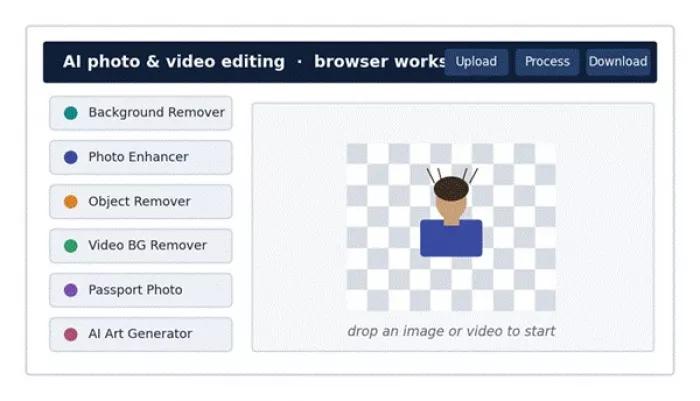
Cutout.Pro brings several AI editing tools into one browser-based workspace built around upload, process, download.
No design skills are required, which is the point. The flip side is that the interface is tuned for speed rather than control. There is very little room for the precise, manual adjustment you get in a real editor, so you mostly accept what the AI decides. For quick wins that is liberating. For anything fussy it becomes the main limitation, and it is worth saying plainly: fast does not always mean correct.
If Cutout.Pro has a headline skill, this is it. On simple product photos and on portraits with a clear outline, the background remover was quick and genuinely clean. Edges were crisp, the subject stayed intact, and I could download a transparent PNG within seconds.
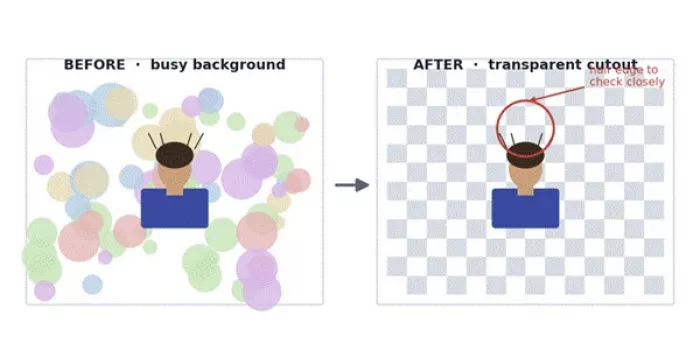
The background remover works best when the subject has clear edges; hair and wispy detail are where it asks for a second look.
Where it wobbled was predictable. Flyaway hair strands, semi-transparent objects, soft shadows, and thin jewellery were all hit and miss. Against a busy or low-contrast background the AI sometimes shaved off part of the subject or left a faint halo. For e-commerce shots, thumbnails, profile pictures, and quick design assets it was more than good enough. As a full replacement for precise masking in Photoshop, it is not there.
| Background removal area | My rating | Notes |
| Simple product images | 9 / 10 | Clean and fast, publish ready |
| Portraits | 8 / 10 | Good, but hair edges need checking |
| Complex objects | 6.5 / 10 | Misses fine and transparent detail |
| Speed | 9 / 10 | Strong for quick batches |
| Manual control | 5 / 10 | Limited next to a pro editor |
I spend a fair amount of time around marketplace and store listings, so this was the test I cared about most. Cutout.Pro handled standard product shots well: drop in a photo, get back a clean white or transparent background, and the item suddenly looks like it belongs in a catalogue. For a small seller who cannot afford to retouch every image, that is a real time saver.
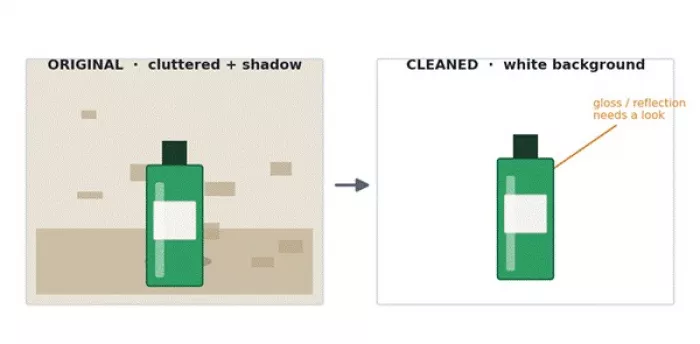
Product images can look noticeably cleaner, but reflective and glossy items still need extra checking.
The catch is that the tool inherits the quality of the original. Poor lighting, heavy shadows, blurry edges, and reflective surfaces such as glass, chrome, or polished packaging often needed a manual pass afterwards. My honest advice is to never run a full catalogue through it untouched. Test a handful of representative shots first, see how your specific product type holds up, then decide whether the time saved is worth the occasional fix.
| Product photo use case | Cutout.Pro suitability | Reason |
| White-background product images | Strong | Fast, clean cutouts |
| Social media product creatives | Good | Easy visual cleanup |
| Marketplace listing photos | Good, with checks | Edges must be reviewed |
| Jewellery, glass, reflective items | Average | Fine detail can break |
| Large catalogue editing | Useful in a batch flow | Needs quality control |
My blurry profile photo was the test case here. The enhancer did improve it: clarity went up, the softness eased, and at small sizes it looked perfectly usable. For slightly blurry or low-resolution images, an old photo, a casual snapshot, a blog image, or a thumbnail, it does what you hope.
What it cannot do is invent detail that was never captured. Push a badly damaged or heavily pixelated image through it and you get a smoother version of the same problem, sometimes with an artificial, waxy look on skin and faces. On one pass it smoothed my features so much that the photo stopped looking like me. So treat it as a clarity boost, not a rescue button, and always view the result at full size before publishing.
The object remover impressed me on the small stuff. Dust spots, a stray cable, a little background distraction, a minor blemish: brush over it and the AI fills the gap cleanly. That alone covers a lot of everyday cleanup.
Bigger removals were a different story. When I tried to erase a larger item sitting against a textured or detailed background, the fill area sometimes came back smeared or oddly patterned, the classic sign of an AI guessing at what should be behind an object. It is fine for quick tidying. It is not reliable enough for high-end commercial retouching without a human review afterwards.
| Practical verdict: Use the object remover for quick cleanup, not for final commercial retouching. Small marks vanish cleanly; large removals against busy backgrounds need checking. |
This is the feature most rivals do not offer, so I was curious. Cutout.Pro removes a video background without a green screen and accepts common formats such as MP4, MOV, WebM, and GIF. For a talking-head clip, a creator intro, a quick product promo, or a basic ad, it produced a usable separation between me and the background.
It works best when the subject is clearly distinct from the background and stays reasonably still. Motion blur, moving hair, fast hand gestures, and backgrounds close in colour to my clothing all caused edge flicker, where the outline shimmers or breaks for a few frames. Processing time also climbed with file size. For short social clips it is a genuine convenience. For professional post-production it is a starting point that still wants a manual cleanup pass.
| Video condition | Expected result |
| Clear subject, plain background | Best output |
| Fast movement | Edge flicker possible |
| Subject and background similar in colour | Detection may struggle |
| Moving hair | Fine-edge issues likely |
| Short social clip | Useful and quick |
| Professional commercial video | Needs manual review |
Cutout Pro includes ID and passport-style photo tools, and for the mechanical part, resizing and cleaning up the background, they are handy. Within a minute I had a tidy, plain-background headshot at a standard ratio.
My caution is about everything the tool cannot know. Passport and visa photo rules vary by country and are strict about head size, expression, lighting, and background shade. AI editing that subtly alters your face, skin tone, or background can quietly push a photo out of spec, and a rejected application is an expensive way to find out. I would use it for a first draft, then verify every requirement against the official guidance for your country before submitting anything official.
| Important: Do not rely blindly on AI-modified images for official documents. Always confirm your country's exact passport or visa photo specification before using an edited photo. |
For a one-off edit the web tools are plenty. The platform gets more interesting at scale, where Cutout.Pro offers an API for image and video AI processing. That is the version that suits apps, marketplaces, media platforms, agencies, and e-commerce teams that need to process visuals automatically rather than one at a time.
Through the API the same core jobs are available programmatically: background removal, video background removal, object removal, AI art generation, and background generation. The company positions it as a scalable integration with stable uptime, which matters if you are building it into a live product. Worth a sober note though: judge any uptime claim by your own testing and the current service terms, not by the marketing copy.
| API use case | Who needs it | Practical benefit |
| Product image cleanup | E-commerce stores | Faster catalogue processing |
| In-app background removal | Developers | AI editing inside their own app |
| Video cutout workflow | Agencies | Less manual editing per clip |
| Object removal at scale | Content teams | Cleaner visuals, faster |
| Batch image processing | Marketplaces | Saves repetitive editing time |
Cutout.Pro runs on a hybrid model: a limited free tier, pay-as-you-go credits, monthly or annual subscriptions, and separate API pricing. Almost every operation, a background removal, an enhancement, an object removal, spends credits, and that credit logic is where casual users get caught out. The figures below were accurate at the time of writing and are rounded, so treat them as direction, not a quote.
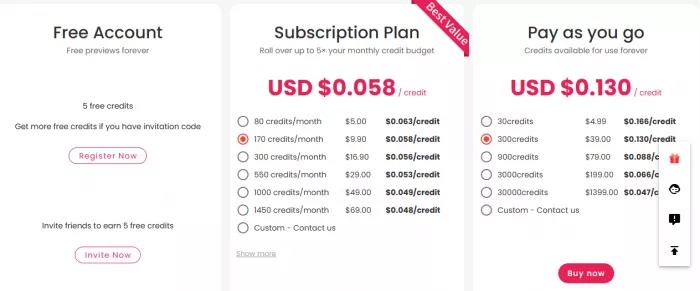
Stepping back from the individual tests, the strengths cluster around speed and breadth. Background removal is fast and the interface is friendly enough that a complete beginner can get a clean result on the first try. Everything runs in the browser, the product photo cleanup is genuinely useful for stores, the enhancer is a quick fix for soft images, and green-screen-free video background removal is a real differentiator. Add the API and it becomes more than a casual toy.
| Strength | Why it matters |
| Fast cutouts | Cuts repetitive editing time sharply |
| Browser-based workflow | Nothing to install, works anywhere |
| Product photo cleanup | Practical for e-commerce sellers |
| Video background removal | Helpful for creators without a green screen |
| API support | Scales into real product workflows |
| Many tools in one place | Less app-switching for small jobs |
The weaknesses are the mirror image of the strengths. The same automation that makes it fast also strips away manual control, so when the AI gets an edge wrong you have little ability to fix it inside the tool. Complex edges fail, the enhancer can over-process faces, video cutouts can flicker, and the credit pricing confuses people who expected a flat subscription.
There is also a trust point worth surfacing rather than burying. Sentiment is genuinely split: some users on review platforms praise the simplicity and the background-removal accuracy, while others, notably on Trustpilot, complain about disappointing output, refund friction, and slow support. Separately, third-party security outlets reported an alleged 2024 data incident involving user details; the company denied it and no detailed public post-mortem has appeared. I cannot verify that report either way, but combined with the official-photo caution above, it is reason enough to think twice before uploading sensitive or identifying images.
• Limited manual editing control once the AI has decided.
• Complex edges, hair, transparency, and reflections can fail.
• The photo enhancer can over-smooth and look artificial.
• Video cutouts may flicker or look rough on motion.
• Credit-based pricing confuses casual and one-time users.
• Mixed third-party sentiment on output, refunds, and support.
• Not a safe default for sensitive or official photos without verification.
• Not a full Photoshop replacement for precise work.
Cutout.Pro is a strong generalist, but for any single job there is usually a more focused option. Before committing, these are the alternatives I would weigh depending on what actually matters to you. None of them is simply better across the board; the right pick depends on your task.
| Alternative | Better for | Cutout.Pro advantage | Better choice when |
| Remove.bg | One-click background removal | More tools in one place | You only ever need cutouts |
| Canva Pro | Social designs and templates | Stronger AI cutout and video tools | You need full design layouts |
| Photoroom | Product photos and listings | API plus video tools | You sell products online |
| Photoshop | Pixel-level pro editing | Faster beginner workflow | You need precise manual control |
| Let's Enhance / VanceAI | Upscaling and enhancement | Broader mix of editing tools | Image quality is the only goal |
| Kapwing / Runway | Video editing | Dedicated AI cutout tools | You need a full video editor |
After the testing session, this is the routine I settled on. It treats Cutout.Pro as a fast first-pass tool and leaves final polish to whatever editor I already use.
1. Upload the image and run the background remover first.
2. Zoom in and check the edges, especially hair, fingers, and any reflective area.
3. Download the transparent PNG once the cutout looks clean.
4. Drop that PNG into Canva, Photoshop, or Figma for the final layout.
5. Run the enhancer only if the image still looks soft, then review at full size.
6. For product shots, test three to five sample images before batch-editing a catalogue.
7. For video, process a short test clip before committing a long, large file.
Pulling the six tasks together, here is how Cutout.Pro scored across the categories that mattered to me. The chart and table say the same thing two ways: excellent for fast, everyday edits, weaker the moment precision or sensitive accuracy is on the line.
| Category | Rating /10 | Reason |
| Ease of use | 9 | Very beginner-friendly |
| Background removal | 8.5 | Strong for clean subjects |
| Product photo use | 8 | Useful, but needs review |
| Photo enhancement | 7 | Helpful, sometimes artificial |
| Object removal | 6.5 | Good for small fixes only |
| Video background removal | 7 | Useful, not always perfect |
| Pricing clarity | 6.5 | Credit system needs attention |
| Professional control | 5 | Limited manual editing |
| Overall value | 7.8 | Best for fast, practical edits |
After running real work through it, my view is simple. Cutout.Pro is worth trying if you need fast background removal, product image cleanup, simple photo enhancement, or quick video background removal without learning complex software. It fits creators, small e-commerce teams, bloggers, marketers, and agencies handling repetitive visual tasks, and the green-screen-free video tool is a genuine point of difference.
It is not perfect, and I would not pretend otherwise. Complex edges, high-end retouching, sensitive official photos, and professional video work still need human review or a proper editor. The smartest way to use Cutout.Pro is as a fast first-pass editor that gets you 80 percent of the way in seconds, not as a final-quality replacement for skilled editing.
| My recommendation: Start on the free preview or a small credit top-up, and test your own image type before paying anything. If the results hold up on your files, a subscription pays off; if they do not, you have lost nothing. |

I started looking for Wsup AI alternatives after a simple realization:...

Marvell Technology is set to join the prestigious S&P 500 index la...

The Artificial Intelligence world is progressing at a fast pace, becom...

Pink Video Chat can be fun for quick conversations, but it is not perf...
That Uneasy Feeling Before You SearchMaybe the replies started landing...

Airbnb Chief Executive Brian Chesky is planning to launch a new artifi...
Discussion