

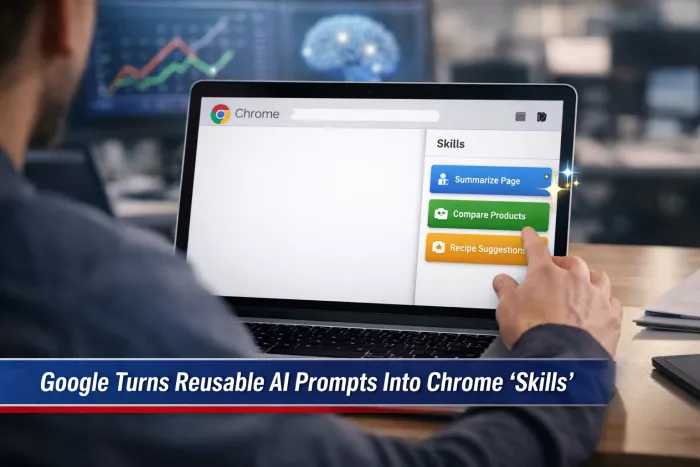
Google is bringing a new kind of workflow automation to Chrome by rolling out “Skills” inside Gemini, a feature designed to let users save prompts as reusable actions that can work across the websites they visit. Instead of repeatedly typing the same instructions into Gemini, users will be able to turn successful prompts into one-click tools that live inside the browser.
The update is part of Google’s broader effort to make Gemini more deeply embedded in Chrome, turning the browser from a passive place to view pages into a more active workspace for summarizing, comparing, organizing, and acting on information. In practical terms, Skills are meant to reduce one of the quiet frictions of everyday AI use: the need to keep rewriting prompts for tasks that are already repetitive.
That shift matters because browser-based AI is now moving beyond chat-style assistance and toward something more operational. Google is not just trying to make Gemini available in Chrome. It is trying to make it persistent, reusable, and increasingly woven into the actions people perform across shopping sites, articles, recipes, documentation, and Google’s own productivity tools.
At the center of the rollout is a simple idea. If a user writes a prompt that works well, such as summarizing an article into five beginner-friendly bullet points or comparing product specifications in a table, that prompt can now be saved as a Skill and reused later without retyping it.
Google is positioning these Skills as a personal library of repeatable AI workflows. A user can create them from scratch or save them out of Gemini chat history when they find a prompt worth keeping. Once stored, they can be reopened from Gemini inside Chrome and applied to whatever page the user is currently viewing.
This changes the role of prompting inside the browser. Instead of treating every page interaction as a fresh AI session, Google is nudging users toward standardized routines. That makes Gemini feel less like a chatbot sitting beside the browser and more like a set of custom browser tools built from natural language.
It also reflects a broader product trend in AI. The value is no longer only in getting an answer. It is increasingly in turning repeated behavior into systems that save time and reduce effort.
Google’s early examples suggest that Skills are being framed as practical productivity tools rather than abstract AI experiments. Shopping is one of the clearest use cases. A saved Skill could read product pages and produce side-by-side comparisons when a user is moving across different tabs, helping turn scattered browsing into a more structured buying decision.
Recipe and food tasks are another obvious fit. Google highlights workflows where a Skill could analyze ingredients, suggest substitutions, or adapt a recipe to dietary constraints such as vegan or gluten-free preferences. Research and reading tasks are also central to the pitch. A user could create a Skill that consistently turns long articles into a fixed output format, such as key takeaways, risks, and next steps.
Routine work tasks appear to be part of the target as well. Long emails, documentation pages, and web-based resources can all be turned into summaries and action lists through the same reusable prompt logic. That makes the feature particularly relevant in workplace settings where AI is often helpful not because it is brilliant, but because it is consistent.
The underlying message is clear: Google wants Gemini in Chrome to become less about ad hoc conversations and more about repeatable micro-automation.

Google is not relying only on user-created Skills. Chrome is also shipping with a prebuilt Skills library for common tasks. These include functions such as checking ingredients on product pages, finding gift ideas, or making recipe substitutions. Users can then edit or remix those built-in Skills to better match their preferences.
That matters because it lowers the barrier to entry. One of the biggest challenges with prompt-based AI is that many users still do not know what to ask for, even when they know what they want done. Prebuilt Skills act as templates, giving users a starting point and making Gemini feel less dependent on prompt-writing fluency.
Skills also fit into a much wider Gemini-in-Chrome strategy. Google has already been expanding the Gemini side panel, giving users a more persistent assistant layer while keeping the main browsing tab focused on the task at hand. At the higher end of the Gemini subscription stack, Chrome is also getting more agent-like features through Auto Browse, which is designed to handle multi-step tasks such as filling forms or gathering quotes with user confirmation.
Alongside that, Gemini’s deeper integration with Google services such as Gmail, Calendar, Drive, Maps, and YouTube points to a future where Chrome is not just the place where people browse, but also the place where AI coordinates work across the web and across Google’s own ecosystem.
In that context, Skills are not an isolated feature. They are the reusable layer that connects prompting, browsing, and action into something more structured.
As with most browser-based AI features, privacy and control are likely to shape how widely the feature is embraced. Google is emphasizing that Skills operate under the same permission and safety structure as other Gemini actions in Chrome. If a Skill needs to do something more consequential, such as sending an email, making a purchase, or adding an event, the user will be asked to confirm before the action is completed.
That is an important distinction because the feature is being framed as assistant-style automation rather than full autonomy. Users can edit Skills, delete them, and change prompts if they decide they no longer want certain behaviors repeated. For now, Google appears to be trying to keep the system useful without making it feel uncontrolled.
That balance matters because browser AI quickly becomes sensitive when it moves from reading and summarizing into acting. Summarizing a page is low-risk. Triggering actions across shopping sites, email, or calendars is a different category of trust entirely.
Skills are rolling out to desktop versions of Chrome on macOS, Windows, and ChromeOS, with availability initially tied to U.S. English settings and rollout beginning in mid-April 2026. Users need to be signed into Gemini in Chrome, and full access may take several days to reach all eligible devices.
The launch also arrives as browser competition is becoming more clearly shaped by AI and productivity features, not just raw browsing speed. Chrome has already added non-AI improvements such as Split View, PDF annotations, and Save to Google Drive, suggesting Google sees the browser as a broader productivity environment rather than just a web access point.
That makes Skills more significant than they may first appear. On the surface, they are saved prompts. In practice, they are another step toward turning Chrome into a browser where AI does not just respond when asked, but quietly becomes part of the default workflow.

Creating a logo that will grab customers' attention is one of the main...

Enterprise software has a well-known failure mode. The demo goes great...

Most people who produce video at any real scale hit the same wall even...

A cinematic AI video needs more than realistic skin, dramatic lighting...

Have you noticed how difficult it is not to watch spoilers of a sporti...

Most investors building around AI stocks are chasing growth, and that...
Discussion