

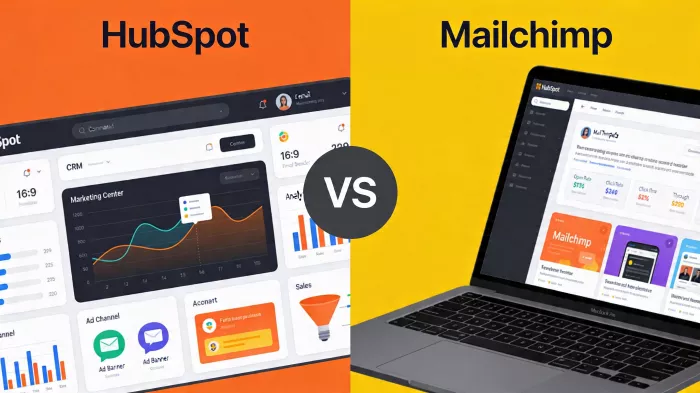
CRM brain vs campaign engine: a non-SEO, workflow-first comparison for teams deciding what should sit at the center of their marketing stack
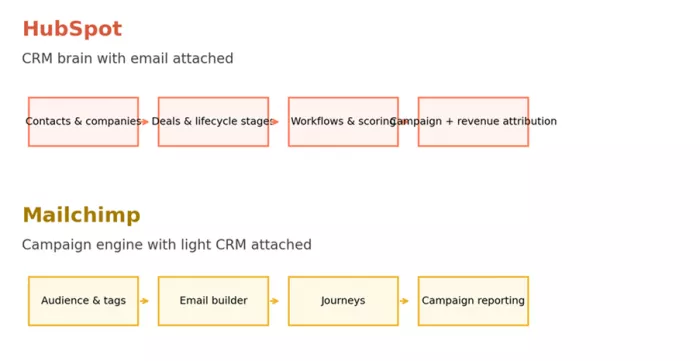
Most comparison pages flatten HubSpot and Mailchimp into the same category, then argue over templates, automation, or pricing. That misses the real decision. These tools are not trying to win the same job in the same way. HubSpot behaves like a CRM and revenue platform that happens to send email. Mailchimp behaves like an email and campaign platform that learned enough CRM to keep small and mid-sized businesses inside the product longer.
When that distinction is ignored, buyers end up with the wrong kind of complexity. A team that only needs stronger newsletters, product announcements, and a few e-commerce journeys can overbuy HubSpot and inherit cost, governance, and implementation work it did not actually need. A team with a long sales cycle, multi-touch reporting requirements, and shared marketing-sales visibility can underbuy with Mailchimp and then spend the next year patching around its lighter data model.
This comparison is built around the points where the difference becomes operational, not theoretical: automation design, CRM depth, campaign execution, reporting, scaling behavior, review sentiment, and the cost of turning each product into the center of a real stack. The goal is not to force a winner. It is to make the product logic visible so the choice becomes harder to get wrong.
| Dimension | HubSpot | Mailchimp |
| Official URL | https://www.hubspot.com | https://mailchimp.com |
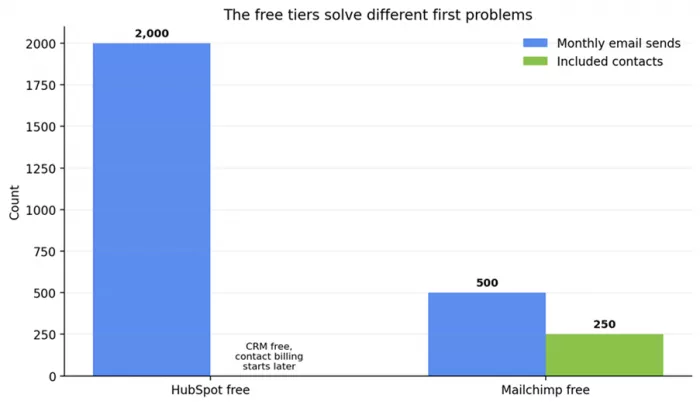
| Free plan signal | Free CRM tools plus up to 2,000 email sends per month | Free plan with up to 250 contacts and 500 monthly sends |
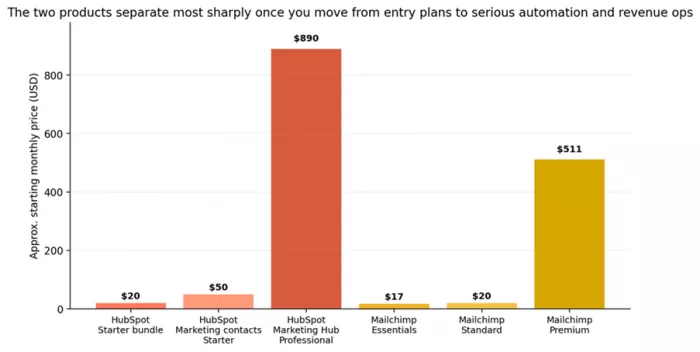
| Entry price signal | Starter Customer Platform bundle starts at $20/month; Marketing Hub contact-based pricing starts at $50 for 1,000 marketing contacts | Capterra lists starting price at $13/month; official pricing pages show Essentials and Standard as the main paid on-ramps |
| Data model | Native CRM with contacts, companies, deals, tickets, lifecycle stages, and shared records | Audience-centric marketing database with tags, segments, and lighter CRM behavior |
| User-review pattern | Praised for automation, cross-team visibility, and ecosystem depth, but repeatedly criticized for pricing that rises fast as contacts and features grow | Praised for usability, templates, and quick campaign execution, but criticized for list-based cost creep and a lower ceiling for complex revenue workflows |
| Review counts used here | 4,431 Capterra comparison reviews for HubSpot CRM; 14,590 G2 reviews for HubSpot Marketing Hub | 17,516 Capterra comparison reviews; G2 review summaries emphasize ease of use and price creep |
| Integration posture | HubSpot positions itself as the central system of record and app marketplace hub | Mailchimp positions itself as a specialist that plugs into a broader stack, especially commerce and SMB tooling |
Source note: pricing and plan limits are drawn from official HubSpot and Mailchimp pricing/help pages, while review counts and sentiment summaries come from Capterra and G2 comparison/review pages. See the source list at the end of the document.
HubSpot started as an inbound marketing company and grew into a much broader customer platform. Today the product surface stretches across Marketing Hub, Sales Hub, Service Hub, Content Hub, Commerce Hub, Operations features, and a shared CRM layer. That matters because email inside HubSpot is not really a standalone feature. It is one instrument inside a larger operating model built around contacts, companies, deals, lifecycle stages, and revenue reporting.
Mailchimp grew from the opposite direction. It became famous as an email platform, then added customer journeys, forms, landing pages, a website builder, product recommendations, light CRM features, SMS, and e-commerce integrations. The shape of the product still reflects that origin. Campaigns come first. Audiences and commerce events sit close behind. CRM exists mainly to make campaigns smarter, not to become the master record for the business.
That contrast sounds abstract until a team starts asking practical questions. Should sales and marketing be looking at the same record? Should email performance connect to closed-won revenue or mostly to opens, clicks, and order events? Should automation trigger internal tasks, deal-stage changes, and service actions, or mostly customer-facing messages? The tool you choose answers those questions whether you notice it or not.
Automation is where both products look superficially similar and then separate quickly. Each can send welcome series, nurture flows, abandoned-cart reminders, and follow-ups. The difference is in what the automation can see, what it can change, and who can act on the result.
In HubSpot, workflows can branch on CRM properties, deal data, behavioral events, list membership, form submissions, lifecycle stages, and more. The product is designed for automation that is not limited to email. A workflow can assign an owner, rotate a lead, create a task for sales, enroll a contact in another nurture path, or update fields that other teams see immediately. That makes HubSpot stronger in businesses where email sits inside a larger revenue process.
Mailchimp's customer journeys are easier to understand and faster to deploy. For many teams that is a feature, not a limitation. Prebuilt paths for welcomes, post-purchase follow-up, and cart recovery are enough when the business is selling directly and the buying cycle is short. The trade-off appears when the logic gets messier. Mailchimp can personalize and branch, but it does not natively give marketing, sales, and support the same operational field of view that HubSpot does.
The practical dividing line is maintenance. HubSpot can support more sophisticated automation, but it also makes it easier to build sprawling logic that only one administrator understands. Mailchimp keeps the automation layer more contained, which is exactly why smaller teams often keep moving faster inside it.
This is the point many buyers underestimate. In HubSpot, email is one expression of the CRM. In Mailchimp, light CRM exists to make email smarter.
HubSpot keeps contacts, companies, deals, tickets, and interactions inside one native model. Website visits, form fills, email engagement, sales outreach, and pipeline changes can roll into the same record. For a B2B team or any company with longer buying cycles, that shared record is the whole argument for paying more. It changes how marketing qualifies leads, how sales works handoff, and how leadership attributes revenue.
Mailchimp has audiences, tags, segments, predicted demographics, commerce data, and customer journey context. That is useful and often sufficient for e-commerce and campaign-led businesses. But it is not the same thing as running a real CRM with deal management, company records, or cross-functional operational history. If email is the center of gravity, Mailchimp feels natural. If CRM is the center of gravity, Mailchimp starts feeling like a smart campaign layer that needs another system beside it.
Mailchimp still has the stronger 'send something good quickly' feel. Its template system, drag-and-drop editing, campaign setup, and audience flow are easier for non-technical marketers to learn. Review patterns on G2 continue to highlight ease of use and an intuitive campaign workflow as a major reason small and medium businesses stay with the product.
HubSpot's email builder is solid, but the product feels strongest when the email is part of a larger campaign structure with CRM-backed personalization, smart content, web activity context, and reporting downstream. Users do not usually choose HubSpot because its editor is more fun. They choose it because the editor sits inside a deeper system.
That distinction matters in a content-heavy team. If the job is weekly newsletters, launch emails, nurture sends, and e-commerce promotions, Mailchimp is often the faster instrument. If the job is coordinating email with lifecycle movement, lead qualification, attribution, and sales context, HubSpot's heavier setup becomes an advantage rather than friction.
Mailchimp reports well on campaign performance. It shows opens, clicks, order-related outcomes for connected stores, audience growth, and engagement patterns in a way that makes day-to-day optimization approachable. That is why it remains comfortable for marketers whose reporting story is primarily campaign-driven.
HubSpot is stronger when leadership asks questions that campaign software alone cannot answer cleanly. Which emails influenced opportunities? Which forms and pages moved a deal forward? Which workflows generate qualified pipeline, not just engagement? Because the CRM is native, HubSpot can tie more of the story together across web, email, sales, and pipeline data.
This is also why some teams end up frustrated with Mailchimp after they mature. The software can show whether a campaign performed. It is weaker at becoming the unquestioned answer to what marketing contributed inside a long, multi-touch revenue process.
HubSpot and Mailchimp do not just charge differently. They assume different economic stories. HubSpot assumes the product is part of a broader customer platform investment. Mailchimp assumes the buyer is watching monthly marketing spend much more closely and may not want to pay platform-level prices until much later.
Official HubSpot pages show a $20 per month Starter Customer Platform bundle for small businesses, while HubSpot's marketing contact pricing page shows Starter contact-based pricing at $50 for 1,000 marketing contacts, with Professional at $890 for 2,000 included contacts and 10x monthly email sends. In other words, HubSpot entry can look inexpensive in isolation, but the serious marketing stack becomes materially more expensive once contact-based marketing and advanced automation are central.
Mailchimp's free plan currently includes up to 250 contacts and 500 sends per month. Capterra lists Mailchimp starting at $13 per month, while official Mailchimp pricing/help pages position Essentials and Standard as the principal paid starting points and note that Standard's base price includes 500 contacts and 12x monthly sends. Premium shifts the product into a different budget class, but most buyers evaluating Mailchimp against HubSpot are looking at Essentials or Standard first.
The result is simple. Mailchimp tends to stay financially comfortable longer for campaign-led teams. HubSpot starts making sense when the extra spend replaces several other systems, improves revenue visibility, and reduces coordination costs across departments. Without those benefits, the price difference feels heavier very quickly.
Ecosystem and integrations
HubSpot wants to sit in the middle of the stack. Its marketplace and app strategy are built around being the record where other systems sync back. That is a strong fit when leadership wants one place to see contacts, deals, activities, and campaign influence. It is also why HubSpot can become sticky very quickly once multiple teams depend on it.
Mailchimp behaves more like a specialist. It plugs well into stores, CMS tools, forms, and smaller business software. Official and marketplace material emphasizes integrations and developer tooling, and recent G2 product material notes over 300 integrations. That is a healthy ecosystem for a campaign platform. It is not the same thing as becoming the operational source of truth for an entire go-to-market team.
What users praise, and where they get annoyed
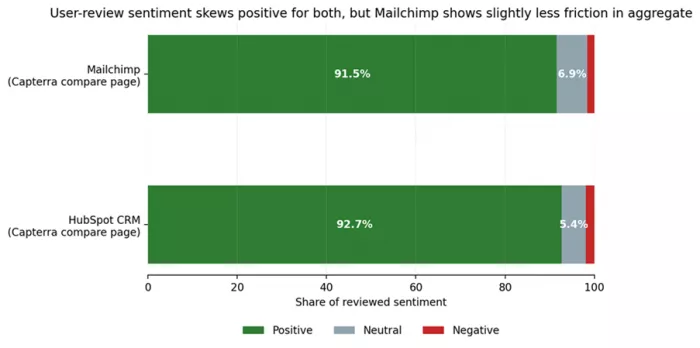
The review pattern is unusually consistent. HubSpot Marketing Hub's G2 review summary emphasizes the user-friendly interface and strong automation, but repeatedly mentions that pricing rises quickly as businesses grow. Capterra reviews add a more operational note: users value the single ecosystem for marketing and sales, while complaining that contact-based pricing and feature thresholds make budgeting harder.
Mailchimp's G2 summary keeps circling back to ease of use, all-in-one campaign functionality for SMBs, and intuitive design. The recurring complaint is cost escalation as contact lists grow. Capterra's large comparison dataset also shows slightly better value-for-money scores for Mailchimp than HubSpot, which lines up with how the two products are usually purchased.
That does not mean Mailchimp is automatically the cheaper or easier answer forever. It means user frustration arrives in different places. HubSpot users tend to feel pain in pricing governance and product sprawl. Mailchimp users tend to feel pain when their marketing model outgrows campaign-centric reporting and lighter CRM depth.
| Scenario | Better fit | Why the choice changes in practice |
| Bootstrapped e-commerce brand sending promos, abandoned-cart reminders, and post-purchase flows | Mailchimp | The campaign workflow is faster, templates are easier to deploy, and the lighter CRM is usually enough when the store is the real source of truth. |
| B2B SaaS with a multi-month sales cycle and a sales team that must see marketing activity inside the same record | HubSpot | The native CRM, lifecycle stages, and pipeline-aware reporting matter more than editor convenience. |
| Publisher or creator business whose main goal is regular newsletters, launch campaigns, and audience engagement | Mailchimp | The center of gravity is campaign execution, not deep deal management. |
| Scale-up trying to connect web leads, nurture, sales handoff, and management reporting in one system | HubSpot | This is exactly the type of cross-functional visibility the product is built to support. |
| Small marketing team that keeps outgrowing basic newsletters but still does not need a full revenue platform | Mailchimp first, HubSpot later | Mailchimp usually stretches further than teams expect before the CRM question becomes unavoidable. |
| Organization replacing several disconnected tools and willing to standardize process around one platform | HubSpot | The higher cost is easier to justify when it meaningfully collapses tool sprawl. |
Mailchimp is often the right answer when email and campaigns are the center of gravity, budgets are under real pressure, and the business is comfortable keeping CRM depth somewhere else. It is still one of the quickest ways to get from idea to live campaign without adding unnecessary system overhead.
HubSpot is the better answer when shared customer data is the center of gravity, and email is only one instrument in a larger revenue process. In that environment, the product stops feeling expensive in isolation and starts feeling like infrastructure.
The common buying mistake is easy to name. Companies buy HubSpot when they only need a better Mailchimp, or they push Mailchimp to behave like a full CRM and then act surprised when reporting, handoffs, and automation logic start to fray. The right choice is less about which product is better and more about which problem is actually central in the business right now.

Marketing teams often need images before a product is ready for a phot...

Creating a logo that will grab customers' attention is one of the main...

Enterprise software has a well-known failure mode. The demo goes great...

Most people who produce video at any real scale hit the same wall even...

A cinematic AI video needs more than realistic skin, dramatic lighting...

Have you noticed how difficult it is not to watch spoilers of a sporti...
Discussion