


There is a certain type of tool that looks like it is about to change your workflow.
Hotpot AI is exactly that kind of tool.
It promises everything in one place. Image generation, editing, writing, templates, enhancements. The kind of setup that makes you think you can finally close 10 tabs and pretend you are now a “focused creator.”
So naturally, I believed it.
I decided to use Hotpot AI for a full working day. No Canva. No Photoshop. No Midjourney. No switching tools. Just one tab, one system, one expectation.
By the end of it, I realized something important. Tools that try to do everything usually make one trade. They optimize for speed, not depth.
The platform loads quickly and looks structured, but nothing about it feels distinct. The layout is simple, almost too safe. It does not feel like a premium creative environment. It feels like a collection of utilities placed inside a clean UI.
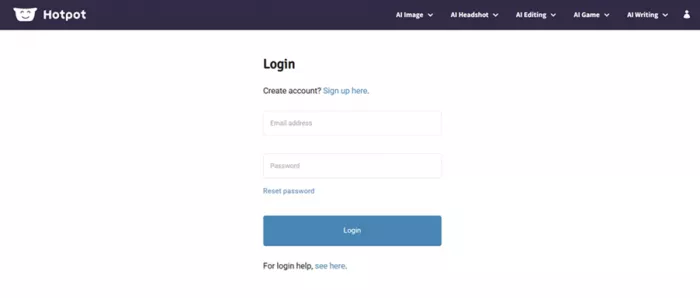
The login experience reinforces that feeling. No modern shortcuts, no external integrations, no OTP-based fast access. It is straightforward, but also feels behind what most users expect today.
That first impression matters more than it seems. Because when a creative tool feels generic, the outputs often follow the same pattern.
Hotpot AI runs on a credit-based system, and this is where the experience starts changing from “fun” to “calculated.”
You are not just generating content. You are managing usage.

From testing:
This creates a subtle shift in behavior. Instead of experimenting freely, you start optimizing prompts to avoid wasting credits. That sounds efficient, but it reduces exploration.
| Plan Type | Credits | Price | Cost per 1K Credits | Best For | Limitation |
| One-time | 1000 | $12 | $12 | Testing | Runs out quickly |
| One-time | 2500 | $30 | $12 | Light usage | Still limited |
| One-time | 5000 | $60 | $12 | Regular users | No scaling benefit |
| One-time | 10000 | $120 | $12 | Heavy users | Expensive at scale |
| Monthly | 1000/mo | $10/mo | $10 | Casual creators | Low volume |
| Monthly | 5000/mo | $50/mo | $10 | Consistent work | Still credit-bound |
| Yearly | 5000/mo | $500/yr | ~$8.3 | Long-term users | Commitment required |
What stands out is consistency. The pricing does not scale dramatically. You pay for usage, not efficiency.
To test image quality, I used this prompt:
“Two handsome anime rappers, muscular, smooth detailed faces, school uniforms, gang behind, cinematic lighting, urban rooftop vibe”
The output was not bad. But it was not memorable either.
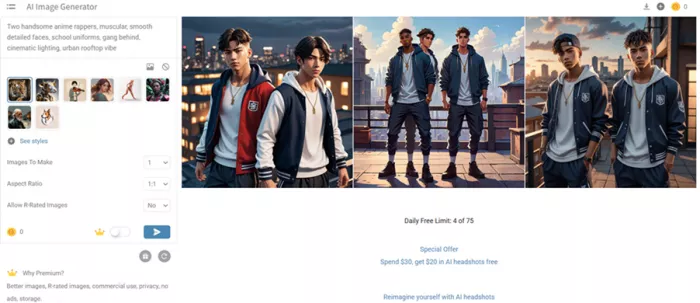
It followed the prompt loosely, delivered a clean image, and looked like something you have already seen a hundred times across AI tools.

There was no strong artistic identity. No standout detail. No sense of “this is uniquely good.”
| Aspect | Result | Observation |
| Prompt accuracy | Medium | Followed basic structure |
| Visual detail | Good | Clean but standard |
| Style depth | Low | Lacked cinematic feel |
| Uniqueness | Low | Felt repetitive |
| Overall quality | Average | Usable but not impressive |
This is where the tool starts revealing itself. It prioritizes speed over distinction.
The second test was character creation using:
“Anime school kid, messy hair, bright expressive eyes, playful smile, casual uniform, soft lighting, colorful background”
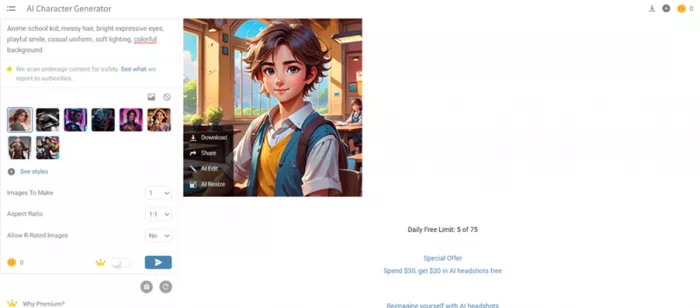
This time, the output felt more refined.
The expressions were better, colors were balanced, and the composition felt more complete. It was not groundbreaking, but it was noticeably more usable than the previous test.
This suggests a pattern. Hotpot performs better with simpler, focused prompts rather than complex cinematic scenes.
Short sessions feel smooth. Longer sessions expose limitations.
The prompt section has a character limit, but it is not clearly visible. This creates confusion when detailed prompts do not behave as expected.
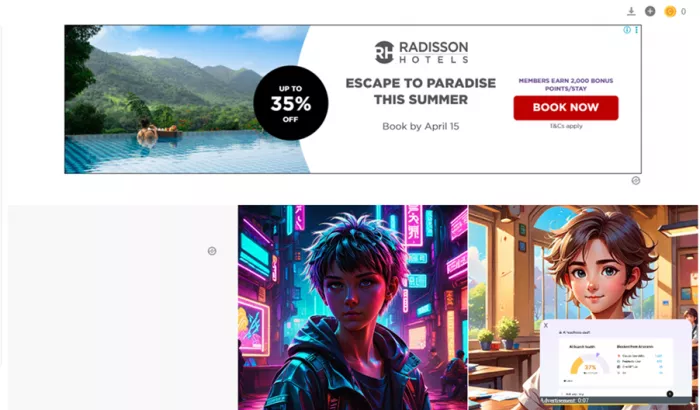
At the same time, the presence of ads becomes noticeable. Not overwhelming, but enough to break focus during extended use.
| Category | Score | What it means |
| Speed | 9/10 | Extremely fast execution |
| Quality | 7/10 | Good but not standout |
| Creativity | 6/10 | Repetition appears quickly |
| Control | 5/10 | Limited precision |
| Workflow value | 7.5/10 | Useful but not complete |
| Overall | 6.9/10 | Efficient but not exceptional |
Hotpot AI works best when your goal is speed.
It helps you create drafts quickly, clean images fast, and move through basic creative tasks without switching tools. That alone makes it useful.
But it is not a replacement for deeper creative workflows.
The outputs are good enough, not exceptional. The system is fast, not flexible. And the more you use it, the more you start noticing patterns in both results and limitations.
It fits perfectly for quick content creation. It struggles when originality, control, or precision becomes important.
Yes, if your work involves quick visuals and repetitive content tasks.
Because the tool is optimized for speed and templates rather than deep customization.
It depends on usage. Light users are fine. Heavy users will notice costs adding up.
It can replace them for basic tasks, but not for advanced creative work.
Fast generation, quick edits, and simple creative workflows.

Marketing teams often need images before a product is ready for a phot...

Creating a logo that will grab customers' attention is one of the main...

Enterprise software has a well-known failure mode. The demo goes great...

Most people who produce video at any real scale hit the same wall even...

A cinematic AI video needs more than realistic skin, dramatic lighting...

Have you noticed how difficult it is not to watch spoilers of a sporti...
Discussion