


Motion graphics has always been a discipline where creativity meets technical precision. Designers combine animation, typography, visual effects, and timing to create visuals that communicate ideas in motion. Traditionally this process required complex tools, long rendering times, and an enormous amount of manual work.
Artificial intelligence is gradually changing that workflow. Instead of animating every element frame by frame, designers can now use AI tools that generate motion, remove objects automatically, or create entire scenes from text prompts. These technologies are not replacing motion designers, but they are dramatically accelerating production pipelines and enabling rapid experimentation.
AI motion graphics tools generally fall into three categories. Some generate motion video from prompts or images, others automate editing and compositing tasks, and a few integrate directly into traditional software pipelines like After Effects.
The following analysis examines the most influential AI tools currently shaping motion graphics workflows and compares how they perform in real production environments.
Runway ML has become one of the most widely discussed AI tools in creative production. The platform provides browser-based video generation, editing, and compositing tools that allow designers to create visual sequences through prompts or reference images.
Runway is particularly useful for early concept work and rapid prototyping. Designers can generate short motion sequences quickly, experiment with styles, and then refine the result inside traditional motion graphics software. This hybrid workflow has become increasingly common in studios that combine generative AI with manual compositing.
One of Runway’s strongest capabilities is automation of time-consuming editing tasks. Object removal, background replacement, and generative fills can be performed automatically rather than manually frame by frame. These features dramatically reduce the amount of repetitive work involved in motion graphics production.
Another advantage is its text-to-video functionality. Designers can describe scenes in natural language and generate animated sequences that can later be refined in editing software. While the results are not always perfect, they are extremely useful for concept exploration.
• powerful generative video models
• strong editing automation features
• browser based workflow
• results often require refinement
• learning curve for prompt-based workflows
Adobe Firefly represents a different approach to AI motion graphics. Instead of functioning as a standalone tool, it integrates generative AI directly into the Adobe Creative Cloud ecosystem.
Firefly includes tools that generate images, video, vectors, and other visual elements using text prompts. These assets can then be imported into applications like After Effects or Premiere Pro where motion designers finalize the animation and compositing.
One important advantage of Firefly is its focus on professional production pipelines. Because the platform integrates with existing creative software, it fits naturally into workflows already used by designers and studios.
Another benefit is that Firefly allows designers to rapidly generate visual variations. Instead of manually designing dozens of style frames, AI can generate multiple options instantly, allowing artists to explore creative directions more efficiently.
The platform also includes features such as automatic background removal, generative fill, and content editing powered by AI models.
• strong integration with Adobe tools
• excellent for generating design assets
• commercially safe training data
• motion still relies heavily on After Effects
• requires Creative Cloud subscription
Pika Labs focuses primarily on generating short animated clips from text prompts or images. The platform gained popularity because it allows creators to produce stylized motion videos with minimal technical knowledge.
For motion designers, Pika Labs is most useful during ideation and style exploration. Designers can test animation styles, experiment with motion aesthetics, or quickly generate background sequences.
One of the strengths of Pika Labs is its ability to transform static images into animated motion sequences. This capability allows designers to convert concept art into short animated shots.
However, the platform is better suited for short sequences rather than complex motion graphics compositions. Most professional designers use it as part of a broader creative workflow rather than a complete production tool.
• fast animation generation
• easy to use interface
• useful for concept visuals
• limited editing control
• short clip generation
Kaiber AI has become popular among musicians, visual artists, and motion designers who want to create visually dynamic videos quickly.
The platform specializes in stylized animation and music-driven visuals. Users can upload reference images or prompts and generate motion graphics sequences that follow a particular artistic style.
Kaiber is frequently used for music videos, lyric videos, and experimental visual storytelling. Its AI models are particularly effective at generating surreal or artistic motion sequences.
For traditional motion graphics work such as brand animations or corporate videos, Kaiber is less commonly used. However, it remains a powerful tool for creative experimentation.
• strong artistic style generation
• good for music videos and visual storytelling
• simple workflow
• limited professional motion controls
• not ideal for precise animation
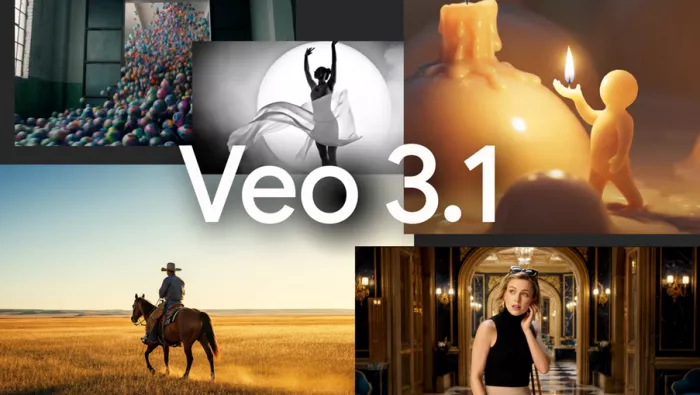
Google Veo represents one of the newest developments in AI video generation. The system is designed to generate cinematic motion sequences with realistic physics and camera movement.
Unlike simpler AI animation tools, Veo focuses on realism and narrative storytelling. It is capable of producing longer sequences with complex camera motion and environmental details.
For motion designers, this type of AI tool may eventually transform how scenes are produced. Instead of constructing every animation element manually, designers could generate base sequences and then integrate them into larger motion graphics projects.
At the moment, access to Veo remains limited compared with other tools. However, it demonstrates how AI video generation is evolving rapidly.
• cinematic video generation
• realistic motion simulation
• high production potential
• limited availability
• still evolving technology
| Tool | Best For | Strength | Weakness |
| Runway ML | Video generation and editing | Powerful generative tools | Requires refinement |
| Adobe Firefly | Professional design workflows | Integration with Adobe ecosystem | Motion still handled externally |
| Pika Labs | Short animations | Fast idea generation | Limited editing |
| Kaiber AI | Artistic animation | Stylized visuals | Limited control |
| Google Veo | Cinematic video | Realistic motion generation | Limited access |
AI tools are not replacing motion designers. Instead they are transforming the production pipeline in several ways.
First, they significantly accelerate concept development. Designers can generate multiple motion styles quickly and evaluate ideas before committing to full animation production.
Second, AI automates repetitive tasks. Processes such as rotoscoping, object removal, and compositing cleanup can now be completed in minutes rather than hours.
Third, AI expands creative exploration. Designers can test unusual visual styles or experimental motion sequences that might have been too time-consuming to produce manually.
The most successful workflows combine AI tools with traditional software like After Effects, Blender, or Cinema 4D. AI generates the initial visual material, while designers refine timing, composition, and storytelling.
Selecting the best tool depends on the type of motion graphics work being produced.
For concept generation and experimentation, tools like Runway ML and Pika Labs are extremely effective.
For professional pipelines, Adobe Firefly offers the strongest integration with existing design software.
For creative or artistic animation, Kaiber AI provides visually distinctive outputs.
And for the emerging cinematic AI generation, systems like Google Veo demonstrate where the industry may be heading.
In practice, many motion designers use multiple AI tools simultaneously. Each platform contributes a different capability within the production pipeline.
Artificial intelligence is rapidly transforming the motion graphics landscape. Tasks that once required hours of manual work can now be performed automatically, allowing designers to focus more on creativity and storytelling.
Tools such as Runway ML, Adobe Firefly, Pika Labs, Kaiber AI, and Google Veo illustrate how AI can support different stages of the motion graphics process. Some specialize in video generation, others in design assets, and some in experimental animation styles.
The most effective approach is not choosing a single tool but building a workflow that combines several AI platforms with traditional motion graphics software.
As these technologies continue to evolve, the role of the motion designer will increasingly focus on directing AI systems, refining outputs, and shaping the final visual narrative rather than animating every frame manually.

Marketing teams often need images before a product is ready for a phot...

Creating a logo that will grab customers' attention is one of the main...

Enterprise software has a well-known failure mode. The demo goes great...

Most people who produce video at any real scale hit the same wall even...

A cinematic AI video needs more than realistic skin, dramatic lighting...

Have you noticed how difficult it is not to watch spoilers of a sporti...
Discussion