


Akool AI looks tempting because it promises a lot in one place: avatars, face swaps, video translation, live camera tools, and AI-generated visuals. For anyone trying to create professional videos without hiring a full production team, that sounds like a serious time-saver.
But the real question is not whether Akool has many features. The real question is whether those features are good enough for actual work. A face swap needs to hold up around the eyes, hairline, and motion. An avatar needs to feel natural, not stiff. A translated video needs to look believable, not just technically processed.
This article breaks down Akool AI before payment, including its first impression, tools, pricing, credit system, user reviews, strengths, limitations, alternatives, and final verdict. The goal is simple: to see whether Akool is genuinely worth using or just another AI video suite that looks better on the homepage than in real projects.

Akool is a generative AI video suite built for marketing, sales, training, and content teams. Founded in 2022 and based in Palo Alto, it combines several distinct capabilities under one account rather than specializing in a single output. The core promise is studio-quality video without a studio, produced by typing, uploading, and selecting rather than filming.
The intended audience is broad: marketers producing localized campaigns, HR and training teams scaling onboarding video, e-commerce sellers needing product ads, and creators who want avatars or face swap effects without a camera. The problem it claims to solve is the cost and slowness of traditional video production. Whether it solves that cleanly depends heavily on the type of work and the plan chosen.
The Palo Alto company presents itself as a premium product, and the website reflects that. The landing experience is clean, fast, and confident, leaning on claims of Fortune 500 clients and a large user base rather than gimmicks. Signup through Google or email takes seconds, and the default landing spot is the free Basic tier with no countdown timer or trial pressure.
The dashboard organizes everything down a left sidebar: media, avatars, audio, elements, text, and assets. The video editor uses a timeline familiar to anyone who has touched conventional editing software, which is a genuine point of difference from rivals that hide everything behind one-click templates.
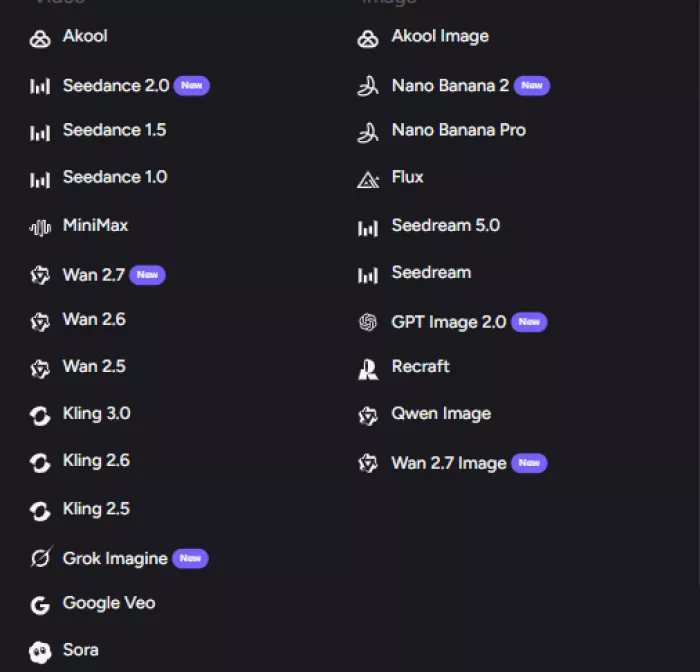
What stands out immediately is the breadth of models on offer, including third-party engines like Seedance, Kling, Veo, and Sora alongside Akool's own.
Hesitation arrives at the pricing page. The plan cards advertise prices per seat, the feature differences read as dense comparison grids, and the credit cost of any given task is not visible until generation begins. For a tool that otherwise feels polished, the commercial layer feels deliberately opaque.
First impression verdict: The platform feels professional and capable from the first click, but the pricing and credit fine print demand careful reading before any payment is made.
The workflow is consistent across most of the tools and follows a recognizable pattern:
1. Sign in and select a tool from the sidebar, such as Avatar Video, Face Swap, or Video Translation.
2. Provide the input the tool needs: a script for avatars, a source image or clip for face swap, or a finished video for translation.
3. Choose a model, an avatar or voice, output resolution, and any style options.
4. Generate, then wait while credits are deducted based on the task type, length, and resolution.
5. Preview, edit on the timeline if needed, and export.
The critical detail sits in step four. Results are not free beyond a small starter allowance.
Every generation consumes credits from a monthly subscription balance, and heavier outputs such as 4K video, longer clips, and face swap burn through that balance faster than most users expect. Free-plan exports also carry a full-screen watermark and are capped at 720p, which makes them suitable for testing rather than client work.

Akool spreads across a wide set of features. The headline offerings:
• Face Swap for images and video, with multi-face detection, re-age, face enhance, and a live face swap mode.
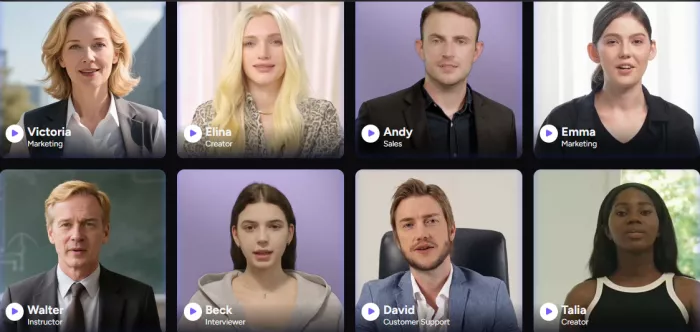
• Talking and streaming avatars, including instant avatars and higher-tier studio avatars for real-time interaction.
• Live Camera, a real-time face transformation feature for calls, streams, and recordings.
• Video Translation across 155 or more languages with lip-sync, subtitles, and a proofread editor on paid tiers.
• Image generation and editing through multiple models, plus background change without a green screen.
• A timeline-based video editor and an API for developers building Akool generation into their own products.
In practice, the two capabilities that carry the most real-world weight are video translation and the avatar suite. Translation is where Akool earns its keep for global marketing teams, and the avatar realism is consistently the feature users single out as ahead of several competitors. Face swap draws attention but raises the most privacy questions, which the next sections address.
During hands-on use, the avatar output landed closer to the marketing claims than expected. Expressions and gestures track the script reasonably well, and the result avoids the dead-eyed look that plagues cheaper avatar tools. Video translation handled common languages cleanly, with lip-sync that holds up for standard dialogue, though technical or jargon-heavy content still needed a manual proofread pass.
Live Camera, tested in a long video call, showed minimal latency at standard settings and accurate mapping for large movements like nodding and laughing. Subtle microexpressions were less precise, which is the expected tradeoff for real-time processing.
Where the experience turned frustrating was speed and cost predictability. Complex 4K outputs on lower tiers took a long time to render, and the credit meter dropped faster than any pre-generation estimate suggested, because no estimate is shown before committing. The free version gives a genuine feel for quality but produces nothing usable for professional work because of the watermark and resolution cap. The honest summary: the technology is strong, the commercial experience is where disappointment tends to set in.
Akool runs on a tiered subscription layered over a credit system. The structure below reflects the most consistently reported monthly figures from recent third-party reviews. Akool advertises roughly a 30 percent discount on annual billing.
| Plan | Price | What It Includes | Worth It? |
| Basic (Free) | $0 | Akool Basic model only, 720p, 5 GB storage, watermark, 1 concurrent generation, 5 TTS uses total | For testing |
| Pro | ~$30/mo | Up to 4K, 30-min videos, watermark removed, all models, 4 face swap models, 4 concurrent generations, 50 GB | Solo creators |
| Pro Max | ~$119/mo | Up to 8K, 45-min videos, API access, workspace collaboration, studio voice, 8 concurrent, 500 GB | Teams |
| Business | ~$500/mo | Up to 16K, 60-min videos, studio avatar, 1 TB storage, 10 concurrent, dynamic overdraft billing | Agencies |
| Enterprise | Custom | Everything in Business plus non-expiring credits, VIP processing, security, dedicated success manager | Large orgs |
Pricing can change, so the final amount should be verified on the official pricing page before any
Value depends almost entirely on usage volume and team size. For an occasional user, the free tier answers the quality question, but the watermark forces an upgrade the moment output goes public. The Pro tier makes sense for a solo creator producing a steady stream of localized or avatar-based video, where the monthly cost is comparable to a single freelance editing invoice.
For heavy users, the math gets complicated. The credit system rewards predictable, lighter workloads and punishes bursts of 4K or long-form generation, where credits vanish mid-month. The per-seat charging model is the sharpest hidden cost, turning a reasonable team plan into a five-figure annual commitment quickly. Against alternatives, Akool justifies its price when the work genuinely needs its breadth, particularly multilingual translation plus avatars in one place. For a single narrow task such as presentation avatars or UGC ads, a focused competitor usually delivers better value.
| Review Source | Rating | Common Praise | Common Complaint |
| G2 | 4.7 / 5 | Avatar realism, ease of use, time saved on filming | Sync issues in complex fast-dialogue scenes |
| Capterra | Mixed | Simple timeline editor, no-face video creation | Unpredictable credit costs month to month |
| Trustpilot | Mixed | Strong output quality when it works | Billing, cancellation, and a fake-review flag |
| Mixed | Fast multilingual reach for creators | Translations need manual fine-tuning |
The consistent praise centers on output quality and speed. Users repeatedly describe the avatars as more realistic and expressive than several competitors, value the beginner-friendly interface, and credit the platform with cutting filming and localization time dramatically. The G2 score of 4.7 out of 5 across roughly 52 reviews reflects genuine satisfaction among the teams it fits.
The complaints cluster tightly around money and billing rather than quality. The credit system is the single most flagged pain point, with costs described as hard to predict. Trustpilot has flagged the listing over removed fake reviews, and multiple users report cancellation buttons that fail, leading to charges that the no-refund policy then makes irreversible. The review picture is genuinely mixed: the product impresses, the commercial experience frustrates.
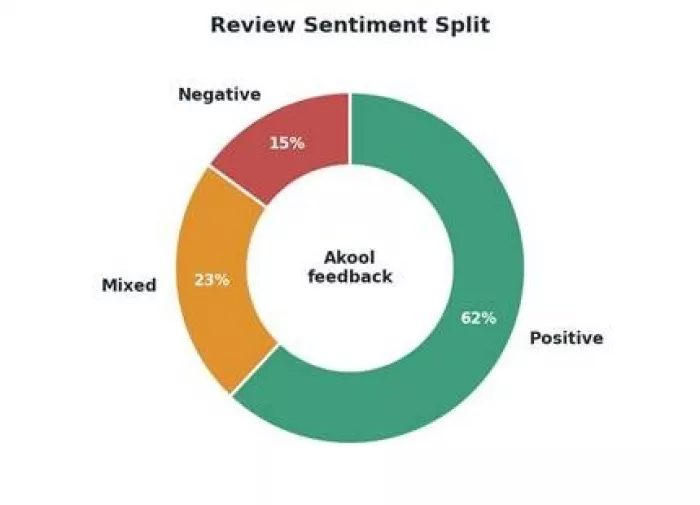
Sentiment skews positive on output, negative on billing and credits.
| Good Fit | Why |
| Global marketing teams | Video translation across 150-plus languages with lip-sync replaces costly re-recording and localization agencies. |
| Corporate training and HR | Avatar-led onboarding and training video scales without filming, and updates require only a script change. |
| Agencies needing breadth | One workspace covers avatars, face swap, translation, and image work, reducing the number of subscriptions to manage. |
| Creators wanting realism | Avatar expressiveness and face swap quality are consistently rated ahead of several lower-cost rivals. |
| Poor Fit | Why |
| Budget-sensitive solo users | The credit system and lack of cost estimates make monthly spend hard to predict, and the free tier is watermarked. |
| Large teams on tight budgets | Full per-seat pricing scales aggressively, making big collaborative teams expensive compared with flat-rate tools. |
| E-commerce UGC ad creators | No product-URL ad-script generation, no static ad templates, and no product photography, where purpose-built tools fit better. |
| Users needing flexible billing | A no-refund policy and reported cancellation issues make it a poor fit for anyone wanting easy exit terms. |
Akool handles sensitive inputs: face images, voice samples, and uploaded video. That raises legitimate questions worth weighing before uploading anything personal or client-owned.
None of this makes the platform unsafe to use. It does mean that anyone handling regulated, confidential, or client-owned media should read the terms and confirm retention policies before relying on it.
| Factor | Score | Notes |
| Ease of Use | 8.5 / 10 | Clean dashboard and familiar timeline editor, approachable for non-editors |
| Features | 9.0 / 10 | Exceptional breadth across avatars, translation, face swap, and image tools |
| Output Quality | 8.0 / 10 | Strong avatar realism, good translation, occasional sync issues in complex scenes |
| Pricing Value | 6.0 / 10 | Capable but opaque, with credits that drain unpredictably and steep per-seat costs |
| Trust and Privacy | 5.5 / 10 | Billing complaints, a no-refund policy, and limited transparency on sensitive data |
| Customer Support | 6.5 / 10 | Email support across tiers, dedicated manager only at enterprise level |
| Overall Score | 7.3 / 10 | A technically excellent suite held back by a confusing and aggressive commercial model |
The overall score reflects a real split. On capability alone the platform would score higher. The deductions come entirely from the pricing structure, billing practices, and trust signals, which a buyer feels acutely the moment a card is entered.
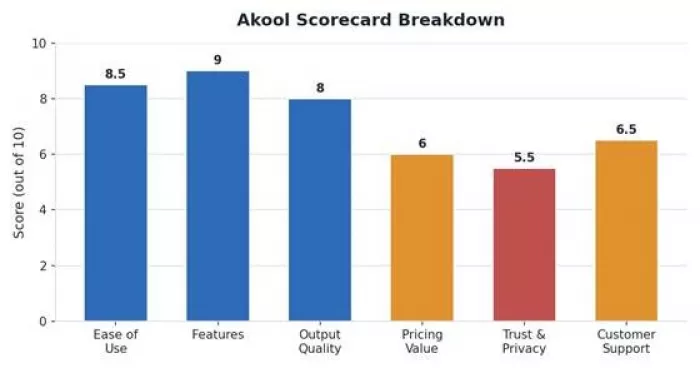
Capability scores high; pricing value and trust drag the average down.
| What Works | What to Watch Out For |
| Exceptional feature breadth in one place | Credit costs are unpredictable and unestimated |
| Realistic, expressive avatars | Full per-seat pricing scales expensively |
| Strong multilingual video translation | No-refund policy and cancellation complaints |
| Owns its model stack, ships niche features fast | Slower rendering on lower tiers |
| Tool | Best For | Starting Price | Main Strength | Main Limitation | Verdict |
| HeyGen | Presentation avatars | ~$29/mo | Polished avatar video and clear pricing | Narrower feature range | Best for avatars |
| Synthesia | Corporate training | ~$29/mo | Stable enterprise training workflows | Less creative flexibility | Best for L&D |
| Creatify | UGC ad creation | ~$39/mo | Ad scripts from a product URL | Limited beyond ads | Best for ads |
| D-ID | Talking photos | ~$18/mo | Affordable avatar entry point | Smaller toolset | Best on budget |
Each alternative wins on focus. Akool's advantage is consolidation. The choice comes down to whether the work needs one deep tool or one platform covering many jobs.
Akool is a capable AI video suite, but it is not a simple “yes” for every user. The avatars, face swap tools, and video translation features can be useful for teams that regularly create multilingual videos, training content, or campaign assets. From a feature and output-quality perspective, it deserves a strong position among AI video platforms.
The bigger concern is the cost structure. The credit system, per-seat pricing, no-refund policy, and cancellation-related complaints make Akool a tool that should be tested carefully before committing to a paid plan. It may work well for agencies, marketing teams, and businesses that will use several features often enough to justify the cost.
For solo creators, small teams, or users with occasional video needs, Akool may feel expensive once credits start being used across avatars, translations, and face swaps. In that case, a more focused tool may be a safer choice.
Overall, Akool is worth considering if the workload is frequent, professional, and multilingual. It is less suitable for users who only need quick face swaps, occasional avatar videos, or low-cost AI editing. The best approach is to start with a limited test, calculate expected credit usage, and only upgrade if the numbers make sense.

Marketing teams often need images before a product is ready for a phot...
Creating a logo that will grab customers' attention is one of the main...

Enterprise software has a well-known failure mode. The demo goes great...

Most people who produce video at any real scale hit the same wall even...

A cinematic AI video needs more than realistic skin, dramatic lighting...

Have you noticed how difficult it is not to watch spoilers of a sporti...
Discussion