

Short-form video isn't a trend anymore — it's the baseline. YouTube Shorts pulls over 70 billion daily views, TikTok has crossed 1.7 billion active users, and Instagram Reels now accounts for 30% of all time spent on the platform. If you're producing long-form content and NOT repurposing it into short clips, you're essentially leaving an entire distribution channel dark.
2short.ai entered this space as one of the more YouTube-specific repurposing tools, built around a clean promise: paste a YouTube link, let the AI find the best moments, download your vertical clips. That promise works. The tool is fast, affordable, and genuinely useful for creators who live in the YouTube ecosystem.
But 2short.ai also has a ceiling. The AI clip selection, while solid for spoken-word content, occasionally picks visually coherent but narratively weak moments. The free plan offers just 30 minutes of AI analysis per month — enough to dip a toe in, not enough to build a workflow around. And if your content isn't primarily talking-head or interview-style, the tool's face-tracking-first logic doesn't always serve you well.
That's the real question this article answers: not 'is 2short.ai bad?' — it isn't — but 'are there tools that fix its specific gaps, and at what cost?'
Below are six of the most serious alternatives. Each one has been benchmarked against 2short.ai across pricing, features, AI accuracy, editing depth, and real user sentiment. The goal is to help you make a clean, data-based decision rather than read five marketing pages and still feel confused.
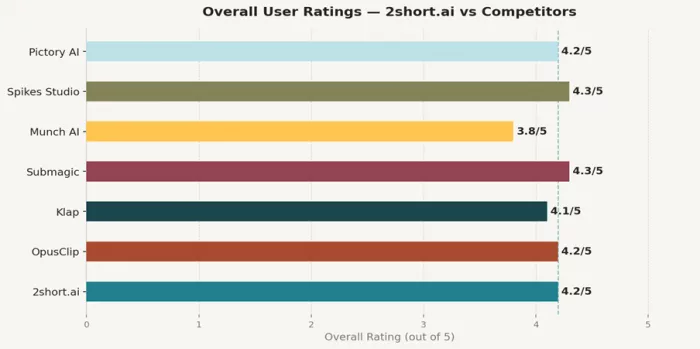
| Tool | Best For | Starting Price | Free Plan | Overall Rating |
| 2short.ai | YouTube-focused repurposing | $9.90/mo | Yes (30 min/mo) | 4.2/5 |
| OpusClip | High-volume creators & teams | $15/mo | Yes (60 min/mo) | 4.2/5 |
| Klap | Speed, simplicity, YouTube clips | $14/mo | No | 4.1/5 |
| Submagic | Caption-heavy short-form editing | $12/mo | Yes (3 vids/mo) | 4.3/5 |
| Munch AI | Marketing teams & trend data | $49/mo | No | 3.8/5 |
| Spikes Studio | Streamers, Twitch, live content | $13.99/mo | Yes (30 min/mo) | 4.3/5 |
| Tool | Best For | Starting Price | Free Plan | Overall Rating |
| Pictory AI | Script/blog-to-video creators | $19/mo | Trial (3 vids) | 4.2/5 |
A few patterns worth noting before diving in: Munch AI is the most expensive entry point by a significant margin ($49 vs $9.90 for 2short.ai), but it's also the only tool in this group that natively layers trend-matching and SEO scoring into its clip selection logic. Submagic runs cheapest among the paid tools but approaches the problem from the opposite angle — it's a caption editor first, clip-finder second. Klap and OpusClip are the most direct feature-for-feature competitors to 2short.ai, which is why they deserve the most detailed treatment below.
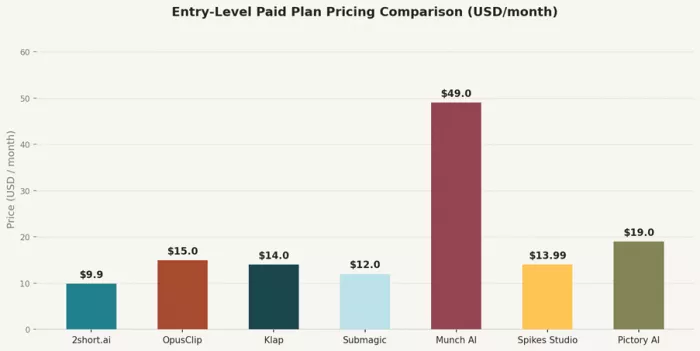
Fig. 1 — Entry-Level Paid Plan Pricing Comparison (USD per month)
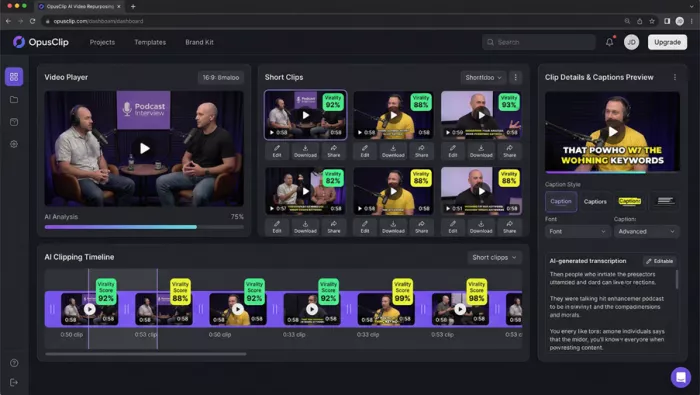
OpusClip dashboard — AI Clipping Timeline with Virality Scores
OpusClip is, by most measurable standards, the market leader in this category. It serves over 10 million creators and 1 million businesses, and it earned that position by building the most comprehensive feature set in the automated clipping space. If 2short.ai is a scalpel, OpusClip is a full surgical suite.
The difference starts with how each tool selects clips. 2short.ai relies heavily on speech pacing, facial motion, and keyword detection. OpusClip adds a proprietary 'Virality Score' — an AI-generated percentage that predicts how likely a given clip is to perform well based on large-scale engagement pattern analysis across social platforms. In practice, this means OpusClip's clip selection often prioritizes narrative hooks, emotional peaks, and strong openings, not just clear speech. For creators who struggle to identify their own 'best moments,' that's a meaningful advantage.
On the Pro plan ($29/month, or ~$14.50/month billed annually), OpusClip unlocks B-Roll generation, social media scheduling, XML export to Adobe Premiere Pro and DaVinci Resolve, filler word and pause removal, AI voice-over, and up to two team seats. 2short.ai's $49.90 Premium plan doesn't come close to matching that feature depth.
The AI reframe engine is another area where OpusClip pulls ahead. Its moving object tracking and genre-specific reframing model adjusts cropping dynamically based on what type of content you're working with — podcast versus gaming versus talking head. 2short.ai's face tracking is solid for standard talking-head content but doesn't have the same contextual intelligence.
Here's where OpusClip's reputation gets complicated. The platform runs on a credit system where 1 credit equals 1 minute of source video processed. On the Starter plan (150 credits/month at $15), a single 30-minute podcast episode eats 30 credits, leaving you with 120 credits for the rest of the month — enough for roughly four more episodes. On the Pro plan (300 credits), you're looking at about ten 30-minute episodes per month. That's fine for regular creators, but production studios or agencies will quickly outgrow even the Pro tier.
Trustpilot puts OpusClip at 4.0/5 from 302 reviews, with 22% one-star ratings — an unusually high negative tail for a well-regarded product. The complaints cluster around two issues: credits expiring after 60 days without rollover, and aggressive renewal charges for unused credits. One verified G2 reviewer put it plainly: 'Getting charged for a renewal when I still have nearly 2,000 credits left feels more like a cash grab than customer care.' That pattern appears frequently enough to warrant attention before subscribing.
| Plan | Price | Credits/Month | Key Features |
| Free | $0 | 60 min | Watermarked exports, 3-day storage, 9:16 only |
| Starter | $15/mo | 150 min | No watermark, Virality Score, auto-captions, basic posting |
| Pro | $29/mo | 300 min | AI B-Roll, scheduler, XML export, team workspace, multi-aspect |
| Business | Custom | Custom | API, dedicated support, unlimited storage |
Overall: ★★★★ 4.2/5
Feature Depth: ★★★★½ 4.5/5
Value for Money: ★★★½☆ 3.5/5
Ease of Use: ★★★★☆ 4/5
For solo creators publishing 2–3 times per week on multiple platforms, yes — especially on the annual Pro plan. For high-volume teams or agencies, the credit system will feel limiting unless you negotiate the Business plan. For casual creators publishing once a week, 2short.ai's $9.90 Pro plan almost certainly delivers better ROI.
●+ AI Virality Score gives clip selection a data edge over manual judgment
●+ B-Roll, social scheduler, XML export all in one ecosystem
●+ Moving object tracking reframes content intelligently, not just face-first
●- Credits expire — unused monthly credits are lost after 60 days
●- Steep jump from Starter to Pro — basic editing tools locked behind $29 tier
●- Billing complaints are unusually common for a mainstream paid tool
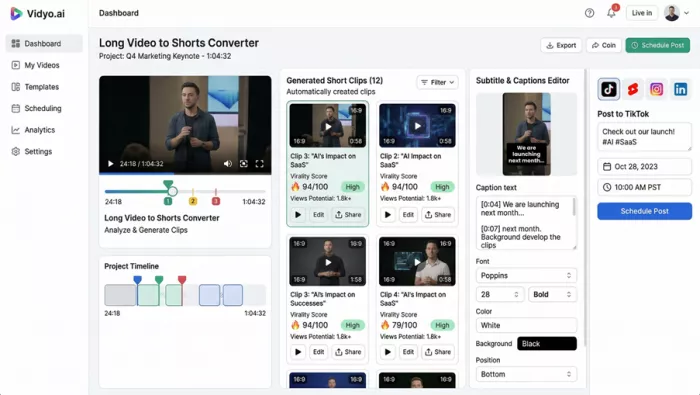
Vidyo.ai / Quso.ai dashboard — virality scoring, scheduling, and captions in one view
Vidyo.ai rebranded as Quso.ai in 2025 and the name change reflects a genuine product evolution. What started as a video clipping tool has become a social content hub — combining AI clip extraction, caption editing, content scheduling, and basic social analytics under one roof. For creators who currently juggle three or four tools to manage their content pipeline, Quso.ai is worth examining seriously.
The clip detection logic scores each generated clip with a virality rating, similar to OpusClip, and the default options work well for clean, well-lit talking-head content. Where Quso.ai differentiates itself is in the end-to-end workflow — you can go from a raw YouTube video to a scheduled TikTok post without leaving the platform.
The platform offers CutMagic for automatic scene detection, a full-video transcript alongside each project, a stock media and B-roll library, and social media scheduling with direct publishing to TikTok, Instagram, YouTube, and LinkedIn. The Essential plan at $35/month includes a content planner — a feature that neither 2short.ai nor Klap offers at any tier.
Caption customization is another strong point. The subtitle editor supports multiple font families, word-by-word highlight animations, and multi-speaker color-coding. Compared to 2short.ai's one-click animated subtitles (which work but offer minimal stylistic control), Quso.ai gives creators far more precision.
| Plan | Price | Credits | Key Extras |
| Free | $0/mo | 75 credits | Watermark, 720p, TikTok publishing |
| Lite | $19/mo | Expanded | AI tools, 1080p, video resizing |
| Essential | $35/mo | More | Premium AI, scheduler, content planner |
| Growth | $49/mo | Most | Unlimited scheduling, analytics, custom branding |
Overall: ★★★★ 4.3/5
Ease of Use: ★★★★½ 4.5/5
Features: ★★★★½ 4.5/5
Customer Support: ★★★½☆ 3.5/5
The main friction points are pricing — real value only kicks in at $35+ per month — and customer support that reviewers describe as slow to respond. One user noted: 'The free plan is so limited that I couldn't actually test most features without pulling out my card. The experience felt more like a forced upgrade than a free trial.'
Content creators who currently use 2short.ai for clipping AND a separate tool for scheduling are the obvious Quso.ai audience. Consolidating into one platform saves money and reduces context-switching. The $35 Essential plan is competitive with the combined cost of 2short.ai Pro + a basic scheduling tool.
●+ Social scheduler + content planner built into mid-tier plan
●+ Virality scoring and full-video transcript in every project
●+ Strong caption editor with per-word animations
●- Meaningful features start at $35/mo — not at free or Lite
●- Support response times draw repeated criticism in user reviews
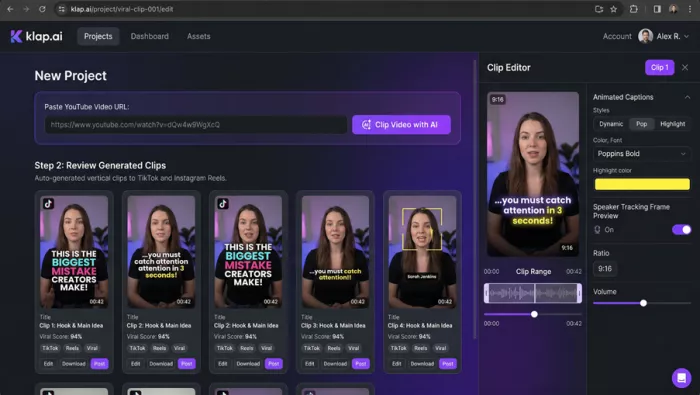
Klap dashboard — YouTube URL input, auto-generated vertical clips, animated captions editor
Klap's entire product philosophy can be summarized in one sentence: paste a YouTube URL, get scroll-ready vertical clips, move on with your day. There is no social scheduler. There is no analytics dashboard. There is no content planner. What Klap does, it does with remarkable efficiency.
In automated clip generation tests, Klap consistently produced 10–15 clips from a 45-minute YouTube video in under eight minutes — a processing speed that competes favorably even with OpusClip on its Pro tier. The AI highlight detection is tuned specifically for YouTube content, making it a more natural competitor to 2short.ai than any other tool on this list.
Two areas stand out. First, Klap's animated captions are more visually expressive out of the box — offering 'Dynamic,' 'Pop,' and 'Highlight' styles that apply word-level color and motion effects without any manual configuration. 2short.ai's one-click subtitles are functional but visually plain by comparison.
Second, Klap's AI dubbing feature (available on the Pro plan at $39/month, billed annually) supports 29 languages — allowing creators to generate translated versions of their clips for international distribution. 2short.ai has multi-language transcription but does not offer AI dubbing at any price point.
| Plan | Price (Annual) | Videos/Month | Max Length | Clips/Month | Quality |
| Starter | $14/mo | 10 | 45 min | 100 | HD |
| Pro | $39/mo | 30 | 2 hrs | 300 | 4K + AI Dubbing (29 langs) |
| Pro+ | $94/mo | 100 | 3 hrs | 1,000 | 4K + AI Dubbing |
Overall: ★★★★ 4.1/5
Speed & Simplicity: ★★★★½ 4.6/5
Caption Quality: ★★★★☆ 4/5
Customization Depth: ★★★☆ 3.2/5
The tradeoff for all that speed is limited customization depth. Klap doesn't offer brand kit management with multiple templates, doesn't have a social publishing integration beyond basic sharing, and the free trial restricts video length to 10 minutes while blocking downloads. Testing Klap meaningfully requires a paid subscription.
Creators who publish primarily YouTube-sourced content and want faster processing and better out-of-box captions than 2short.ai provides. International creators who need translated clips should consider Klap Pro specifically — that AI dubbing capability alone can justify the price jump.
●+ Fastest processing speed in this category for YouTube-source videos
●+ AI dubbing in 29 languages — unique at this price point
●+ Clean animated captions without configuration
●- No social scheduler or publishing integration
●- Free trial blocks downloads — can't test the output quality for free
●- No virality scoring or data-backed clip ranking
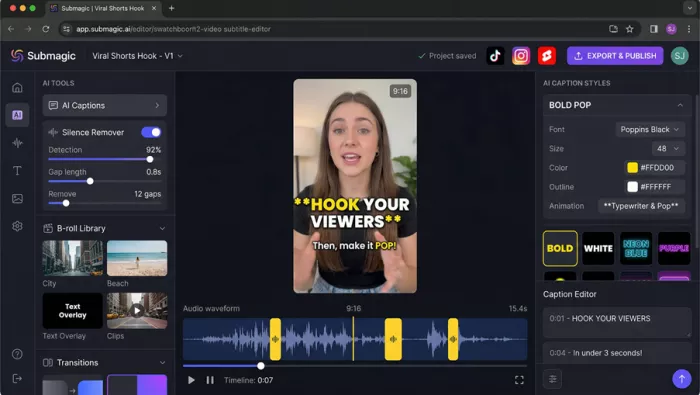
Submagic editor — silence removal, animated caption styles, B-roll library, waveform timeline
Submagic approaches the repurposing problem from the opposite end to 2short.ai. Where 2short.ai starts by finding clips and then adds captions, Submagic starts by perfecting captions and then builds the short video around them. That distinction matters more than it sounds.
A growing portion of short-form video performance is driven not by clip selection quality but by caption design. The 'bold animated words' style popularized by creators like Alex Hormozi — where individual words pop, color-shift, and scale as they're spoken — has become a scroll-stopping signal on its own. Submagic was one of the first tools to productize this format, and it remains the most refined implementation of it.
Submagic's multi-speaker detection assigns unique caption colors per speaker, making it genuinely useful for podcast clips and interview content where 2short.ai would render captions in a single uniform style. The silence remover operates with precision controls — you set gap length and detection sensitivity rather than toggling a single on/off switch — and the platform claims to remove up to 12 filler gaps in an average 15-second clip automatically.
The B-roll integration via Storyblocks (on Growth and Business plans) is another genuine differentiator. 2short.ai has no B-roll library. Submagic's AI scans your dialogue and auto-inserts contextually relevant stock footage — not random clips, but visuals that align with what's being said. In practice this feature works well for educational and explainer content, less so for more abstract or opinion-driven material.
| Plan | Price | Videos/Month | Max Length | Key Features |
| Free | $0/mo | 3 | 1-2 min | Basic captions, watermark, 1080p |
| Starter | $12/mo | 15 | 2 min | No watermark, captions, basic B-roll |
| Growth | $50/mo | Unlimited | 5 min | 4K, premium B-roll, hooks, silence removal |
| Business | $150/mo | Unlimited | 30 min | 60fps, priority support, unlimited templates |
Overall: ★★★★ 4.3/5
Caption Experience: ★★★★½ 4.6/5
Ease of Use: ★★★★½ 4.5/5
Value at Higher Tiers: ★★★½☆ 3.8/5
The pricing structure deserves scrutiny. The Starter plan at $12/month is excellent value, but it caps video length at 2 minutes per clip — enough for TikTok, borderline for YouTube Shorts, and inadequate for anyone working with podcast or interview content. To unlock 5-minute clips and 4K export, you're jumping to $50/month. That's a steep mid-tier gap that many creators find frustrating.
Caption-driven content creators — coaches, motivational speakers, educators, marketers — who want their words to carry visual weight. If your content success depends on people reading and engaging with on-screen text as much as listening, Submagic's caption engine is meaningfully better than what 2short.ai or OpusClip offer.
●+ Best animated caption engine in this category
●+ Multi-speaker color-coded captions — unique at this price range
●+ Precision silence removal controls
●- Not a clip-finder — you bring the short clips, it polishes them
●- Big jump from Starter ($12) to Growth ($50)
●- No AI clip selection or virality scoring
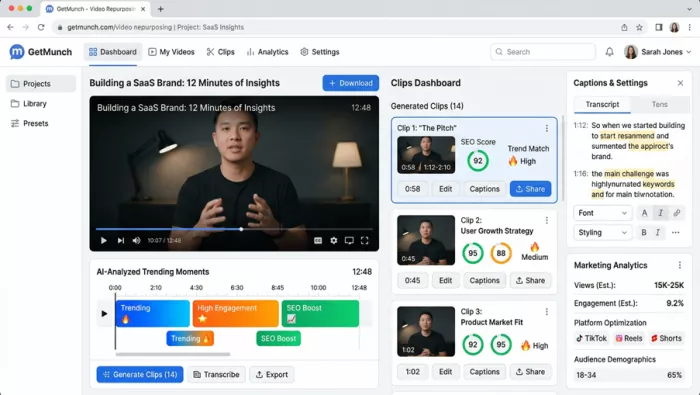
Munch AI dashboard — AI-analyzed trending moments, SEO score, trend-matching labels
Munch AI serves a different buyer profile to the rest of this list. Where 2short.ai and Klap are built for individual creators, Munch AI explicitly targets marketing teams, B2B content teams, and agencies — and its pricing reflects that positioning clearly. The $49/month Pro plan is more than five times 2short.ai's entry-level paid tier.
The justification for that premium is the platform's trend-matching intelligence. Munch doesn't just detect engaging moments — it cross-references those moments against current trend data from major social platforms, assigning each clip an SEO score and a trend-match rating. Over 500,000 users have adopted the platform, including enterprise clients like HubSpot and Salesforce, which validates its positioning for serious marketing operations.
Munch generates captions, hashtags, and social copy for each clip automatically — not as an afterthought but as part of the core workflow. A typical 2short.ai clip comes out of the platform as a video file. A Munch clip comes out with a caption, hashtags, and SEO-optimized title ready to paste into a publishing interface. For marketing teams publishing across multiple channels at scale, that difference in output completeness is genuinely significant.
The platform also produces marketing analytics per clip — estimated view ranges, engagement rates, and audience demographic breakdowns based on platform data. This is a level of intelligence that no other tool on this list offers at any tier, and it's the clearest reason to pay the Munch premium.
| Plan | Monthly Price | Annual Price | Upload Mins/Month | Best For |
| Pro | $49/mo | $40.80/mo | 200 min | Individuals & small business |
| Elite | $116/mo | $96.60/mo | 500 min | Power creators & small agencies |
| Ultimate | $220/mo | ~$183/mo | 1000 min | Media agencies & large brands |
Overall: ★★★½☆ 3.8/5
Feature Intelligence: ★★★★ 4.1/5
Pricing Transparency: ★★★½☆ 3.5/5
Value for Money: ★★★½☆ 3.7/5
The most legitimate complaint about Munch is pricing transparency. The platform historically required sign-up before revealing its pricing structure, which created trust friction for new users. That opacity, combined with a starting price that is 5x the category average, means Munch isn't the right fit for the majority of independent creators.
A second limitation: Munch has no free plan. The free mode only allows testing with sample projects — your own content requires a paid subscription. For creators wanting to validate fit before paying, this is a meaningful barrier.
Marketing teams at companies already using HubSpot, Salesforce, or similar platforms who need to produce social video at scale and want clip output to include SEO-ready copy alongside the video file. Solo creators and individual YouTubers will find the price-to-value ratio uncomfortable.
●+ Trend-matching + SEO score per clip — unique in this category
●+ Auto-generated captions, hashtags, and social copy
●+ Enterprise client validation (HubSpot, Salesforce)
●- No free plan — paid subscription required to use your own content
●- $49/mo starting price is steep for independent creators
●- Limited manual editing depth — export to Premiere for complex work
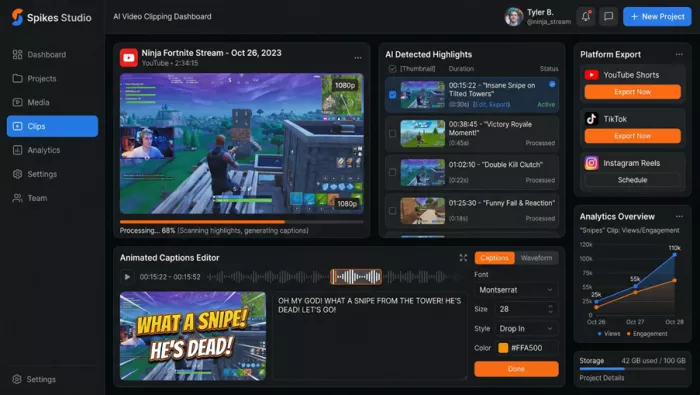
Spikes Studio — AI highlight detection, animated captions editor, platform export panel
Spikes Studio started its life as an automated clip tool for Twitch streamers — a niche that neither 2short.ai nor OpusClip explicitly serves. Gaming streams, live streams, and reaction content have fundamentally different AI detection requirements: you're looking for high-energy moments, kills, reactions, and emotional peaks rather than clean speech segments. Spikes Studio built its AI around those signals first.
By 2025, the platform had expanded well beyond streaming, reaching 1 million users and adding support for any long-form video source. The transition has been successful, and Spikes Studio now competes credibly with 2short.ai for general creator workflows while maintaining its Twitch differentiation.
The most underrated aspect of Spikes Studio's 2025 feature set is its real-time performance analytics. Unlike 2short.ai, which generates clips and stops there, Spikes Studio tracks view counts, engagement rates, and growth trends for every published clip in a unified dashboard. Over time, the platform learns what performs for your specific audience and surfaces content suggestions based on those patterns.
For creators who publish consistently and want to understand which types of clips resonate — not just from industry benchmarks but from their own channel data — this is a genuinely useful feedback loop that 2short.ai simply doesn't offer.
| Plan | Price | Minutes/Month | Export Quality | Key Extras |
| Free | $0/mo | 30 min | 720p + watermark | Core AI clipper, auto-captions |
| Pro+ | $13.99/mo | 300 min | 1080p | Animated captions, AI B-roll |
| Enterprise | $54.99/mo | 1200 min | 1080p | Custom templates, fast processing |
Overall: ★★★★ 4.3/5
For Live/Stream Content: ★★★★½ 4.5/5
Analytics Depth: ★★★★ 4.2/5
Value at Pro+ Tier: ★★★★ 4.1/5
At $13.99/month for the Pro+ plan with 300 minutes, Spikes Studio offers the best minutes-per-dollar ratio among the paid tools in this comparison. The nearest competitor is 2short.ai's Pro plan ($19.90/month for 15 hours), but Spikes Studio's 300 minutes is measured at a flat credit rate rather than 2short.ai's hour-based system, making direct comparison slightly tricky.
Streamers and live content creators first and foremost — the AI detection for high-energy visual content is simply more accurate than anything else in this list. General creators who value analytics and social scheduling as part of their repurposing workflow are a close second. Those who exclusively produce talking-head educational content may find 2short.ai's face-tracking logic a better fit.
●+ Best AI detection for gaming/live stream content
●+ Real-time analytics per clip with audience-specific learning
●+ Built-in social scheduling + cross-platform posting
●- Advanced editing less granular than OpusClip or Submagic
●- Cloud-only platform requires stable internet
●- AI clip selection occasionally needs manual corrections
Pictory AI — A Different Animal Entirely
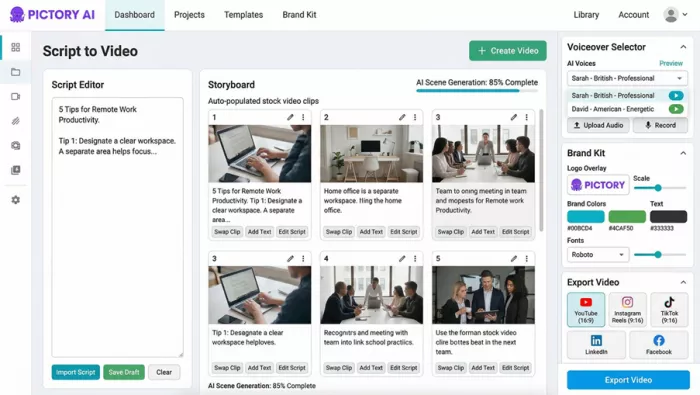
Pictory AI — Script-to-Video workflow with storyboard, voiceover selector, and brand kit
Pictory AI doesn't compete with 2short.ai in a direct sense. It solves a different problem for a different creator profile — which is exactly why it belongs in this comparison. If you find yourself repeatedly wishing that 2short.ai could work in reverse (create a video from a script rather than just extract clips from one), Pictory is your answer.
The platform's core functionality runs in four directions: Script to Video, Article to Video, Text-Based Editing, and Video Highlights. Only the last function overlaps with 2short.ai's territory. The other three are entirely different capabilities. Pictory is trusted by over 20,000 companies and integrates with major stock libraries from Storyblocks and Getty Images, making it particularly well-suited for marketers who produce brand video content at scale.
A growing segment of content creators — particularly newsletter writers, bloggers, and LinkedIn professionals — want to expand into video without building a filming setup. Pictory's article-to-video feature converts a blog post URL into a full video draft with stock footage, AI voiceover, and music in under two minutes. For that workflow, 2short.ai is simply not a relevant product. Pictory is the only tool in this group that serves it.
| Plan | Price (Annual) | Video Minutes | Max Video Length | Key Extras |
| Starter | $19/mo | 200 min | 30 min | AI tools, Storyblocks, 1 brand kit |
| Professional | $29/mo | 600 min | 30 min | Getty images, video summarization, AI voices |
| Team | $99/mo | 1800 min | 30 min | Team workspace, 10 brand kits, API access |
| Enterprise | Custom | Custom | Custom | Custom templates, dedicated support |
Overall: ★★★★ 4.2/5
Script / Blog to Video: ★★★★½ 4.5/5
Clip Extraction Accuracy: ★★★★☆ 4/5
Value for Money: ★★★★ 4.2/5
The one area where Pictory underperforms versus 2short.ai is in pure clip extraction accuracy for YouTube-sourced spoken-word content. 2short.ai's AI is more precisely tuned for that task. But Pictory isn't trying to win that race — its audience creates video differently.
Bloggers, newsletter writers, LinkedIn creators, and brand marketers who need to produce video content from written source material. If you currently write more than you film, Pictory gives you a video production capability that no other tool in this comparison offers.
●+ Only tool offering script and blog-to-video at this price range
●+ 18 million stock video/image library via Getty + Storyblocks
●+ AI voiceover with hyper-realistic ElevenLabs voices on upper tiers
●- Clip extraction less accurate than 2short.ai or OpusClip
●- Not designed for YouTube repurposing workflows
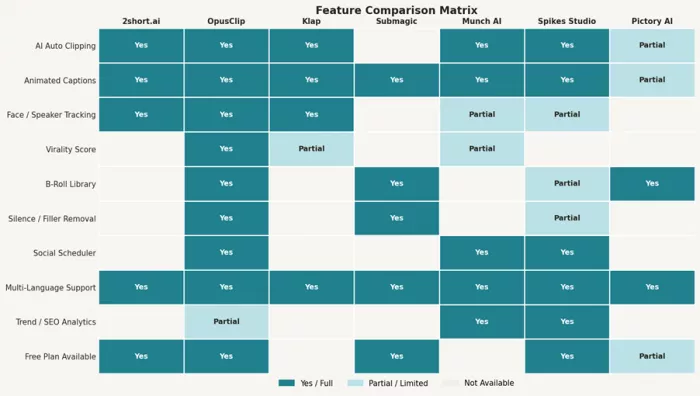
Fig. 3 — Feature Comparison Matrix Across All 7 Tools
| Metric | 2short.ai | OpusClip | Klap | Submagic | Munch AI | Spikes Studio | Pictory AI |
| Starting Price | $9.90 | $15 | $14 | $12 | $49 | $13.99 | $19 |
| Free Plan | 30 min/mo | 60 min/mo | No | 3 vids/mo | No | 30 min/mo | Trial (3) |
| AI Clip Detection | Yes | Yes + Score | Yes | No | Yes + Trend | Yes | Partial |
| Virality Score | No | Yes | Partial | No | SEO Score | No | No |
| Animated Captions | Yes | Yes | Yes | Yes (Best) | Yes | Yes | Basic |
| Face Tracking | Yes | Advanced | Yes | No | Partial | Partial | No |
| B-Roll Library | No | Yes (Pro+) | No | Yes (Growth+) | No | Partial | Yes (18M) |
| Social Scheduler | No | Yes (Pro) | No | No | Yes | Yes | No |
| AI Dubbing | No | No | Yes (29 langs) | No | No | No | No |
| Trend/SEO Analytics | No | Partial | No | No | Yes | Yes | No |
| Script/Blog to Video | No | No | No | No | No | No | Yes |
| Overall Rating | 4.2/5 | 4.2/5 | 4.1/5 | 4.3/5 | 3.8/5 | 4.3/5 | 4.2/5 |
The core insight this comparison surfaces is that 'best 2short.ai alternative' is the wrong framing. These tools don't sit in a neat ranking — they serve different use cases with different tradeoffs. Choosing the right one is a function of what 2short.ai is missing for your specific workflow.
●Your content is primarily YouTube-based and talking-head or podcast style
●Budget is a priority — $9.90/month for 15 hours of AI analysis is hard to beat
●You don't need social scheduling — extra features would just add friction
●Your editing workflow is handled in a separate tool (CapCut, Premiere, etc.)
●You produce high volumes of content and need 300+ minutes/month
●You want virality scoring to prioritize which clips to spend time on
●Your team shares a workspace and needs collaboration tools
Switch to Klap If:
●Speed and simplicity are your top priorities
●You need AI dubbing for multilingual distribution
●You want better default caption styles without any configuration
●Captions are the centerpiece of your content strategy
●You work with interview or multi-speaker podcast content
●Silence and filler word removal would meaningfully improve your output
●You're a marketing team, not a solo creator
●Clip output needs to include SEO copy and hashtags for immediate publishing
●Trend-matching matters more to you than price
●You create live streams, gaming content, or Twitch highlights
●You want real-time per-clip analytics feeding back into your content strategy
●You produce more written content than filmed content
●Converting blog posts or scripts into video is a regular part of your workflow
2short.ai remains one of the best-priced, most accessible tools for converting YouTube videos into short-form content. For creators building a repurposing workflow from scratch, starting with 2short.ai's $9.90 Pro plan is a perfectly rational decision. It handles the core task competently, the UI is clean, and the financial commitment is low enough to adjust if something better fits.
The tools that justify switching are those that fill a specific gap 2short.ai leaves open. OpusClip fills the 'I need more AI intelligence and team features' gap. Klap fills the 'I need faster processing and multilingual output' gap. Submagic fills the 'I need professional captions more than I need clip selection' gap. Munch fills the 'I need marketing-grade output, not just video files' gap. Spikes Studio fills the 'I make live content and I need performance data' gap. Pictory fills the 'I want to create video from text, not just clip existing video' gap.
None of them are objectively better. Each is better for someone specific. The right question isn't 'which tool wins' — it's 'which gap is making your current workflow feel small.'
The AI video repurposing market is moving fast. Tools that cost $50/month today will likely offer $15-equivalent features within 18 months. Locking into annual plans for tools you haven't tested is a decision worth making carefully.

Marketing teams often need images before a product is ready for a phot...

Creating a logo that will grab customers' attention is one of the main...

Enterprise software has a well-known failure mode. The demo goes great...

Most people who produce video at any real scale hit the same wall even...

A cinematic AI video needs more than realistic skin, dramatic lighting...

Have you noticed how difficult it is not to watch spoilers of a sporti...
Discussion