

Most visual tools assume the work is already decided. They wait for a finished idea, a layout, a layered file, a brand kit. Dreamina AI is useful in the opposite moment, the messier one that comes first, when there is only a rough concept in mind: a poster mood, an avatar style, a thumbnail scene, a logo direction, or a product shot that has to look polished before the day ends.
Dreamina AI is CapCut's all-in-one creative suite for generating images and short videos from text prompts, reference images, and plain editing commands. It sits inside the ByteDance ecosystem that also powers CapCut and TikTok, and it leans toward speed and approachability rather than the steep learning curve of professional design software. The official site frames it around practical outputs: posters, logos, avatars, memes, AI headshots, image upscaling, image-to-image edits, text-to-image generation, and style transfer.
This guide does not crown Dreamina the best generator on the market. It maps where the tool earns a place in a real creative workflow, where it slows down or produces weak results, and how to prompt it so the output is usable rather than merely interesting. Quality is not automatic. It depends on prompt detail, the quality of any reference image, the model selected, and how much time goes into editing and regeneration.
A fast orientation before the workflow detail.
| Category | Details |
| Tool type | AI image and video creative suite |
| Parent ecosystem | CapCut and the wider ByteDance ecosystem (known in some regions as Jimeng) |
| Main uses | AI images, posters, logos, avatars, headshots, memes, upscaling, style transfer, and short AI videos |
| Input types | Text prompts and reference images |
| Models named officially | Seedream 5.0, GPT Image 2, and Nano Banana for images; Seedance 2.0 for video. Model lineups change, so confirm current options inside the app |
| Creative exploration | Up to 40 visual directions from a single idea or image, per official claims |
| Editing style | Text command editing for background, outfit, lighting, hairstyle, and visual effects |
| Best for | Social creators, marketers, designers, thumbnail makers, brand visual drafts, and avatar concepts |
| Main caution | Pricing and credit limits must be verified live, and output quality varies by prompt, reference, and model |
Dreamina makes the most sense as a sequence, not a single button. The path below moves from a vague idea to a publish ready asset, with the quality check that matters at each stage.
| Stage | User action | Dreamina AI role | Quality check |
| Idea | Write a rough concept | Turns the idea into visual directions | Does the image match intent? |
| Style | Choose a mood or upload a reference | Explores multiple art and realistic styles | Is the style consistent? |
| Generation | Create images | Produces draft visuals | Check anatomy, text, and lighting |
| Editing | Change small areas | Adjusts outfit, background, hairstyle, lighting | Does the edit blend naturally? |
| Refinement | Upscale or regenerate | Improves the final output | Check sharpness and artifacts |
| Publishing | Export for social or design use | Delivers the final creative asset | Check platform size and copyright safety |
Dreamina works best when treated like a creative assistant, not a one click final designer. The first generation is a starting point, and the value comes from steering it through the stages above.
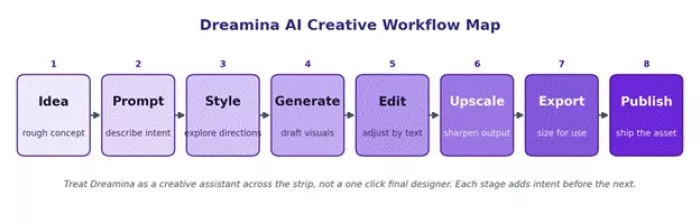
Figure 1. Dreamina AI creative workflow map, from prompt idea to a final publish ready visual.
Rather than a flat feature list, it helps to match each creative task to the right tool inside Dreamina, the output to expect, and the specific risk to watch.
| Creative task | Dreamina feature to use | Best output type | Risk to check |
| Instagram poster | Text-to-image or poster maker | Campaign graphic | Text accuracy and layout |
| YouTube thumbnail concept | AI image generator | Character or scene concept | Face consistency |
| AI avatar | Avatar and headshot tools | Profile image | Over smoothing |
| Logo concept | AI logo generator | Early brand direction | Trademark uniqueness |
| Product mockup | Reference image plus prompt | Marketing visual | Product distortion |
| Anime character | Style generation | Character art | Hand and anatomy errors |
| Meme visual | Meme generator | Social post | Readability |
| Short creative video | Seedance and Dreamina video | Social clip | Motion stability |
Generic prompts produce generic images. The formulas below are built to give Dreamina direction. Each pairs a reusable structure with a worked example that can be adapted to a different subject.
Prompt formula 1: Poster visual FORMULA Subject + campaign purpose + background + color mood + lighting + layout + platform size + negative details EXAMPLE PROMPT "Create a clean product launch poster for a futuristic AI writing app, glassmorphism interface, dark navy background, soft blue glow, centered product screen, premium SaaS style, empty space at top for headline, 4:5 Instagram ratio, avoid distorted text and messy icons." |
Prompt formula 2: Realistic headshot FORMULA Person type + outfit + environment + lens style + lighting + expression + realism instruction EXAMPLE PROMPT "Generate a realistic professional headshot of a young startup founder wearing a charcoal blazer, modern coworking background, 85mm portrait lens, soft window lighting, natural expression, sharp face details, realistic skin texture, no plastic skin." |
Prompt formula 3: AI avatar FORMULA Character identity + style + pose + facial expression + background + use case EXAMPLE PROMPT "Create a friendly AI avatar for a productivity app, semi realistic 3D style, confident smile, clean tech background, soft gradient lighting, suitable for a website hero section and app onboarding." |
Prompt formula 4: Logo concept FORMULA Brand name + industry + symbol idea + design style + color palette + restrictions EXAMPLE PROMPT "Create a minimal logo concept for a fitness tracking app called PulsePath, heartbeat line forming a route icon, modern sans serif style, black and neon green palette, flat vector look, no complex shadows." |
Prompt formula 5: Image-to-image improvement FORMULA Keep + change + style + quality instruction EXAMPLE PROMPT "Keep the same person and pose, change the background to a premium office setup, improve lighting, make the outfit formal, preserve facial identity, realistic photography style, no cartoon effect." |
The same principle scales across every task: the more specific the brief, the closer the first draft lands. The ladder below shows that climb in practice.
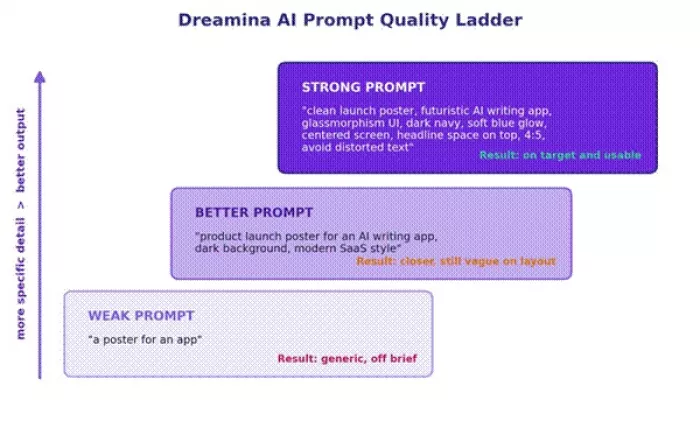
Figure 2. Dreamina AI prompt quality ladder, from a vague request to a detailed, usable brief.
The ratings below are editorial workflow estimates, not user review scores. They reflect how well each capability fits a practical creative process, based on the official documentation and observed output patterns.
| Category | Rating | Reason |
| Prompt to image usefulness | ★★★★☆ 4.2 / 5 | Strong fit for posters, avatars, social visuals, and concept art |
| Style exploration | ★★★★☆ 4.3 / 5 | Officially promotes up to 40 visual directions from one idea |
| Image editing flexibility | ★★★★☆ 4.1 / 5 | Text command editing is useful for small, targeted changes |
| Video generation potential | ★★★☆☆ 3.7 / 5 | Useful for short creative clips, but motion needs a manual check |
| Logo and branding reliability | ★★★☆☆ 3.4 / 5 | Good for concepts, not final trademark safe branding |
| Pricing clarity | ★★☆☆☆ 2.8 / 5 | Third party pricing exists, but official live pricing must be verified |
| Beginner friendliness | ★★★★☆ 4.0 / 5 | Prompt based workflow is easier than pro design software |
| Professional design replacement | ★★★☆☆ 3.2 / 5 | Helpful for drafts, not always enough for final brand systems |
With Dreamina style tools, the monthly price is the headline, but credits decide the real cost. Generation type, model choice, image or video length, resolution, and watermark or export limits all draw from a credit balance. Video in particular consumes credits far faster than still images, so a low monthly price can run dry within days of heavy use.
Reported figures also vary by source and by region. ByteDance adjusts pricing across markets, and some regions see lower rates, with entry plans reported well below the figures listed by Western trackers. Free access generally exists through daily refreshing credits, often enough for a handful of images or one to two short clips per day, sometimes with a watermark or lower resolution on free output.
| Plan or source | Price | Credits or limits | Best for |
| Free | $0 | Daily bonus credits and limited access, per third party listings | Testing prompts |
| Basic | $18 / month | 1,010 credits, per Futurepedia | Light daily creators |
| Standard | $42 / month | 4,040 credits, per Futurepedia | Frequent creators |
| Advanced | $84 / month | 13,110 credits, per Futurepedia | Heavy creative users |
| Official checkout | Use live value | Use live value | Final article pricing |
Different creators lean on different parts of the suite. The table maps the strongest fit, the prompt style that tends to work, and the final check before anything ships.
| User type | Best Dreamina AI use | Prompt style | Final check |
| Instagram creator | Carousel covers, memes, portraits | Bold style plus platform ratio | Text readability |
| YouTuber | Thumbnail scenes, character visuals | Emotion, composition, lighting | Face and hand quality |
| Small business owner | Posters, product visuals, promo graphics | Clear offer plus brand mood | Brand consistency |
| Designer | Moodboards and concept drafts | Art direction language | Originality |
| Blogger or SEO writer | Featured images and visuals | Topic, audience, style | Relevance to the article |
| E-commerce seller | Product background concepts | Product preservation plus lighting | Product distortion |
| AI artist | Fantasy, anime, cinematic styles | Detailed scene prompts | Artifacts |
| Social media manager | Campaign batches | Brand tone plus layout rules | Repetition across images |
The matrix below summarizes where the fit is strong, good, or light across the same creator types and tasks.
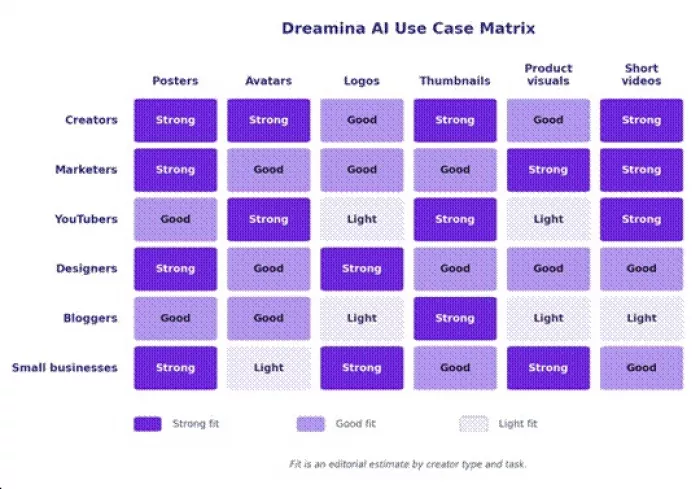
Figure 3. Dreamina AI use case matrix across creator types and common visual tasks.
Public feedback on Dreamina AI is mixed. Users who like the tool usually praise its clean interface, fast creative generation, and ability to turn prompts into images, posters, logos, and short video drafts. On Product Hunt, reviewers describe it as beginner-friendly and useful for quick creative experiments, especially for creators who want visual ideas without using multiple design tools.
However, the negative side is also important. Trustpilot feedback for dreamina.capcut.com is poor, with many users complaining about subscription issues, missing credits, billing problems, and weak support response. Trustpilot lists 14 reviews with a 2.1/5 TrustScore, and the rating breakdown shows 86% one-star reviews, so the paid-plan experience needs to be checked carefully before subscribing.
On the App Store, Dreamina AI has a better but still limited rating base: 4.0 out of 5 from 7 ratings, which is too small to treat as a strong user consensus. Apple also lists it as a free app with in-app purchases, developed by ByteDance Pte. Ltd.
| Review Source | Rating / Score | No. of Reviews / Ratings | Main Positive Feedback | Main Complaints / Limits |
| Product Hunt | Not clearly shown in search result | User review page available | Easy interface, clean output, useful for text/image-to-video, good for creative experiments | Some logic errors in video generation; users want longer and more consistent outputs |
| Trustpilot — dreamina.capcut.com | 2.1/5 | 14 reviews | Very limited positive feedback | Billing complaints, missing credits, weak support, subscription frustration; 86% one-star reviews |
| Trustpilot — dreamina.com | 2.2/5 | 9 reviews | Not enough data for a strong positive pattern | Low TrustScore and small review base; should be treated carefully |
| Apple App Store | 4.0/5 | 7 ratings | Better mobile rating, but very small sample size | Rating base is too small to judge long-term reliability |
| Independent review sites | Mixed | Not rating-based | Good for ideation, quick drafts, social-first designs, posters, avatars, and prompt-based visuals | Not always strong enough for final broadcast-quality videos; may need another editor for polishing |
Review Verdict: Dreamina AI looks useful for creators who want fast AI images, posters, social graphics, avatars, and short video concepts. It seems strongest as an idea-generation and visual drafting tool, not necessarily as a final professional editing platform. The biggest concern is not creative quality but paid-user reliability, because Trustpilot reviews repeatedly mention credit, billing, and support problems. A safe recommendation would be: try the free version first, test output quality with small projects, and avoid committing to a paid plan until the credit system and cancellation terms are clear.
Dreamina overlaps with several well known tools without fully replacing any of them. The comparison stays honest about where each rival still leads.
| Tool | Better for | Dreamina advantage | Dreamina limitation |
| Midjourney | High end artistic image quality | More practical editing and workflow feel | Midjourney may still win for art style depth |
| Leonardo AI | Game assets and character workflows | Easier social and design positioning | Leonardo may offer deeper asset controls |
| Canva AI | Template based marketing design | Stronger pure AI generation feel | Canva is stronger for layout editing |
| Runway | AI video generation | Fits image plus short creative workflows | Runway is more video specialized |
| CapCut | Video editing | More prompt generation focused | CapCut is stronger for timeline editing |
| Adobe Firefly | Brand safe commercial design | May feel faster for casual creators | Adobe offers stronger enterprise and legal comfort |
Dreamina is not the strongest option on every axis. Midjourney still tends to win on pure artistic image quality, Runway on dedicated video, Canva on template driven layout, and Adobe Firefly on brand safe commercial output. Dreamina's edge is breadth and speed inside one approachable interface.
Most disappointing results trace back to a small set of habits. Each has a quick correction.
| Mistake | Result | Better approach |
| Writing one line prompts | Generic images | Add subject, mood, lighting, and composition |
| Asking for final logos | Weak brand output | Use Dreamina for concepts, then refine manually |
| Ignoring aspect ratio | Cropped social visuals | State the platform size in the prompt |
| Not checking text | Misspelled words in the image | Add text later in a layout tool if needed |
| Over editing one image | Distorted final result | Regenerate from an improved prompt |
| Trusting the first output | Average visuals | Compare multiple directions |
| Using copyrighted characters | Legal and brand risk | Create original character descriptions |
Dreamina AI fits the gap between a blank canvas and a finished design. For social creators, marketers, and small teams that need posters, avatars, thumbnails, product concepts, and short clips quickly, it offers real breadth inside one approachable interface, backed by text command editing that handles small fixes without a full rebuild.
It is less convincing as a final step. Logos arrive as concepts rather than trademark ready marks, photorealism can wobble on hands, faces, and small text, video motion still needs a manual check, and credit costs reward planning over endless trial and error. Anyone needing top tier art quality, dedicated video control, or brand safe commercial output will still reach for a specialist.
The honest read: treat Dreamina as a fast first draft engine and a creative assistant, pair it with a layout or editing tool for polish, and judge it on the workflow it unlocks rather than the marketing around it. Tested with specific prompts and a clear quality check at each stage, it earns a regular place in a creator's toolkit without pretending to replace one.

Most investors building around AI stocks are chasing growth, and that...

Artificial intelligence is changing how we use video. It used to be a...
If you look at how digital content is made today, everything moves inc...
Let’s be entirely honest about the modern corporate environment: nobod...
AI video generators create ads from product photos by first understand...
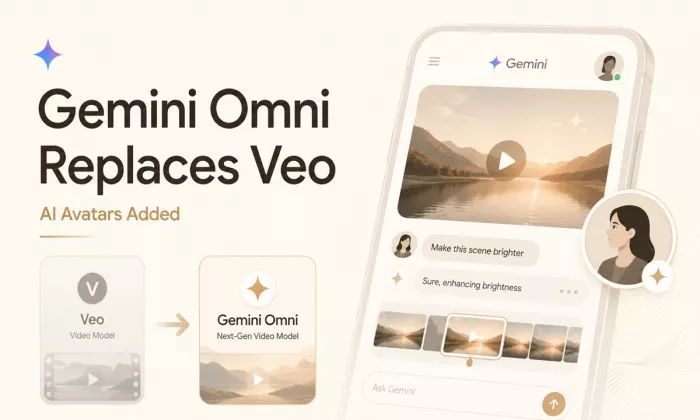
Google is officially retiring Veo as the default video model inside th...
Discussion