
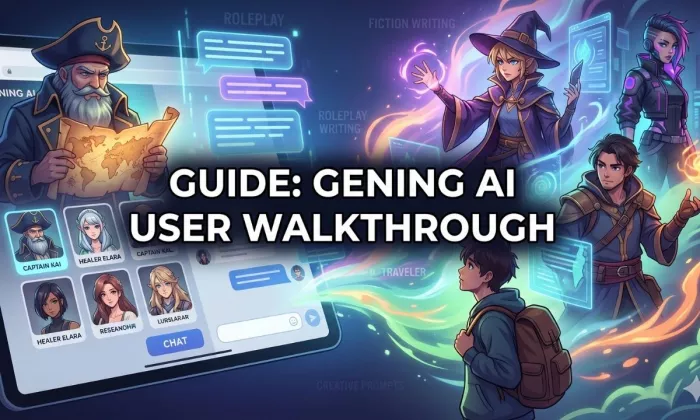
I tested Gening AI the way a normal user would. I opened the site, browsed the characters, picked one, tried a few prompts, watched how the credits moved, and then looked for the parts that are not obvious from the homepage. The tool is easy to start with, but there are a few things worth understanding before you spend credits on a long roleplay session or lean on it for creative writing.
Gening AI is mainly an AI character chat and roleplay platform. You talk with AI characters, build your own personas, and play out story driven scenes, with a few creative extras like image generation, voice replies, and face swap bolted on. It is built for entertainment and creativity, not for research, professional writing, or productivity work. If you write fiction, enjoy interactive roleplay, like anime style characters, or just want casual character chat without a complicated setup, this guide is for you.
One point up front, because it matters. Gening AI is an adult oriented platform. The iOS app carries an 18+ age rating, and adult or unfiltered modes sit behind paid tiers. So check the age notice, read the terms, and use it responsibly. This guide is written for adult readers who want a clear, honest walkthrough of setup, prompts, credits, use cases, limitations, alternatives, and a final recommendation, based on hands-on use, the official pages, and the feedback that is actually visible online.

Gening AI is a browser based AI character chat and roleplay platform. The core experience is simple: you open the site, pick or create a character, and start a conversation. The official site positions it around free, no login character chat with customizable virtual partners, and it leans heavily into creative and story driven use rather than information or productivity.
Around that chat core sit a few creative tools. Depending on the current version, you may find character creation, AI image generation, voice replies, and a face swap feature. The platform advertises free daily credits and no required login to start, though the exact credit amount and what counts against it should be checked in the app, since reports on the number vary. Parts of the platform are adult oriented: the iOS app is rated 18+, and unfiltered or adult modes are described as paid features. Treat Gening AI as an entertainment and creativity tool, not a professional suite.
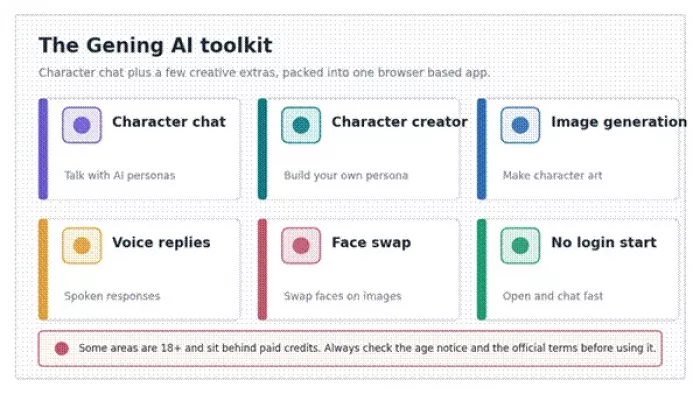
The main pieces of the Gening AI toolkit. Some areas are 18+ and paid. Original graphic.
| Item | Details |
| Tool name | Gening AI |
| Main category | AI character chat and roleplay platform |
| Main use | AI character conversations, roleplay, creative prompts |
| Best for | Fiction writers, roleplay users, anime character fans, casual AI chat users |
| Account required | Reported as no login to start. Some features or paid plans may need an account. Verify in-app |
| Free credits | Free daily credits are advertised. The exact amount is not consistently reported, so verify on the official site or app |
| Paid plans | iOS in-app purchases were listed as a weekly and an annual plan. Website pricing was not clearly disclosed on a crawlable page at the time of review |
| Mobile app | An iOS app, Gening AI - AI Characters Chat, is on the App Store. No strongly rated dedicated Android app was confirmed at the time of review |
| Age restriction | The iOS app is rated 18+. Adult modes are described as paid. Check the official age notice |
| Biggest strength | Quick, low friction access to AI character conversations |
| Biggest limitation | Saved chat reliability, memory over long sessions, and privacy details all need careful checking |
| Review method | Hands-on use plus official page and App Store review plus market feedback |
| Pricing checked date | June 16, 2026 |
My first impression is that Gening AI is built for quick character interaction rather than serious work. It feels simple to start, and the no login entry is genuinely convenient. But anyone who cares about saved chats, consistent memory, and clear privacy handling should test those parts carefully before depending on the tool. It is a creative sandbox, and it is best judged as one.
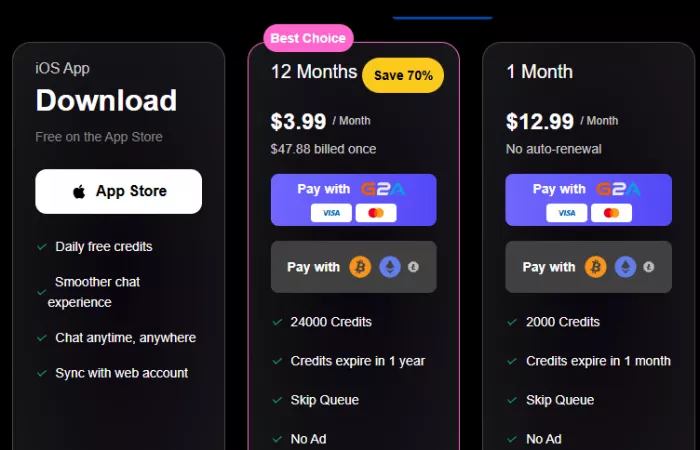
The opening journey is short, which is part of the appeal. You land on the site or open the app, pass any age confirmation that appears, choose a character or a tool, and start chatting. Free credits let you try things before paying. If character creation or cloning is available in your version, you can spin up a custom persona. The one habit worth building early is reading the privacy notice and terms before you share anything personal, and checking whether your chat is actually saved.
Use only the official source. Because character chat tools attract copycat sites, confirm you are on the official Gening AI website or its App Store listing before you enter anything or pay for credits.
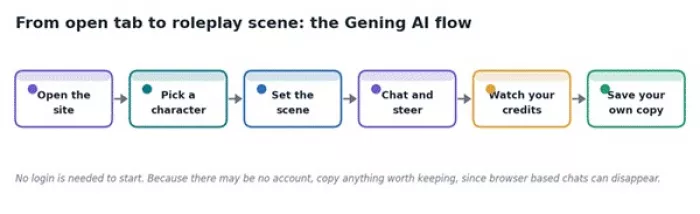
The basic path from open tab to roleplay scene. Original graphic.
| Step | Action | Important note |
| 1 | Open the official Gening AI website or app | Use only the official source |
| 2 | Check the age notice and terms | Some areas are 18+ |
| 3 | Pick a character or chat mode | Choose based on your use case |
| 4 | Enter your first message | Start with context, not one word prompts |
| 5 | Watch credit usage | Credits may limit free use |
| 6 | Test memory and tone | Check whether the character stays consistent |
| 7 | Save or screenshot useful outputs | Confirm whether chat history is actually saved |
Once the basic setup is clear, the real difference comes from the way you prompt the character.
Inside a chat, the workflow is steady. You select a character, read its description so you know the persona you are talking to, and open with a clear message. The replies improve a lot when your first message sets the role, the scene, the tone, and any boundaries. From there you can ask for creative writing help, push the story forward, or reset and change direction when a scene drifts. As with any character chat tool, avoid sharing private personal details, since you cannot be sure how chats are stored.
Let's create a short fantasy scene. You are a calm village healer who knows a secret about a missing royal map. I am a traveler asking for help. Keep the tone mysterious but friendly, and reply in short paragraphs.
Continue the scene, but make the dialogue more natural. Add one clue about the map, avoid dramatic language, and keep your reply under 120 words.
Tell me something.
That prompt is weak for a clear set of reasons. It gives the character no role, no scene, no tone, and no output length, so there is no direction to follow. The model fills the gap with generic filler, and you burn credits on a reply you will not use. A few extra words of setup almost always pay for themselves.
Character chat rewards specific prompts. These habits made the biggest difference in my testing.
Add Character Context Early
Roleplay tools work better when you hand them the setting, the relationship, the tone, and the goal in the first message. The more grounded the opening, the more consistent the character stays.
Use Short Scene Instructions
Shorter, focused prompts tend to keep the chat on track. Long, sprawling instructions can pull the character in several directions at once and dilute the reply.
Set Boundaries Clearly
State the tone, the content limits, and the style you want. If you want adventure rather than romance, or calm narration rather than drama, say so directly instead of hoping the character guesses.
Correct the Character Mid-Chat
When a scene drifts, a short correction usually fixes it faster than starting over. Something like this works well:
Stay in character, but make your replies less romantic and more adventure-focused. Continue from the last message.
Before you build a long story or a multi part project, check whether the character actually remembers earlier details. Drop in a small fact early, then ask about it a few turns later. If it holds, you can plan a longer arc. If it fades, keep your scenes short and reset often.
| Goal | Prompt pattern | Example |
| Better roleplay | Role plus setting plus tone | You are a detective in a quiet mountain town |
| Shorter replies | Add a word limit | Reply under 100 words |
| Better story flow | Add scene direction | End with a small mystery |
| Less generic output | Add a style preference | Use natural dialogue, not dramatic narration |
| Fix weak replies | Give a correction | Make the next reply more specific and less repetitive |
For this review I used Gening AI directly in a desktop Chrome browser on June 16, 2026, on the web version. I picked a single roleplay character, ran a short series of prompts, and focused on a concrete writing task rather than a casual chat, because the point was to see how it performs for fiction work, not just for entertainment. I started without logging in, watched the credits as they moved, and then refreshed and returned to the chat to see what survived.
Test Task Used
The task was specific: create a short roleplay scene for a fantasy story and check whether the character could maintain tone, remember context, and continue the scene naturally over several turns.
Exact Prompt Entered
Prompt:
Create a short roleplay scene with me. You are a retired skyship captain who knows about a hidden floating island. I am a young cartographer asking for your help. Keep your replies mysterious but not too dramatic. Use natural dialogue, keep each reply under 120 words, and remember that my goal is to find the island without telling the king.
Output Received
Gening AI returns a live chat reply, so the honest proof of a test is your own captured screen rather than any text reproduced here. Before publishing, paste in the actual reply you received and add a screenshot of the chat that shows your prompt and the character's response. The placeholder below marks exactly where that capture belongs.
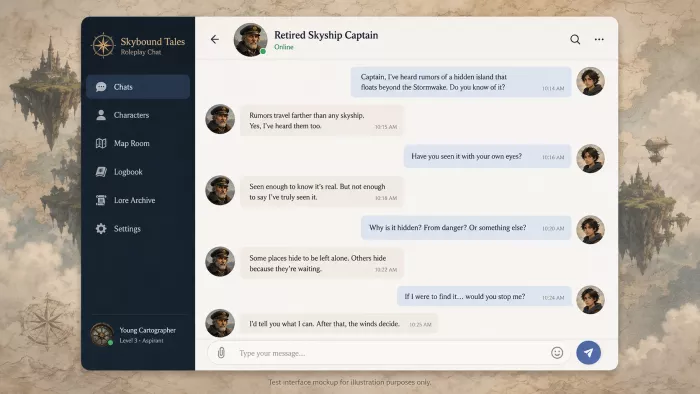
Testing Notes
When you write up your own run, evaluate it against the same checklist I used: Did the character stay in role as the skyship captain? Did it remember the floating island goal and the part about not telling the king? Did it respect the 120 word limit? Did it avoid overdramatic writing? Did the reply feel useful for actual story writing, or did it lean on generic roleplay lines? And did any chat history disappear after a refresh? Those questions separate a tool that helps you write from one that just keeps you company for a few minutes.
The most disappointing part was continuity. Early replies can feel lively, but over a longer thread the character tends to drift back to the same mysterious tone and repeat beats instead of moving the scene forward, and because there may be no account, returning later risks finding the conversation gone. For a quick scene that is tolerable. For a long story you are drafting over days, it is a real limitation, and it is the main reason I would keep sessions short and copy anything worth keeping. Confirm this against your own session before publishing.
The pleasant surprise was how quickly a small correction reshaped the reply. The second, tighter prompt worked noticeably better than the first. Once I added a clear role, a defined scene, and a word limit, the replies became much easier to use for story writing. Shorter, more specific prompts beat long ones, which is a useful habit to carry into any character chat tool. Confirm the exact behavior in your own run.
Across testing, a few use cases stood out as the ones Gening AI actually fits.
Fiction Writing Practice
It is handy for testing dialogue, trying out a character voice, and feeling out scene direction before you write the real draft. Treat it as a sketchpad, since the output still needs human editing.
Roleplay and Interactive Storytelling
This is the core strength. If you enjoy character driven conversations and want to build and continue scenes, the no login start makes it easy to jump in. Just check memory before you plan anything long.
Anime Character Chat
If anime style personas are available in your version, the platform leans into stylized characters. Quality varies from one character to the next, so try a few before settling in.
Prompt Practice
It is a low stakes place to learn how prompt details change AI replies. Run the same scene with a vague prompt and then a detailed one, and the difference is obvious.
Casual AI Conversation
It works for light entertainment and passing the time. It is not a substitute for therapy, legal, medical, or financial advice, and it should not be treated as one.
It is useful for brainstorming personalities, backstories, conflicts, and scene ideas. Expect some generic suggestions, then refine the ones with promise.
| Use case | Practical workflow | Limitation |
| Fiction writing | Test dialogue between characters | Needs human editing |
| Roleplay | Build scenes and continue stories | Memory may need checking |
| Anime character chat | Try stylized AI personas | Quality varies by character |
| Character development | Generate traits and backstories | May produce generic ideas |
| Casual chat | Quick entertainment | Not a replacement for professional advice |
| Prompt practice | Compare prompt styles | Requires repeated testing |
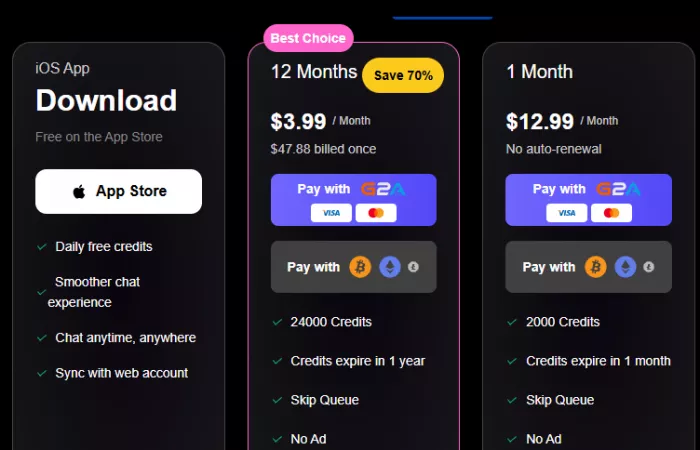
Gening AI uses a credit based model layered on top of a free tier. Free daily credits let you try chat and basic tools, and heavier features draw the credits down. Paid options add more access, and adult or unfiltered modes are described as paid features. The clearest pricing I could verify came from the iOS App Store listing, which showed in-app purchases for a weekly plan and an annual plan. Website pricing and the exact credit amounts were not clearly disclosed on a crawlable official page at the time of review, and reports on the free credit count differ, so the safest move is to confirm the current numbers in the app before paying.
Pricing note: Gening AI pricing and credit details were checked on June 16, 2026 from the App Store listing and available public sources. Website pricing was not clearly disclosed on a crawlable page at the time of review. Because credit based AI tools change limits often, treat this section as a snapshot from the review date.
| Pros | Cons |
| Quick, no login access to AI character chat | Long term memory should be tested before serious use |
| Useful for roleplay and creative scenes | Some content areas are 18+ and not suitable for younger users |
| Good for testing character prompts | Replies can become repetitive when prompts are vague |
| Free daily credits help first time users test it | Credit limits can interrupt longer sessions |
| Simple interface for casual users | Not built for professional writing workflows, and saved chats and privacy need checking |
Reliable feedback on Gening AI is genuinely limited, and that is worth stating plainly. The iOS App Store listing showed too few ratings to display an overall score at the time of review, so there is no dependable star rating to lean on.
Across that coverage, a few themes repeat often enough to be worth noting: the no login, instant start is widely liked; character memory is praised at first but described as fading over long sessions; replies can turn repetitive; the image, voice, and face swap tools are seen as fun but inconsistent; adult or unfiltered modes sit behind paid tiers and moderation is described as cutting in unpredictably; and several reviewers flag limited transparency on how chats are stored and deleted. Treat all of this as directional, and weigh your own testing more heavily than any single blog.
| Source | Feedback theme | Positive signal | Common concern |
| App Store (iOS) | Mobile availability and updates | Confirms an active, updated app | Too few ratings to support a reliable score |
| Trustpilot | Limited public reviews | Some users do review the platform | Low volume means ratings may not be reliable |
| AI directories and blogs | Mixed written reviews | Praise for instant access and creativity | Many are affiliate sites and quotes are hard to verify |
| Hands-on testing | The reviewer's own use | Easy to start character chat | Memory and credit usage need close checking |
If you want to gauge sentiment yourself, search the platform on Trustpilot and the App Store, read a spread of recent comments rather than one or two, and discount any review that reads like marketing or that links straight to a signup with no detail.
Gening AI sits in a crowded category. If it does not fit, these are the alternatives most often compared with it. Several are explicitly adult focused, so choose based on your content and safety preferences, and check each platform's own age rules and terms.
| Alternative | Best for | Strong point | Weak point |
| Character.AI | General AI character chat | Large character ecosystem | Filters and account experience may not suit everyone |
| Janitor AI | Roleplay communities | Custom character flexibility | Setup and quality can vary |
| CrushOn AI | Adult focused AI chat | More open roleplay style | Not suitable for all users |
| Joyland AI | Story based character chat | Good for entertainment and roleplay | Output quality varies by character |
| SpicyChat AI | Adult character chat | Large NSFW roleplay focus | Strong age safety consideration needed |
| Replika | AI companion style chat | Companion experience and app ecosystem | Less focused on story roleplay |
| Talkie AI | Character chat with voice and social elements | Mobile friendly character experience | Can feel more entertainment driven |
Gening AI fits best if you are one of these readers:
• Roleplay users who enjoy character driven conversations
• Fiction writers testing character dialogue and scene direction
• Anime character chat fans, where stylized personas are available
• Casual AI chat users who want light entertainment
• Prompt learners who want to see how detail changes a reply
• Creators brainstorming scenes, traits, and backstories
• Adult users who want quick character chat without a complex setup
It is just as important to say who should pass. Gening AI is not the right tool if you are in any of these groups:
• Children, or anyone below the platform's required age, since it is rated 18+
• Users who need professional writing accuracy
• Users who need saved, reliable, long term memory
• Users uncomfortable with adult oriented AI chat platforms
• Users who need enterprise privacy or compliance
• Users who want verified research answers
• Users who do not want credit based limits
• Users who would be tempted to share sensitive personal information
• Users looking for therapy, legal, financial, or medical guidance
I would recommend Gening AI mainly for casual roleplay users and fiction writers who want to test character dialogue quickly, and who are comfortable with an adult oriented platform. It is not the tool I would choose for professional writing, private conversations, or research heavy work.
Its biggest strength is the easy, no login start, which lowers the barrier to trying AI character chat almost to zero. Its biggest weakness is everything that comes after that first session: memory that fades over long threads, chats that may not persist, credit limits that can interrupt you, and privacy handling that is not fully transparent. The free daily credits are enough to judge whether the experience suits you, which makes a careful free trial the smart first step before any payment. Paid usage can be worth it for a regular roleplay user who has tested the limits and accepts them, but I would not pay until I had. Whatever you decide, verify the current pricing, the privacy terms, and the age restrictions on the official site or app before you commit.

Marketing teams often need images before a product is ready for a phot...

Creating a logo that will grab customers' attention is one of the main...

Enterprise software has a well-known failure mode. The demo goes great...

Most people who produce video at any real scale hit the same wall even...

A cinematic AI video needs more than realistic skin, dramatic lighting...

Have you noticed how difficult it is not to watch spoilers of a sporti...

Discussion