

Hypernatural AI is built around one promise: paste a script or an idea and get a stylized, faceless short back in a couple of minutes. For storytelling on TikTok, YouTube Shorts, and Reels, that speed is hard to argue with.
The friction shows up at the edges. The free tier caps clips at roughly 30 seconds and stamps a watermark on exports, paid plans run on a monthly generation-credit budget, and the workflow is deliberately guided, so there is not much room for frame-level editing, presenter-style avatars, or turning a 2,000-word blog post into a polished long-to-short repurpose.
If you have hit any of those walls, you are not looking for a Hypernatural clone. You are looking for the tool that fits the part of your workflow Hypernatural does not. Below are 5 alternatives I keep returning to, what each one does better, where Hypernatural still earns its place, and a scoring breakdown so you can match a tool to how you actually work.
If you only have 30 seconds, here is where each tool lands before the detail.
| Category | Top pick |
| Best overall alternative | InVideo AI |
| Best for long-form content repurposing | Pictory |
| Best for voiceover-led videos | Fliki |
| Best for avatar and business videos | Synthesia |
| Best for simple editing and social content | VEED.io |
Each of these tools targets a different part of the creator workflow. The table sorts the trade-offs at a glance; the deeper reviews and scoring follow.
| Tool | Best for | Main strength | Main limitation | Free plan or trial | Ideal user |
| InVideo AI | Prompt-to-video for faceless YouTube and social | Largest stock and template library with conversational edits | Credit and minute limits; AI voices can need cleanup | Free plan (watermark); Plus and Max paid tiers | Creators who want one broad video workflow |
| Pictory | Turning blogs, webinars, and scripts into videos | Long-form to short repurposing with transcript-based editing | No permanent free plan; trial exports are watermarked | 14-day trial (watermarked); paid plans only | Bloggers and marketers recycling content |
| Fliki | Narration-led and multilingual videos | 2,000+ AI voices (ElevenLabs-grade) across 80+ languages | Stock visuals are good, not premium; lighter editing | Free forever (about 5 min per month) | Voice-first faceless and podcast creators |
| Synthesia | Avatar-led training, explainers, and demos | Polished AI presenters in 140+ languages | Not a social shorts tool; per-minute cost adds up | Free plan (short monthly cap, watermark) | Teams making business and training video |
| VEED.io | AI plus hands-on editing and subtitles | Browser editor with strong captions and cleanup tools | Editor-first, so more manual than auto-generators | Free plan (watermark); Lite and Pro tiers | Creators who refine after AI generation |
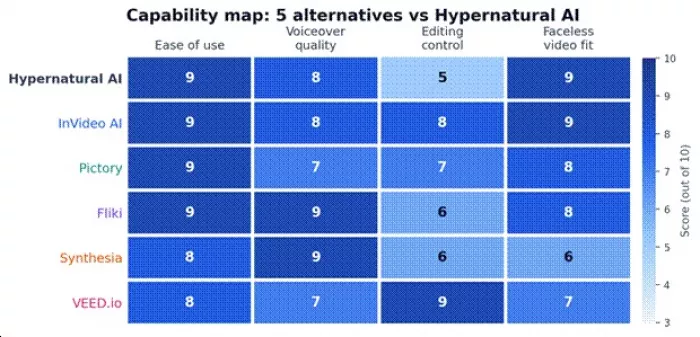
Capability map: how each alternative scores against Hypernatural AI across 4 core creator dimensions (0 to 10). Scores reflect hands-on workflow testing, not vendor claims.
Every score here comes from the same lens, which I call the Creator Workflow Fit (CWF) review. Each tool is rated on 5 inputs, then those inputs roll into a single 10-point number that is weighted toward the job the tool is actually built for. A tool is not penalized for skipping work it was never meant to do: Synthesia is not a Shorts factory, and VEED.io is not a one-click script-to-video engine, so each is judged in its own lane.
The 5 CWF inputs • Workflow usefulness: does it remove real steps from how you make videos? • Output quality: do the exports look publish-ready without heavy fixing? • Editing flexibility: how much control do you keep after the AI generates? • Pricing clarity: are limits, watermarks, and commercial rights easy to understand? • Beginner friendliness: how fast can a first-timer ship something usable? |
Pricing was checked against official sources at publication. Plans, credit limits, watermark rules, and commercial rights change often, so confirm the current terms on each vendor's site before you commit, especially for client or monetized work.
If Hypernatural feels too narrow, InVideo AI is the natural step up. You describe the video in plain language, optionally paste a script or a URL, and it assembles scenes, stock footage, music, captions, and an AI voiceover into a draft you can then refine by typing edit commands. It leans on a large stock library, including iStock-grade footage on higher tiers, which matters when you are producing faceless YouTube essays or social explainers at volume.
Standout features: the parts that earn the upgrade.
• Prompt, script, and URL to video, plus 1,000s of templates
• Deep stock footage and music libraries with brand kits
• AI voiceovers and text-to-speech in many languages
• Conversational editing, for example “change scene 3 to a city night shot”
• One-click resizing for Shorts, Reels, and 16:9 YouTube
Where it beats Hypernatural AI: breadth. InVideo covers more formats and a far deeper media library, and the conversational editing gives you more control than Hypernatural's guided flow. For a faceless channel that needs both Shorts and longer videos from one tool, it is the more complete workflow.
Where Hypernatural AI still wins: Hypernatural's stylized look and consistent characters feel more distinctive straight out of the box. InVideo drafts can look templated until you swap clips and tighten pacing, so expect an editing pass to make a video feel like yours.
Best use case: high-volume faceless YouTube and multi-platform social video built from prompts.
Pricing note: A free plan exists with a watermark and lower resolution. Paid tiers (commonly Plus and Max) start in the mid-$20s per month, with roughly 20% off annual billing, and higher tiers add more AI minutes, stock allowances, and API access. Confirm current minute limits and watermark rules on InVideo's pricing page.
The honest limitation: the credit and minute system is easy to exhaust mid-month, and AI voice pronunciation sometimes needs manual correction.
| Reviewer's take. For most people leaving Hypernatural for more room to grow, this is where I would start. Budget one editing pass and it punches well above its price. |
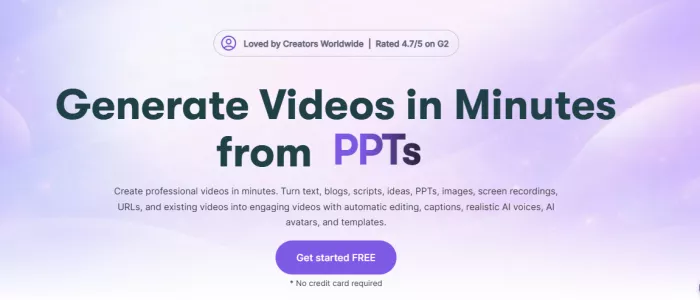
Pictory is built for the opposite starting point from Hypernatural. Instead of a fresh idea, you bring something that already exists: a blog post, a webinar recording, a long YouTube video, or a script. Pictory pulls out the key moments, matches stock footage and captions, adds an AI voice, and hands back short, social-ready cuts. Its transcript-based editing, where you trim the video by editing the text, is the feature that sets it apart.
Standout features: the repurposing toolkit.
• Blog or article URL to video, and script to video
• Long video to Shorts, with automatic highlight detection
• Edit the video by editing its transcript
• 3M+ stock clips, music, and auto-captions
• Brand colors and logo for consistent output
Where it beats Hypernatural AI: repurposing. If your growth engine is written content or recorded sessions, Pictory does in minutes what Hypernatural is simply not designed to do.
Where Hypernatural AI still wins: for original, stylized storytelling from a blank page, Hypernatural's generation and character tools are more creative. Pictory is an assembler, not a stylist.
Best use case: bloggers, marketers, and YouTubers turning existing content into clips.
Pricing note: Pictory does not offer a permanent free plan; the trial is time-limited and watermarks exports. Paid plans start in the high-teens to mid-$20s per month, with higher tiers adding premium stock, more video minutes, and team seats. Annual billing typically saves about 20%. Verify trial limits and commercial rights before publishing client work.
The honest limitation: AI voices are solid but not best-in-class, and footage matching can feel generic, so plan to swap clips on the scenes that matter.
| Reviewer's take. If you write a lot, Pictory quietly multiplies your output. I treat it as a content-recycling machine rather than a creative studio. |
Some faceless videos live or die on narration, and that is Fliki's home turf. It combines text-to-speech and text-to-video, so you paste a script, a blog URL, or a topic, pick from a very large voice library, and get a narrated video with matching footage and captions. The voice catalog draws on ElevenLabs-grade engines, and for non-English content it is among the most natural-sounding options available.
Standout features: a voice-first feature set.
• 2,000+ voices across 80+ languages and many dialects
• Ultra-realistic text-to-speech with emotional range
• Voice cloning on higher tiers for a consistent brand voice
• Blog and URL to video, plus podcast and audiobook output
• Stock footage, AI images, and auto-captions
Where it beats Hypernatural AI: voice quality and language coverage. If your audience is multilingual, or your style depends on a specific narrator tone, Fliki gives you more believable and more varied voices than a general video tool.
Where Hypernatural AI still wins: visual polish and editing. Hypernatural's generated visuals and styles feel more cinematic; Fliki's strength is the audio layer, not advanced visual control.
Best use case: narration-heavy faceless videos, multilingual content, and podcast-to-video.
Pricing note: Fliki has a genuine free-forever tier (a few minutes a month, watermarked, limited voices). Standard sits around the low-$20s per month on annual billing (more month to month), and a premium tier unlocks voice cloning, more minutes, and commercial rights. Confirm voice-cloning availability and licensing on Fliki's pricing page.
The honest limitation: the stock library is good but not premium-grade, and deep visual control is limited compared with a true editor.
| Reviewer's take. When the script is the star, Fliki is my pick. For non-English voiceovers especially, nothing on this list sounds more natural to me. |
Synthesia plays a different game. Rather than stock-and-narration shorts, it generates a realistic AI presenter who delivers your script to camera in 140+ languages. That makes it the strongest pick here for training videos, onboarding, product explainers, and internal communications, the kind of polished talking-head content Hypernatural does not produce at all.
Standout features: a business-video toolkit.
• 230+ AI avatars, plus custom avatars of real presenters
• 140+ languages and voices from one script
• PowerPoint and slide import that keeps your design
• Screen recording and interactive video on higher tiers
• One-click translation of a finished video
Where it beats Hypernatural AI: professional presenter video. For an explainer where a consistent on-brand host matters, Synthesia is in a different class entirely.
Where Hypernatural AI still wins: social shorts and stylized storytelling. Synthesia videos can read as corporate, there is no stock B-roll engine, and it is overkill, and overpriced, for fast TikTok content.
Best use case: business, learning-and-development, and SaaS teams making explainer and training video at scale.
Pricing note: A free plan offers a short monthly allowance with a watermark and a small avatar set. Starter lands in the high-teens per month on annual billing, Creator in the $60s to high-$80s depending on billing, and Enterprise is custom (often well into four figures a year). Custom studio avatars cost extra. Check current minute caps and avatar terms on Synthesia's pricing page.
The honest limitation: per-minute cost is high for social-volume creators, and videos can look obviously AI-presenter without post-production.
| Reviewer's take. I would not buy Synthesia for a faceless meme channel. For a company that ships courses or product demos, it is the most credible option here. |
VEED.io is the choice for creators who want AI help but refuse to give up the timeline. It is a browser-based editor with AI built in: auto-subtitles in 100+ languages, translation, background removal, eye-contact correction, audio cleanup, screen recording, AI avatars, and text-to-speech, all alongside manual cutting, layering, and social resizing. It does not spit out a finished video from one prompt the way Hypernatural does, and for this audience that is the point.
Standout features: an editor-plus-AI toolkit.
• Full online editor with a multi-layer timeline
• AI subtitles and translation in 100+ languages
• Clean audio, eye-contact, and background-removal tools
• AI avatars and text-to-speech inside the editor
• Social aspect presets and team collaboration
Where it beats Hypernatural AI: manual refinement. After AI does the heavy lifting, VEED lets you fix pacing, captions, and branding frame by frame, and share projects with a team for review.
Where Hypernatural AI still wins: speed from zero. If you want a finished video from a single idea with minimal hands-on work, Hypernatural and the auto-generators above get there faster.
Best use case: creators and small teams who generate with AI, then polish and caption by hand.
Pricing note: VEED has a free plan (watermark, lower resolution, limited subtitle minutes). Paid tiers (commonly Lite and Pro) range from roughly $12 to the $40s and up per month depending on tier and billing, with Pro unlocking 4K, the full AI toolset, translation, and more editors. Enterprise is custom. Confirm subtitle minute caps and export limits on VEED's pricing page.
The honest limitation: because it is editor-first, it expects more hands-on time, and the strongest AI tools sit behind the higher tier.
| Reviewer's take. When I care about captions and final polish more than one-click magic, VEED is where I finish a video. It is the most editor-like tool on this list. |
Feature lists blur together fast. The clearer way to choose is to look at where each tool sits on the jobs that actually differ: prompt-to-video speed, faceless creation, AI voiceover quality, avatar support, social editing, blog-to-video, manual editing control, brand consistency, beginner friendliness, and pricing flexibility. The same pattern shows up across all 10.
Hypernatural and InVideo AI cluster around fast, faceless, prompt-first creation. Fliki and Pictory share that speed but tilt toward voice and repurposing. Synthesia trades speed for presenter polish. VEED.io trades one-click generation for editing control.
On prompt-to-video speed, Hypernatural, InVideo, and Fliki are quickest. For faceless fit, Hypernatural and InVideo lead, with Fliki and Pictory close behind. AI voiceover quality favors Fliki and Synthesia. Avatar support is Synthesia's alone at the top, with VEED a distant second. Social editing and brand consistency lean to VEED and InVideo. Blog-to-video is Pictory and Fliki territory. Manual editing control is clearly VEED, then InVideo and Pictory. For beginner friendliness, the prompt-first tools win; for pricing flexibility, the ones with real free tiers, Fliki and VEED, are easiest to start on, while Synthesia is the priciest to scale.
Hypernatural AI is still a strong choice if your main goal is quick, stylized faceless storytelling for Shorts, Reels, and TikTok. It works best when you want a guided workflow, fast output, and a distinct visual style without spending much time inside an editor. But once your needs move beyond short-form generation, its limits become easier to notice — especially around longer videos, deeper editing control, avatar-based explainers, blog-to-video repurposing, and voiceover flexibility.
That is where the alternatives make more sense. InVideo AI is the best overall upgrade for creators who want a broader faceless video workflow. Pictory is better if you already have blogs, webinars, or long videos to repurpose. Fliki is the strongest pick for narration-heavy and multilingual content. Synthesia is the better choice for business, training, and avatar-led videos. VEED.io fits creators who want AI assistance but still need hands-on editing, subtitles, and final polish.
My honest recommendation is simple: do not choose the “best” AI video tool on paper. Choose the one that matches the bottleneck in your workflow. If speed and stylized shorts matter most, Hypernatural AI is still worth keeping. If you need more control, better voices, stronger repurposing, or professional presenter videos, one of these five alternatives will give you more room to grow.

Marketing teams often need images before a product is ready for a phot...

Creating a logo that will grab customers' attention is one of the main...

Enterprise software has a well-known failure mode. The demo goes great...

Most people who produce video at any real scale hit the same wall even...

A cinematic AI video needs more than realistic skin, dramatic lighting...

Have you noticed how difficult it is not to watch spoilers of a sporti...
Discussion