

I started testing Knowbase AI because my notes, PDFs, saved YouTube references, meeting recordings, and research documents had ended up scattered across half a dozen places. A normal AI chat tool is fine for general questions, but it stops being useful the moment the answer I need is locked inside a specific file. That gap is what pulled me toward Knowbase AI.
The pitch is straightforward: upload documents, audio, video, and links, then chat with that material and get answers that point back to the source. There are plenty of feature lists out there, so I wanted to do the opposite. I loaded real files, asked real questions, checked the citations, pushed the transcription, looked hard at the pricing, and then decided where it earns its place and where it does not.
This Knowbase AI review covers the actual experience across document chat, Chat-All, transcription, Nests, sharing and the chatbot embed, pricing, pros and cons, safety, and the alternatives I would weigh before paying. Where it felt useful I will say so plainly, and where it felt limited I will not soften it.
| Review area | My take |
| Best for | Students, researchers, content teams, educators, analysts, and anyone document-heavy |
| Strongest feature | Chatting with uploaded files and getting answers tied to source citations |
| Most useful add-on | Audio and video transcription with speaker labels and timestamps |
| Weakest area | The free plan is too thin for anything beyond a quick trial |
| Pricing value | Reasonable on Pro if you use it regularly; hard to justify for occasional use |
| Biggest concern | Public third-party review volume is still limited, so your own testing matters |
| Overall rating | 8 out of 10 |
After a few days with it, Knowbase AI felt less like a chatbot and more like a searchable workspace built around my own material. It is not the tool I reach for to ask a random question. Its value shows up once several files are inside it and I need an answer that comes from them, with a citation I can click to check.
I did not want to evaluate the marketing. I wanted to see whether the core loop holds up: load a file, ask a question, trust the answer. So I ran it through the parts that actually decide whether a tool like this is worth a subscription.
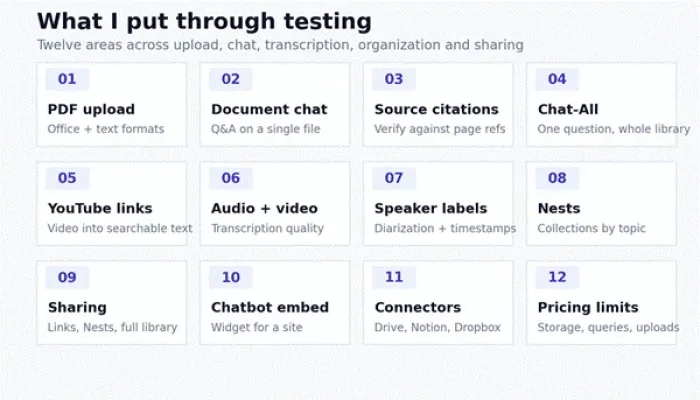
Figure: the twelve areas I focused on, from upload and document chat through transcription, organization, and sharing.
Here is the same coverage as a checklist, with what I was looking for in each case and what I found.
| Test | What I wanted to check | My observation |
| PDF chat | Can it answer from uploaded documents? | Yes, and answers stayed close to the file rather than drifting into generic filler |
| Source citations | Can I verify the answer? | Each response carried numbered references I could open to the page or section |
| Chat-All | Can it search across multiple files? | Useful once my library grew, with citations showing which file an answer came from |
| YouTube transcription | Can it turn a video into searchable notes? | Worked well on clear, captioned English videos; other cases draw on transcription minutes |
| Audio transcription | Can it label speakers and timestamps? | Speaker labels and timestamps appeared, though they need a quick manual check |
| Nests | Can files be organized properly? | Collections kept topics separate and stopped the library turning into a pile |
| Sharing | Can I share knowledge with others? | Links, Nests, full-library sharing, and an embeddable chatbot are all there |
| Pricing | Is the free plan enough? | Only for a trial; real use needs Starter or Pro |
To keep this consistent, I judged Knowbase AI through five lenses rather than a feature checklist. I think of it as a knowledge-tool test, and each lens maps to a question that decides whether the tool is worth paying for.
• Retrieval accuracy: do answers actually come from my files, or does the model wander into generic text?
• Citation verifiability: can I click a reference and land on the exact page, section, or timestamp?
• Media handling: how well does it turn audio, video, and YouTube links into searchable, labelled text?
• Organization and sharing: can a growing library stay usable, and can I share or embed it cleanly?
• Cost and privacy fit: do the storage, query, and transcription limits match real use, and are the data controls clear?
I loaded a mix of PDFs, a Word document, a slide deck, an audio recording, and a couple of YouTube links, then asked summaries, specific look-ups, and follow-up questions. Pricing and feature details here were verified against the official Knowbase AI pricing page on the last-updated date, because several third-party listings still quote older limits. Two honest limitations: output quality depends heavily on the quality of the files you feed it, and public third-party reviews are still thin, so treat any single verdict, including this one, as a starting point rather than the final word.
The first thing that stood out is that Knowbase AI only makes sense once there are real files inside it. Empty, it looks and behaves like any other chat box. The moment I uploaded a few documents, the experience changed, because the answers were now anchored to my material instead of the model’s general knowledge.
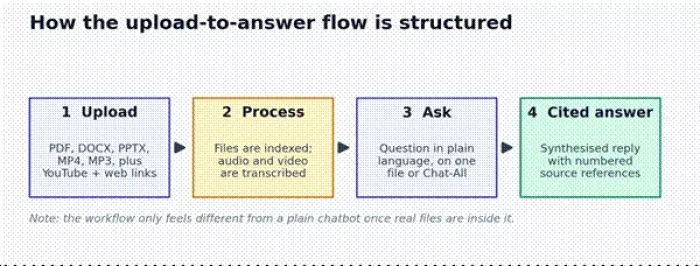
Figure: how the upload-to-answer flow is structured, from file to cited reply.
Uploading was uneventful in a good way. I dropped in PDFs, a DOCX, a PPTX, and an MP3, and pasted YouTube links, and the files were processed into the library without fuss. The interface leans simple, so a beginner can start asking questions quickly without a manual.
Where I did feel friction was the plan limits rather than the design. On the free tier the storage ceiling and the small monthly query allowance mean you run out of room to evaluate it properly, which pushes you toward a paid plan sooner than I would like. That is a recurring theme in this review.
Document chat is the heart of the product, so I spent the most time here. I uploaded a longer report and a couple of shorter PDFs and worked through the questions I would normally ask a colleague who had read them.
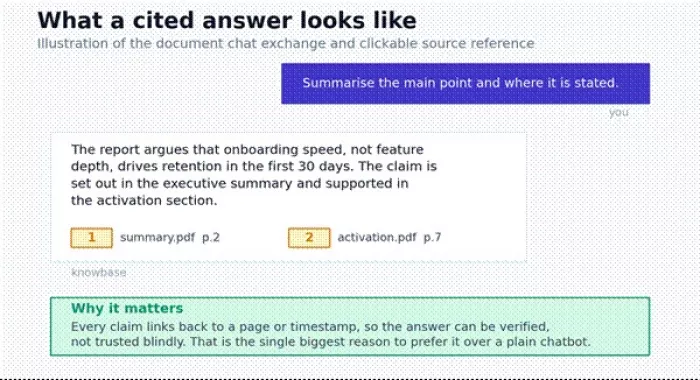
Figure: an illustration of a cited answer. The reply links back to the page where each claim is supported.
I asked it to summarize the main argument of the report. The summary was tight and, more importantly, it told me where the argument was made rather than just paraphrasing it. I then asked it to find a specific section, and it pulled the relevant passage with a reference I could open.
The part that builds trust is the citation. I clicked through to check whether the answer matched the source, and it did. That single behavior, linking each claim back to a page, is what separates this from asking a general chatbot that sounds confident but cannot be checked. There is also a deeper Thinking Mode for complex questions, which breaks a query into sub-questions before answering.
It is not flawless. On a long, dense document a broad question sometimes returned a slightly shallow summary, and the fix was to ask narrower, more specific questions. Follow-up questions held context well within a chat, which made it feel like a real back-and-forth rather than one-shot lookups.
| Document chat test | Result quality | Notes |
| Summarizing a PDF | Good | Accurate and tied to where the point is made, not generic filler |
| Finding specific details | Good | Pulled the right passage with an openable reference |
| Follow-up questions | Good | Held context within a conversation |
| Citation usefulness | Good | Clicking through landed on the supporting page or section |
| Long document handling | Average | Broad questions can read shallow; narrow questions fix it |
Verdict on document chat Document chat is the strongest reason to try Knowbase AI, especially if you regularly work with PDFs, reports, notes, or research material and you care about being able to verify an answer. |
Chat-All was the feature I underrated at first. With one or two files, chatting with a single document is enough. The value appeared once my library had grown and I could no longer remember which file held the detail I needed.
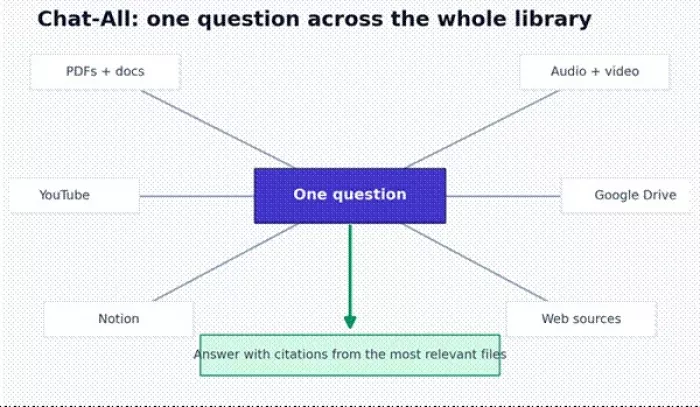
Figure: Chat-All sends one question across the whole library and answers from whichever files are most relevant.
Instead of opening five PDFs and skimming each, I asked one question across the full set and let it find the answer. It pulled from the most relevant files and still attached citations, so I could see which document the answer came from. For research notes and course material this saved real time.
The limitation is organization. If the library is a random pile, Chat-All can return answers that are technically correct but pulled from a file you did not expect, which is why the Nests feature matters. A tidy library makes Chat-All noticeably more reliable.
| Use case | Chat-All usefulness |
| Research notes | Very useful |
| Business reports | Useful |
| Meeting transcripts | Useful |
| Course materials | Very useful |
| Random mixed files | Can become messy |
Transcription is where Knowbase AI goes beyond a typical document chat tool, so I tested it with an audio recording and a few YouTube links. The output becomes searchable text you can then question like any other file, which is genuinely handy for lectures, interviews, podcasts, webinars, and meetings.
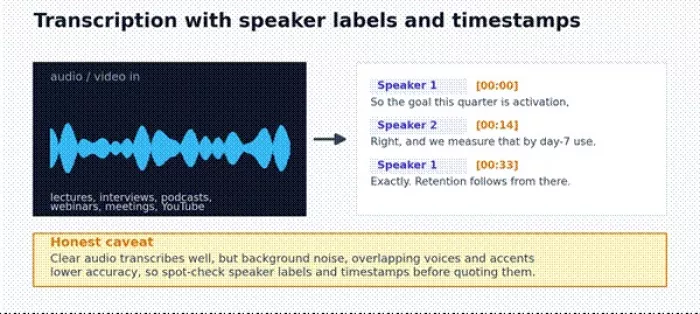
Figure: transcription turns audio and video into searchable text with speaker labels and timestamps, which should still be spot-checked.
On clear audio the transcript was solid, and the speaker labels plus timestamps made it easy to jump to the right moment. Pasting a captioned English YouTube link worked smoothly and, usefully, English videos that already have captions do not eat into your transcription minutes.
I would not treat any transcript as final. With background noise, overlapping speakers, or strong accents, accuracy drops and the labels can mislabel a line, so anything you plan to quote should be checked against the audio. Heavier transcription also runs into plan limits quickly, since the free tier only covers captioned English YouTube and the paid tiers add real minutes.
| Transcription test | My review |
| Clear audio | Reliable transcript that was easy to search |
| Noisy audio | Accuracy drops; review before trusting it |
| Multiple speakers | Speaker labels help but need a quick check |
| YouTube video | Strong for turning captioned videos into searchable text |
| Long recordings | Practical only on paid plans because of transcription minutes |
| Timestamp references | Helpful for verifying and jumping to a moment |
Honest caution Transcription should not be treated as perfect. If the audio has background noise, overlapping speakers, or unclear pronunciation, review the transcript manually before you rely on it. |
Knowbase AI lets you group files into Nests, which are collections for different topics, clients, classes, projects, or research areas. Early on I ignored them. That was a mistake.
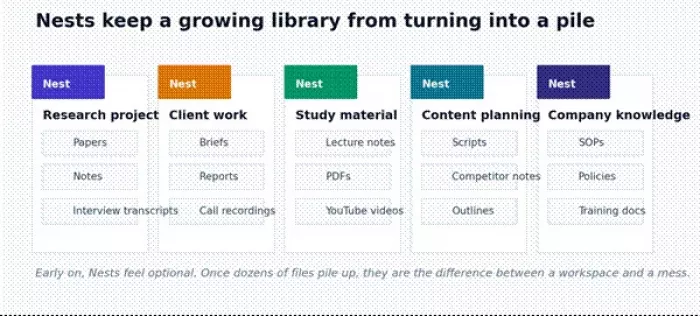
Figure: Nests keep separate topics organized so a growing library stays a workspace rather than a pile.
Once a handful of files turned into dozens, the lack of structure started to hurt both browsing and Chat-All. Grouping files into Nests fixed it: a research Nest, a client Nest, a study Nest, and so on, each holding the documents, notes, and recordings that belong together. It is a small habit that pays off as soon as the account fills up.
Up to this point everything I tested was personal. Sharing is what turns Knowbase AI into something a team or a creator can use. You can share a single file, a whole Nest, or a larger library, and you can embed a chatbot widget on a site.
A student probably does not need an embedded chatbot. An educator sharing course material, a business answering repeat questions, or a documentation-heavy team absolutely might. The embed turns your knowledge base into a website FAQ or a support assistant, and on the higher plans it can collect leads.
| Sharing feature | Best use |
| Single file sharing | Send one document to someone |
| Nest sharing | Share a whole topic or project |
| Library sharing | Open up a larger knowledge base |
| Embedded chatbot | Power a website FAQ or support widget |
| Lead collection | Capture enquiries through a business chatbot |
Here is where a Knowbase AI review has to be specific, because the limits decide everything. I checked these against the official pricing page on the last-updated date, since several listings online still quote older numbers.
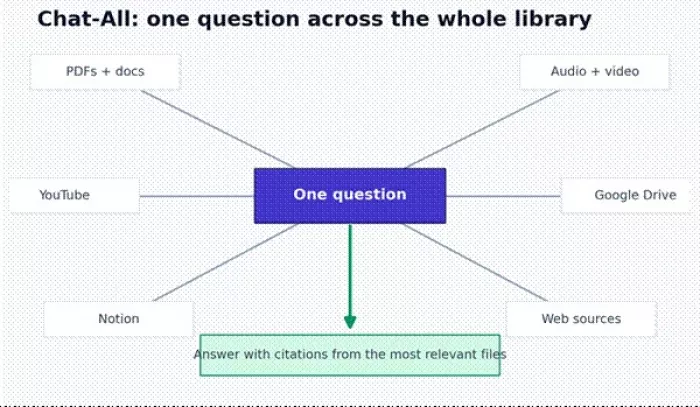
Figure: how storage and monthly queries scale across the four plans. Yearly billing is cheaper than the monthly prices shown.
| Plan | Price | Main limits |
| Free | $0 / mo | 50 MB storage, 25 queries, 10 uploads, 1 assistant, captioned English YouTube transcription, Thinking Mode |
| Starter | $19 / mo | 2 GB storage, 500 queries per month, 100 uploads, 60 minutes of transcription, 1 connector (Drive, Notion, or Dropbox), 3 shared chatbots |
| Pro | $49 / mo | 25 GB storage, 2,000 queries per month, 500 uploads, 10 hours of transcription, unlimited connectors, unlimited shared chatbots, Web Search connector, API access |
| Team | $99 / mo | 100 GB storage, 5,000 queries per month, unlimited uploads, 30 hours of transcription, 3 assistants, everything in Pro plus priority support |
My read after using it: the free plan is a try-before-you-buy, nothing more. Starter suits a light user with a moderate document load, though the 60-minute transcription cap is tight if you record meetings weekly. Pro is the plan that actually unlocks the product, with serious storage, 10 hours of transcription, unlimited connectors, the Web Search connector, and API access. Team is for groups, agencies, and educators who need more capacity and shared seats.
There is no separate paid trial advertised: the free tier is the trial, and no card is required to start. Billing yearly brings the price down.
Pricing verdict Knowbase AI pricing makes sense if you regularly work with documents, recordings, videos, and connected sources. If you only need to chat with one PDF occasionally, a paid plan will feel like overkill, and a simpler tool will do. |
| Pros | Cons |
| Chats with PDFs, documents, audio, video, and YouTube content in one place | The free plan is too limited for anything beyond a trial |
| Source citations make answers easy to verify | Public third-party reviews are still limited |
| Chat-All searches across the whole library | Accuracy still depends on file quality and interpretation |
| Transcription adds value for meetings, lectures, and videos | Transcripts need a manual check before quoting |
| Nests keep projects and topics organized | New users have to invest a little time to organize well |
| Sharing and the chatbot embed make it useful for teams and sites | Most of the advanced value sits behind paid plans |
| API access helps developers and businesses | API and transcription limits should be checked before building on it |
| User type | Recommendation |
| Students | Good for notes, lecture recordings, PDFs, and exam prep, with answers still worth verifying |
| Researchers | Useful for papers, transcripts, and source-backed summaries |
| Content creators | Helpful for YouTube research, scripts, and a searchable content library |
| Educators | Useful for sharing learning material and answering repeat questions |
| Professionals | Good for reports, meeting notes, and internal documents |
| Teams | Useful when they need shared, searchable knowledge |
| Developers | Worth it if API access fits the workflow |
| Casual users | Probably do not need a paid plan |
I would not push everyone toward it. Knowbase AI is probably not the right fit if you recognize yourself in any of these:
• You only need a one-time summary of a single PDF
• You want a fully free tool with no meaningful limits
• You work under strict enterprise compliance rules and have not reviewed the privacy terms
• You are not comfortable uploading documents to any AI platform
• You expect transcription to be perfect out of the box
• You need advanced, manual knowledge-base governance and controls
• You handle sensitive legal, medical, financial, or client data without first checking how it is stored and used
No tool should be bought in isolation, so here are the alternatives I would line up against it. The short version: Knowbase AI competes on breadth, handling documents, audio, video, and YouTube in one library while also offering a deployable chatbot, which most focused tools do not.
| Alternative | Better for | Knowbase AI advantage |
| NotebookLM | Free research inside the Google ecosystem | Broader sharing, an embeddable chatbot, and transcription controls |
| ChatPDF | Simple, single-PDF chat | Handles many more file and media types |
| Humata AI | Document question and answer for teams | Adds audio, video, and chatbot-style sharing |
| Notion AI | People already living in Notion | More focused on file-based chat and citations |
| AskYourPDF | Quick document question and answer | Feels broader for full mixed-media libraries |
| Guru | Enterprise knowledge management | Lighter and easier for smaller teams |
| Slite | Structured team documentation | Stronger for mixed-media chat across file types |
If you live inside Google, NotebookLM is a strong free starting point. If all you ever do is chat with single PDFs, ChatPDF or AskYourPDF are simpler. Knowbase AI earns its place when your sources are mixed and you also want to share or embed the result.
Because Knowbase AI is built around uploaded files, privacy matters more than it would for a general chatbot. The company states that documents are not used to train AI models and that files stay private unless you choose to share them, with access you can revoke. That is reassuring, but I would still verify the specifics against the current terms before uploading anything sensitive.
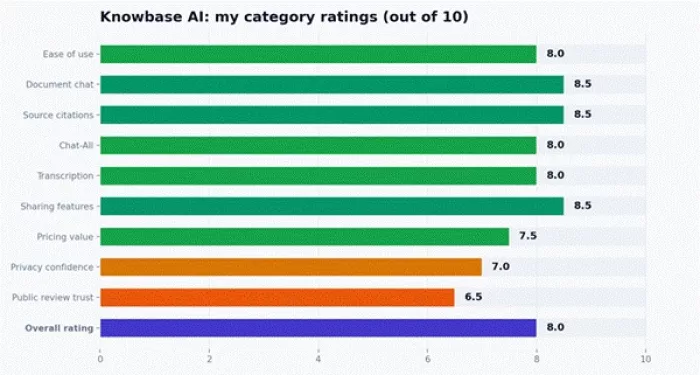
Figure: my category ratings. The overall score reflects how well it fits a document-heavy workflow, not a feature count.
I want to be clear about what this score means. The rating is not driven by counting features. Knowbase AI earns a strong score if you have many files, recordings, and sources to search, because that is exactly where it shines. For a casual user with one occasional PDF, the same tool would feel like more than they need, and the score would mean less.
After living with it, the strongest use case is clear. Knowbase AI is most useful when your information is already scattered across PDFs, notes, videos, recordings, and connected tools. The document chat and source citations make its answers more trustworthy than a plain AI reply, and Chat-All plus transcription make it genuinely helpful for research-heavy and document-heavy work.
It is not a must-have for everyone. The free plan is limited, public review data is still thin, and anyone handling sensitive documents should read the privacy terms before uploading. If you only need to summarize one PDF now and then, a simpler tool is enough. But if you regularly wrestle with documents, lectures, meetings, research files, or client knowledge, Knowbase AI is worth testing through the free plan first and then moving to Pro if it fits how you work.

Marketing teams often need images before a product is ready for a phot...

Creating a logo that will grab customers' attention is one of the main...

Enterprise software has a well-known failure mode. The demo goes great...

Most people who produce video at any real scale hit the same wall even...

A cinematic AI video needs more than realistic skin, dramatic lighting...

Have you noticed how difficult it is not to watch spoilers of a sporti...
Discussion