


I did not plan to keep using MotionMuse AI past the first week. I signed up the way I sign up for most AI tools, which is to say at 11pm on a Tuesday, mildly annoyed that another piece of content I was working on needed a hero animation and the freelance motion designer who usually saves me had quoted a price that made my eye twitch.
The tool was the third Google result, the homepage promised four to six second clips from any image, and the free tier handed me twenty credits the second I confirmed my email. No card required. That is the entire reason I tried it.
My expectations were honestly close to zero. I have been burned by enough AI video tools in the past two years that I now assume the demo reel is lying. Most of these platforms produce gorgeous output for the three pre-baked sample images on their homepage and then completely fall apart the moment you upload anything from your own camera roll.
So when I dragged in a thumbnail I had been struggling with, a fairly soft product shot of a leather notebook on a wooden desk, I expected the kind of warped, melty, uncanny output that has become a sort of running joke in my Slack with other content people.
What I got back, eleven seconds later, was a slow camera drift across the notebook with a barely perceptible flicker of light on the leather grain. It was not stunning. It was not going to win anyone a Webby. But it was usable. I dropped it into the article as a hero loop and moved on with my evening. That clip is what made me come back the next day and start actually testing the platform.
This review is what came out of three months of using the tool across roughly forty real pieces of content. Some of what I am about to write is going to read like criticism, because the platform has real limitations that no amount of marketing copy can paper over. Some of it is going to sound like genuine enthusiasm, because at the price point this thing operates at, I do not know of a closer competitor. The goal here is to land somewhere honest in between.
"It was not stunning. It was not going to win anyone a Webby. But it was usable. That clip is what made me come back the next day."
MotionMuse AI is a browser-based tool that takes a still image and turns it into a short animated clip of four to six seconds. That is the entire product. There is no timeline editor, no multi-shot stitching, no text-to-video pipeline, no audio layer, no avatar generator. The team has decided to do one thing, and the discipline shows in the interface. I have used platforms that try to be everything at once, and the result is usually a cluttered dashboard where the actual generation feature is buried three menus deep. MotionMuse does not have that problem.
The platform launched in April 2025 and recorded 16.61 million monthly visits in January 2026 according to Semrush, which puts it firmly in the consumer end of the AI video category. The user base is heavily international, with Thailand as the largest single market, followed by the United States and Mexico. Direct traffic accounts for roughly 85 percent of all visits, which is the kind of stickiness number you usually see when a tool has worked its way into someone's weekly routine.
The mechanic is simple enough that I can describe it in one sentence. I upload a JPG, PNG, or WebP file, I either pick a motion preset from the platform's library or I type a short description of the movement I want, and the AI analyzes the image's depth and structure and applies the motion. That is the loop. The first time I tried writing a custom prompt I typed something like 'slow pan to the left with a soft cloud drift,' and what came back was, almost exactly, a slow leftward pan with cloud movement. Not generic motion. The specific motion I had asked for.
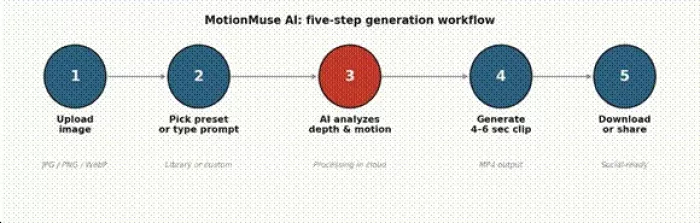
Figure 1. The five-step generation workflow
I will tell you the truth about MotionMuse AI before anything else: you will spend more mental energy on the credit system than on any creative decision the tool offers. Every clip you generate consumes credits from your monthly balance, and unused credits do not roll over at the end of the cycle. I learned this the expensive way during my second month, when I rationed credits all month for a batch I planned to do on the 28th, only to watch the balance reset to zero on the 29th.
The free tier gives you 20 starter credits the moment you sign up, plus 5 more credits every day you log in. If you are disciplined about logging in daily, that compounds to roughly 170 free credits per month, which is enough to generate somewhere between 8 and 15 short clips depending on the complexity of the motion you choose. For a casual user posting once or twice a week, the free tier is genuinely usable. I know that sounds like a marketing claim, but I tested it. Five logins, five credits each, no card on file.
The interface offers two workflow modes. Simple Mode is the default, and it strips the experience down to upload, pick a preset, generate. I lived in Simple Mode for the first week before I even noticed Expert Mode existed. Expert Mode adds slider controls for animation speed and intensity, plus a real-time preview window that shows you the expected output before you commit a credit to a full render. That preview window is the single biggest reason to switch to Expert Mode, because once I started using it I cut my wasted renders by roughly half. The preview is not pixel-perfect, but it is close enough that I can tell whether a motion is going in the right direction or whether the AI has decided to interpret my prompt in a way I did not intend.
This is the feature that surprised me most. On any paid tier, MotionMuse lets you upload a short reference video of the motion you want and the platform builds a private template you can reuse on new images. I tried this with a six-second reference of a slow dolly shot I had pulled from an old project, and after about a day the platform had a reusable preset that mimicked the camera behavior on whatever still I fed it. The fidelity is not perfect. When I uploaded a portrait when my reference had been a landscape, the motion drifted in ways I did not love. But for maintaining a consistent visual style across a batch of similar shots, this feature is genuinely useful, and I do not know of another tool at this price point that includes it on the entry tier.
If you take one practical thing from this review, take this: MotionMuse AI does not improve your source image. It applies motion to whatever you give it. I learned this the hard way by uploading a compressed JPEG that had been resaved three times across various platforms before it reached me. The resulting clip was soft and blurry in motion, and I assumed the tool was broken. Then I went back to the original PNG export of the same image at native resolution, ran it through with the same prompt, and got a noticeably sharper result. The lesson is to feed the platform clean files. If you have a Figma export, use the Figma export. If you have a Photoshop master, use that. Do not upload the social media repost.
This is the section where MotionMuse AI either wins you over or it does not. The plan structure is freemium with three paid tiers, and the annual discount is unusually steep. Here is what the tiers look like at the time of writing.
| Plan | Monthly price | Annual (per month) | Monthly credits | Top-up rate | AI training tools |
| Free | $0 | $0 | 20 starter, 5 daily | Not available | No |
| Basic | $9.99 | $4.99 | 300 | 300 credits / $10 | Yes |
| Pro | $29.99 | $14.99 | 1,500 | 500 credits / $10 | Yes |
| Premium | $49.99 | $24.99 | 3,000 | 600 credits / $10 | Yes |
Table 1. MotionMuse AI plan structure. Annual billing produces a roughly 50 percent discount on all paid tiers.
The Basic tier on annual billing is, in my opinion, the most quietly aggressive number on this entire pricing page. At $4.99 a month, MotionMuse undercuts every direct competitor I can think of. Runway starts at $15 a month on its Standard plan. Pika starts at $8 a month, but commercial rights and watermark-free exports require the $28 a month Pro tier. Kling AI starts at $7.99. Luma Dream Machine starts at $9.99 for the Lite plan.
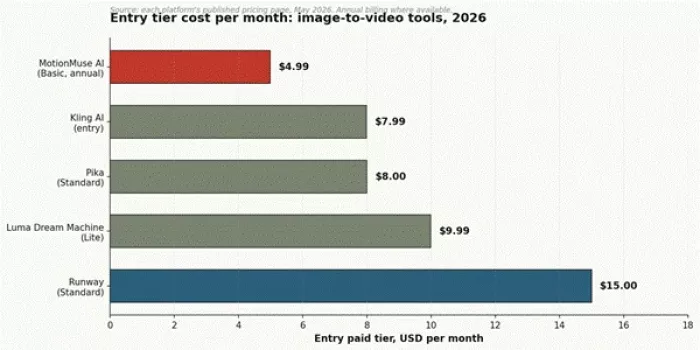
Figure 2. Entry tier monthly cost comparison across the image-to-video category
I want to be honest about something here, because it matters. When I started researching MotionMuse AI's reputation across the standard B2B review platforms, I expected to find at least a thin presence on G2 or Capterra. I did not. Direct profile searches on G2, Capterra, and TrustRadius returned adjacent products with similar names, MotionTools and Snapmuse, which are entirely different platforms. MotionMuse AI itself has essentially no footprint on B2B review aggregators at the time of writing.
That gap is not necessarily a red flag. It is consistent with the tool's positioning. MotionMuse AI is a consumer creator product, not enterprise software, and B2B review sites typically lag the consumer AI space by twelve to eighteen months. The category for tools like this is more accurately reflected in Reddit threads, Quora answers, YouTube comments, and Twitter posts than in the curated B2B review world.
What I did find, across public discussion, is a sentiment pattern that lines up with my own experience. Praise tends to cluster around price, ease of use, and the daily refresh of the preset library. Neutral discussion focuses on workflow fit. The duration cap, the lack of audio, and occasional rendering artifacts on complex images are the most common negatives I came across. None of this is dramatic. The community sentiment reads as practical rather than evangelical, which is itself a useful signal: this is a tool people use, not a tool people advocate for.
After forty-something pieces of content and a few late-night testing sessions, here is where I landed on the platform's strengths and weaknesses. I have organized the limitations alongside the workarounds I actually used, because every problem with this tool has at least a partial fix if you are willing to do a little extra work outside the platform.
| Pros | Cons |
| Lowest entry price in the image-to-video category at $4.99 annual | Hard four to six second cap on every clip |
| Daily refresh of preset library keeps the visual style from going stale | Cloud-only architecture, no offline option |
| Custom motion training utility on the entry paid tier | Credits do not roll over month to month |
| Two-mode interface that scales from beginner to power user | No audio layer of any kind, output is silent MP4 |
| Free tier with daily login credits actually works as a trial | Output quality is bottlenecked by source image quality |
| Expert Mode preview window cuts wasted renders significantly | No character consistency tools for multi-clip workflows |
Table 3. Side-by-side pros and cons after three months of use
Now the workarounds. Every limitation in the table above has a path around it, with one exception, and I want to walk through them practically because this is the part of most reviews that I never see and always want.
| Limitation | Practical impact | Workaround that actually worked for me |
| 6-second duration cap | No long-form narrative in a single clip | Generate multiple clips, stitch in DaVinci Resolve or CapCut, use matched motion to hide the seam |
| No audio layer | Output is silent MP4 | Layer audio in a separate editor, royalty-free libraries work fine |
| Credits expire monthly | Wasted unused balance | Batch generations in the final week of each billing cycle |
| Cloud dependency | Queue waits, internet failures | Schedule batches off-peak (early morning), keep source files local in case of retry |
| Source quality bottleneck | Soft images animate poorly | Pre-clean and upscale source files before upload, never use social-reposted images |
| No character consistency | Same person varies across clips | Use external character lock tools, or accept variance for purely ambient shots |
Table 4. Limitations and the workarounds I tested over three months of use
If I am rating MotionMuse AI strictly against the use case it is built for, which is short, decorative, ambient motion at the lowest sustainable price in the category, I land on a 7.4 out of 10. That score breaks down across six dimensions I tested, and you can see where it earns points and where it loses them in the scorecard below.
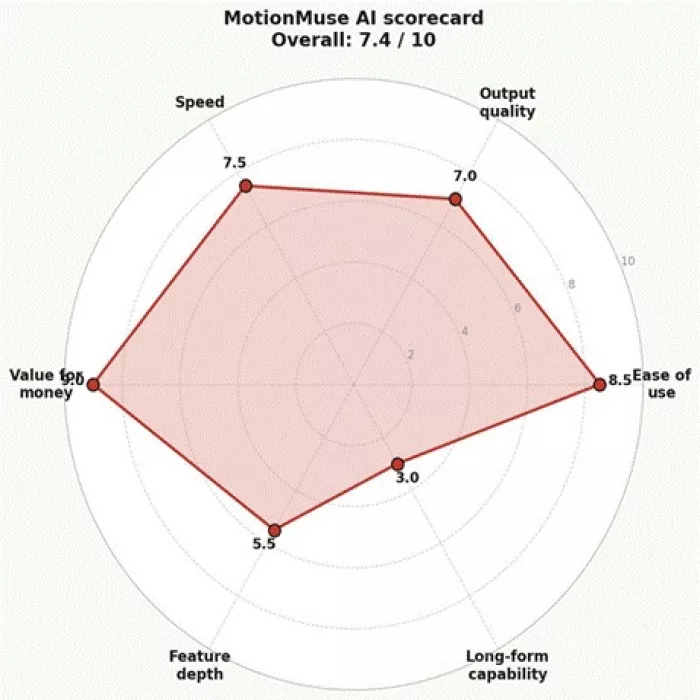
Figure 5. Scorecard across six evaluation dimensions
The recommendation I would actually give to a friend depends entirely on what kind of content they make. If you are a social media manager handling multiple accounts and you need cheap, fast, decorative motion on still images, MotionMuse AI on the annual Basic plan is the answer. I have not found a closer competitor at the price. If you run a small ecommerce shop and you want animated product hero shots for your listings, same answer. The duration cap genuinely does not matter for those use cases, because product hero loops are usually four to six seconds anyway.
If you are producing anything narrative, anything with characters speaking, anything that needs to run longer than six seconds in a single shot, or anything where you need consistent characters across multiple clips, MotionMuse AI is the wrong tool. The right answer is Runway, or Kling for human motion specifically, and the additional cost is worth it because the alternative is fighting the platform's limitations on every project.
“For ambient motion on stills, MotionMuse AI is the cheapest workable option I have used. For anything else, it is the wrong tool, and that is okay.”

Marketing teams often need images before a product is ready for a phot...

Creating a logo that will grab customers' attention is one of the main...

Enterprise software has a well-known failure mode. The demo goes great...

Most people who produce video at any real scale hit the same wall even...

A cinematic AI video needs more than realistic skin, dramatic lighting...

Have you noticed how difficult it is not to watch spoilers of a sporti...
Discussion