


The editing problem that led to Remaker AI
I tested Remaker AI because small image edits were taking more time than they should. Tasks like removing backgrounds, improving blurry photos, creating profile images, swapping faces, or preparing quick blog and social visuals often felt too minor for Photoshop but too important to ignore.
Remaker AI stood out because it combines several tools in one browser-based platform, including face swap, AI headshots, background removal, object removal, image enhancement, and upscaling. In this review, I looked at whether it actually saves time, how natural the results look, where it performs well, and where creators may still need better alternatives.
For readers who want the verdict before the detail, here is the short version.
| Question | The short answer |
| Is Remaker AI useful? | Yes, mainly for quick AI photo edits, face swaps, and upscaling |
| Best feature | Face swap and the image upscaler |
| Best for | Creators, social media users, casual editors, and marketers |
| Not best for | Advanced professional retouching and brand-critical work |
| Biggest concern | Privacy, consent, and output realism in hard cases |
| Worth using again? | Yes for fast edits, no for sensitive or high-end work |
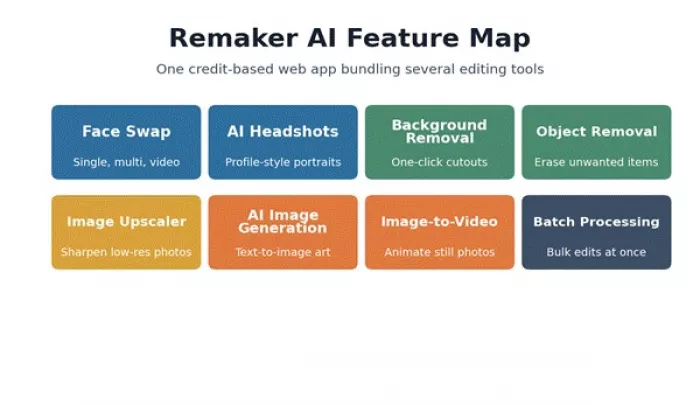
Remaker AI bundles several editing tools into one credit-based web app.
Homepage claims rarely survive contact with real files, so Remaker AI was assessed through practical editing tasks rather than marketing copy. The evaluation framework for this review is called the Real-Upload Test: every tool was fed the kind of imperfect image a working creator actually deals with, not a clean studio sample, and judged on whether the output was usable without a second round of manual fixing.
The tasks covered face swap on a clear photo, face swap under difficult lighting, an AI headshot-style portrait, background cleanup, object removal, image enhancement, creative image generation, export quality, free versus paid limits, and the privacy and consent terms attached to uploads.
| Test | Why it was tried | What mattered |
| Face swap | It is the platform's flagship feature | Face match, skin tone, expression, realism |
| AI headshot | Useful for profile photos | Natural look, over-editing, background quality |
| Background cleanup | A constant creator need | Edge quality, speed, artifacts |
| Object removal | Common photo fix | Clean removal without distortion |
| Image enhancement | Tests practical day-to-day value | Sharpness, noise, natural improvement |
| AI image generation | Tests creative use | Prompt accuracy and output quality |
| Pricing value | Important before paying | Credits, limits, exports, watermark |
The first moment Remaker AI earned its place was speed. There were no layers to build, no masks to paint, and no manual selections to fight with. An image goes in, a tool is selected, and an output comes back fast enough to judge whether it is worth keeping or refining. A useful detail along the way: the platform shows a preview before a download is committed, which avoids burning credits on a result that was never going to work.
The image upscaler stood out earliest in testing. Grainy, low-resolution source photos came back noticeably crisper and more detailed, with a natural rather than over-sharpened finish. For a casual user or a creator clearing a backlog of visuals, that first fast, presentable result is exactly what makes the difference between a tool that gets used and one that gets abandoned after the trial credits run out.
Face swap is the feature that put Remaker AI on the map, and it carries the most weight in this review. The upload flow is simple: a source face and a target image, with support for single swaps, multi-face swaps in group photos, batch jobs, and video swaps reserved for paid VIP access.
On a clear, front-facing photo with even lighting, results were strong. Faces aligned well, skin tone blended convincingly, and the target expression was preserved rather than flattened. Where realism dropped was in harder conditions: side angles, low light, or strong color casts produced softer hairlines, occasional edge artifacts, and a slight identity drift that a careful eye will catch. For entertainment, memes, and casual social posts, the quality is good enough. For anything presented as real, every output needs a human check.
How Remaker AI face swap holds up across the factors that decide realism.
One point deserves to be stated plainly rather than buried: face swap is the single feature where restraint matters most. It should only be used on a creator's own images or on photos where the person involved has given clear permission. The technology is convincing enough that misuse is not hypothetical.
The AI headshot tool aims to turn an ordinary selfie into a clean, profile-ready portrait, with options to adjust background and outfit. For drafting a LinkedIn photo, a resume image, or a quick profile picture, it does a reasonable job and removes the need for a studio shoot.
The limits show up under scrutiny. Skin can be smoothed to the point of looking artificial, the generated identity can shift slightly from the original face, and backgrounds tend toward a generic studio look. For quick profile ideas it is genuinely handy. For final branding, executive portraits, or anything where the image represents a business at a high level, a real photographer or a careful manual editor still produces a more trustworthy result.
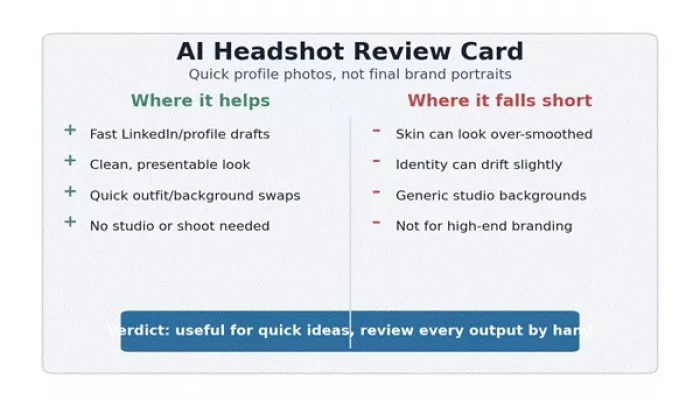
AI headshots: useful for fast profile drafts, not a replacement for a real shoot.
Beyond the headline features, Remaker AI's smaller utilities are where a lot of the everyday value sits. Background removal, object removal, image enhancement, and quick creative edits all live in the same account, which removes the friction of jumping between separate apps.
Background removal handled simple subjects cleanly and worked well enough for social posts and basic product-style visuals, though complex edges such as flyaway hair occasionally needed a second pass. Object removal was reliable when the background behind the removed item was simple, and less convincing against busy or textured backgrounds. Enhancement was a consistent strength, while creative generation produced useful starting points rather than finished, brand-ready assets.
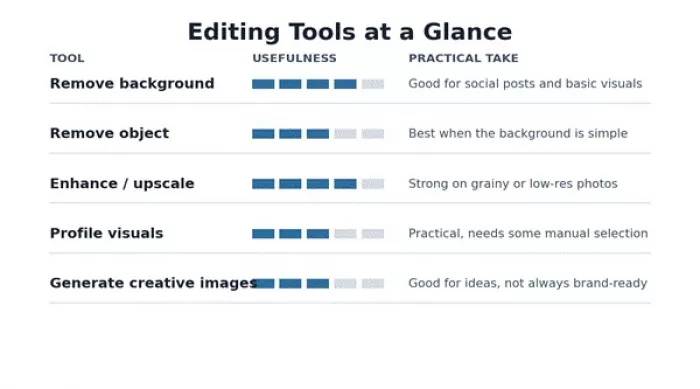
A practical read on where each editing tool earns its keep.
Speed is the throughline of the whole experience. No editing skills are required, uploads and outputs are quick, and the low barrier makes it easy to test an idea before committing time to it. That suits social media creators, and it suits anyone producing blog images, avatars, profile photos, and thumbnails in volume.
Honesty about the weak spots matters more than the feature list. Face swaps can look unnatural in difficult lighting, edges can show artifacts, and skin can be over-smoothed in portraits. Backgrounds in generated images are sometimes inconsistent, and AI-generated visuals can look generic without careful prompting.
There are also practical cautions that sit outside output quality. Commercial use requires checking the license terms attached to a given plan, and the privacy terms covering uploaded images deserve a read before any sensitive file is uploaded. None of this makes the tool unusable; it makes it a tool that rewards a reviewing eye rather than blind trust.
Pricing for AI tools changes often, so the figures below were checked against Remaker AI's official site at the time of writing and should be verified again before any purchase. Remaker AI runs on a one-time credit model rather than a recurring subscription, which is unusual in this category. Credits are bought once and, per the official site, do not expire.
New users receive free credits on sign-up plus a small daily top-up, and paid credit packs reported on the official site range from roughly 5.99 US dollars for around 200 credits up to about 299 US dollars for 20,000 credits. Different tasks cost different amounts of credits, with a simple face swap costing very little and video enhancement costing far more. Video face swap is gated behind paid VIP access, so the free tier does not unlock everything the homepage shows.
| Pricing point | What to check | Why it matters |
| Free credits | Sign-up bonus and daily allowance | Lets users test before paying |
| Credit packs | Price per pack and credits included | Defines real cost for frequent use |
| Credit cost per task | How many credits each tool uses | Video and enhancement burn credits fast |
| Watermarks | Free versus paid export quality | Free exports may not be client-ready |
| Commercial rights | License terms on paid plans | Essential for any business use |
| Refund terms | First-purchase, low-usage window only | Refunds are narrowly limited |
The one-time model genuinely suits light or occasional users, since there is no recurring charge to cancel. Heavy users running video or high-volume enhancement should price out credit consumption carefully, because the per-task cost adds up quickly.
Trust signals for Remaker AI are mixed, and they are worth weighing before relying on the tool for anything important. The picture differs sharply depending on which platform is consulted.
On Trustpilot, the score sits low at around 2.5 out of 5 across a small number of reviews, with recurring complaints about site downtime, intermittent feature failures, and slow or absent customer support. On software directories such as G2, sentiment is far more positive, with users praising the variety of tools and ease of use. App store ratings for the mobile version trend favorable, often cited around 4.3 stars. The volume of reviews is limited overall, so the data is suggestive rather than definitive.
What users like: fast results, ease of use, strong upscaling, and convincing face swaps on clear photos
What users complain about: occasional downtime, inconsistent feature reliability, and weak customer support
Pricing feedback: the one-time credit model is welcomed, though some note recent changes reduced free options
Privacy notes: the site claims uploaded face-swap images are deleted within a short window, but some review analysis flags vague third-party data references
Because review volume is thin and sentiment is split, the sensible approach is to test with free credits first and pay with a method that offers chargeback protection.
Face swap and AI portrait tools carry real responsibility, and this is the part of the review that matters most for trust. The line is simple: convenience never justifies using someone's likeness without their knowledge.
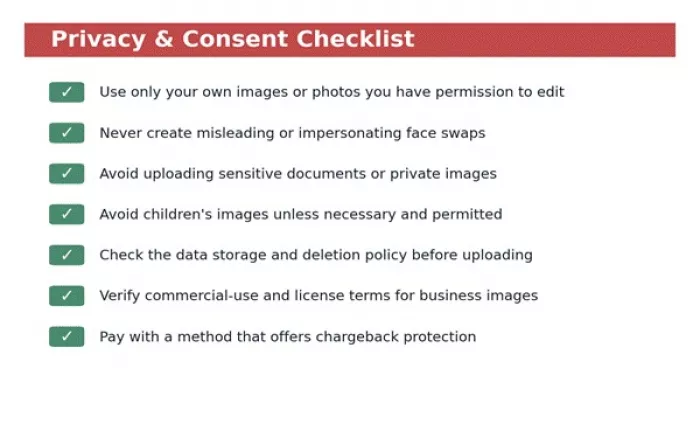
A short consent and privacy checklist worth running before any upload.
In short, a creator should use only their own images or images with clear permission, avoid misleading swaps and impersonation, keep sensitive documents and private photos off the platform, treat children's images with particular caution, and confirm the data-deletion and commercial-use terms before depending on the tool for business work.
Remaker AI sits in a crowded category, and no single tool wins on everything. The comparison below maps where each rival tends to be the stronger choice.
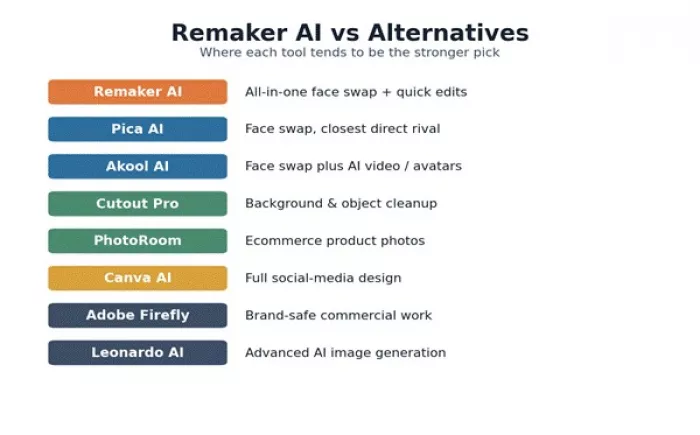
Where Remaker AI and its main alternatives each tend to lead.
| Tool | Stronger for | How it compares with Remaker AI |
| Pica AI | Face swap and AI photo editing | Closest direct rival, worth comparing head to head |
| Akool AI | Face swap plus AI video and avatars | Better for video and avatar workflows |
| Cutout Pro | Background and object removal | More focused on clean cutouts |
| PhotoRoom | Product photo editing | Better for ecommerce product images |
| Canva AI | Full design workflows | Better for finished social media designs |
| Fotor AI | General photo editing | A broader all-round editing toolkit |
| Picsart AI | Mobile creative editing | More casual, creator-friendly on mobile |
| Adobe Firefly | Commercial creative AI | Stronger for brand-safe professional work |
| SeaArt AI | AI art generation | Better for pure AI art |
| Leonardo AI | AI image generation | Better for advanced creative generation |
Remaker AI fits a clear set of situations where speed and convenience outweigh the need for perfection.
There are situations where a more specialized or professional tool is the safer choice.
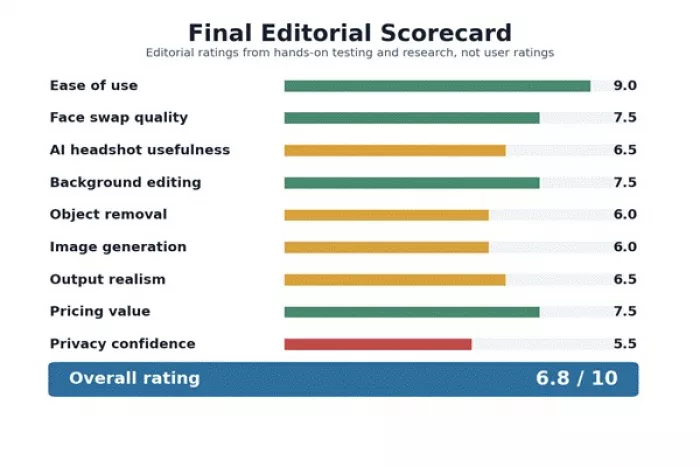
The ratings below are editorial scores drawn from hands-on testing and research for this review. They are not aggregated third-party user ratings.
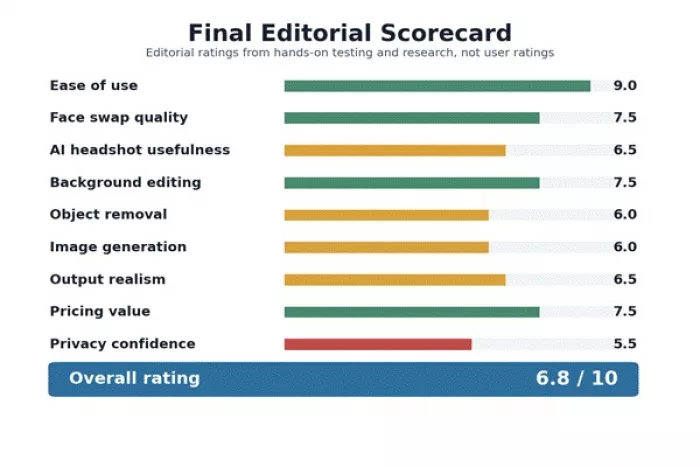
Editorial scorecard based on testing and research, not user ratings.
| Category | Rating | Why |
| Ease of use | 9.0 / 10 | Fast, beginner-friendly, no skills needed |
| Face swap quality | 7.5 / 10 | Strong on clear photos, weaker in hard light |
| AI headshot usefulness | 6.5 / 10 | Good for drafts, not final branding |
| Background editing | 7.5 / 10 | Clean on simple subjects, edges can slip |
| Object removal | 6.0 / 10 | Reliable only against simple backgrounds |
| Image generation | 6.0 / 10 | Useful starting points, often generic |
| Output realism | 6.5 / 10 | Convincing in easy cases, inconsistent in hard ones |
| Pricing value | 7.5 / 10 | One-time credits suit light and occasional use |
| Privacy confidence | 5.5 / 10 | Stated deletion policy, but thin trust signals |
| Overall rating | 6.8 / 10 | Fast and versatile, best for casual creative work |
Remaker AI is a useful, fast tool for quick AI image edits, with face swap, profile-style images, background cleanup, image upscaling, and creative experiments all sitting in one credit-based account. It is not a Photoshop replacement, and it is not a tool to use blindly. The realism holds up in easy cases and slips in hard ones, the trust signals are mixed, and privacy, consent, and commercial-use terms all deserve a careful look.
For casual creators and marketers who need presentable visuals quickly, it earns its place and saves real time. For professional brand work, sensitive images, or anything where a mistake is costly, every output should be reviewed by hand, and a more specialized tool may be the safer choice. Used with that judgment, Remaker AI is a capable shortcut rather than a finished solution.
Is Remaker AI free?
Remaker AI offers a free tier with sign-up credits plus a small daily allowance, enough to test most basic features. Paid credit packs unlock higher volume and gated features such as video face swap. The model is one-time credit purchases rather than a recurring subscription.
Is Remaker AI safe?
The official site states that uploaded face-swap images are deleted within a short window and that payments run through Stripe. Independent trust signals are mixed, with a low Trustpilot score and some flags about vague data references, so testing with free credits and using a payment method with chargeback protection is the sensible approach.
Does Remaker AI have a face swap tool?
Yes. Face swap is its flagship feature and supports single swaps, multi-face swaps in group photos, batch processing, and video swaps, with video reserved for paid VIP access.
Does Remaker AI replace Photoshop?
No. It is built for fast, simple AI edits rather than precise, layer-based work. It complements a professional editor for quick tasks but does not replace one.
Should I use Remaker AI for professional work?
It can help with drafts and quick assets, but professional brand work, sensitive images, and high-end commercial visuals warrant manual review of every output and often a more specialized tool.

Marketing teams often need images before a product is ready for a phot...

Creating a logo that will grab customers' attention is one of the main...

Enterprise software has a well-known failure mode. The demo goes great...

Most people who produce video at any real scale hit the same wall even...

A cinematic AI video needs more than realistic skin, dramatic lighting...

Have you noticed how difficult it is not to watch spoilers of a sporti...
Discussion