

Anyone who has spent real time in AI art tools understands why SeaArt AI built a following. It combines AI image generation, creative models, character-style visuals, community discovery, and prompt-based workflows in one place, which makes it a natural home for creators who like to explore styles and remix what others have made.
That breadth does not fit every creator, though. Some need stronger realism for product-style shots. Some want anime-focused output above everything else. Some need commercial-safe design tools they can defend to a client. And some simply want easier image creation for a blog or a social feed without learning a model ecosystem. Those different goals are exactly why people look for SeaArt AI alternatives.
This guide compares seven of them by creative use case rather than raw feature lists: Midjourney, Leonardo AI, Ideogram, Adobe Firefly, Playground AI, Tensor.Art, and Canva AI Image Generator. SeaArt AI is not framed as bad here. The point is to match the right tool to the right creative goal, since the best alternative depends on what you publish, your budget, and how comfortable you are with community-driven tools. Pricing, credits, model access, and rights change often across these platforms, so confirm specifics on official pages before relying on them.
A shortlisting aid, not a final answer. Match the need, then read the relevant review and verify the caution.
| Creator Need | Best Alternative | Reason | Main Caution |
| High-quality artistic images | Midjourney | Polished, cinematic aesthetic | No free tier; learn the prompt style |
| Anime-style creation | Tensor.Art | Community anime models and styles | Vet model licenses and content rules |
| Realistic product-style visuals | Leonardo AI | Realism models and editing control | Credit limits on heavy use |
| Text inside images | Ideogram | Best-in-class text rendering | Fewer community or model features |
| Commercial-safe brand work | Adobe Firefly | Licensed-data training focus | Less stylistic range than rivals |
| Community model discovery | Tensor.Art | Large shared model library | Filter content and rights carefully |
| Beginner design workflows | Playground AI | Simple creation and editing | Verify free limits and watermarks |
| Social media graphics | Canva AI Image Generator | Image gen inside a design suite | AI art depth is limited |
Before the alternatives, a quick frame on what SeaArt does well. This is deliberately brief and exists only to anchor the comparisons.
• AI image generation: broad text-to-image across many models and styles
• Anime and character-style creation: a particular strength of its community models
• Model and community discovery: browse, remix, and use shared models
• Prompt-based creation: deep prompt control for experimentation
• Creative experimentation: a sandbox for trying styles quickly
• Possible image and video tools: feature set varies; verify current tools
• Best fit: creators who enjoy exploring different styles and models in one platform
The snapshot table pairs each area with the practical reason some creators shop around. The right column is not a knock on SeaArt, just the trigger that sends users looking.
| SeaArt AI Area | Practical Meaning | Reason Users Look for Alternatives |
| AI art generation | Many models and styles | Some want a single polished aesthetic |
| Anime visuals | Strong anime models | Some want dedicated anime depth or safer galleries |
| Character creation | Character-style workflows | Some need tighter character consistency |
| Community models | Shared model library | Open models raise licensing questions |
| Prompt control | Deep controls | Beginners may want simpler creation |
| Image editing | Editing tools vary | Some want stronger editing or canvas tools |
| Commercial use | Verify per case | Brands want clearer commercial-safe terms |
| Pricing and credits | Credit-based | Frequent creators watch credit burn |
| Beginner workflow | Capable but broad | Some want a simpler starting point |
| Content rules | Open ecosystem | Some want clearer moderation and safety |
Tools here are compared by creative workflow value, not popularity alone. The Creative-Workflow Output Test scores each platform against the factors below, and pairs each with a question worth asking before committing.
| Evaluation Factor | Reason It Matters | Question to Ask Before Choosing |
| Image quality | Output is the whole point | Does quality hold up on your style? |
| Prompt accuracy | Saves wasted generations | Does it follow complex prompts? |
| Style variety | Range supports different jobs | Are the styles you need available? |
| Anime output | Key for anime creators | Are anime models strong and safe? |
| Realistic output | Key for product and people | Are faces and details believable? |
| Character consistency | Needed for series and concepts | Can a character stay consistent? |
| Editing control | AI alone rarely nails it | Are there editing or canvas tools? |
| Text rendering | Posters and logos need readable text | Does text come out legible? |
| Commercial-use clarity | Business use carries risk | What does the license actually allow? |
| Community and model access | Shortcuts the learning curve | Are shared models available and licensed? |
| Ease of use | Affects daily speed | Can a beginner get a good result fast? |
| Pricing transparency | Hidden credits distort cost | What is the real cost per usable image? |
| Export quality | Low-res limits real use | What resolution and formats export? |
| Safety and content policy | Affects publishing risk | Are moderation and rules documented? |
The grid shows editorial fit for each alternative across six creative dimensions. These are fit scores to aid comparison, not vendor performance ratings, so confirm each capability on the official sites.
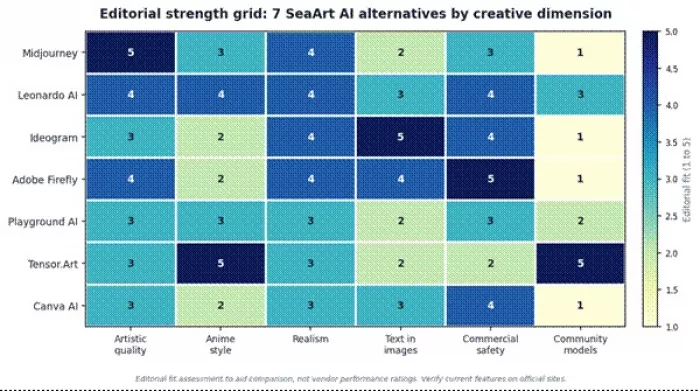
Editorial strength grid across creative dimensions. Verify current features before relying on them.
Midjourney remains the reference point for polished, cinematic AI images. It is less about granular control and more about a distinctive house aesthetic that tends to look finished out of the box, which is why artists keep returning to it for premium creative output.
Best creative workflow
It suits concept art, fantasy, editorial visuals, mood boards, and any project where visual style matters more than precise control. The web interface has made it more approachable than its Discord-only past.
Where it may beat SeaArt AI
For creators who prioritize polished visual style and artistic quality, Midjourney usually beats SeaArt AI on sheer aesthetic finish. Its outputs often need less cleanup to look professional.
Where SeaArt AI may still feel better
SeaArt AI may still feel better for community model exploration, anime-specific styles, and creators who want a free entry point and a remix-driven workflow rather than a single curated aesthetic.
Best-fit user: Artists and concept creators who want premium aesthetic quality.
Reviewer verdict Midjourney is my pick when the image itself needs to impress without much rework. The honest trade-offs are the lack of a free tier and a prompt style you have to learn. For polish, little else matches it; for model variety and free experimentation, SeaArt is the more flexible playground. |
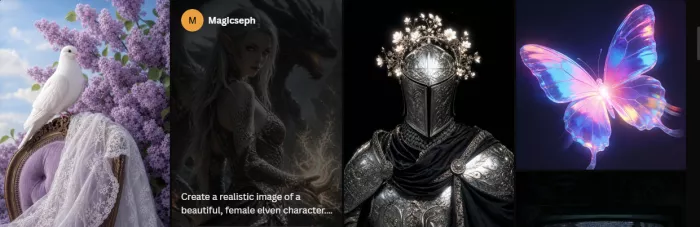
Leonardo AI has grown into a structured creative suite aimed at production work. Alongside image generation it offers style control, an AI Canvas for editing, and custom model training, which makes it a favorite for game designers and character creators who want repeatable results.
Best creative workflow
It fits game art, character design, marketing visuals, and any workflow that benefits from controlled, repeatable output. The editing and model tools support iterating toward a specific look rather than one-off generations.
Where it may beat SeaArt AI
For creators who want structured tools and more controlled workflows, Leonardo AI tends to beat SeaArt AI on production discipline, with stronger editing and model management for repeatable results.
Where SeaArt AI may still feel better
SeaArt AI may still feel better for sheer community model breadth and casual style exploration, where the goal is variety and inspiration rather than a controlled pipeline.
Best-fit user: Game designers, character creators, and AI artists who want control.
Reviewer verdict Leonardo is the one I reach for when I need to hit the same look repeatedly, not just a lucky single image. The credit math rewards planning, and heavy users feel the limits. For controlled character and asset work it is excellent; for free-form remixing, SeaArt is looser and broader. |
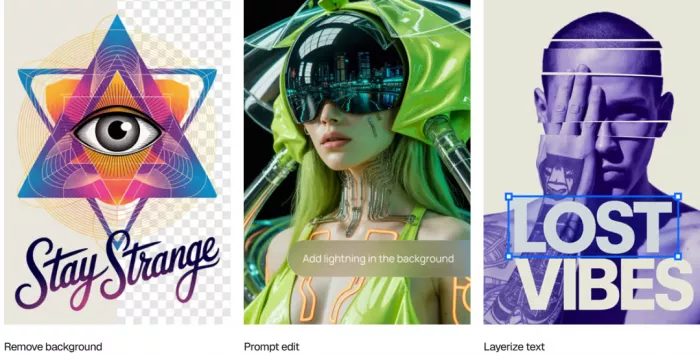
Ideogram solved the problem most AI generators still stumble on: readable text inside images. For posters, logos, typography-led visuals, and social graphics, that single strength changes what is actually usable versus what needs a redo.
Best creative workflow
It fits any design where words matter as much as the image, including posters, book covers, promotional graphics, and branded social posts. A typography focus in prompts pushes text quality further.
Where it may beat SeaArt AI
For creators who need legible, well-placed text inside images, Ideogram beats SeaArt AI clearly. It is the difference between a finished graphic and one that needs text added in another tool.
Where SeaArt AI may still feel better
SeaArt AI may still feel better for character art, anime styles, and community model discovery, which are outside Ideogram's typography-focused lane.
Best-fit user: Designers and marketers who need readable text in images.
Reviewer verdict Ideogram is a specialist, and within its specialty it is the best tool here. I would not pick it as an all-rounder, but for poster and logo concepts with real words, it saves the most time. SeaArt remains the better choice when the job is illustrative art rather than typography. |
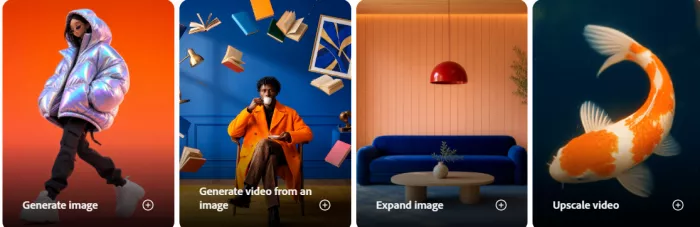
Adobe Firefly is built around commercial safety. Adobe states it is trained on licensed and public-domain content rather than scraped from the open web, and outputs commonly carry Content Credentials. For marketers and businesses, that provenance is the headline.
Best creative workflow
It fits brand and marketing work, generative fill and edits, and any team already living inside the Adobe ecosystem. The integration with Photoshop and other apps keeps the workflow in one place.
Where it may beat SeaArt AI
For marketers, designers, and businesses that care about safer creative use, Firefly beats SeaArt AI on commercial confidence thanks to its licensed-data approach and provenance signals.
Where SeaArt AI may still feel better
SeaArt AI may still feel better for stylistic range, anime, and community-driven exploration, where Firefly's curated, brand-safe approach can feel more limited.
Best-fit user: Brand-conscious creators and businesses that need safer commercial output.
Reviewer verdict Firefly is my recommendation when a client will ask where an image came from. It trades some stylistic adventurousness for peace of mind, which is the right trade for brand work. For expressive or anime art, SeaArt and others give more range. |
Playground AI leans toward approachable image creation and editing. With a canvas-style workflow and simpler controls, it lowers the barrier for people who want to make and tweak images without learning a model ecosystem.
Best creative workflow
It fits casual creators who want to generate, edit, and adjust images quickly, including simple design-style tasks and light retouching, without the depth of a full art platform.
Where it may beat SeaArt AI
For users who want simpler, design-style image creation and editing, Playground AI can be easier to live with than SeaArt AI, with less to learn before getting a usable result.
Where SeaArt AI may still feel better
SeaArt AI may still feel better for deep community model exploration and advanced prompt control, which are beyond Playground's lighter approach.
Best-fit user: Casual creators who want easy image creation and light editing.
Reviewer verdict Playground is the friendly on-ramp of this group. It will not satisfy a creator chasing model depth, but for quick make-and-edit tasks it is pleasant and low-friction. SeaArt is the better choice once you want to dig into models and styles. |
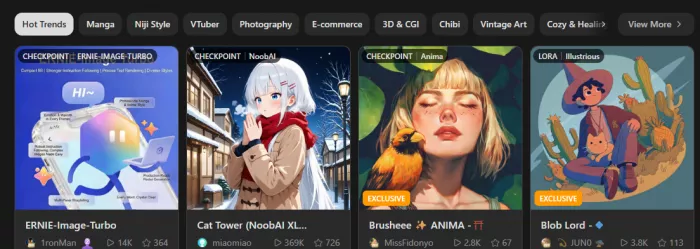
Tensor.Art is the closest in spirit to SeaArt AI, built around community models and anime-style creation. It draws creators who want model variety, discovery, and a community to remix and learn from.
Best creative workflow
It fits anime-style work and model exploration, where browsing community models and experimenting with prompts is the point. For creators who treat model discovery as part of the craft, it is a natural fit.
Where it may beat SeaArt AI
For creators focused on model variety and anime-style exploration, Tensor.Art can match or beat SeaArt AI on community breadth and discovery, with a strong anime-leaning library.
Where SeaArt AI may still feel better
SeaArt AI may still feel better for its particular community, interface, and any image or video tools it bundles, so the two are best compared head to head on model selection and rules.
Best-fit user: Anime creators and model explorers who want community variety.
Reviewer verdict Tensor.Art is the natural cross-shop for a SeaArt user, since the experience rhymes. The same openness that makes it fun also puts licensing and content responsibility on you, so verify model rights carefully. For anime and model variety it is genuinely strong. |
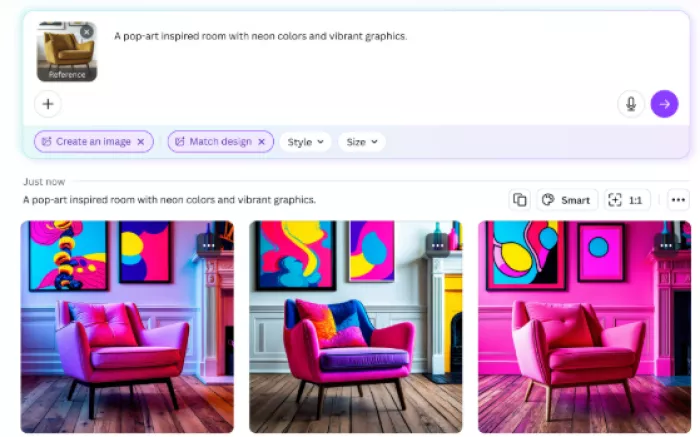
Canva's AI image generator lives inside a full design platform, which changes what it is for. Instead of producing a raw image and stopping, it turns generation into a finished post, thumbnail, or marketing asset using templates and brand kits.
Best creative workflow
It fits social media graphics, presentations, thumbnails, and marketing assets, where the real goal is publishable content rather than standalone AI art. The design tools around the generator are the value.
Where it may beat SeaArt AI
For users who need finished content rather than only generated images, Canva AI beats SeaArt AI on turning an image into a real, on-brand asset quickly.
Where SeaArt AI may still feel better
SeaArt AI may still feel better for AI art quality, model control, and stylistic depth, which Canva's design-first generator does not aim to match.
Best-fit user: Marketers and social creators who need finished, on-brand designs.
Reviewer verdict Canva is the pick when the image is only step one and a publishable design is the real goal. It is not where I would chase AI art quality, but for social and marketing output it is hard to beat on speed. SeaArt is the better art generator; Canva is the better finisher. |
This table pairs each creative need with a strong alternative and a practical takeaway. The alternative named is a representative strong option, not the only choice.
| Creative Need | SeaArt AI | Better Alternative | Practical Takeaway |
| Anime image generation | Strong community models | Tensor.Art | Compare two community-driven anime tools |
| Realistic images | Capable | Leonardo AI | Realism models plus editing control |
| Character concepts | Character workflows | Leonardo AI | Better control for repeatable characters |
| Community model discovery | Core strength | Tensor.Art | Both strong; compare libraries and rules |
| Prompt control | Deep | Leonardo AI | Structured controls aid production |
| Text inside images | Limited | Ideogram | Ideogram is the clear text leader |
| Image editing | Varies | Playground AI | Simpler editing and canvas tools |
| Commercial-safe design | Verify per case | Adobe Firefly | Licensed-data approach aids brand work |
| Social media graphics | Generated images | Canva AI | Templates turn images into posts |
| Beginner workflow | Broad, can overwhelm | Playground AI | Lower barrier to a usable result |
| Brand visuals | Verify rights | Adobe Firefly | Provenance helps brand confidence |
| Creative experimentation | Strong | Midjourney | Polished aesthetic for premium output |
Direct recommendations follow. Treat each as a starting shortlist, then verify pricing and rights.
• Midjourney: for premium artistic visuals
• Leonardo AI: for characters, game assets, and controlled creative workflows
• Ideogram: for posters, graphics, and images with readable text
• Adobe Firefly: for brand-conscious and commercial-safe workflows
• Playground AI: for easy image creation and editing
• Tensor.Art: for anime-style model exploration
• Canva AI Image Generator: for social media, thumbnails, and finished marketing designs
• Stay with SeaArt AI: if you like community-driven AI art, character creation, and model exploration in one platform
Rather than trusting feature lists, run a short, controlled test. This takes under an hour and gives an honest answer for your own work.
1. Use the same prompt across three tools.
2. Test one realistic image, one anime image, and one social graphic.
3. Check prompt accuracy against your intent.
4. Check hands, faces, backgrounds, and text quality.
5. Review how many credits each generation used.
6. Check export quality and watermark rules.
7. Read the commercial-use terms.
8. Test editing or regeneration controls.
9. Save outputs and compare actual usability.
10. Choose based on publishable results, not feature count.
The table frames each test and what a win looks like.
| Test | Reason | Winner Criteria |
| Same prompt, three tools | Controls for input differences | Closest match to your intent |
| Realistic, anime, and graphic | Covers different output types | Best result per type |
| Prompt accuracy | Saves wasted credits | Follows the prompt faithfully |
| Hands, faces, text quality | Common failure points | Fewest artifacts |
| Credit usage | Reveals real cost | More usable output per credit |
| Export and watermark | Affects publishability | Higher quality, fewer marks |
| Commercial-use terms | Decides safe use | Clearer, friendlier rights |
| Editing controls | Fixes weak outputs | Easier, more capable edits |
| Usability comparison | Output is what matters | Most publishable result |
| Final results-based choice | Avoids feature-count bias | Best real output wins |
A last look before deciding, distilling the strongest reason to choose each tool against its biggest trade-off.
| Alternative | Strongest Reason to Choose It | Biggest Trade-Off | Best User |
| Midjourney | Polished artistic image quality | No free tier; learning curve | Artists and concept creators |
| Leonardo AI | Control plus character and asset tools | Credit limits on heavy use | Game and character creators |
| Ideogram | Best text rendering in images | Narrower beyond typography | Designers and marketers |
| Adobe Firefly | Commercial-safe, licensed data | Less stylistic range | Brand-conscious creators |
| Playground AI | Easy creation and editing | Less model depth | Casual creators |
| Tensor.Art | Anime and community model variety | Licensing and moderation to verify | Anime and model explorers |
| Canva AI | Turns images into finished designs | Limited AI art depth | Marketers and social creators |
There is no single best SeaArt AI alternative for everyone, and the right pick follows the image you need to make. Midjourney is strongest for polished artistic images. Leonardo AI is strong for creator control and character workflows. Ideogram is the one for text-heavy graphics. Adobe Firefly is better for brand-conscious commercial use. Playground AI is easier for casual editing. Tensor.Art is useful for model and anime exploration. Canva AI is best when the final goal is a social post, thumbnail, or marketing asset.
Match the tool to the output, verify pricing and commercial rights, and keep copyright and consent in mind, especially on community-model platforms where licensing is your responsibility.
The Idea Worth Keeping – Choose a SeaArt AI alternative based on the image you need to publish, not the longest feature list. |

Marketing teams often need images before a product is ready for a phot...

Creating a logo that will grab customers' attention is one of the main...

Enterprise software has a well-known failure mode. The demo goes great...

Most people who produce video at any real scale hit the same wall even...

A cinematic AI video needs more than realistic skin, dramatic lighting...

Have you noticed how difficult it is not to watch spoilers of a sporti...
Discussion