

Most people do not open a 90 minute YouTube video because they have 90 free minutes to spare. They open it because one answer, one tutorial step, one definition, or one quote is buried somewhere inside it. The cost is rarely the video itself. The cost is the search for the useful part.
Skipit AI sits in exactly that gap. It is an AI YouTube video summarizer that condenses videos into key points and answers direct questions about what was said. It supports videos up to 12 hours long, allows unlimited messages, and can save chats and videos for later, according to its official site. The promise is plain: answers in seconds instead of minutes.

This guide treats Skipit AI as a productivity decision, not a product to admire. The sections below map its features to real tasks, estimate where it saves time, separate verified facts from editorial judgment, confirm current pricing, and weigh it against free summarizers, so the choice is clear for students, researchers, marketers, creators, online learners, and busy professionals.
The short version, before the detail:
| Category | Details |
| Tool type | AI YouTube video summarizer |
| Main job | Summarize videos and answer questions about their content |
| Best for | Long videos: tutorials, lectures, podcasts, webinars, research videos |
| Maximum video length | Up to 12 hours |
| Chat feature | Ask questions and get answers from the video, with unlimited messages |
| Saved history | Chats and videos can be saved forever, per the official site |
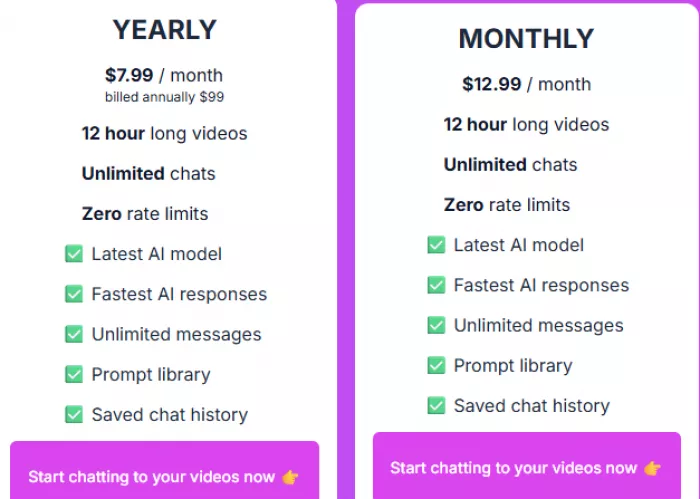
| Pricing (June 2026) | Yearly $7.99/month (billed $99/year); Monthly $12.99/month. Re-check on publish date. |
| Main limitation | Summary quality depends on transcript quality, audio clarity, and how structured the speech is |
Ratings in this guide are not scraped from review sites. They are built from four lenses, applied consistently across the tool:
1. Verified capability: what the official site actually claims, including length, messages, and saved history.
2. Task fit: how cleanly a feature maps to a real job a reader needs done.
3. Accuracy risk: where transcript quality, audio, or topic complexity can weaken the output.
4. Cost clarity: whether pricing can be confirmed from the official source on the publishing date.
Usefulness scores reflect feature fit and the known behavior of transcript-based summarizers, not user review ratings. No third-party star ratings were invented. Public, verified aggregate review scores for Skipit are limited: the official homepage shows user testimonials rather than a numeric rating, so this guide relies on capability and fit instead of borrowed scores.
The single most useful number attached to Skipit is its video length ceiling. Support for videos up to 12 hours covers the formats where summarizing actually pays off: full podcast episodes, recorded courses, conference talks, long livestreams, and multi-part lectures. Many free tools cap out well before that.
| Video type | Average length | Skipit AI use case |
| Short tutorial | 5 to 15 min | Quick recap of the key steps |
| Product demo | 20 to 45 min | Extract steps and feature notes |
| Podcast episode | 45 to 180 min | Find key opinions and the moments that matter |
| University lecture | 60 to 120 min | Convert into study notes |
| Webinar | 45 to 90 min | Pull action points and takeaways |
| Long livestream or course | 3 to 12 hr | Ask targeted questions without watching all of it |
Long-video support only helps when the transcript is readable and the speech is reasonably structured. A noisy recording or poor captions can still produce a thin summary, regardless of length.
A feature list says little on its own. The table below reframes each capability as a task a reader might bring to it, with the practical payoff and the honest risk attached.
| Real-life task | Skipit AI feature | Practical benefit | Accuracy risk |
| Summarize a 2 hour podcast | AI video summary | Saves viewing time | May miss tone or context |
| Find one tutorial step | Video Q&A | Returns a targeted answer | Depends on transcript quality |
| Keep research videos | Saved chats and videos | Revisit them later | Requires an account or session |
| Ask follow-up questions | Unlimited messages | Allows deeper exploration | Answers may still need checking |
| Study from lectures | Summary plus Q&A | Turns a video into notes | May simplify complex ideas |
Used together, those features form a short, repeatable loop:
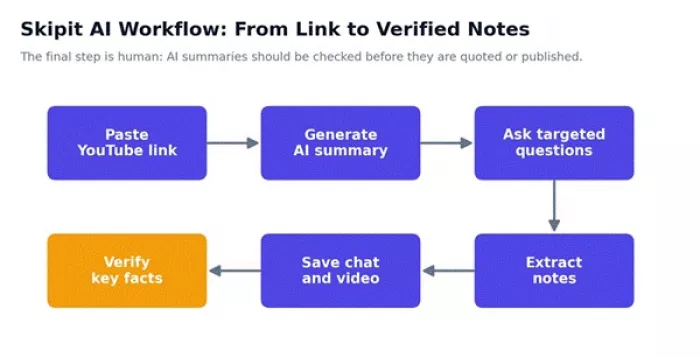
Figure 1. The Skipit AI loop, ending in a human fact-check.
Time saved is the entire point, so it is worth estimating rather than asserting. The chart and table below compare ordinary watching time with a realistic summarize then question workflow.
| Scenario | Video length | Manual watching | Skipit workflow | Estimated time saved |
| Tutorial recap | 30 min | 30 min | 3 to 5 min | 25+ min |
| Podcast research | 90 min | 90 min | 8 to 12 min | 75+ min |
| Lecture notes | 60 min | 60 min | 10 to 15 min | 45+ min |
| Webinar summary | 45 min | 45 min | 5 to 8 min | 35+ min |
| Long course scan | 4 hr | 240 min | 20 to 30 min | 3+ hr |
These are workflow estimates, not official Skipit performance figures. Real savings depend on how specific the questions are and how clean the transcript is.
To test Skipit AI properly, I first tried to use the tool myself instead of relying only on feature claims. My goal was simple: open Skipit AI, paste or use a YouTube video, generate a summary, ask follow-up questions, and see whether the result was useful enough to justify paying.
The first step was account creation.
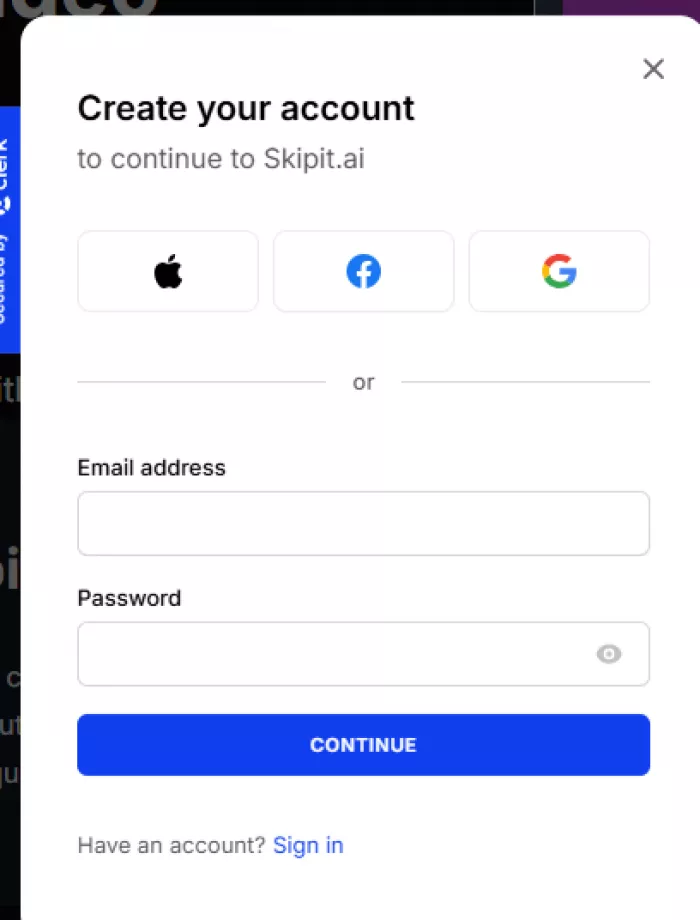 Skipit AI showed a sign-up window with options to continue using Apple, Facebook, Google, or email and password. I used the Google sign-in option, which redirected me through Clerk authentication. Google showed that Clerk would access basic account information such as my name, profile picture, and email address.
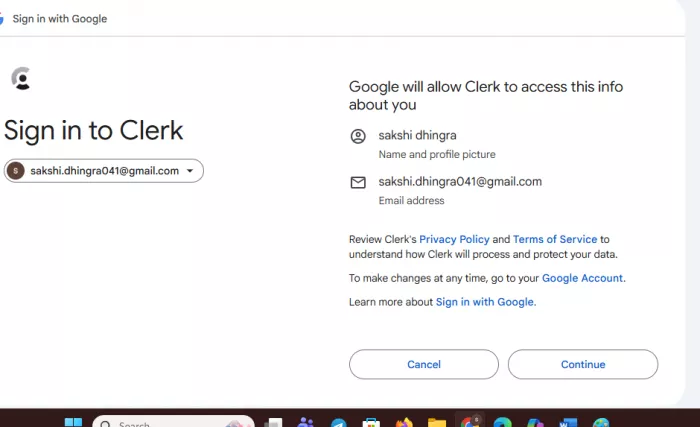
After signing in, I expected to test at least one YouTube summary for free. But instead of giving me a usable free trial workflow, Skipit AI pushed me toward its paid subscription page. The pricing screen showed two plans: a yearly plan at $7.99 per month billed annually at $99, and a monthly plan at $12.99 per month. It also displayed an India-specific discount message offering 50% off with the code INDIA50.
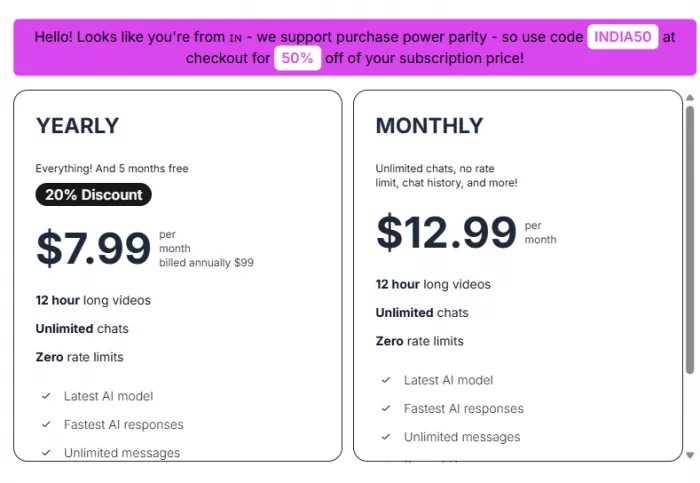
This is where the hands-on test became limited. I could not properly test the actual YouTube summarizer output without paying first. That means I could not directly judge the summary quality, follow-up chat accuracy, or how well it handles long videos from my own completed test.
Because of that, I treated this review carefully. I used my own sign-up and pricing experience to evaluate the onboarding and payment flow, then checked other public review pages, product listings, and available information to understand what Skipit AI claims to offer. However, I did not treat those outside sources as a replacement for a full hands-on output test.
| Step | What I Did | What Happened |
|---|---|---|
| 1 | Opened Skipit AI | The site asked me to create an account |
| 2 | Checked sign-up options | Apple, Facebook, Google, and email signup were available |
| 3 | Used Google login | It redirected through Clerk authentication |
| 4 | Completed sign-in | Google showed Clerk would access basic profile and email info |
| 5 | Tried to test the summarizer | I was taken toward the subscription/pricing flow |
| 6 | Checked pricing | Monthly and yearly paid plans were shown |
| 7 | Looked for free testing access | I could not complete a free output test |
| 8 | Reviewed other public information | Used it only to understand claims, pricing, and feature positioning |
| 9 | Final testing limit | I could not judge real summary quality without paying |
The same tool serves very different goals depending on who is holding it. The matrix and table below pair each role with its strongest use and a prompt that tends to work.
| User type | Best Skipit AI use | Example prompt to ask |
| Student | Lecture summaries | “Turn this lecture into exam notes.” |
| Researcher | Extract claims and evidence | “List the main arguments and the evidence given.” |
| Marketer | Competitor video analysis | “Summarize the product positioning in this video.” |
| Content creator | Repurpose long videos | “Pull 10 short-form content ideas from this video.” |
| SEO writer | Gather expert insights | “Extract expert points worth citing in an article.” |
| Busy professional | Webinar recap | “Give me the action items and key takeaways.” |
| Developer | Tutorial debugging | “Find the installation steps and any errors mentioned.” |
Summaries inherit the strengths and flaws of the transcript underneath them. The scorecard below estimates where Skipit tends to be dependable and where its output needs a second look.
| Task | Expected usefulness | Reason |
| Summarizing structured tutorials | ★★★★☆ 4.2 | Clear, ordered steps are easy to summarize |
| Skimming long podcasts | ★★★★☆ 4.0 | Good for themes, weaker on nuance |
| Lecture notes | ★★★★☆ 4.1 | Useful when the transcript is clean |
| Capturing exact quotes | ★★☆☆☆ 2.5 | Wording needs manual verification |
| Legal or medical detail | ★★☆☆☆ 2.0 | High-risk topics require source checking |
| Short viral videos | ★★★☆☆ 3.0 | Often too little substance to summarize |
| Noisy audio or poor captions | ★★☆☆☆ 2.2 | Transcript quality limits the output |
Free YouTube summarizers are good when you need a quick recap of a short video. Skipit AI becomes more useful when the video is long, when you want to ask follow-up questions, or when you want to save the video chat for later. That is the main difference. Free tools usually solve the “summarize this now” problem, while Skipit AI is closer to a long-video research assistant.
The biggest reason Skipit AI stands out is its 12-hour video support, unlimited messages, and saved chat/video history. These points matter most for podcasts, online courses, webinars, long tutorials, livestreams, and lectures where one simple summary is not always enough.
| Tool | Main Strength | Free Access | Best For | Main Limitation |
| Skipit AI | Long YouTube summaries with saved video Q&A | Paid plans listed | Long videos, podcasts, courses, webinars, lectures | No clearly visible free tier in the article data |
| NoteGPT | Quick YouTube transcript summaries and AI chat | Yes, with limits/credits | Fast free summaries | Free usage may be capped |
| Monica YouTube Summary | Browser-based YouTube summaries | Yes, free tier | Users already using Monica extension | Works inside its wider extension ecosystem |
| Gist AI | One-click summaries for YouTube, webpages, and PDFs | Yes | Lightweight Chrome-based summaries | Less focused on saved video research |
| Heuristica | Summaries, concept maps, flashcards, quizzes | Yes | Students and visual learners | Less focused on long saved Q&A sessions |
| Noiz | Fast one-click YouTube summaries | Free, but limits need checking | Quick casual summaries | Feature depth and limits can vary |
For short videos, free tools often make more sense. If you only want to summarize a 5-minute tutorial, a product demo, or a quick explainer, tools like NoteGPT, Gist AI, Heuristica, or Noiz may be enough. They reduce friction because you do not need to think much about pricing, saved history, or advanced workflows.
A summary is only as sharp as the prompt behind it. The inputs below are written to pull specific, usable output rather than a vague recap.
| Goal | Prompt |
| Study notes | “Convert this video into exam notes with definitions, examples, and key terms.” |
| Quick summary | “Summarize this video in 7 points and keep only the useful parts.” |
| Research extraction | “List all claims, examples, numbers, and sources mentioned in the video.” |
| Tutorial workflow | “Extract every step in order and note any warnings or errors.” |
| Content repurposing | “Turn this video into 10 Shorts ideas, 5 LinkedIn angles, and 3 blog sections.” |
| Meeting or webinar recap | “Give me the decisions, action items, names mentioned, and follow-up tasks.” |
| Fact-check support | “List statements that should be verified before they are used in an article.” |
Pulling the threads together, the snapshot below scores Skipit by category rather than by task.
| Category | Rating | Reason |
| Long-video usefulness | ★★★★☆ 4.3 / 5 | The 12 hour ceiling suits long-form content |
| YouTube learning workflow | ★★★★☆ 4.2 / 5 | Strong fit for lectures, tutorials, and podcasts |
| Pricing transparency | ★★★☆☆ 3.0 / 5 | Plans are listed on the site, but third-party pages report them inconsistently |
| Beginner friendliness | ★★★★☆ 4.0 / 5 | Simple link-based workflow |
| Research reliability | ★★★☆☆ 3.3 / 5 | Summaries should be checked against the source |
| Creator workflow value | ★★★★☆ 4.1 / 5 | Useful for repurposing long videos |
| Overall editorial fit | ★★★★☆ 4.0 / 5 | Strong use-case fit, with caution on price and accuracy |
Skipit earns its place for anyone who works through long-form video on a regular basis. Multi-hour podcasts, recorded courses, lectures, and conference talks are exactly where a 12 hour ceiling and a saved, searchable Q&A history pay off, and that combination is its clearest advantage over free, throwaway summaries.
For occasional, short clips, free tools such as NoteGPT, Gist AI, or Heuristica usually cover the need without a subscription. The decision comes down to three things: how much long video is involved, how often saved chats matter, and whether the budget justifies a paid plan over a capable free one.
One rule holds across every option. The summary is a starting point, not a citation. The workflow that ends in a quick fact-check is the one that saves time without quietly introducing errors.
Is Skipit AI a YouTube summarizer?
Yes. The official site describes it as an AI YouTube video summarizer that condenses videos and answers questions about their content.
Does Skipit AI support long videos?
Yes. The official site lists support for videos up to 12 hours, which covers most podcasts, courses, and lectures.
Can Skipit AI answer questions from a video?
Yes. It allows direct questions and returns answers drawn from the video, with unlimited messages for follow-ups.

Marketing teams often need images before a product is ready for a phot...

Creating a logo that will grab customers' attention is one of the main...

Enterprise software has a well-known failure mode. The demo goes great...

Most people who produce video at any real scale hit the same wall even...

A cinematic AI video needs more than realistic skin, dramatic lighting...

Have you noticed how difficult it is not to watch spoilers of a sporti...
Discussion