
If you've been keeping an eye on the creative tech space, you already know things are moving fast. The global Generative AI in Animation market was valued at USD 2.1 billion in 2024 — and it's projected to explode to USD 15.9 billion by 2030, clocking a staggering 39.8% CAGR. Some forecasts from Precedence Research push that figure even further, to USD 31.37 billion by 2035.
What does that mean for you as a creator, marketer, or brand? It means the barrier to producing studio-quality animated content has essentially collapsed. A solo content creator today can produce what a small animation studio used to take weeks and thousands of dollars to deliver. But — and this is important — not all AI animation tools are created equal.
This review cuts through the noise. We've tested seven of the most talked-about AI animation platforms, broken down every meaningful data point — pricing, output quality, video length, ease of use, community, and value — and given each tool a raw, unfiltered rating. No fluff. Just facts, comparisons, and our honest take on who each tool is actually built for.
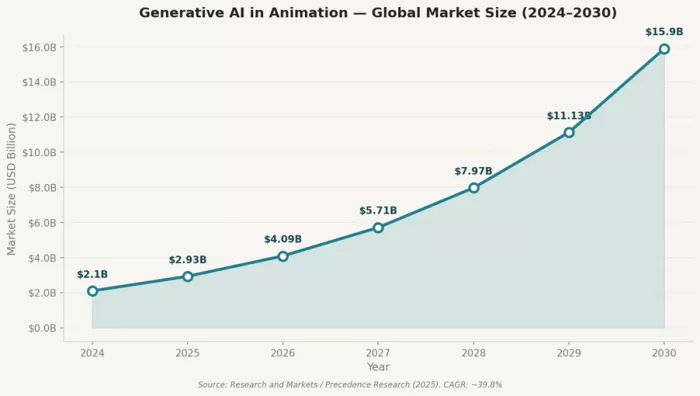
Figure 1: GenAI in Animation global market size projection (2024–2030). Source: Research and Markets / Precedence Research
Before we go deep, here's a bird's-eye view. Bookmark this section — it's the fastest way to find the right tool for your specific situation.
| Tool | Best For | Max Video Length | Entry Price/mo | Rating | Free Plan |
| Runway ML Gen-3 | Cinematic quality, pro editing | 10 seconds | $15 | ★★★★½ (4.5) | Yes (125 credits) |
| Kling AI 2.0 | Long-form video, natural motion | 2 minutes | $10 | ★★★★ (4.4) | Yes (daily credits) |
| Pika Labs 2.0 | Budget-friendly quick clips | 4–10 seconds | $8 | ★★★★ (4.2) | Yes (150 credits/mo) |
| Synthesia | AI avatars, corporate training | Unlimited (minutes-based) | $29 | ★★★★ (4.3) | Yes (3 min/mo) |
| Adobe Firefly | Creative pros, Adobe ecosystem | 5 seconds (beta) | $9.99 | ★★★★ (4.1) | Yes (limited) |
| D-ID | Talking-head & presenter videos | Minutes-based | $49.99 | ★★★★ (4.0) | 14-day trial |
| Luma Ray 2 | Ultra-realistic physics-based video | 10 seconds | $9.99 | ★★★★ (4.3) | Yes (720p) |
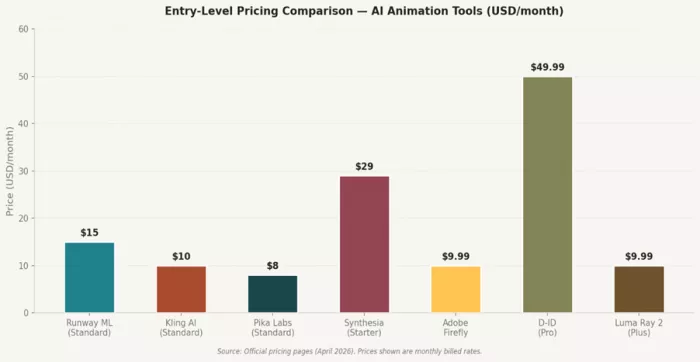
Figure 2: Entry-level pricing comparison across all 7 AI animation tools (USD/month)
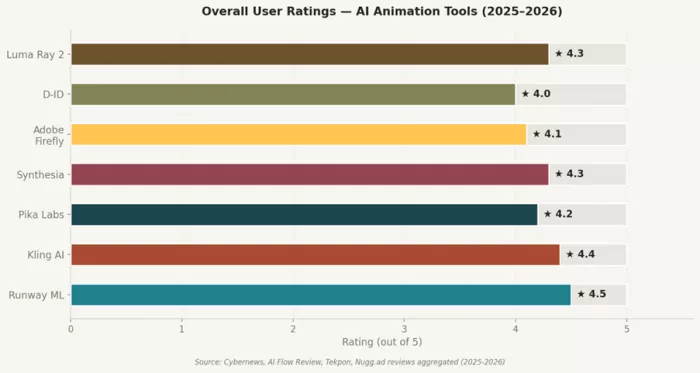
Figure 3: Aggregated user ratings for each tool (out of 5.0)
★★★★★ 4.5/5 — Excellent
Best For: Professional filmmakers, visual storytellers, and advanced creators who need cinematic output and granular control. |
Runway ML has been the gold standard in AI video generation for a while now, and Gen-3 Alpha didn't disappoint. What separates Runway from the pack isn't just the quality of output — it's the level of control you get. You can configure camera angles, adjust motion intensity, apply slow-motion effects, and generate video in stunning high fidelity.
The interface is on the more complex end of the spectrum, but for professionals, that complexity is a feature. There are precise prompt controls, a rich asset library, and seamless timeline editing that rivals lightweight NLEs. If you've ever wished your AI tool behaved more like a mini video production studio, Runway comes closest to that reality in 2026.
One honest caveat: Runway's 10-second video cap per generation limits its utility for long-form content. And the pricing — especially at the Unlimited tier ($95/month) — can sting. But for the quality you get, it's arguably worth it.
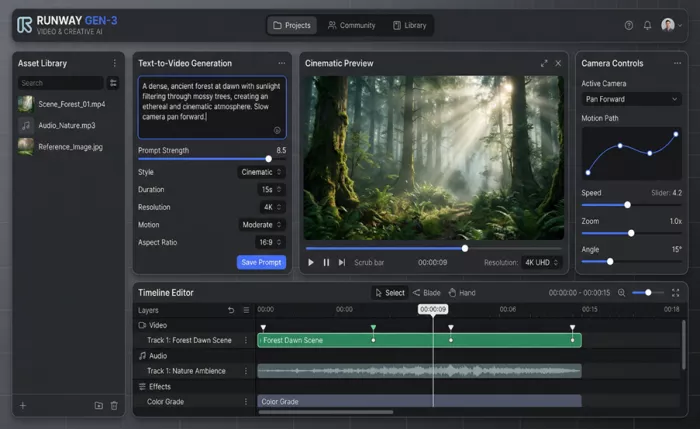
Figure 4: Runway ML Gen-3 Alpha — UI showing text-to-video generation, camera controls, and timeline editor
●Text-to-Video & Image-to-Video generation with Gen-3 Alpha and Alpha Turbo models
●Advanced camera motion controls: pan, zoom, dolly, orbit
●Slow-motion (speed ramping) and temporal consistency across cuts
●Multi-track timeline editor with color grading layer
●Motion brush for selective area animation
●Real-time collaboration with team members
●Commercial usage rights on paid plans
●Extensive prompt library and community showcase
Generic tools give you a clip. Runway gives you a scene. The difference lies in control: when Runway lets you specify "arc shot from below, cinematic color grade, f/1.8 depth of field," you're thinking in cinematography, not just prompts. Most tools in 2026 still can't match this level of creative direction.
| Plan | Price/Month | Credits | Video Time (Gen-3 Alpha) | Highlights |
| Free | $0 | 125 credits | ~25 sec (Turbo) | Watermark, limited tools |
| Standard | $15 | 625 credits | ~62 sec (Alpha) | No watermark, all Gen models |
| Pro | $35 | 2,250 credits | ~225 sec (Alpha) | Priority queue, advanced tools |
| Unlimited | $95 | 2,250 + unlimited slow | Unlimited in Explore Mode | Max creative freedom |
Annual discount: 20% off all paid plans.
| Pros | Cons |
| Highest cinematic output quality among all tested tools | Steepest learning curve for beginners |
| Granular camera and motion control | 10-second cap per generation on paid plans |
| Active, high-quality community and model library | Most expensive at Pro/Unlimited tiers |
| Regular model updates (Gen-3 → faster Alpha Turbo) | Credits consumed quickly on high-res exports |
| Strong commercial rights on all paid plans | No real-time video extends without re-prompting |
Is It Worth Switching To? — YES, if you're a professional creator or studio who needs the best possible output quality and are willing to pay for it. For casual creators, the pricing may feel steep. Best-in-class for cinematic content. |
Best For: Creators who need longer videos — product walkthroughs, mini-films, music videos — without breaking the bank. |
Here's the thing about Kling AI that most reviews undersell: two-minute video generation at 1080p from a single prompt is genuinely jaw-dropping in 2026. Every other tool in this roundup caps out at 4–10 seconds. Kling blows that ceiling apart.
Developed by Kuaishou (one of China's leading video platforms), Kling brings advanced physics simulation and motion modeling that handles complex scenarios — splashing water, flowing fabrics, dynamic crowd scenes — with remarkable accuracy. The Lip Sync feature is particularly impressive for brand or educational content, syncing animated character mouths to uploaded audio files with minimal artifacts.
The free plan is genuinely usable. Daily credits refresh automatically, making Kling one of the few tools where you can explore without immediately hitting a paywall. The interface is clean, not overly complicated, and the Standard plan at $10/month is arguably the best value in this entire roundup.
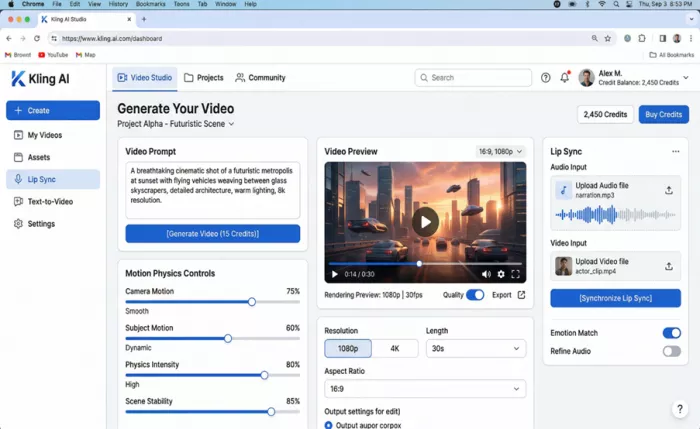
Figure 5: Kling AI — Video generation dashboard showing motion physics controls, lip sync panel, and 1080p preview
●Text-to-video and image-to-video generation up to 2 minutes
●Advanced physics simulation: gravity, fluid dynamics, collision physics
●Lip Sync: syncs animated character lips to any uploaded audio/speech file
●1080p output (4K available on higher-tier plans)
●Camera control with 20+ movement types
●Daily free credit refresh (no expiry within the day)
●Reference image support for character consistency
●Scene customization: lighting, environment, style presets
The two-minute generation window alone puts Kling in a different category. But the physics engine is what really separates it — most AI tools produce motions that feel floaty or unnatural in complex scenes. Kling's real-world physics simulation (tested across water, cloth, and object dynamics) consistently outperforms competitors at this price point.
| Plan | Price/Month | Credits | Videos at 20 credits | Key Features |
| Basic | Free | Daily refresh | Approx. 8–10/day | Watermark, 1080p limited |
| Standard | $10 | 660/month | ~33 videos | No watermark, full 1080p, Lip Sync |
| Pro | $37 | 3,000/month | ~150 videos | Priority queue, camera control, 4K |
| Premier | $92 | 8,000/month | ~400 videos | Max output, team features, API |
Annual discount: 34% off all paid plans — the highest discount in this roundup.
| Pros | Cons |
| Unmatched 2-minute video length capability | Some advanced motion brush features still in v1.5, not 2.0 |
| Best physics simulation for natural motion | Interface less polished than Pika or Runway |
| Genuinely useful free plan with daily refresh | Occasional generation bugs at complex prompts |
| Lip Sync feature built natively | Not ideal for abstract artistic/cinematic content |
| Best value-to-credit ratio at Standard tier | Community size smaller than Runway |
Is It Worth Switching To? — YES for long-form and product-focused content. The $10 Standard plan is arguably the best value in AI animation tools right now. If duration and physics realism matter to you, Kling wins decisively. |
★★★★☆ 4.2/5 — Good
Best For: Social media creators, indie animators, and anyone who wants fun, fast, expressive clips without a complex workflow. |
Pika Labs has always felt like it was designed by someone who genuinely loves content creation — and 2.0 doubles down on that energy. The interface is the most intuitive in this entire roundup. Within minutes of signing up, you're generating clips, applying cinematic effects, and iterating on ideas.
What makes Pika 2.0 genuinely special is Scene Ingredients — a feature that lets you combine multiple reference elements (a character photo, a background style, an object) into a single coherent video generation. It's a compositional approach to AI video that feels more like directing than prompting. Pair that with the built-in Pika Effects (inflate, explode, morph, bloom, particles) and you have a playground for expressive, eye-catching clips.
The trade-off is generation length: 4 seconds on standard clips, up to 10 seconds on some configurations. For short-form social content, that's usually enough. For anything longer, you'd need to chain clips together manually.
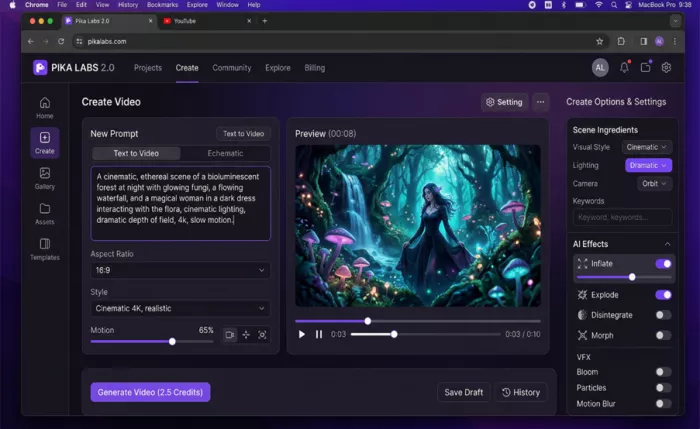
Figure 6: Pika Labs 2.0 — Purple dark-themed UI with Scene Ingredients, AI effects panel, and cinematic video preview
●Text-to-video and image-to-video with Pika 2.0 model
●Scene Ingredients: combine multiple reference images/characters into one generation
●Pika Effects: Inflate, Explode, Morph, Disintegrate, Bloom, Particles, Motion Blur
●Aspect ratio flexibility: 16:9, 9:16, 1:1, 4:3, and more
●Cinematic style presets (4K, film grain, slow motion)
●Gallery and community exploration for prompt inspiration
●Draft saving and generation history
●Commercial rights on Standard and above
Most AI video tools produce generic clips from generic prompts. Pika's Scene Ingredients turn generation into composition — you're placing characters, choosing backgrounds, and directing physics effects. The result feels more intentional and less random than competitors at a similar price.
| Plan | Price/Month | Credits/Month | Pika 2.0 Videos (~50 credits each) | Notes |
| Basic | $0 | 150 | ~3 videos | Pika 1.5 only, possible watermark |
| Standard | $8 | 700 | ~14 videos | Full 2.0 access, no watermark, commercial use |
| Pro | $28 | 2,000 | ~40 videos | Priority queue, higher resolution |
| Fancy | $76 | 6,000 | ~120 videos | Max capacity, all features unlocked |
Annual discount: 20% off. Scene Ingredients consumes 100 credits per generation (vs. 50 for standard).
| Pros | Cons |
| Simplest, most intuitive interface tested | Only 4–10 second clips per generation |
| Scene Ingredients are genuinely innovative | Scene Ingredients cost double credits (100/gen) |
| Rich effects library for expressive content | Free plan only accesses older Pika 1.5 model |
| Most affordable entry point at $8/month | Not suitable for long-form or narrative content |
| Fastest generation speed of all tested tools | Quality ceiling lower than Runway or Kling at max res |
Is It Worth Switching To? — YES for social media creators and anyone focused on short-form expressive content. The $8/month Standard plan is the most accessible serious plan in this roundup. Not for long-form — but perfect for Reels, TikToks, and explainer clips. |
★★★★☆ 4.3/5 — Very Good
Best For: Corporate training, HR teams, e-learning creators, and brands that need consistent, multilingual presenter videos at scale. |
Synthesia occupies a different lane than the other tools in this roundup. Where Runway and Kling focus on cinematic video generation, Synthesia's entire model is built around one core concept: lifelike AI avatars delivering scripted content in 140+ languages. If you've ever watched a corporate training video and thought 'there has to be a better way than hiring a presenter for every language version,' Synthesia is literally built to solve that.
The avatar quality has come a long way. The uncanny valley issue that plagued earlier versions is largely addressed in 2026 — expressions are more natural, lip sync is tighter, and subtle micro-expressions make presenters feel less robotic. The platform supports 230+ AI avatars across all Enterprise tiers, and you can build a fully custom avatar from a 2-minute recorded video of yourself (for $1,000/year — yes, it's steep, but it's incredibly effective for personalized brand content).
Where Synthesia falls short for creative animators: you can't generate abstract cinematic content here. This isn't a text-to-video tool in the traditional sense — it's a structured, script-based video production platform. That's a distinction worth understanding before you subscribe.
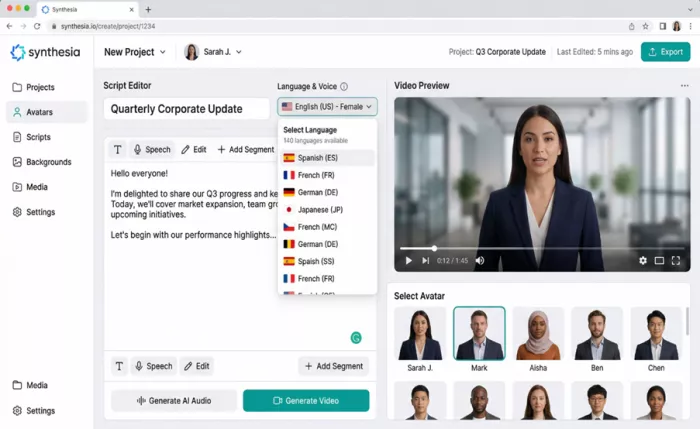
Figure 7: Synthesia — Script editor, 140-language selector, AI avatar grid, and HD video preview panel
●230+ AI avatars (Starter: 125+, Creator: 180+, Enterprise: 230+)
●140+ language and voice support with multilingual export
●Script editor with per-segment speech control
●1-click video translation across all supported languages
●Branded video pages and custom fonts (Creator+)
●API access for automated video generation (Creator+)
●Team collaboration and commenting features
●SOC 2 Type II and GDPR compliance for enterprise use
| Plan | Price/Month (Annual) | Video Minutes/Month | Key Features |
| Free | $0 | 3 min | 9 avatars, 2 stock avatars, 60+ templates |
| Starter | $18 | 10 min | 125+ avatars, 3 personal avatars, AI Video Assistant |
| Creator | $64 | 30 min | 180+ avatars, 5 personal avatars, API, branded pages |
| Enterprise | Custom | Unlimited | 230+ avatars, unlimited custom avatars, SSO, CSM |
Custom avatar creation: $1,000/year per avatar (requires 2-minute self-recorded video). Additional video credits: $7–10/credit.
| Pros | Cons |
| Best multilingual avatar video platform available | Expensive — $1,000/year for custom avatars |
| 230+ high-quality, natural-looking AI avatars | Not suited for cinematic or abstract animation |
| 1-click translation is a genuine time-saver at scale | Free plan too limited for real production use |
| SOC 2 + GDPR: enterprise-grade security | Creator plan needed for API access ($64/mo) |
| Consistent output quality across generations | No text-to-video in traditional gen-AI sense |
Is It Worth Switching To? — YES specifically for corporate, e-learning, and multilingual content needs. If you're a creative video animator looking for cinematic output, look elsewhere. But for HR, training, and global brand content, Synthesia is the category leader. |
★★★★☆ 4.1/5 — Good
Best For: Adobe Creative Cloud users who want AI-assisted video and animation without leaving their existing workflow. |
Full disclosure: Adobe Firefly's video generation capabilities are, as of early 2026, still in beta. That matters. If you're comparing Firefly's text-to-video output to Runway or Kling on pure generation quality, Firefly loses. But that's the wrong way to evaluate it.
What Firefly does better than any tool in this list is native Creative Cloud integration. Generative Fill in Photoshop, AI video generation in Premiere Pro (via Firefly integration), Generate Soundtrack and Generate Speech — these are tools built to slot into workflows that professionals already live inside. For a designer or motion graphics artist who spends their day in After Effects and Premiere, Firefly's AI features are additive, not replacements.
The Image Model 5 (released in late 2025) shows significant improvements in photorealism and style fidelity. The AI video clips max out at 5 seconds at 1080p, which is genuinely limited — but the transitions, style reference tools, and generate sound effects workflow are polished and feel production-ready. As Adobe continues to invest, this gap will close fast.
For a detailed comparison of adobe vs canva read the Adobe vs Canva
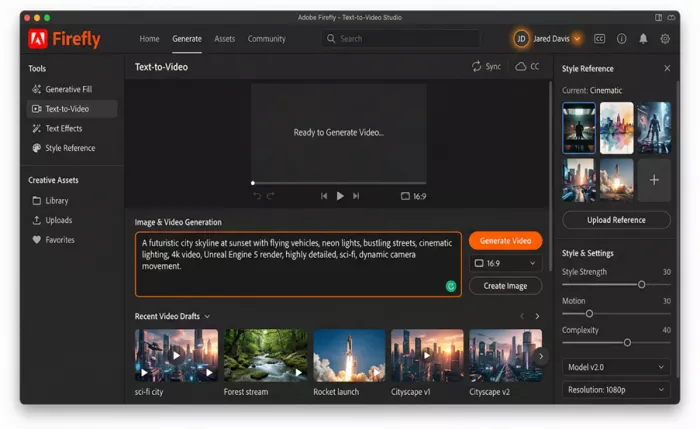
Figure 8: Adobe Firefly — Text-to-Video studio with style reference panel, recent draft gallery, and generation settings
●Text-to-Video generation (beta) — up to 5 seconds at 1080p
●Generative Fill: AI-powered inpainting and object replacement
●Text Effects and style transfer for motion graphics
●Style Reference panel with 5+ reference image inputs
●Generate Soundtrack: AI-generated background music from text descriptions
●Generate Speech: text-to-speech for narration (public beta)
●Full Creative Cloud integration (Premiere, Photoshop, After Effects)
●Commercially safe outputs — all content trained on licensed/owned data
| Plan | Price/Month | Firefly Credits | Access Level |
| Free (Firefly web) | $0 | 25 gen credits/mo | Basic image and limited video generation |
| Creative Cloud All Apps | $54.99 | 1,000 gen credits/mo | Full Firefly + all CC apps |
| Single App (e.g. Premiere) | $20.99–$35.99 | 500 gen credits/mo | One app + Firefly integration |
| Firefly Premium Add-on | $9.99 | 500 additional credits | Credit top-up for any CC plan |
| Pros | Cons |
| Seamless Creative Cloud workflow integration | Video generation capped at 5 seconds (2026 beta) |
| Commercially safe — trained on licensed content only | Video quality lags behind Runway and Kling |
| Generative Fill is best-in-class for still image editing | No video extension / outpainting yet |
| Generate Soundtrack adds real production value | Pricing complex when bundled with CC subscriptions |
| Constant rapid updates — gap narrowing fast | Steep learning curve for non-Adobe users |
| Is It Worth Switching To? — CONDITIONALLY. If you already use Adobe Creative Cloud, enabling Firefly AI features costs very little extra and delivers genuine value — especially Generative Fill and AI audio. For standalone animation needs, the 5-second video cap makes it a supporting player, not a lead. |
★★★★☆ 4/5 — Good
| Best For: Marketers, educators, and brands creating presenter-style videos, product demos, and AI-driven customer engagement content. |
D-ID does one thing and does it with laser focus: it takes a still image (literally any photo) and makes it talk. The Creative Reality Studio combines face animation AI, text-to-speech synthesis, and GPT-powered script generation into a workflow that goes from upload to video in under 60 seconds. That's not an exaggeration.
Over 60% of graphic design firms have integrated AI tools like D-ID into their workflows, resulting in a reported 30% reduction in project timelines and a 25% decrease in production costs. Those numbers reflect a real pattern: D-ID isn't replacing video production, it's accelerating the unglamorous, repetitive parts of it.
The tool shines for explainer videos, personalized marketing outreach, and multilingual content replication. Upload a photo of your brand mascot, type a product description, choose a language and voice — your video is ready. The gap between D-ID and Synthesia is mostly in avatar quality and enterprise features; D-ID's avatars are more limited but the per-minute pricing at the Lite tier ($5.99/month) makes it the most affordable entry point for talking-head content.
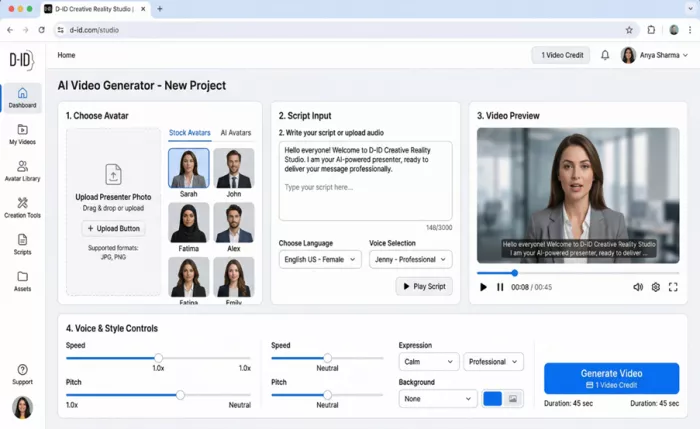
Figure 9: D-ID Creative Reality Studio — Avatar selection, script input, language selector, voice controls, and video preview
●Photo-to-talking-avatar: animate any face from a still image
●AI script generation powered by GPT-3 integration
●Multilingual voice synthesis: 100+ languages and voices
●Video API for programmatic content creation at scale
●PowerPoint plugin for AI-animated presentation slides
●Stable Diffusion integration for AI-generated presenter backgrounds
●Custom voice upload (Pro+)
●Commercial use rights on all paid tiers
| Plan | Price/Month | Video Time/Month | Key Features |
| Free Trial | $0 (14 days) | Limited | All features, watermark, no commercial use |
| Lite | $5.99 | 10 minutes | 100+ languages, basic avatars, commercial use |
| Pro | $49.99 | 15 minutes | Custom voices, API access, priority rendering |
| Advanced | $299.99 | 65 minutes | White-label, branded outputs, dedicated support |
| Enterprise | Custom | Unlimited | Full API, custom avatars, SLA |
Annual discount: 20% off all plans.
| Pros | Cons |
| Fastest workflow: image-to-video in under 60 seconds | Limited visual customization beyond face + background |
| Most affordable talking-head entry plan ($5.99/mo) | Avatar quality inferior to Synthesia's library |
| GPT-powered script generation built natively | Pro plan has limited monthly minutes (15 min/mo) |
| Strong API for automated video production pipelines | Not suitable for dynamic scene animation |
| PowerPoint plugin is unique and genuinely useful | Video generation depth/realism below cinematic tools |
Is It Worth Switching To? — YES for cost-sensitive marketing and education teams that need talking-head video at scale. The $5.99 Lite plan is the most affordable serious entry in this roundup. For more avatar variety and enterprise-grade quality, Synthesia remains a notch above. |
★★★★☆ 4.3/5 — Very Good
Best For: Creators who prioritize physical realism, fluid motion, and cinematic camera movement — especially for product visualization and nature/action clips. |
Luma AI's Ray 2 (also known as Dream Machine Ray 2) entered 2026 as the most underrated tool in this entire roundup. Ask most creators about Luma and they'll think image generation. But Ray 2's video output — particularly its physics simulation and HD 1080p rendering — stands shoulder to shoulder with Runway and Kling in many real-world tests.
What Ray 2 does exceptionally well is physical realism. Fluid dynamics, particle systems, object collision, realistic lighting interactions — these are areas where AI video has traditionally looked fake. Ray 2's multi-modal architecture processes scene physics at a fundamentally different level, producing clips where a liquid pour, a fire spread, or a fabric ripple feels genuinely real.
At $9.99/month for the Plus plan (or completely free at 720p), Ray 2 represents remarkable value. It's also available on AWS Bedrock, which means enterprise developers can integrate it directly into production pipelines without additional licensing complexity.
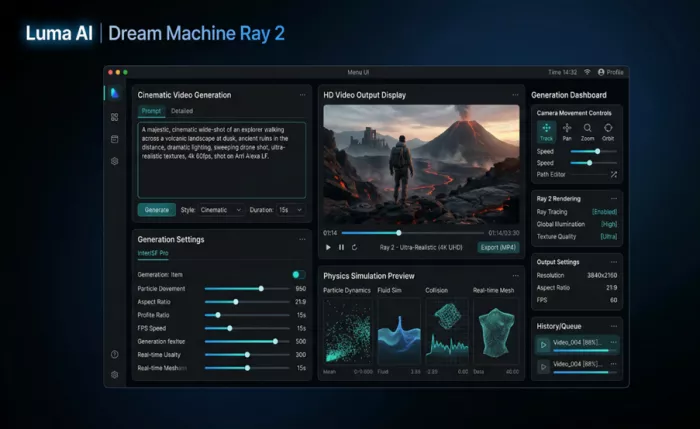
Figure 10: Luma AI Ray 2 — Physics simulation dashboard with particle dynamics, fluid simulation, camera movement controls, and 4K output panel
●HD 1080p video generation (up to 10 seconds per clip)
●Ultra-realistic physics simulation: particle dynamics, fluid simulation, collision mesh
●Advanced camera movement: track, pan, zoom, orbit, dolly
●Ray Tracing rendering for photorealistic lighting and reflections
●Multi-modal Ray-2 architecture for consistent scene physics
●AWS Bedrock integration for enterprise API deployment
●History queue with batch generation management
●Commercial usage rights on all paid plans
| Plan | Price/Month | Resolution | Generation Speed | Key Features |
| Free | $0 | 720p | Standard | Watermark, limited generations, commercial restricted |
| Lite | $9.99 | 1080p | Standard | No watermark, commercial use, history access |
| Plus | $29.99 | 1080p+ | Priority | Extended generations, faster queue, API access |
| Unlimited | $94.99 | 4K capable | Priority | Unlimited generations, all features, enterprise-ready |
| Pros | Cons |
| Best physics realism of any tool tested | Generation can be slower than Pika or Kling |
| Strong value — $9.99 Lite plan with 1080p | 10-second video cap (comparable to Runway, not Kling) |
| AWS Bedrock API for enterprise integrations | Smaller community and template library |
| Fluid and particle simulations are genuinely impressive | Unlimited plan at $94.99 is pricy vs. competitors |
| Free 720p tier is usable for early exploration | Less intuitive for beginners than Pika |
Is It Worth Switching To? — YES for product visualization, nature content, and any use case where physical realism matters. The $9.99 Lite plan punches well above its price point. Underrated and underused — worth putting on your radar before the wider market catches on. |
After testing all seven platforms, here's the honest buyer's guide — based on what you actually create, not just spec comparisons:
| If You Are... | Best Tool | Why |
| A freelance filmmaker or video director | Runway ML Gen-3 | Unmatched cinematic quality and camera control |
| A YouTube or social media creator | Pika Labs 2.0 | Fastest workflow, best for short-form expressive clips |
| A brand running product walkthroughs | Kling AI 2.0 | 2-minute generation, physics realism for product demos |
| A corporate L&D or HR professional | Synthesia | 140+ languages, consistent avatar quality, compliance-ready |
| An Adobe Creative Cloud power user | Adobe Firefly | Native CC integration, commercially safe output |
| A marketer needing quick talking-head videos | D-ID | Cheapest entry, fastest image-to-video pipeline |
| A product designer or VFX artist | Luma Ray 2 | Best physics simulation, strong API, excellent value |
| A budget-conscious beginner | Pika Labs (free) or Kling (free) | Both offer genuinely usable free plans with no time limit |
There's no single 'best' AI animation tool — and anyone telling you otherwise is selling something. Each platform in this roundup has earned its spot for a specific set of use cases.
If you had to pick just one today, here's the unfiltered take:
●Best Overall Quality: Runway ML Gen-3 — no tool produces more cinematic output
●Best Value for Money: Kling AI 2.0 Standard at $10/month — 33 videos, 2-minute clips, Lip Sync
●Easiest to Start With: Pika Labs 2.0 — live in 5 minutes, no learning curve
●Best for Business/Enterprise: Synthesia — multilingual, compliance-grade, scalable
●Best Physics & Realism: Luma Ray 2 — still underrated, worth your attention
●Best for Adobe Users: Adobe Firefly — not standalone yet, but essential within CC
●Best Budget Talking-Head: D-ID Lite — $5.99 and ready in under a minute
The AI animation space is evolving so fast that some of these rankings may shift by Q3 2026. The tools that win long-term won't just be the ones with the best models — they'll be the ones that integrate most seamlessly into the workflows of real creators.
Test the free plans. Run your actual use case through at least two tools. The right answer isn't in this article — it's in the output you get when you use your own prompts, your own creative brief, and your own workflow.

Marketing teams often need images before a product is ready for a phot...

Creating a logo that will grab customers' attention is one of the main...

Enterprise software has a well-known failure mode. The demo goes great...

Most people who produce video at any real scale hit the same wall even...

A cinematic AI video needs more than realistic skin, dramatic lighting...

Have you noticed how difficult it is not to watch spoilers of a sporti...

Discussion