
Roughly four out of five short-form clips that get reshared today started life as a single still image plus a one-line prompt. That shift is exactly what tools like Unlucid AI were built for, and it is also where their limits start to show on bigger projects.
Unlucid AI is a browser-based AI creative platform built around turning images and prompts into video. Its official pages describe a set of “uncensored AI tools” for creating, editing, and animating videos and images, including a Video AI mode, an Effects AI mode, image generation, image editing, and a library of more than fifteen video effects. The about page frames the core promise plainly: upload an image, add a simple prompt, and get a short animated clip with no editing experience required.
The friction appears when a project grows past experimentation. Preset effects can feel limited once a clip needs precise motion control. Browser-first generation may not deliver the resolution, camera direction, or cinematic flow a finished piece demands. And commercial work introduces a separate set of needs entirely: licensing clarity, brand-safe outputs, social templates, team collaboration, and reliable exports. None of that is a knock on Unlucid AI. It is simply the point where many creators start comparing Unlucid AI alternatives that specialise in one part of the pipeline.
This guide groups the strongest alternatives by creative need rather than by popularity, so the choice maps to the output type rather than the brand name.
Every tool in this guide was reviewed against a single rubric, the Render-Fit Framework, so scores stay comparable across very different products. Hands-on evaluation focused on the workflows a creator actually runs, not marketing claims, and each platform was exercised on its publicly available plan using identical reference images and prompts wherever the feature set allowed.
The framework rates six signals:
• Image-to-video fidelity: how cleanly a still image becomes motion, including subject and identity stability.
• AI effects range: the breadth and quality of preset and prompt-driven visual transformations.
• Editing control: timing, trimming, captions, object handling, and fine adjustment after generation.
• Social workflow: templates, resizing, brand assets, and the path from clip to published post.
• Brand safety: output predictability, moderation, and commercial-use clarity.
• Overall fit: a weighted read of the five signals against real production use.
Scores are editorial ratings based on workflow suitability, not official vendor benchmarks. They reflect a point-in-time view; capabilities and pricing change, and limitations are called out honestly alongside strengths. Readers are encouraged to run the short testing checklist included later in this guide on their own reference material before committing to a paid plan.
The table below summarises where each alternative is strongest. Creative control and ease of use often pull in opposite directions, so the overall fit reflects how well a tool serves its intended job rather than how many features it lists.
| Tool | Best Category | Best For | Creative Control | Ease of Use | Overall Fit |
| Pika | AI video effects | Viral effects and image animation | 8.5 | 8.5 | 9.0 |
| Runway | Pro AI video creation | Cinematic AI video and editing | 9.0 | 7.5 | 9.0 |
| Kling AI | High-quality AI video | Realistic motion and cinematic visuals | 8.5 | 7.5 | 8.8 |
| Luma Dream Machine | Image and video generation | Smooth motion and creative scenes | 8.0 | 8.0 | 8.5 |
| Vidu AI | Image-to-video | Character and visual animation | 8.0 | 8.0 | 8.3 |
| Haiper AI | Fast creative video | Quick social clips and experiments | 7.8 | 8.5 | 8.0 |
| Leonardo AI | Image and motion assets | Visual generation and creative assets | 8.5 | 8.0 | 8.2 |
| Canva AI | Design and AI visuals | Social media assets and branded content | 7.5 | 9.0 | 8.0 |
| CapCut AI | Social video editing | Captions, edits, templates, short-form | 7.5 | 9.0 | 8.2 |
| Adobe Firefly | Brand-safe AI creation | Commercial-friendly creative workflows | 8.0 | 8.0 | 8.4 |
Ratings are editorial assessments of workflow suitability, not official scores. The visual below shows the same idea differently: where each tool concentrates its strength across the creative pipeline.
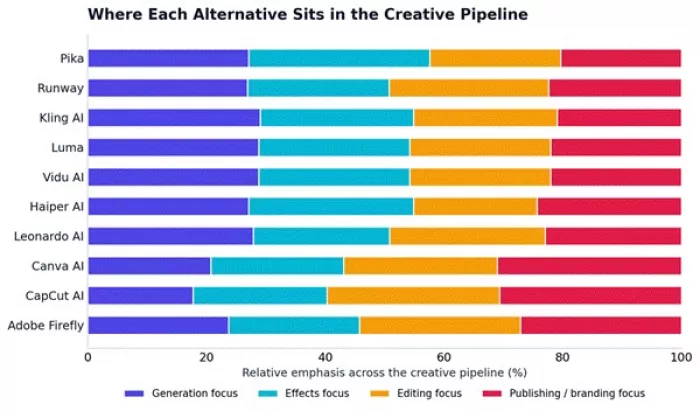
Some alternatives focus on generation, while others focus on editing, branding, or publishing.
This is where the comparison gets practical. The right alternative depends on what the clip needs to become, so the tools below are grouped by job rather than ranked in a single line.
Unlucid AI’s core strength is effect-driven creation, so the closest alternatives are tools that turn a simple idea into a short, shareable clip with minimal setup.
Pika leans into playful AI effects and stylised visual transformations, which makes it the most natural step up for effect-first creators.
Haiper AI favours speed, so it suits quick creative experiments where testing an idea matters more than polishing it.
CapCut AI handles the finishing work: packaging a clip with captions, music, templates, and resizing so it is ready to post.
| Tool | Strongest Use | Better Than Unlucid AI When | Weak Point |
| Pika | Viral AI effects | The creator wants playful motion and stylised results | Output control can still vary |
| Haiper AI | Fast video experiments | Speed matters more than advanced editing | Not always cinematic |
| CapCut AI | Final social video editing | The clip needs captions, music, templates, and resizing | Not mainly an AI generation tool |
EDITORIAL RECOMMENDATION For effect-first content, Pika is the closest single alternative to Unlucid AI. For finishing and publishing those short videos, CapCut AI is the more practical companion. Many creators end up using one to generate and the other to package. |
Creators who feel boxed in by preset effects usually need a platform built for direction and scene quality rather than quick transformations.
Runway pairs advanced AI video generation with a genuine creative editing suite, which suits ads, concept films, and clips that need fine control.
Kling AI stands out for realistic motion and cinematic output, particularly where character movement needs to read as believable.
Luma Dream Machine delivers smooth motion and imaginative scenes with a gentler learning curve, a useful middle ground between effect tools and full production platforms.
| Tool | Motion Quality | Prompt Control | Best Content Type | Learning Curve |
| Runway | 9/10 | 9/10 | Ads, concept films, cinematic clips | Medium |
| Kling AI | 9/10 | 8/10 | Realistic AI video, character motion | Medium |
| Luma Dream Machine | 8.5/10 | 8/10 | Dreamlike scenes, smooth motion | Easy to medium |
EDITORIAL RECOMMENDATION These tools earn their place when the goal is a polished short video rather than a quick AI effect. Expect a steeper setup in exchange for camera direction, scene continuity, and export quality that holds up on larger screens. |
Many Unlucid AI users start from a single still image and want to bring it to life. This is its own discipline, and the tools below are judged specifically on how well one image becomes convincing motion.
Vidu AI is built around image-to-video and character-style animation, which makes it a focused pick for animating a subject.
Pika adds stylised movement and visual transformations on top of a source image, useful when the look matters as much as the motion.
Luma tends to produce smoother whole-scene motion, which helps when the background needs to move naturally with the subject.
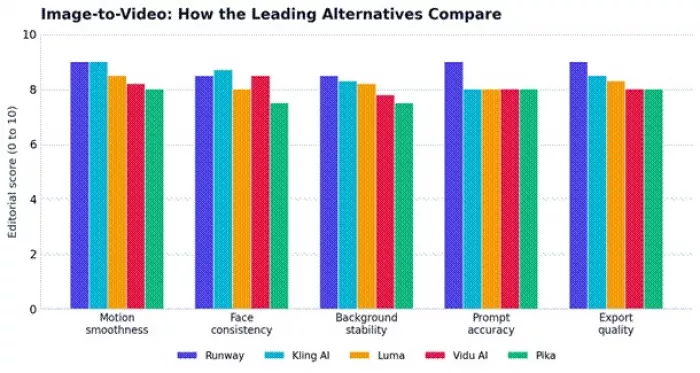
Motion smoothness, face consistency, and background stability are the key testing areas.
Before committing to any image-to-video tool, the same reference image and prompt should be run through each candidate and checked against these areas:
| Test Area | Why It Matters |
| Face consistency | Prevents identity drift across frames |
| Motion smoothness | Avoids awkward or jittery animation |
| Prompt following | Keeps the output close to the original idea |
| Camera motion | Confirms the tool can move the viewpoint, not just the subject |
| Background stability | Reduces warping and visual glitches |
| Export quality | Important for anything that will be published |
| Watermark limits | Affects whether free output is usable |
| Free generation limits | Determines how much testing is possible before paying |
| Commercial rights | Critical for client and brand work |
Some projects do not need an effect first. They need a stronger base image before any motion is added, which is a different requirement entirely.
Leonardo AI produces detailed AI art, concept visuals, and reusable creative assets, giving animation a higher-quality starting point.
Adobe Firefly is positioned around commercially safer image generation and design workflows, which suits brand and client work.
Canva AI turns AI visuals into finished layouts, handling quick social designs, image generation, and editing in one place.
| Tool | Best For | Why It Works as an Unlucid AI Alternative |
| Leonardo AI | AI art and creative assets | Stronger image generation before animation |
| Adobe Firefly | Brand-safe visuals | Better fit for commercial-friendly content workflows |
| Canva AI | Social designs | Turns AI visuals into finished posts, banners, and thumbnails |
EDITORIAL RECOMMENDATION Reach for these tools when the output needs to become a polished design, not only an animated clip. A strong base image often does more for the final result than a flashy effect applied to a weak one. |
Teams rarely need generation alone. They need resizing, captions, templates, brand assets, collaboration, and workflows that repeat reliably across dozens of posts.
| Need | Best Tool | Reason |
| Reels and TikTok editing | CapCut AI | Strong short-form editing workflow |
| Carousels and thumbnails | Canva AI | Templates and reusable brand kits |
| AI video ads | Runway | Better creative and motion control |
| Brand consistency | Canva AI | Easier reusable assets across a team |
| Captions and trimming | CapCut AI | Built for social video finishing |
| Concept visuals | Runway or Leonardo AI | Better for early ideation |
EDITORIAL RECOMMENDATION Unlucid AI can be a good way to create an effect clip, but social teams usually need a full production pipeline. Pairing a generator with a dedicated editor and a design system tends to beat asking one tool to do everything. |
Mapping user type to tool removes most of the guesswork. The table below pairs common creator profiles with the alternative that best matches their typical output.
| User Type | Best Alternative | Reason |
| Meme and effects creator | Pika | Strong effect-style generation |
| Short-form video editor | CapCut AI | Better publishing workflow |
| AI filmmaker | Runway | More control and cinematic tools |
| Realistic video creator | Kling AI | Strong motion realism |
| Image animator | Vidu AI | Focused image-to-video workflow |
| AI artist | Leonardo AI | Strong visual asset creation |
| Brand and content team | Adobe Firefly | Safer commercial creative workflows |
| Social media manager | Canva AI | Templates and an easy design system |
| Fast experimenter | Haiper AI | Quick idea testing |
| Creative generalist | Luma Dream Machine | Balanced generation and motion |
The best Unlucid AI alternative depends on whether the creator needs effects, cinematic video, image editing, or social publishing.
The scorecard below breaks each tool into the six Render-Fit signals. Reading across a row shows where a tool is balanced or specialised; reading down a column shows which tool leads each capability.
| Tool | Image-to-Video | AI Effects | Editing Control | Social Workflow | Brand Safety | Overall |
| Pika | 8.5 | 9.0 | 7.5 | 8.0 | 7.0 | 8.4 |
| Runway | 9.0 | 8.0 | 9.0 | 8.0 | 8.0 | 8.8 |
| Kling AI | 9.0 | 8.0 | 8.0 | 7.5 | 7.5 | 8.4 |
| Luma Dream Machine | 8.5 | 7.5 | 8.0 | 7.5 | 7.5 | 8.0 |
| Vidu AI | 8.5 | 7.5 | 7.5 | 7.5 | 7.0 | 7.8 |
| Haiper AI | 7.8 | 8.0 | 7.0 | 8.0 | 7.0 | 7.6 |
| Leonardo AI | 6.5 | 7.0 | 8.5 | 7.5 | 7.5 | 7.4 |
| Canva AI | 5.5 | 6.5 | 7.5 | 9.0 | 8.0 | 7.3 |
| CapCut AI | 5.5 | 7.0 | 8.0 | 9.5 | 7.5 | 7.5 |
| Adobe Firefly | 5.5 | 6.5 | 8.0 | 8.0 | 9.0 | 7.4 |
Scores should be treated as editorial guidance. The best choice depends on the final content format, so a lower overall number can still be the right pick for a specific job. The heatmap below makes the trade-offs easier to scan.
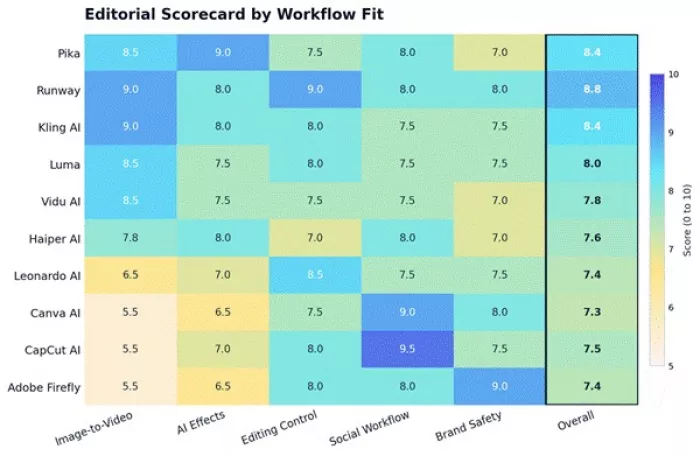
Tools should be rated by workflow fit, not only by popularity.
None of this means an alternative is always the answer. Unlucid AI remains a reasonable choice for several situations, particularly early in a project.
• Quick image-to-video experiments without setup overhead
• Preset AI effects applied in a few clicks
• Simple prompt-based visual creation
• Free creative testing before investing in a paid platform
• A low learning curve for newcomers
• Browser-based editing with nothing to install
• Fast visual experimentation across many ideas
• Image editing and image generation alongside video in one place
Unlucid AI’s official pages emphasise free AI tools, image and video creation, image editing, animation, and short video generation from prompts. For that specific mix, staying put can be perfectly sensible. The table shows when a switch becomes worthwhile.
| Unlucid AI Strength | Alternative to Consider If |
| Fast AI effects | Pika offers stronger viral-style effect workflows |
| Image-to-video | Runway, Kling AI, Luma, or Vidu AI offer more advanced motion |
| Simple browser workflow | Canva AI or Haiper AI may feel easier for casual creators |
| Free experimentation | Free limits should be compared across Pika, Haiper AI, Canva AI, and Luma |
| Image editing | Leonardo AI, Adobe Firefly, or Canva AI may offer better design control |
| Short clips | CapCut AI is better for final social packaging |
The best Unlucid AI alternative depends on the creative goal, not on which tool is trending.
• Pika is the closest fit for viral AI effects.
• Runway is stronger for cinematic video creation.
• Kling AI and Luma Dream Machine are better for polished motion and realistic scenes.
• Vidu AI is useful for image-to-video animation.
• CapCut AI is the right choice when a clip needs to become a finished social video.
• Canva AI and Adobe Firefly suit safer branded visuals and design workflows.
• Leonardo AI is useful when a project starts from high-quality image generation.
Unlucid AI remains useful for quick experimentation, but creators working on publish-ready, brand-safe, or higher-control projects should compare tools by output quality, licensing, pricing, and workflow fit. The fastest path to the right pick is to run a single reference image and prompt through two or three candidates and judge the results directly.

Marketing teams often need images before a product is ready for a phot...
Creating a logo that will grab customers' attention is one of the main...

Enterprise software has a well-known failure mode. The demo goes great...
Most people who produce video at any real scale hit the same wall even...
A cinematic AI video needs more than realistic skin, dramatic lighting...

Have you noticed how difficult it is not to watch spoilers of a sporti...

Discussion