


Before looking at tools, it helps to define what improves output:
The tools below solve these directly.
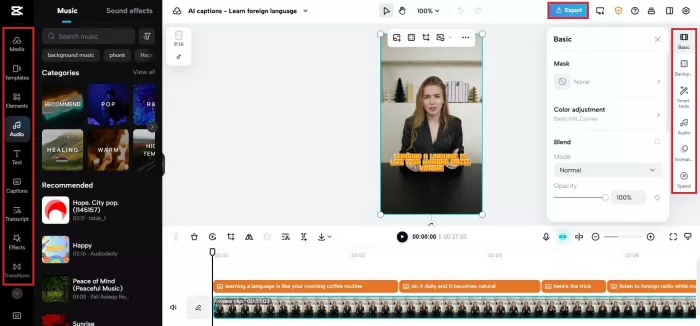
CapCut is directly integrated into TikTok’s ecosystem, which makes it one of the fastest tools for editing and publishing.
It solves the biggest problem: turning raw clips into polished TikTok videos quickly.
CapCut’s AI features include auto captions with multiple styles, background removal, and beat syncing. The caption system supports animated text formats that match trending TikTok styles, such as bold highlight words and dynamic zoom captions. Export is optimized for vertical 9:16 format with no compression issues.
Editing time can drop from 45 minutes to 10–15 minutes per video using templates and auto tools.

Descript focuses on text-based editing, which removes the need for timeline-based cutting.
You upload a video, and it converts speech into text. You can delete words from the transcript to cut the video. It also removes filler words like “um” and “uh” automatically, which improves pacing for TikTok.
It generates captions with word-level timing and supports multiple export formats.
For talking-head content, editing time reduces by 30–50 percent.
VEED is built for creators who want quick browser-based editing without installing software.
It provides auto subtitles, brand presets, and one-click resizing for TikTok format. Caption styles include highlighted keywords and animated text, which directly impact retention.
VEED also includes screen recording and webcam capture, useful for tutorial-style TikTok videos.
Typical editing time reduces to 15–20 minutes per video.
Pictory solves the problem of faceless TikTok content creation.
You input a script or article, and it generates short videos using stock footage, AI voiceovers, and captions. It supports vertical formats and can break long scripts into multiple short clips.
Generation time is typically under 5 minutes for a 30–60 second video.
InVideo is useful for creators producing high-volume content with templates.
It offers 5,000+ templates optimized for short-form content. AI script-to-video features allow creators to generate entire videos from prompts. It also includes text overlays, transitions, and voiceovers.
This reduces production time significantly when batching content.
ChatGPT solves the problem of idea generation and script writing at scale.
Creators use it to generate hooks, scripts, and content angles. A well-structured prompt can generate 10–20 TikTok ideas in seconds. It also helps rewrite viral formats into new variations.
Script creation time drops from 30 minutes to 5 minutes or less.
TrendTok focuses on trend prediction and sound discovery, which directly impacts reach.
It analyzes trending sounds and predicts which ones are about to go viral. This helps creators publish content aligned with platform momentum.
This can increase visibility without increasing production effort.
| Tool | Starting Price | Rating | Best Use Case | Key Strength | Limitation |
| CapCut | Free / $7.99/month | 4.6 | Editing | Fast captions + TikTok optimization | Limited advanced control |
| Descript | $12/month | 4.6 | Talking videos | Text-based editing | Slower rendering |
| VEED | $18/month | 4.6 | Online editing | Subtitle styles | Watermark in free plan |
| Pictory | $19/month | 4.7 | Faceless videos | Script to video | Repetitive visuals |
| InVideo | $20/month | 4.5 | Bulk creation | Templates | Needs manual refinement |
| ChatGPT | Free / $20/month | 4.7 | Script writing | Idea generation speed | Prompt dependent |
| TrendTok | $2.99/week | 4.6 | Trend research | Predictive insights | No creation tools |
Here is a realistic workflow:
Use ChatGPT
Generate 5 hooks and a 30-second script in under 1 minute
Use Pictory
Convert script into video with AI visuals and voice in 2–3 minutes
Use CapCut
Add captions and final edits in 1–2 minutes
Total time: 4–6 minutes per video
Best for Beginners
CapCut + ChatGPT
Simple interface and fast learning curve. No upfront cost required.
Best for Faceless Content
Pictory + InVideo
Script-based video creation removes the need for recording.
Best for Personal Brand Creators
Descript + CapCut
Best for talking videos with clean editing and captions.
Best for Agencies or High-Volume Creators
ChatGPT + InVideo + CapCut + TrendTok
Supports bulk production, trend alignment, and faster turnaround.
TikTok growth is not limited by creativity anymore. It is limited by execution speed and consistency.
The creators who win are not the ones making perfect videos. They are the ones who can produce high-quality content daily without slowing down.
These tools do not replace creativity. They remove friction from execution.

Marketing teams often need images before a product is ready for a phot...

Creating a logo that will grab customers' attention is one of the main...

Enterprise software has a well-known failure mode. The demo goes great...

Most people who produce video at any real scale hit the same wall even...

A cinematic AI video needs more than realistic skin, dramatic lighting...

Have you noticed how difficult it is not to watch spoilers of a sporti...
Discussion