

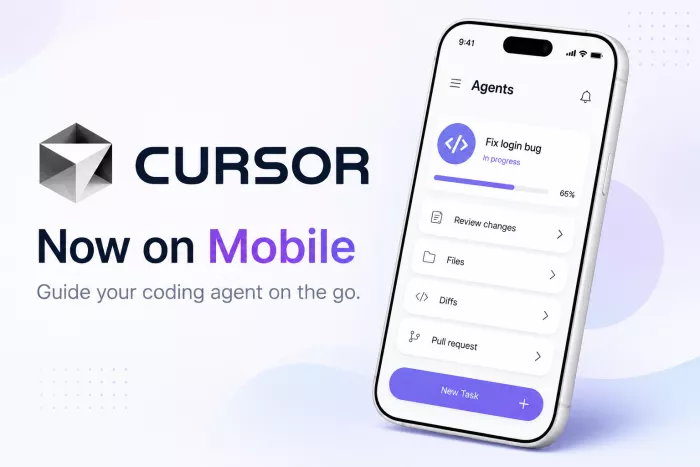
Cursor’s new mobile app turns AI coding from a desktop-only workflow into something developers can manage from anywhere, including reviewing diffs, tracking agents, and merging pull requests from an iPhone.
Cursor has launched a native iOS app in public beta, giving developers a way to start, monitor, and guide AI coding agents directly from their phones. The new app is designed for developers who want to keep projects moving even when they are away from their laptop or workstation.
The company says Cursor for iOS lets users launch always-on cloud agents or control agents already running on their computer. Developers can assign tasks, choose a repository, give instructions through text or voice, review progress, and merge pull requests from the mobile app.
Cursor has become one of the most closely watched AI coding platforms because it does not only autocomplete code. Its larger pitch is agentic software development, where AI agents can plan, write, test, and review code with deeper awareness of a project.
On its product page, Cursor describes its system as “one agent across every surface,” including desktop, CLI, web, and mobile. The iOS launch is an important step in that direction because it gives developers a dedicated phone interface instead of forcing them to stay inside a desktop coding environment.
The idea is simple: developers may still do deep coding work on a computer, but they can now keep AI agents moving while travelling, walking, attending meetings, or handling urgent issues away from their desk.
Cursor’s mobile app is not just a companion notification app. It is built to manage active coding work.
According to Cursor, developers can use the iOS app to:
Cursor says agents running in the cloud can work inside isolated virtual machines with development environments, allowing them to test and verify changes before the developer reviews the output.
One of the more practical features is Remote Control. If an agent is already running on a developer’s computer, the iOS app can be used to continue directing it from a phone.
Cursor says users can enable a setting that keeps their computer awake so the machine remains reachable while they are away. This is useful for developers who start a task on desktop, step away, and then want to add instructions or check progress without reopening the laptop.
This makes the mobile app less like a separate product and more like an extension of the existing Cursor workflow.
Cursor is pitching the app around practical engineering use cases, not casual coding from a phone. The company says the app can help developers handle on-call incidents, respond to customer bugs, and act on product feedback from other mobile apps.
For example, a developer who receives an urgent bug report while away from the office could start an agent to investigate the issue. By the time they return to their computer, the agent may have already reproduced the bug, inspected the relevant code, and prepared a pull request for review.
The app also supports visual feedback. A user can take a screenshot, annotate the issue, and send it to the agent as context. This could be useful for UI bugs, design fixes, and frontend changes where explaining the issue in words may take longer than marking it visually. The App Store listing also highlights image annotations, screenshots, videos, logs, voice conversations, and mobile pull-request review as core features.
Once a coding agent starts working, developers do not have to keep the app open. Cursor says the iOS app uses push notifications and Live Activities to alert users when an agent finishes, needs input, or is ready for review.
This matters because agentic coding is often asynchronous. A developer may give an instruction, wait for the agent to work, and then review the result later. Mobile notifications make that workflow easier to manage because the developer can respond at the right moment instead of constantly checking the desktop app.
Cursor for iOS is now available in public beta on all paid Cursor plans. The App Store listing shows the app is free to download, includes in-app purchases, is designed for iPhone, and has an 18+ age rating. Apple’s listing also shows that it requires iOS 26.0 or later.
Cursor is also offering 75% off Composer 2.5 runs inside the mobile app through July 5, 2026. Composer is Cursor’s own agentic model, which the company positions as optimized for speed and token efficiency.
The launch comes at a time when AI coding tools are becoming more autonomous. Developers are increasingly using agents not only for suggestions, but also for larger tasks such as implementing features, fixing bugs, creating pull requests, and reviewing changes.
Business Insider recently reported that AI-generated code changes are increasingly reaching production without a separate manual review step, citing Cursor data that showed a rise in developer trust over the first half of 2026.
That trend explains why a mobile app matters. If coding agents are doing more background work, developers need better ways to supervise, redirect, approve, or stop that work from wherever they are.
The iOS launch also arrives shortly after Reuters reported that SpaceX agreed to buy Anysphere, the startup behind Cursor, in a $60 billion all-stock deal. Reuters said the deal is aimed at strengthening SpaceX’s position in enterprise AI tools and AI coding.
Even with that major corporate backdrop, Cursor is continuing to ship product updates quickly. The mobile app shows that the company wants to make AI coding agents available across more surfaces, not just inside a traditional code editor.
Cursor says it wants the experience of running cloud agents to eventually feel indistinguishable from running local agents. For now, the iOS app is a bridge between those two workflows, letting developers move work between phone, cloud, and desktop.
The company is also working on repo-less chats, which would make it easier to start tasks that do not require full codebase context. That could make Cursor useful for broader engineering questions, incident analysis, documentation work, and workflow automation.
Cursor’s iOS app is not trying to replace the desktop coding experience. Instead, it gives developers a way to manage AI coding agents when they are away from their main machine.
For teams already using Cursor agents, this could make software development more continuous. A bug can be investigated during lunch, a pull request can be reviewed while travelling, and an agent can keep working in the cloud after the developer leaves the desk.
The larger message is clear: AI coding is becoming less tied to the editor window and more like a managed workflow that follows developers across devices

Marketing teams often need images before a product is ready for a phot...
Creating a logo that will grab customers' attention is one of the main...

Enterprise software has a well-known failure mode. The demo goes great...

Most people who produce video at any real scale hit the same wall even...

A cinematic AI video needs more than realistic skin, dramatic lighting...
Have you noticed how difficult it is not to watch spoilers of a sporti...
Discussion