

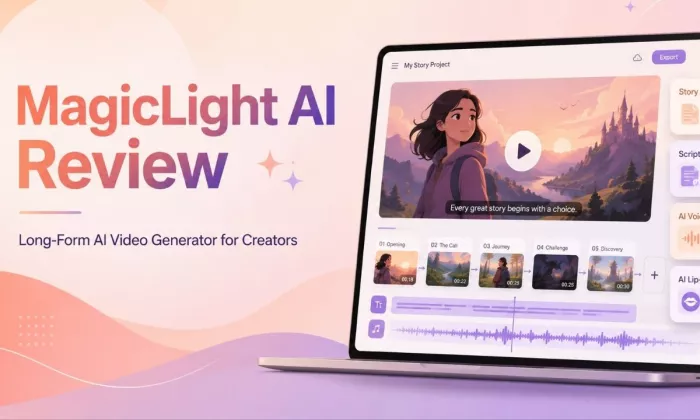
Most AI video tools are useful when you need a short clip, quick motion scene, or social media visual. MagicLight AI feels different because it focuses more on longer videos, story-based content, recurring characters, voiceover, subtitles, and complete scene generation.
My main interest in MagicLight AI is simple: can it help creators turn a story, script, or idea into a longer animated video without building every scene manually?
The tool’s promise is strong. It can take an idea, text prompt, script, or image and turn it into a multi-scene video with characters, narration, lip sync, and subtitles. That makes it useful for faceless YouTube creators, educational channels, storytellers, and animated content creators.
But the real value depends on output quality. Long-form support only matters if the video stays clear, the characters remain consistent, and the story does not feel broken after a few minutes. That is the main point of this review.
| Point | Finding |
| Best for | Story videos, faceless YouTube channels, educational explainers, and animated children-style content |
| Not ideal for | Cinematic realism, perfect character continuity, or zero-edit publishing |
| Biggest strength | Long-form, multi-scene video creation with character-focused workflows |
| Biggest weakness | Long videos still need review for story flow, pacing, and visual consistency |
| Learning curve | Moderate, mainly because of credits and scene control |
| Output quality | Good potential for animated and story-style videos |
| Long-form usefulness | Useful, but creators should test short projects first before making full-length videos |
| Area | Practical Meaning |
| Tool category | Long-form AI story and video generator |
| Best use case | Multi-scene story, educational, and animated videos |
| Long-form video support | Supports long videos depending on plan |
| Story-to-video | Turns a story or idea into scenes |
| Text-to-video | Generates video from text prompts |
| Script-to-video | Converts scripts into video scenes |
| Image-to-video | Animates uploaded images |
| Character creation | Helps create reusable characters |
| Voice and lip-sync | Adds voiceover, voice cloning, and lip sync |
| Subtitles | Supports subtitle generation |
| Export and download | Paid plans may offer HD export and no watermark |
| Free access | Free plan with limited credits |
| Commercial usage | Paid plans may include commercial usage rights |
For a tool like MagicLight AI, a normal feature checklist is not enough. I would judge it from a creator workflow point of view: idea, script, scene generation, voice, subtitles, editing, and export.
| Test Area | Review Question | Why It Matters |
| One-sentence idea to video | Can a rough idea become a watchable video? | Many creators start with only a basic concept |
| Full script to video | Does the script convert into clear scenes? | Scripted creators need control |
| Story-to-video generation | Does the story have a proper flow? | A story needs structure |
| Character consistency | Do characters stay visually similar? | Character drift breaks long videos |
| Voiceover and lip-sync | Is the audio natural and synced? | Poor voice quality makes the video feel unfinished |
| Scene pacing | Does the video move naturally? | Pacing affects retention |
| Editing flexibility | Can weak scenes be fixed easily? | AI videos usually need changes |
| Subtitle quality | Are captions readable and timed well? | Captions matter for YouTube and social media |
| Export quality | Is the final file clean? | Bad export quality reduces usability |
| Time saved | Is it faster than manual editing? | Time-saving is the main reason to use it |
| Platform fit | Does output work for YouTube, education, or social? | Each platform needs a different style |
| Pricing value | Are the credits worth the usable output? | Value depends on usable minutes, not only features |
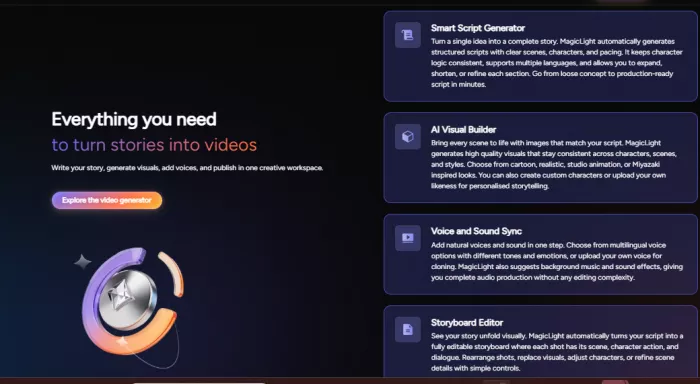
Long-form video is the main reason MagicLight AI stands out. Many AI video tools are designed for short clips, but MagicLight AI is positioned around longer story-based videos.
The important thing I noticed is that video length should not be treated as the only success factor. A tool can generate a long video, but that does not automatically mean the result is ready to publish.
For creators, the real questions are:
| Long-Form Factor | Good Sign | Possible Issue |
| Story coherence | The story still makes sense after several minutes | Long videos can repeat or lose direction |
| Scene flow | Transitions feel connected | Cuts may feel mechanical |
| Character continuity | Same character stays recognizable | Face, outfit, or style may shift |
| Pacing | Scenes do not feel rushed or slow | Long AI videos can feel uneven |
| Narration | Voice keeps the story engaging | AI voices may sound flat |
| Visual consistency | Same style continues across scenes | Backgrounds can change too much |
| Story structure | Clear beginning, middle, and end | Auto-generated story arcs can feel thin |
| Editing weak scenes | Individual scenes can be adjusted | Full regeneration may waste credits |
| Export readiness | Final output looks clean | Some polish may still be needed |
The story-to-video workflow is the strongest area for this tool. A creator can start with a story idea, build scenes, add characters, generate narration, apply subtitles, and export the final video.
A useful test prompt would be:
Create a 3-minute animated story about a young inventor who builds a tiny robot to help her village save water.
This kind of prompt is short but still tests the important areas: character consistency, story structure, emotion, setting, and pacing.
The output should be judged on these points:
Does the story have a clear beginning, middle, and ending?
Do the inventor and robot look consistent across scenes?
Are the visuals connected to the village-and-water theme?
Does the pacing feel natural?
Does the voice match the warm story tone?
Does the final video need light editing or heavy rework?
If the video only needs small edits, MagicLight AI works well as a story-video assistant. If many scenes need fixing, it is better used for drafts rather than final publishing.
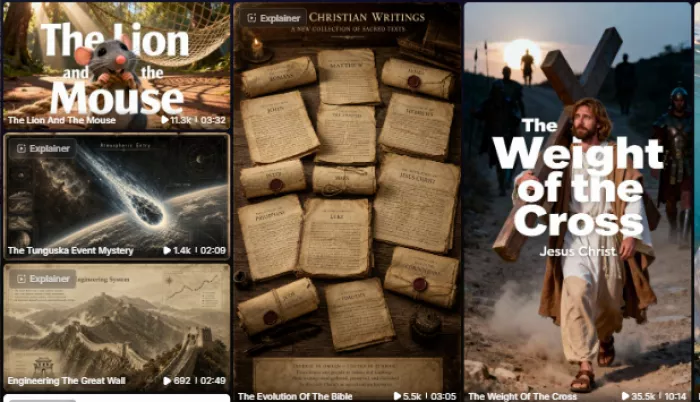
Input quality makes a big difference. MagicLight AI will likely perform better when the creator gives it a structured script instead of a very vague prompt.
| Input Type | Best Use | Editing Needed |
| Short prompt | Quick story drafts | Moderate |
| Detailed script | Story-based videos | Lighter |
| Scene-by-scene script | More control | Lowest |
| Educational explanation | Lessons and explainers | Moderate |
| Marketing video | Product or brand content | Moderate to heavy |
| YouTube story | Faceless story channels | Varies by length |
My finding: creators should avoid one-line prompts for serious videos. A scene-by-scene script gives better control and usually reduces editing time.
Character consistency is one of the most important parts of MagicLight AI. If a creator is making a long story or character-based series, the same character must remain recognizable across scenes.
This is where MagicLight AI has strong potential, but it should be tested carefully before using it for a full series.
Key areas to check:
A two-scene test is not enough. For a real check, creators should generate a longer story where the same characters appear again and again.
Audio can make or break the final video. Even if the visuals look good, weak voiceover or poor subtitle timing can make the video feel unfinished.
| Feature | Review Focus | What to Check |
| AI voice quality | Natural sound and clarity | Listen for robotic delivery |
| Voice tone | Match with story mood | Check emotional scenes |
| Pronunciation | Names and difficult words | Review manually |
| Emotional delivery | Feeling in narration | Avoid flat narration |
| Lip-sync accuracy | Mouth movement with voice | Watch close-up scenes |
| Subtitle timing | Captions match speech | Spot-check different scenes |
| Caption readability | Easy to read on mobile | Check size and contrast |
| Multilingual support | Language availability | Confirm before using |
For YouTube and educational videos, subtitle timing and voice quality need manual review before publishing.
| Feature | Practical Value | Best For | Limitation to Check |
| Long video generator | Main reason to use it | Stories and series | Full-length coherence |
| Story-to-video | Turns ideas into scenes | Storytellers | Story arc quality |
| Text-to-video | Fast video drafting | Quick creators | Less control with vague prompts |
| Script-to-video | Better structure | Scripted creators | Scene accuracy |
| Image-to-video | Animates images | Image-led content | Upload limits |
| AI avatar generator | Creates reusable presenters | Faceless channels | Realism and consistency |
| AI voice tools | Adds narration | All creators | Voice naturalness |
| Lip sync | Makes characters speak | Dialogue videos | Close-up accuracy |
| Subtitles | Improves accessibility | YouTube and social | Timing accuracy |
| Video editor | Helps fix scenes | Iterative creators | Manual control depth |
| Animation styles | Gives visual variety | Story videos | Quality differs by style |
| Character tools | Supports recurring characters | Long stories and series | Drift in longer videos |
| Pros | Cons |
| Focuses on long-form AI video, not only short clips | Long videos still need manual review |
| Useful for stories, scripts, and animated videos | Character consistency should be tested before serious use |
| Helps creators start from ideas quickly | Voice and lip-sync quality may vary |
| Reduces the need for separate tools for voice, subtitles, and scenes | Pricing and credit usage need checking |
| Good fit for educators, storytellers, and faceless creators | Not a full replacement for editing or animation skills |
| Use Case | Fit Level | Best Input Type | Editing Required |
| AI story videos | Strong | Story or script | Light to moderate |
| Children-style story videos | Strong | Story idea | Light |
| Educational explainers | Good | Script or outline | Moderate |
| Faceless YouTube videos | Strong | Script | Light to moderate |
| Animated shorts | Good | Prompt or script | Moderate |
| Long-form storytelling | Core fit | Full script | Moderate |
| Marketing explainers | Moderate | Script | Moderate to heavy |
| Social media clips | Moderate | Prompt | Light |
| Character-based series | Good, but test first | Reusable characters | Moderate |
| Script-to-video projects | Good | Scene-by-scene script | Light if structured well |
MagicLight AI is useful, but I would not recommend it for every type of video project. From a creator’s point of view, it works better for animated storytelling than highly polished cinematic production.
It may disappoint you if:
My finding is simple: MagicLight AI is better for story-led animated videos, faceless YouTube content, and educational explainers. It may not be the right fit for high-end brand films, realistic ads, or projects where every frame must be fully controlled.
| Tool | Stronger Area | Weaker Area | Better For |
| InVideo AI | Templates and repurposing | Long animated stories | Social and faceless edits |
| Pictory | Blog-to-video clips | Character storytelling | Content repurposing |
| Runway | Cinematic short clips | Long story structure | Creative short shots |
| Pika | Fast stylized clips | Long-form narrative | Social clips |
| Kling AI | Realistic short motion | Extended storytelling | Short realistic clips |
| Luma AI | Cinematic short generation | Long story videos | Visual shots |
| Synthesia | Talking-head avatars | Animated storytelling | Training and corporate videos |
The main takeaway: MagicLight AI is not trying to be the best cinematic short-video tool. Its stronger use case is long, animated, multi-scene storytelling.
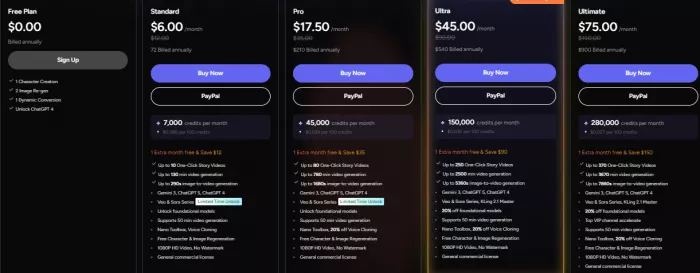
MagicLight AI uses a credit-based pricing model. That means the real cost depends on how many usable minutes you can create from your plan.
 I
I
These are the main creator-focused findings I would keep in the review:
Best workflow: story-to-video and script-to-video for animated content.
Weakest area: cinematic realism and perfect character continuity.
Best prompt style: structured, scene-by-scene scripts.
Best first test: a short 3-minute story before creating a long video.
Main consistency check: recurring characters across several scenes.
Editing required: expect light to moderate editing.
Beginner value: useful because it removes the blank-page problem.
Creator value: best for faceless, story, and educational channels.
Main thing to check before upgrading: usable video minutes per credit.
| Category | Rating Out of 10 | Reason |
| Ease of use | 8/10 | Simple workflow, but credits need understanding. |
| Story quality | 7.5/10 | Good with structured scripts; weak with vague prompts. |
| Video quality | 7/10 | Better for animated videos than realistic visuals. |
| Character consistency | 7.5/10 | Strong feature, but long videos need checking. |
| Voice and lip-sync | 7/10 | Useful, but voice and sync may vary. |
| Editing flexibility | 7/10 | Helpful, but not a full video editor. |
| Long-form usefulness | 8.5/10 | Its strongest area for story-based creators. |
| Pricing value | 7/10 | Depends on usable output per credit. |
| Creator usefulness | 8/10 | Great for faceless, educational, and story videos. |
| Overall rating | 7.6/10 | Strong long-form AI video tool, but still needs human review. |
MagicLight AI is a useful option for creators who want to turn stories, scripts, and ideas into longer animated videos. Its biggest appeal is that it focuses on multi-scene storytelling instead of only short AI clips.
It looks most useful for faceless YouTube creators, educators, storytellers, and animation-style content publishers. Still, it should not be treated as a one-click replacement for editing, story judgment, or quality control.
The best way to use MagicLight AI is to start with a short test video, check character consistency, review the voiceover and subtitles, and then decide whether the output quality is strong enough for longer projects.
MagicLight AI works best as a long-form AI video creation assistant. It can speed up story production, but creators still need to review scenes, polish pacing, and make sure the final video feels publishable.

Marketing teams often need images before a product is ready for a phot...

Creating a logo that will grab customers' attention is one of the main...

Enterprise software has a well-known failure mode. The demo goes great...

Most people who produce video at any real scale hit the same wall even...

A cinematic AI video needs more than realistic skin, dramatic lighting...

Have you noticed how difficult it is not to watch spoilers of a sporti...
Discussion