

I didn’t approach PopPop AI expecting a miracle. Free AI audio tools usually fall into one of two categories: either heavily watermarked demos or underpowered toys that sound impressive on landing pages but fall apart in real use.
So I tested PopPop AI, built by Nabla Mind, the way a real creator would, throwing messy files at it, skipping tutorials, and seeing whether it saves time or creates new problems.
If you want fast, usable audio results without friction, PopPop AI delivers.
If you want studio-grade control, deep editing, or mastering, it won’t replace your DAW.
I’d describe it as:
“The tool I open when I just need the job done and don’t want to think.”
| Feature | What It Does | Best For | Practical Verdict |
|---|---|---|---|
| Text to Speech | Converts text into voice audio | Narration, short voiceovers, scripts | Good for quick voice generation |
| AI Voice Generator | Creates voices from text prompts or voice options | Creators and social videos | Useful, but check voice realism |
| Vocal Remover | Separates vocals and instrumentals | Karaoke, remixes, practice tracks | One of the strongest use cases |
| Karaoke Maker | Creates backing tracks for singing | Karaoke users and music practice | Useful for casual use |
| Acapella Extractor | Isolates vocals from songs | Remixing and music study | Handy for creators |
| Instrumental Maker | Removes vocals to create instrumentals | Covers and practice | Good for quick tracks |
| AI Cover Song Generator | Creates AI-style song covers | Fun experiments and content ideas | Needs copyright caution |
| Voice Cloning | Creates cloned voice outputs | Paid/advanced users | Use carefully with consent |
| Sound Effect Generator | Creates custom sound effects | YouTube, games, videos, podcasts | Useful for quick SFX ideas |
The official site lists voice technologies, music processing, music production, and sound design tools under its AI Audio section.
| Category | My Rating |
| Ease of Use | ⭐⭐⭐⭐⭐ |
| Speed | ⭐⭐⭐⭐⭐ |
| Audio Quality (Contextual) | ⭐⭐⭐⭐☆ |
| Feature Coverage | ⭐⭐⭐⭐☆ |
| Reliability | ⭐⭐⭐⭐☆ |
| Value (Free Tier) | ⭐⭐⭐⭐⭐ |
| Overall | 4.4 / 5 |
The first thing I noticed: nothing blocked me.
I uploaded a random MP3, clicked “Vocal Remover,” and had a result before I could second-guess the decision. That frictionless start matters more than most people realize, especially if you’re juggling content deadlines.
In practice, PopPop AI feels like a collection of single-purpose audio tools packaged into one clean interface.
It’s not a DAW.
It doesn’t pretend to be one.
Instead, it’s a task executor:
Upload → Process → Download → Move on
That design philosophy explains both why it’s effective and why it has limits.
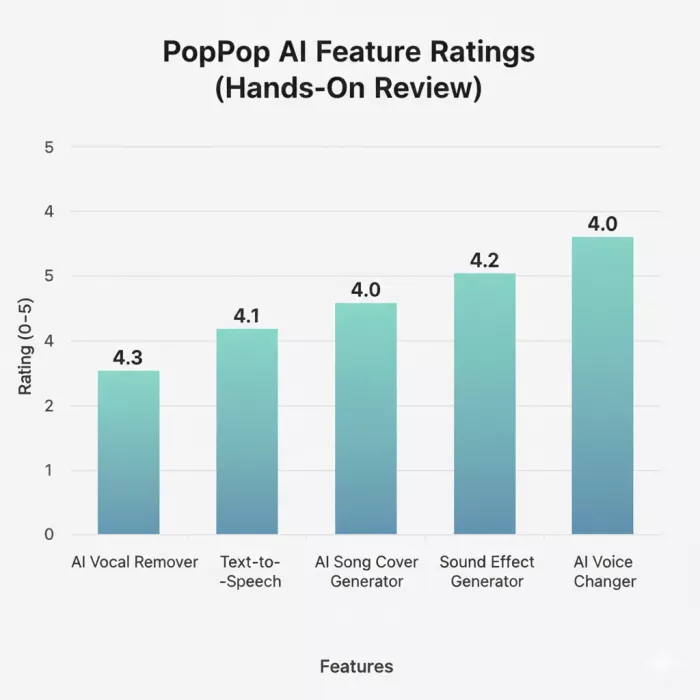
My Rating: ⭐⭐⭐⭐☆ (4.3/5)
This is the feature I tested first—and the one I ended up using the most.
What impressed me
I tried:
A pop track → very clean result
A live recording → acceptable but not perfect
A dense EDM track → vocals leaked slightly
What annoyed me
My takeaway:
For DJ prep, karaoke, and content edits, it’s more than good enough. For studio remixing, it’s not the right tool.
My Rating: ⭐⭐⭐⭐☆ (4.1/5)
I’m usually skeptical of free TTS tools, they often sound robotic or awkward. PopPop AI surprised me here.
What worked
Where I hit limits
How I’d use it
My Rating: ⭐⭐⭐⭐☆ (4.0/5)
This is clearly the “fun” feature, and it shows.
I tested it with:
Clean studio vocals → surprisingly convincing
Noisy tracks → mixed results
What I liked
What I wouldn’t use it for
This feels like a creative sandbox, not a production tool, and that’s okay.
My Rating: ⭐⭐⭐⭐☆ (4.2/5)
This feature quietly became one of my favorites.
Instead of hunting stock libraries, I typed prompts like:
“A metallic door sliding shut in a sci-fi hallway”
The results were:
Limitations
For indie creators, this alone can save hours.
My Rating: ⭐⭐⭐⭐☆ (4.0/5)
I tested this with clean voice recordings and rough mic audio.
Best results
Where it breaks
I wouldn’t use it for professional voice acting, but for casual content, it’s solid.
Small audio files: processed in seconds
Short videos (2–4 minutes): under a minute
Larger files: limited by daily quota, not crashes
I didn’t encounter major failures, just usage caps, which are fair for a free tool.
Free Tier (What I Used)
$0
No login
Around 20 processing actions per day
Paid Options
Appear via partner platforms
Mainly add batch processing and higher export quality
Crucially, core features are not crippled, which is rare.
| What I Genuinely Liked | Why It Helped |
|---|---|
| Zero-friction start | I could begin using the tool without dealing with a complicated setup or long onboarding process. |
| Clean, fast UI | The interface felt simple and responsive, which made quick audio tasks easier to complete. |
| No dark-pattern paywalls | I did not feel forced into payment immediately, which made the free testing experience more comfortable. |
| Handles video files natively | Being able to work with video files directly made it more useful for creators who edit clips, songs, or social media content. |
| Mobile-friendly browser experience | The tool worked well enough from a mobile browser, which is helpful for quick edits without opening a desktop setup. |
| What Got in My Way | Why It Matters |
|---|---|
| No project saving unless logged in | This can be frustrating if you want to return to previous work or manage multiple audio tasks. |
| Internet-only use | Since there is no offline fallback, the tool depends completely on a stable internet connection. |
| Limited control for advanced users | Users who want detailed editing, mixing, mastering, or manual audio adjustments may find it too basic. |
| Two-stem separation only | It works for basic vocal and instrumental separation, but it may not be enough for users who need drums, bass, vocals, and other separate stems. |
I’d recommend PopPop AI if you are:
I wouldn’t recommend it if you are:
| Alternative | Best For | Why It May Be Better |
|---|---|---|
| Lalal.ai | Vocal and instrumental separation | More focused on stem separation |
| Moises | Music practice and stem separation | Stronger for musicians and singers |
| ElevenLabs | Text-to-speech and voice generation | Better voice realism and control |
| Adobe Podcast | Voice enhancement and podcast cleanup | Better for spoken audio improvement |
| Audacity | Free manual audio editing | Better editing control |
| BandLab | Music creation and collaboration | Better for full music projects |
| Descript | Podcast/video audio editing | Better for creators editing spoken content |
| Kits AI | AI voice and music tools | Stronger for AI voice/music workflows |
| Media.io Vocal Remover | Simple online vocal removal | Easy alternative for casual users |
PopPop AI doesn’t try to impress audio engineers, and that’s its strength.
It impressed me because it:
In a market full of overengineered AI tools, PopPop AI succeeds by doing something simple:
It lets you finish audio tasks without becoming an audio expert.
My Final Score: 4.4 / 5
Marketing teams often need images before a product is ready for a phot...
Creating a logo that will grab customers' attention is one of the main...

Enterprise software has a well-known failure mode. The demo goes great...
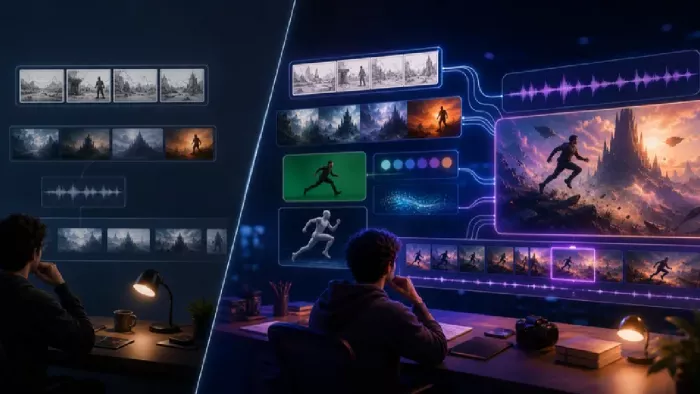
Most people who produce video at any real scale hit the same wall even...
A cinematic AI video needs more than realistic skin, dramatic lighting...
Have you noticed how difficult it is not to watch spoilers of a sporti...
Discussion