


Akool AI pricing is not only about the monthly plan price. The real cost depends on credits, video length, output quality, avatar type, watermark removal, and whether the user is creating a few tests or running client video campaigns. Since the platform is primarily utilized for advanced workflows like AI video generation, face swapping, talking avatars, and video translation, understanding how billing scales is essential before committing to a paid tier. This guide breaks down Akool’s free plan, paid plans, credit system, API pricing, and the plan that makes the most sense for different users.
Akool structures its pricing model using a combination of a web-app free tier, multiple paid subscription tiers based on seats and credits, and a separate API pricing structure for developer environments. Subscription upgrades unlock essential features such as watermark removal, higher export resolutions up to 8K, faster rendering priority, commercial usage rights, and access to state-of-the-art base models like Seedance 2.0 or Kling.
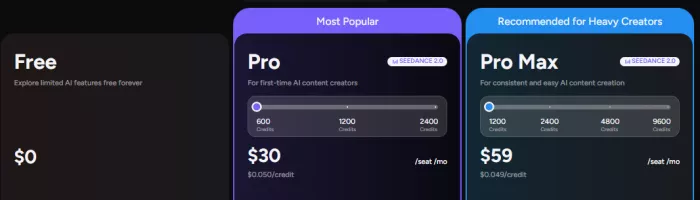
Because credit usage varies directly by video duration, resolution, and selected toolsets, calculating the exact expense requires analyzing your planned output metrics.
| Item | Details |
| Tool Name | Akool AI |
| Official Website | https://akool.com/ |
| Main Category | AI video generation and avatar platform |
| Pricing Model | Free plan + paid plans + credits + API pricing |
| Free Plan | Basic features with limited access and watermarks |
| Paid Plans | Pro ($30/mo), Pro Max ($59/mo), Business ($249/mo) |
| Credit Packs | Pay-as-you-go credit packs available for purchase |
| API Pricing | Dedicated pay-per-use developer rates based on endpoints |
| Watermark Removal | Available on all paid plans (Pro tier and up) |
| Best For | Marketers, creators, agencies, ecommerce teams, enterprise video teams |
| Biggest Pricing Variable | Credits consumed by video length, resolution, and feature type |
| Pricing Checked Date | June 2026 |
Akool should be priced by expected output, not only by subscription cost. A user making one avatar test per week has a different cost profile from an agency generating translated video ads for multiple clients.
Pricing note: Akool pricing, credits, and plan limits were checked on June 18, 2026 from Akool’s official pricing page and API pricing page. Since AI video tools frequently update credits, features, discounts, and plan names, this article should be treated as a pricing snapshot from the review date.
Pricing disclaimer: The pricing information in this article is based on Akool’s official pricing information available at the time of writing. Plan names, prices, credit amounts, feature access, discounts, API rates, renewals, and limits may change without notice. Always verify the latest pricing on Akool’s official website before subscribing, buying credits, or using the API.
Akool provides a basic free tier designed to let users explore the platform's core functional capabilities without paying immediately. This tier requires no credit card up front but introduces significant functional constraints for production work. Free outputs retain prominent branding watermarks, making them unsuitable for formal presentation or commercial distribution.
| Free Plan Item | Details |
| Price | $0/month |
| Credits Included | Limited baseline tier for introductory testing |
| Daily Credits | Not officially specified as recurring daily grants |
| Watermark | Yes, included on all generated video and image exports |
| Video Length Limit | Strict runtime limitations apply per generation |
| Resolution Limit | Max 720P for video processing uploads |
| Avatar Access | Restricted selection of base models |
| Face Swap Access | 5 minutes of free time for live camera face swaps |
| Upload Limit | 150MB video file maximum and 5MB image limit |
| Commercial Use | Prohibited under personal/free licensing terms |
| Credit Card Required | No |
| Best For | Testing Akool before paying |
The free plan is best treated as a test environment. It can help users understand output quality, interface flow, and credit usage, but it may not be enough for serious publishing if watermark, length, or credit limits apply.
Subscriptions are structured primarily by the number of included seats, allocation of platform credits, processing speeds, and maximum configuration tolerances. Akool applies a standard 30% discount when users commit to yearly billing cycles.
Monthly Price: $30 per seat / month ($21/mo if billed yearly)
Credits Included: Scales based on selected volume tier (starts at 600 credits/mo)
Key Features: Full watermark removal, resolution outputs up to 4K, concurrent generations up to 4, video length limits extended up to 30 minutes, access to premium Pro video templates, and personal use licensing. Upload allowances expand to 300MB videos (up to 5 mins) and 10MB images.
Main Limits: Lacks professional team workspace collaboration tools and excludes API integration privileges. Does not grant access to advanced 8K video processing paths.
Monthly Price: $59 per seat / month ($41.3/mo if billed yearly)
Credits Included: Starts at 1,200 credits/mo and scales up to 9,600 credits/mo
Key Features: Increases maximum processing boundaries up to 8K resolution and 45-minute video durations. Unlocks professional workspace collaboration tools, API baseline controls, Studio Voice setups for corporate brand terminology, and concurrent generation slots up to 8. File upload limits grow to 500MB (up to 10 mins) and 20MB images.
Main Limits: Commercial rights are restricted for enterprise-scale distribution depending on specific content governance.
Monthly Price: $249 per seat / month ($174.3/mo if billed yearly)
Credits Included: High-volume allowances spanning 6,000 to 80,000 credits/mo
Key Features: Tailored for production-heavy digital advertising agencies and small corporate businesses. Includes generous system throughput tolerances, elevated file handling allowances up to 1GB videos (up to 15 mins) and 100MB images, alongside rapid priority video rendering paths.
Main Limits: Highly specialized setups requiring custom compliance agreements or massive concurrent API traffic still require enterprise consultation.
Monthly Price: Custom quote based on organizational scoping
Credits Included: Customized flat allocations or high-tier bulk provisions
Key Features: Fully customized yearly contracts providing maximum upload caps, custom security protocols, dedicated account management, and tailored credit structures.
Credits form the base utility engine within the Akool ecosystem. Subscriptions distribute a set allowance every billing cycle, but actual depletion rates depend dynamically on the processing weight of your specific jobs. For example, high-resolution 4K processing runs via more computationally expensive pipelines than low-fidelity draft steps, requiring an increased consumption of credits.
| Feature Type | Credit Usage Pattern | Cost Risk |
| Face Swap Image | Usually lower consumption per single execution | Repeated testing batches can still steadily consume reserves |
| Video Face Swap | Dependent on absolute timeline length and output resolution | Long high-resolution files use credits quickly |
| Talking Avatar | Tied closely to rendering time and baseline model complexity | Multiple asset script revisions multiply overall costs |
| Streaming Avatar | Real-time usage measured continuously per minute/second | Live interactive tools can scale up billing dynamically |
| Video Translation | Dependent on runtime lengths, transcription accuracy checks, and lip sync | Extended multi-minute videos can require sudden upgrades |
| Image Generation | Generally minor credit impact relative to intensive video rendering | Generative bulk matrix tasks can deplete resources |
| API Use | Charged per API pricing metrics directly per call | Production software hooks require constant active logging |
A basic example calculation reveals how quickly resources deplete: Under a standard web workflow or backend metric, if a feature runs at an estimated rate of 1 credit per image or up to 1 credit per minute of general audio/video rendering, producing a multi-page array or generating multiple long video samples will directly shift your requirements toward higher-tier pricing tiers.
Developers looking to integrate Akool's processing directly into custom applications utilize a dedicated developer-centric billing structure rather than simple consumer dashboard interactions. The API infrastructure provides modular costs calculated precisely by call durations and output resolutions.
| API Feature | Official Credit Rate | Resolution/Length Rule | Notes |
| Streaming Avatar | 1.0 to 1.2 credits per 10 seconds | Baseline rate for 1080P resolution | Dual pricing model shifts to 2.0 to 2.4 credits for 4K processing. Concurrency bounds cap at 3 to 10 slots. |
| Talking Avatar | 5 credits per 10 seconds | Standard 1080P output template rule | Pricing jumps to 10 credits per 10 seconds if executing 4K upscaling. |
| Video Translation | 1 credit per 5 seconds | Promotional tier duration tracking | Calculated per runtime segment; outputs include embedded assets. |
| Talking Photo | 10 credits per 5 seconds | Flat asset duration boundary | Generates lifelike animated speech from flat photos. |
| Voice Generator | 2.4 to 3.2 credits per 1,000 characters | Character length-based calculation | Pro Max API utilizes the more economical 2.4 credit optimization tier. |
API users should estimate monthly usage before committing because a production app can consume credits faster than casual web-app use.
Before entering payment card details on Akool, check these secondary operational costs that may impact your absolute return on investment:
| Cost Area | Check Before Paying |
| Credits | Are credits monthly, one-time, or expiring? Unused monthly plan allocations typically do not roll over indefinitely. |
| Watermark | Which plan removes it? The free tier enforces watermarks; you must purchase a Pro subscription or higher to eliminate them. |
| Output Quality | Does 4K/8K cost more credits? Yes, high-fidelity resolutions accelerate credit depletion significantly over baseline 720P/1080P drafts. |
| Video Length | Is there a maximum duration per plan? Pro caps generations at 30 minutes, whereas Pro Max extends processing up to 45 minutes. |
| Extra Credits | Can users buy more without upgrading? Yes, pay-as-you-go credit packs exist, though workspace settings affect seat costs. |
| Failed Output | Are credits returned after failed generation? System errors generally credit back, but user inputs that generate poor visual tracking do not. |
| Commercial Use | Is it allowed on the selected plan? Personal licensing applies to Pro/Pro Max; formal corporate compliance requires high-tier tracks. |
| Team Seats | Is pricing per user or per workspace? Pricing scales per seat. Inviting additional admins or editors adds identical monthly plan costs. |
| API Usage | Are API credits separate? API usage relies on structured tiered access requiring Pro Max or Business workspaces to generate credentials. |
| Renewal | Does discount apply only first month/year? Annual pricing requires a full upfront commitment; monthly transitions lack the 30% reduction. |
| Feature | Free/Basic | Pro | Pro Max | Business | Enterprise |
| Monthly Price | $0 | $30 / mo | $59 / mo | $249 / mo | Custom Quote |
| Yearly Price | $0 | $21/mo ($252 upfront) | $41.3/mo ($495.6 upfront) | $174.3/mo ($2091.6 upfront) | Custom Contract |
| Credits Included | Limited trial | 600 - 2,400 / mo | 1,200 - 9,600 / mo | 6,000 - 80,000 / mo | Custom |
| Watermark Removal | No | Yes | Yes | Yes | Yes |
| Max Resolution | 720P (upload) | Up to 4K | Up to 8K | Up to 16K (upload) | Custom |
| Max Video Length | 30 seconds (upload) | Up to 30 mins | Up to 45 mins | Up to 60 mins (Live) | Custom |
| Avatar Access | Restricted | Standard Pro models | Pro Max models + Studio | Full model library | Full + Custom build |
| Face Swap Models | Basic | 4 Face swap models | Premium models | Professional enterprise models | Full Customization |
| Concurrent Jobs | 1 | 4 | 8 | High priority limits | Unlimited dedicated paths |
| Upload Limit | 150MB | 300MB | 500MB | 1GB | Custom |
| Commercial Use | No | Personal license | Personal license | Commercial/Agency rights | Enterprise clearing |
| Support Level | Self-service Help Center | Standard Support | Premium Support | Priority Support | Dedicated Account Team |
| Best For | Testing | First-time creators | Consistent creators | Agencies & SMBs | Large Enterprises |
The single most critical variable when shifting between plans is understanding seat addition fees. Inviting a collaborator to your team space immediately doubles your tier subscription billing, as seats are charged symmetrically based on the owner's chosen track.
Curious beginner: The Free/Basic Plan provides an excellent baseline sandbox to inspect rendering quality and process localized image face swaps without spending money.
Occasional creator: The Pro Plan represents the lowest cost layout required to clean outputs of branding watermarks and achieve crisp 4K presentation layouts for personal production.
YouTube/short-video creator: The Pro Plan or Pro Max Plan fits standard periodic web delivery workflows, depending on whether you require specialized features like unique Studio Voice uploads or higher generation concurrency.
Marketing freelancer: The Pro Max Plan matches single-operator freelancers who require localized API code structures alongside higher volume credit thresholds to scale client variations.
Small agency: The Business Plan provides the essential team-workspace collaboration controls, higher single-file upload caps, and broader multi-seat alignment tools required for client delivery.
Ecommerce brand: The Pro Max or Business Plan supports generating localized product variations, swapping commercial model visuals, and producing high-resolution marketing ad content.
Developer/API user: The API/Enterprise tracks are mandatory for production pipelines, bypassing consumer web delays to support multi-threaded avatar streaming and video localization scripts.
Enterprise team: The Enterprise Plan balances operational scale with custom legal compliance, corporate data governance, and high-volume billing controls.
The best plan depends less on the plan name and more on how many finished videos the user needs each month.
Flexible entry path: The no-card free tier ensures risk-free quality evaluation before spending capital.
Unified asset billing: One subscription pool finances face swapping, avatar generation, and video localization simultaneously.
Clear API parameters: Pay-per-second API structures prevent unexpected monthly developer overage bills.
Substantial annual deductions: Upfront annual subscription terms reduce standard seat operational costs by 30%.
Aggressive seat scaling: Workspace addition policies charge full mirror subscription prices per added editor.
Trial limitations: Free baseline files are heavily watermarked and restricted to lower resolution profiles.
Complex credit mapping: Processing high-resolution 4K/8K jobs accelerates credit depletion faster than standard draft settings.
The most disappointing aspect for many creators is Akool's strict seat-billing mechanism. If an agency owner on a $59 Pro Max plan invites two team editors to review a video draft, Akool automatically invoices an additional $59 per month for each user. This makes scaling collaborative design spaces expensive compared to tools that offer low-cost or free seat tiers for project review.
Many users are pleasantly surprised by the pricing of the built-in AI Video Translator. While alternative platforms charge premium stand-alone fees for transcription, multi-language voice mapping, and lip synchronization, Akool allows users to process full video translations directly inside standard personal credit packages, delivering high cost-efficiency for international marketing localization.
Analyzing aggregate review trends across reputable third-party software directories reveals clear customer sentiment patterns regarding Akool's billing and asset value:
| Source | Feedback Theme | Positive Signal | Common Concern |
| G2 | Corporate marketing use | Commended for fast face swapping and batch asset localization workflows. | Users note that multi-face tracking variables require careful test billing. |
| Capterra | Small business utility | High marks for consolidating separate avatar and video tools under one billing profile. | Notes highlight that third-party catalog rates can lag behind direct site plan changes. |
| Trustpilot | Account support and renewals | Fast processing response times on higher paid tiers. | Minor friction reported around understanding subscription renewal cutoff dates. |
| Hands-On Testing | Practical credit consumption | Low credit depletion for standard web resolution tasks. | Demanding 4K upscaling tasks use up available credit limits rapidly. |
Third-party reviews are useful for spotting patterns, but Akool’s official pricing page should remain the primary source for current costs.
Akool’s free plan is highly effective for initially assessing platform tools, but users should not judge paid value only by the monthly plan price. The real cost depends on credits, output length, resolution, avatar features, and how many revisions are needed.
Creators should run one small test, note the credits used, and estimate monthly output before upgrading. Teams and developers should check Akool’s API pricing separately before building production workflows to ensure that localized seat expansions and high-resolution concurrent processes align cleanly with their target ROI.

Marketing teams often need images before a product is ready for a phot...

Creating a logo that will grab customers' attention is one of the main...

Enterprise software has a well-known failure mode. The demo goes great...

Most people who produce video at any real scale hit the same wall even...

A cinematic AI video needs more than realistic skin, dramatic lighting...

Have you noticed how difficult it is not to watch spoilers of a sporti...
Discussion