

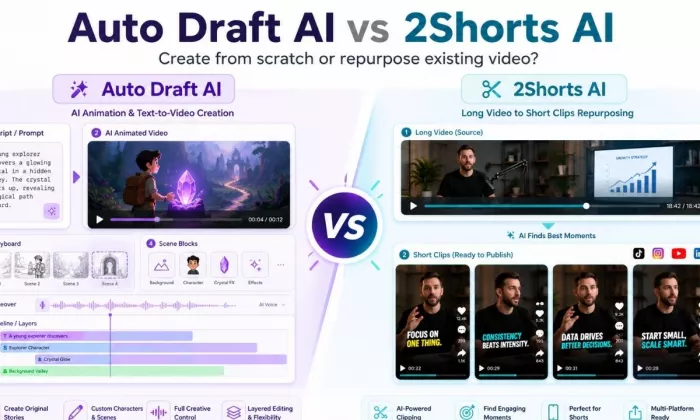
I compared Auto Draft AI and 2Shorts AI because both show up when creators go looking for a faster video workflow, and at a glance it is easy to assume they do the same thing. They do not. Once I looked past the feature lists, the difference was obvious: Auto Draft AI generates an original animated video from a text prompt or script, while 2Shorts AI takes a long video you already have and cuts it into short clips. One creates, the other repurposes.
So I tested them with that distinction in mind, looking at the actual workflow, the output quality, how much manual cleanup each result needed, the pricing, the export limits, and where each tool falls short. My goal was not to crown a single winner, because for most people the right answer depends on whether you are making something new or chopping down something you already filmed. I will be clear throughout about which tool I would personally use, and for which kind of creator.
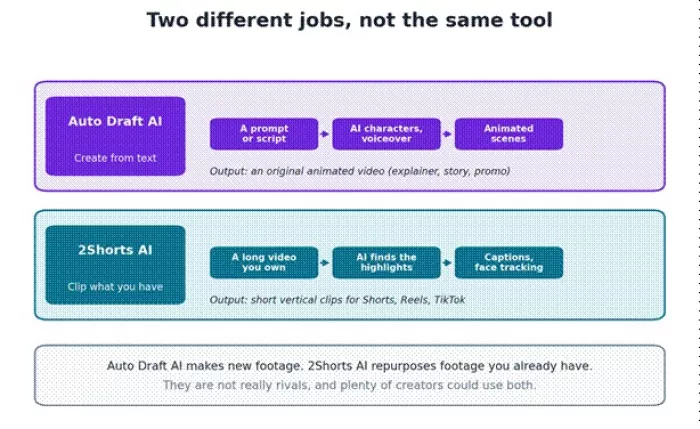
The whole comparison in one picture: create from scratch, or clip what you already have.
If you do not want the full read, here is my fast answer. Where the tools genuinely serve different jobs, I say so rather than forcing a pick.
| Category | My pick | Reason |
| Best for short-form clips | 2Shorts AI | Turning existing long video into clips is its entire purpose |
| Best for full video workflow | Depends on the goal | Auto Draft AI to create, 2Shorts AI to repurpose; neither is a full editor |
| Best for beginners | 2Shorts AI | Paste a link and get clips, with less to assemble |
| Best for editing control | Auto Draft AI | Scene, character, and layer controls, though it is not a pro timeline editor |
| Best for repurposing long videos | 2Shorts AI | Built specifically for this |
| Best for pricing value | 2Shorts AI | Clear, low monthly tiers and a free allowance (verify) |
| My overall choice | Depends on the job | I lean 2Shorts AI for repurposing and Auto Draft AI for animated originals |
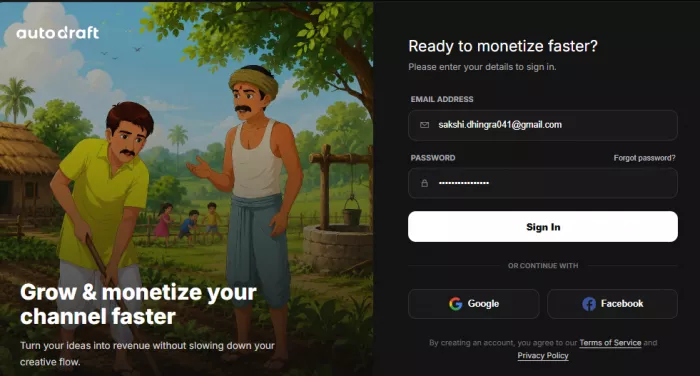
My first impression was that Auto Draft AI is an animation studio, not a writing or drafting assistant. After signing in, I could start from a template or a prompt, drop in characters from the library or generate a custom one, set a background, add a voiceover, and animate the scene. The appeal is clear: it turns a script or an idea into an animated explainer or story without any real editing skill, and the custom model training is meant to keep a character looking consistent across scenes.
On output, the strength is that I could go from a written concept to an animated video that would suit an explainer, a story, or a kids channel, with voiceover and scene control built in. Editing control covers scenes, characters, layers, effects, and chroma key, which is generous for animation even though it is not a professional timeline editor.
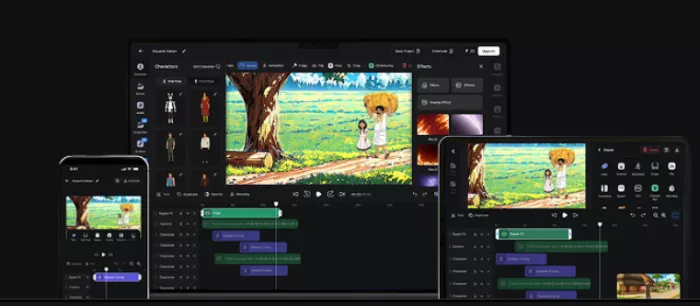
Exports go up to 4K on paid plans, and a free tier exists, though I would verify the current free-tier limits and any watermark before relying on it. The biggest limitation I would flag is that building an animated scene takes more time and thought than a one-click tool, and because the output is animated, it will not fit every brand. I would use it again specifically when I needed an original animated piece.
| Item | My notes |
| Tool name | Auto Draft AI |
| Main use | AI animation and text-to-video generation |
| Best for | Animated explainers, stories, and promos created from a script |
| Free plan or trial | Free tier available |
| Key strength | Turns a script into animated video with characters and voiceover |
| Biggest limitation | Animation setup takes time; output is animated, not live action |
| My experience summary | Strong for creating original animated content, less so for quick clips |
2Shorts AI felt fast from the first minute. I pointed it at a long video, and it analyzed the footage and proposed short clips with animated captions and automatic speaker framing that keeps the talker centered. From there I could pick the clips I liked, adjust the crop and captions, apply a brand preset, and export in vertical, square, or horizontal. For spoken-word content, the time saved compared with manual scrubbing is the whole point.
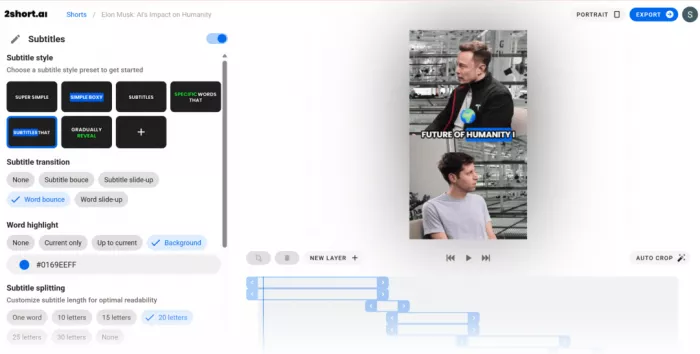
The clip selection and captions were good starting points, but they needed review, which matches what other users report. It works best with clear spoken audio, so a clean podcast or talking-head video gives better results than a messy recording. Exports are server-side and capped by plan, with more analysis time and unlimited exports on the higher tiers. One thing worth remembering is that everything it produces is derived from footage you already have, so the commercial clearance of a clip is on you. The biggest limitation is simply that it cannot create anything new; it only repurposes. I would use it again whenever I had long videos to turn into shorts.
| Item | My notes |
| Tool name | 2Shorts AI |
| Main use | Repurposing long videos into short clips |
| Best for | YouTubers, podcasters, and educators with long spoken-word video |
| Free plan or trial | Free Starter, about 30 minutes of analysis per month |
| Starting price | Lite around $9.90 per month |
| Key strength | Fast automatic clipping with one-click animated captions |
| Biggest limitation | Clips and captions need review; needs existing footage |
| My experience summary | A real time saver for repurposing, not a content creator |
Lining the two up by workflow makes the split clear. Read each row as a job, not a score.
| Feature | Auto Draft AI | 2Shorts AI | My opinion |
| Ease of setup | Moderate, you build a scene | Easy, paste a link | 2Shorts reaches a first result faster |
| Content input options | Prompt, script, templates | Video upload or URL | Different inputs by design |
| Short-form video support | Yes, from a script | Yes, from clips | Both, by different routes |
| Long video repurposing | No | Yes | 2Shorts only |
| Script or draft generation | Yes, animates a script | No | Auto Draft only |
| Caption generation | Partial | Yes, one-click animated | 2Shorts is stronger |
| Editing control | Scenes, characters, layers | Crop, captions, brand | Auto Draft deeper; neither a full editor |
| Templates | Characters and scenes | Brand presets | Different kinds of templates |
| Export quality | Up to 4K on paid | HD server-side | Auto Draft has the higher ceiling |
| Branding options | Via assets (verify) | Brand presets, logo, overlays | 2Shorts is more direct for clips |
| Platform support | Web, Android, iOS | Web | Auto Draft has more device options |
| Best workflow fit | Create animated video | Repurpose existing video | Choose by the job in front of you |
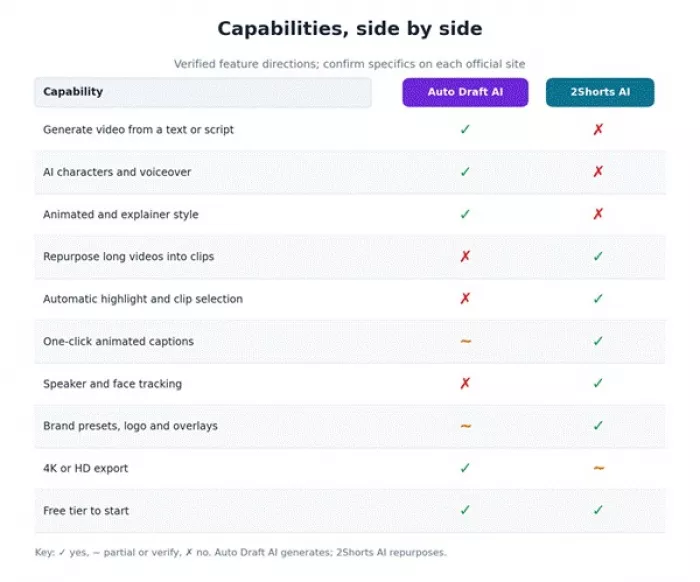
Green where a tool does the job, amber where it is partial or needs checking, red where it does not.
In real work, the question that settled it for me was not which tool had more features, but which one matched the task. When I had a script and no footage, Auto Draft AI was the only one that could help. When I had a long recording and wanted clips by lunchtime, 2Shorts AI was the obvious pick.
The main thing I checked was whether I could actually publish the result after small edits. A tool can look impressive in a demo, but if I have to rebuild the whole video by hand, it does not save much time. With Auto Draft AI, the animated output was a strong base, and the work that remained was tightening the script, timing, and scene transitions. With 2Shorts AI, the clips were close to ready, and the cleanup was mostly fixing a caption, trimming a hook, or swapping a weak clip for a better moment.
On the specifics: hook quality and clip selection in 2Shorts depended heavily on how clear the spoken audio was, captions were accurate but worth a proofread, and the vertical framing held the speaker well. In Auto Draft AI, script clarity and visual flow came down to how I wrote and arranged the scenes, and the branding lived in the assets I chose. Neither produced a finished, hands-off video, which is normal, and I have left the actual frames as placeholders for you to fill from your own testing.
Signup was simple for both, with social or email login. The dashboards reflect their jobs: 2Shorts AI is built around dropping in a video and getting clips, so the learning curve is short, while Auto Draft AI puts a canvas, characters, and scene tools in front of you, which is more to learn but also more to control.
The upload and input process favored 2Shorts for speed, and the preview and export felt quicker there too.
Auto Draft AI asked for more setup before the first export, which is the trade-off for creating rather than clipping.
For a complete beginner who just wants short clips, 2Shorts AI felt easier; for someone willing to learn in exchange for original animation, Auto Draft AI was worth the extra steps.
| Plan detail | Auto Draft AI | 2Shorts AI |
| Free plan | Yes | Yes, about 30 min analysis per month |
| Starting paid price | Base plan | Lite around $9.90 per month |
| Monthly plan | Base and Pro, credit-based | $9.90, $19.90, $49.90 |
| Credits or usage limits | Credit-based | Analysis hours per tier (30 min, 5h, 15h, 50h) |
| Export limits | 4K downloads on pai | Export minutes by tier; unlimited on Pro and up |
2Shorts AI publishes clear monthly tiers. Auto Draft AI uses credit plans I did not confirm here, so verify both.
Pricing disclaimer This pricing information is based on each tool's official pricing page at the time of writing. Plans, features, discounts, usage limits, credits, and prices may change without notice. Always verify the latest pricing on the official website before purchasing. |
| Pros | Cons |
Creates original animated video from a script AI characters and voiceover built in Character consistency via custom training Exports up to 4K on paid plans | Building a scene takes time to learn Output is animated, so it does not suit every brand Some useful features sit behind paid plans |
| Pros | Cons |
Fast automatic clipping from long video One-click animated captions Keeps the speaker centered automatically Clear, low monthly pricing tiers | Selected clips need a manual review Captions sometimes need correction Works best with clear spoken audio, not messy recordings It only repurposes; it cannot create new footage |
The most disappointing pattern was the same one I see across this whole category: both tools saved time at the start, but neither handed me a finished video.
With 2Shorts AI I still had to review clip choices and fix the odd caption, and with Auto Draft AI I had to tidy the script and timing before it felt publish-ready. That does not make either tool useless, but it changes how I would use them, as a strong first draft rather than a final product.
What surprised me was that a simpler input often produced a cleaner result. I expected the most detailed brief to win, but both tools tended to do better when the task was direct: a short, clear script for Auto Draft AI, and a clean spoken video for 2Shorts AI. Piling on detail sometimes muddied the output rather than improving it.
These themes summarize what reviews and user discussion report. They are directional, not exact ratings, and should be backed with specific dated citations before publishing. No quotes or scores are invented here.
| Tool | Source | Positive feedback theme | Common complaint |
| Auto Draft AI | Product Hunt | Text-to-animated character, 4K output, beginner-friendly, responsive team | The animation process can feel complex |
| 2Shorts AI | G2, Reddit, Product Hunt | Saves editing time, good auto-captions, easy to use | Clip selection and captions need review; free analysis and export limits |
If hands-on testing is limited, add dated screenshots from these review platforms as supporting feedback.
| User type | My pick | Reason |
| YouTubers repurposing long videos | 2Shorts AI | Built to turn long uploads into clips |
| TikTok creators | 2Shorts AI | Fast vertical clips from existing video |
| Instagram Reels creators | 2Shorts AI | Quick captioned Reels from long content |
| Beginners | 2Shorts AI | Simplest path to a usable result |
| Agencies | Depends on the deliverable | 2Shorts for volume repurposing, Auto Draft for animated assets |
| Solo creators | Depends on the goal | 2Shorts to repurpose, Auto Draft to create |
| Marketers | Auto Draft AI | Animated explainers and promos from a script |
| Users needing fast drafts | Auto Draft AI | Animated drafts straight from a script |
| Users needing short clips | 2Shorts AI | Its core job |
| Budget-conscious users | 2Shorts AI | Clear low tiers and a free allowance (verify) |
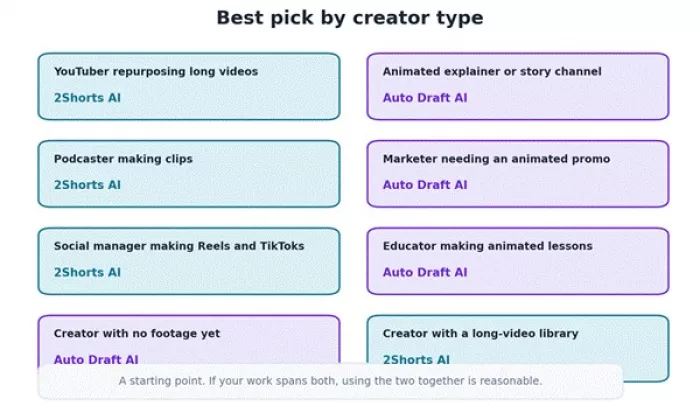
I would choose Auto Draft AI if I needed to create an animated explainer or story from a script with no footage to start from. I would choose 2Shorts AI if I already had long videos and wanted fast Shorts, Reels, and TikToks from them. For my own workflow, which leans toward repurposing recordings I already have, I would personally reach for 2Shorts AI first, and I would bring in Auto Draft AI whenever a project called for an original animated piece. They are not equals competing for the same slot; they are two different tools I would keep for two different jobs.
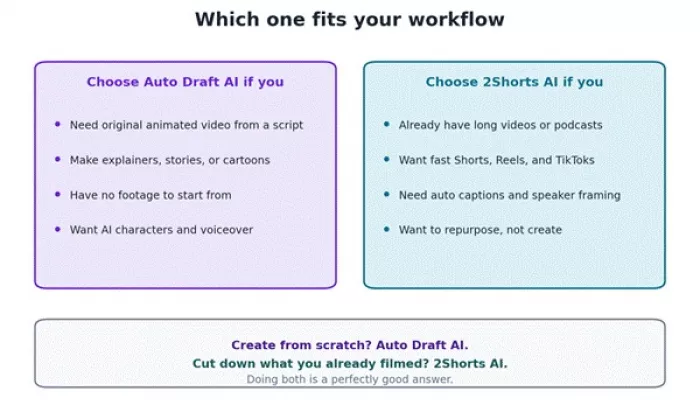
The quick rule I kept coming back to.
Auto Draft AI is a good fit if you are:
• A creator who needs AI-assisted animated video from a script
• A marketer making animated explainers or promo content
• Someone who needs structured, original video output, not just clips
• A team that wants help producing animated concepts quickly
• Anyone who needs more than simple clip extraction
2Shorts AI is a good fit if you are:
• A YouTuber repurposing long videos into shorts
• A podcaster turning episodes into clips
• A creator converting webinars or talks into Shorts
• A social media manager making Reels or TikToks from existing footage
• Anyone who already has a library of long spoken-word video
I would steer clear, or keep expectations low, if you:
• Need fully professional, frame-level video editing control
• Want perfect, publish-ready videos with no edits
• Need advanced timeline editing
• Do not already have good input content for 2Shorts AI
• Need enterprise-level brand control
• Want unlimited free exports
• Need human-level creative judgment
• Work with sensitive client videos and have not checked the privacy policies
My honest takeaway is that this is not a contest with one winner, because the two tools do different jobs. For short-form clips, 2Shorts AI wins easily, since repurposing long video is its entire purpose. For drafting and planning original video content, Auto Draft AI is the one, because it can build an animated explainer from a script that 2Shorts AI simply cannot create. For beginners, 2Shorts AI is the gentler start, and on value it also looks stronger thanks to clear, low monthly tiers, though I would verify the current prices for both.
Auto Draft AI's biggest strength is turning text into an animated video with characters and voiceover, and its biggest weakness is the time and learning the animation takes, plus the fact that the output is animated rather than live action. 2Shorts AI's biggest strength is fast, automatic clipping with solid captions, and its biggest weakness is that it needs existing footage and a review pass before publishing. Both are worth paying for if the job matches: 2Shorts AI for anyone sitting on long videos, and Auto Draft AI for anyone who needs original animation. You should skip both if you need professional timeline editing, live-action production, or finished videos with no edits. For me, I would keep 2Shorts AI in my workflow for repurposing and add Auto Draft AI whenever a project needed something animated and original.

Marketing teams often need images before a product is ready for a phot...

Creating a logo that will grab customers' attention is one of the main...

Enterprise software has a well-known failure mode. The demo goes great...

Most people who produce video at any real scale hit the same wall even...

A cinematic AI video needs more than realistic skin, dramatic lighting...

Have you noticed how difficult it is not to watch spoilers of a sporti...
Discussion