


People usually land on Muke AI because they want fast AI edits, a quick background swap, a cleaned-up object, or a simple prompt-based transformation. That is a reasonable starting point. The better question, though, is not which tool edits fastest. It is which tool gives cleaner results, clearer privacy terms, better design control, and safer use cases over time.
This comparison answers that question for everyday creators, bloggers, social media users, marketers, eCommerce sellers, students, small businesses, and casual users.
Five tools are covered in depth: Canva AI, Fotor, Pixlr, Adobe Firefly, and Cutout.Pro. Each gets an honest read, including where it falls short and where Muke AI might still feel simpler. Pricing, credits, watermark rules, and privacy terms change frequently across AI photo editing tools, so the practical advice throughout is to confirm specifics on official pages before committing or publishing.
Use this as a shortlist, not a final answer. Match the need, then read the full review and verify the caution before deciding.
| User Need | Best Alternative | Reason |
| Social media visuals | Canva AI | Turns edits into finished, on-brand posts |
| Product photo cleanup | Cutout.Pro | Strong cutouts and batch product workflows |
| Browser-based editing | Pixlr | Full editor with layers in the browser |
| Commercial-safe AI generation | Adobe Firefly | Trained on licensed and public-domain content |
| Background removal | Cutout.Pro | Dedicated remover with fine-edge focus |
| AI headshot-style edits | Fotor | Portrait touch-ups plus enhancement |
| Beginner-friendly design | Canva AI | Templates and simple, guided editing |
| More manual control | Pixlr | Layers and manual adjustment after AI edits |
This overview sets up the detailed reviews. Privacy and safety notes here are reminders to verify, not final compliance judgments.
| Tool | Best For | Main Strength | Main Limitation | Free Plan or Trial | Ideal User |
| Canva AI | Finished designs | Design plus AI in one place | Less deep photo retouching | Free tier, limited AI | Marketers and creators |
| Fotor | All-round AI edits | AI plus classic photo tools | Advanced tools need paid plan | Free tier with watermarks | Casual and hobby editors |
| Pixlr | Manual control | Browser editor with layers | Learning curve for beginners | Free tier available | Hands-on editors |
| Adobe Firefly | Creative generation | Commercial-safe training data | Less one-click simple | Free tier with credits | Brand-conscious creators |
| Cutout.Pro | Cutouts and products | Background removal focus | Narrow for broad design | Free credits at signup | eCommerce sellers |
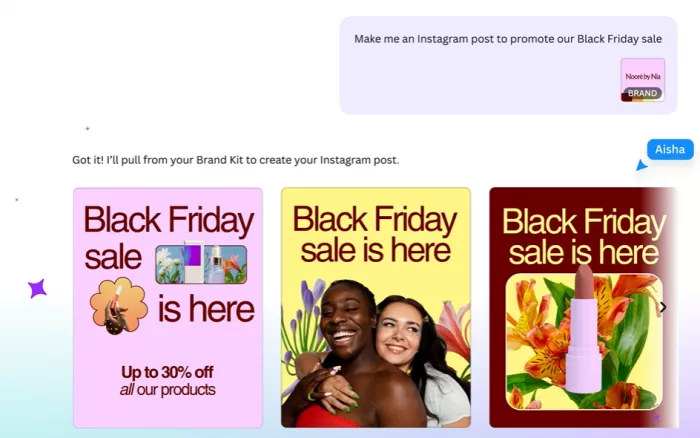
Canva is a design platform first, with AI woven through its Magic Studio tools. That framing matters: instead of producing a single edited image and stopping, Canva turns an edit into a finished asset, a post, a thumbnail, a slide, or a banner. For people who need the edited image to become real content, that is the difference.
• Social media graphics and post sets
• Thumbnails, banners, and marketing visuals
• Presentations and simple branded layouts
• Quick background removal and object cleanup inside a design
Canva groups its AI under Magic Studio, which commonly includes text-to-image generation, a background remover, and a Magic Eraser-style object remover, alongside templates, brand kits, and resizing. Feature access and naming shift over time and by plan, so confirm what is included on the current pricing page.
When the goal is a finished, on-brand piece of content rather than a raw edited photo, Canva tends to beat Muke AI. The template library, brand kit, and one-place workflow move an image from edit to publishable asset quickly.
For a fast, single one-off edit with no design wrapper, Muke AI may feel more direct. Canva's depth can be more than a user wants when all they need is a quick background change.
Best-fit user: Marketers, creators, and small businesses producing social and marketing visuals.
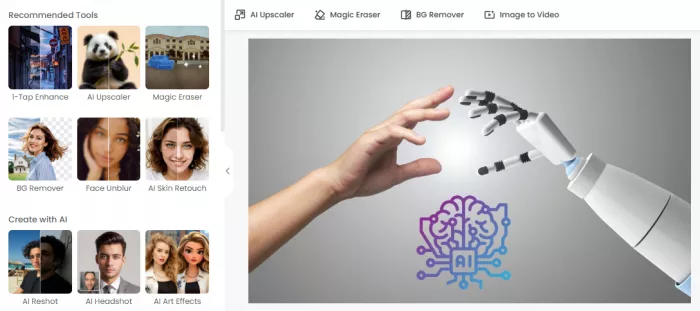
Fotor sits between a one-click AI tool and a traditional photo editor. It offers AI enhancement, object removal, and background removal, but pairs them with the familiar sliders and touch-up controls many editors expect. That blend suits users who want AI to do the heavy lifting and still want to nudge the result by hand.
• Quick photo enhancement and upscaling
• Object and background removal
• Portrait touch-ups
• Light design work with editing controls
Fotor commonly includes an AI image enhancer, an object remover, a background remover, portrait retouching, and an AI image generator, alongside classic editing tools. Availability varies by plan, so verify which tools are free and which are paid.
For users who want AI editing and traditional photo controls in one place, Fotor can be a more flexible fit than Muke AI. The mix of automation and manual adjustment covers more everyday editing situations.
If a user only wants the single fastest AI edit with no extra controls, Muke AI may feel more streamlined. Fotor's broader toolset adds options that a casual one-tap user may not need.
Best-fit user: Casual and hobby editors who want AI plus hands-on photo controls.
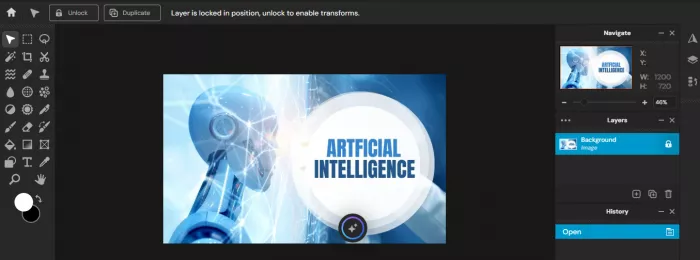
Pixlr is a browser-based editor that leans toward manual control. It supports layers, retouching, filters, and AI tools including generation and background removal, which makes it a strong choice for people who want to refine an image by hand after the AI does its first pass.
• Layer-based editing in the browser
• Manual retouching after AI edits
• Background removal and cleanup
• Filters and creative adjustments
Pixlr commonly includes a layered browser editor, AI image generation, background removal, retouching tools, and filters. Confirm which features sit on the free versus paid tier on the official site.
For users who want to manually adjust an image after an AI edit, Pixlr tends to beat Muke AI on control. Layers and fine adjustments allow a level of cleanup that one-click tools cannot match.
Beginners may find Muke AI faster to start with, since Pixlr's editor takes time to learn. The control that makes Pixlr powerful also makes it less instant for a first-time user.
Best-fit user: Hands-on editors who want manual control without installing desktop software.
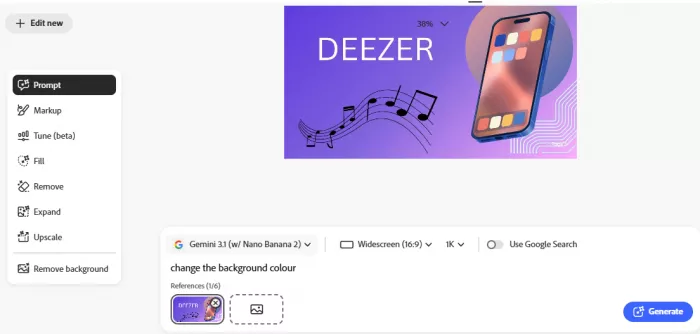
Adobe Firefly is built around generative AI with a deliberate emphasis on commercial safety. Adobe states that Firefly is trained on licensed and public-domain content rather than scraped from the open web, and outputs commonly carry Content Credentials that flag AI involvement. For brand-conscious creators, that provenance focus is the main draw.
• Text-to-image creative generation
• Generative fill and content-aware edits
• Brand and marketing visuals
• Workflows inside the Adobe ecosystem
Firefly commonly includes text-to-image generation, generative fill and expand, and integration with Adobe apps such as Photoshop. Adobe describes its outputs as designed for commercial use, but confirm the exact terms for your tier directly from official sources.
For creators who care about safer brand and commercial workflows, Firefly can be a stronger fit than Muke AI. The licensed training data approach and content provenance signals are meaningful for business use.
For users who only want a quick one-click edit, Firefly and the broader Adobe ecosystem can feel heavier than necessary. Muke AI may feel simpler when generation and provenance are not the priority.
Best-fit user: Brand-conscious creators and marketers who want commercially safer generation.
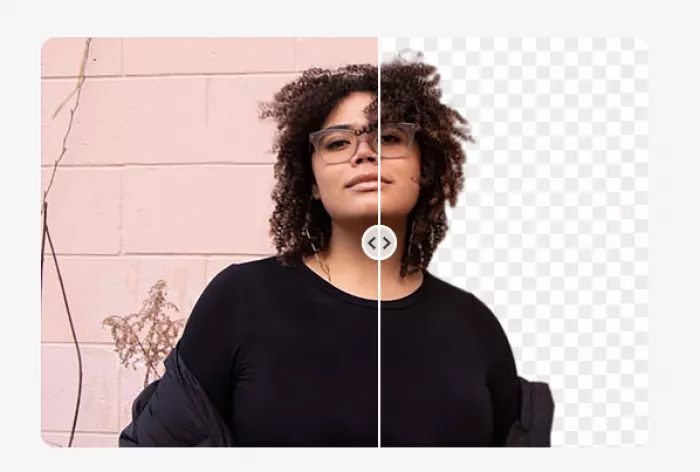
Cutout.Pro is built around subject cutouts. Its core strength is background removal, and it extends into object removal, image enhancement, and product or ID-style photo workflows. For eCommerce sellers and anyone who needs clean, consistent cutouts at volume, that focus is the appeal.
• Background removal at volume
• Product image cleanup for eCommerce
• Object removal and image enhancement
• ID and passport-style photo workflows
Cutout.Pro commonly includes background removal for images and video, object removal, image enhancement and upscaling, and product and ID photo tools, often on a credit-based system. Confirm credit costs and feature access on the official site.
For eCommerce sellers and users who need clean subject cutouts, Cutout.Pro tends to beat Muke AI on dedicated background removal and batch product workflows. The narrow focus produces consistent results for catalog-style images.
For broad creative design work, Muke AI or a design-first tool may feel more flexible. Cutout.Pro is specialized, so it is less suited to general layout and content creation.
Best-fit user: eCommerce sellers and users who need clean cutouts and product image cleanup.
This table pairs each editing need with a strong alternative and a practical takeaway. The alternative named is a representative strong option, not the only valid choice.
| Editing Need | Muke AI | Better Alternative | Practical Takeaway |
| Object removal | Quick prompt-based removal | Pixlr | Manual control improves tricky cleanups |
| Background replacement | Fast automatic swap | Cutout.Pro | A dedicated remover handles edges better |
| Headshot-style edits | Simple touch-ups | Fotor | Portrait tools plus enhancement add polish |
| Product photos | Basic cleanup | Cutout.Pro | Batch cutouts suit catalog consistency |
| Social media graphics | Edited image output | Canva AI | Templates turn edits into finished posts |
| AI image generation | Prompt transformations | Adobe Firefly | Licensed-data generation suits commercial use |
| Manual editing control | Limited fine control | Pixlr | Layers allow precise adjustments |
| Commercial usage clarity | Verify terms | Adobe Firefly | Provenance and terms aid business use |
| Privacy transparency | Verify policy | Adobe Firefly | Documented terms reduce uncertainty |
| Beginner workflow | Fast to start | Canva AI | Guided templates ease new users in |
Direct recommendations follow. Treat each as a starting point, then verify pricing and privacy terms before committing.
• Canva AI: for social media graphics and marketing visuals
• Fotor: for quick image enhancement and general AI photo editing
• Pixlr: for browser-based editing with more manual control
• Adobe Firefly: for creative image generation with stronger brand-safety expectations
• Cutout.Pro: for background removal and product image cleanup
• Stay with Muke AI: only if its current feature set, privacy terms, and pricing fit your simple editing needs and you are using it ethically
The summary below distills the strongest reason to choose each tool against its biggest trade-off, for a quick last look before deciding.
| Alternative | Strongest Reason to Choose It | Biggest Trade-Off | Best User |
| Canva AI | Turns edits into finished, on-brand content | Best AI tools are paid | Marketers and creators |
| Fotor | AI plus classic photo controls together | Watermarks and paid tools on free tier | Casual all-round editors |
| Pixlr | Browser editor with real manual control | Learning curve for beginners | Hands-on editors |
| Adobe Firefly | Commercial-safe, licensed-data generation | Heavier than a one-click tool | Brand-conscious creators |
| Cutout.Pro | Dedicated background and product cutouts | Narrow for broad design; verify data terms | eCommerce sellers |
There is no single best Muke AI alternative for everyone, and any reviewer claiming otherwise is oversimplifying. The right choice depends on what the edit is for.
Canva AI is the best pick for finished designs and social content. Fotor is the best all-rounder for quick photo editing with hands-on controls. Pixlr is the best choice for manual, browser-based control. Adobe Firefly is the strongest option for creative generation with brand-safety expectations. Cutout.Pro is the specialist for background removal and product cleanup. Match the tool to the job, then verify pricing, privacy, and commercial terms before you commit.
The Idea Worth Keeping – The best AI photo editor is not the one that can make the most dramatic edit. – It is the one that helps you create useful, ethical, clean visuals without risking privacy, consent, or brand trust. |

Marketing teams often need images before a product is ready for a phot...

Creating a logo that will grab customers' attention is one of the main...

Enterprise software has a well-known failure mode. The demo goes great...

Most people who produce video at any real scale hit the same wall even...

A cinematic AI video needs more than realistic skin, dramatic lighting...

Have you noticed how difficult it is not to watch spoilers of a sporti...
Discussion